1. Введение
This manual provides detailed instructions for the safe and efficient operation of your SolarPlay Q2501 Portable Power Station. The Q2501 is a high-capacity 2400W/2160Wh portable power station designed for emergency power backup, outdoor activities, and travel. It features a durable LiFePO4 battery, multiple charging options, and an Uninterruptible Power Supply (UPS) function.
2. Инструкции по технике безопасности
Перед использованием данного изделия ознакомьтесь со всеми предупреждениями и инструкциями по технике безопасности. Несоблюдение предупреждений и инструкций может привести к поражению электрическим током, пожару или серьёзной травме.
- Не разбирайте, не ремонтируйте и не модифицируйте устройство.
- Не подвергайте устройство воздействию огня или высоких температур.
- Держите устройство вдали от воды и других жидкостей.
- Используйте только одобренные аксессуары и зарядные кабели.
- Обеспечьте надлежащую вентиляцию во время использования и зарядки.
- Не допускайте падений устройства и сильных ударов.
- The unit features a Battery Management System (BMS) for protection against overcharge, overdischarge, overcurrent, short circuit, overload, low voltage, high temperature, and low temperature.

Рисунок 2.1: The internal Battery Management System (BMS) provides comprehensive protection for safe operation.
3. Содержимое упаковки
Убедитесь, что все товары в вашей посылке присутствуют. Если какие-либо товары отсутствуют или повреждены, обратитесь в службу поддержки клиентов.
- SolarPlay Q2501 Portable Power Station
- Складная тележка
- Зарядный кабель переменного тока
- MC4 XT90 Solar Charging Cable
- Руководство пользователя
4. Продукт закончилсяview
The SolarPlay Q2501 is equipped with various input and output ports to accommodate a wide range of devices. It also includes a foldable cart for enhanced portability.
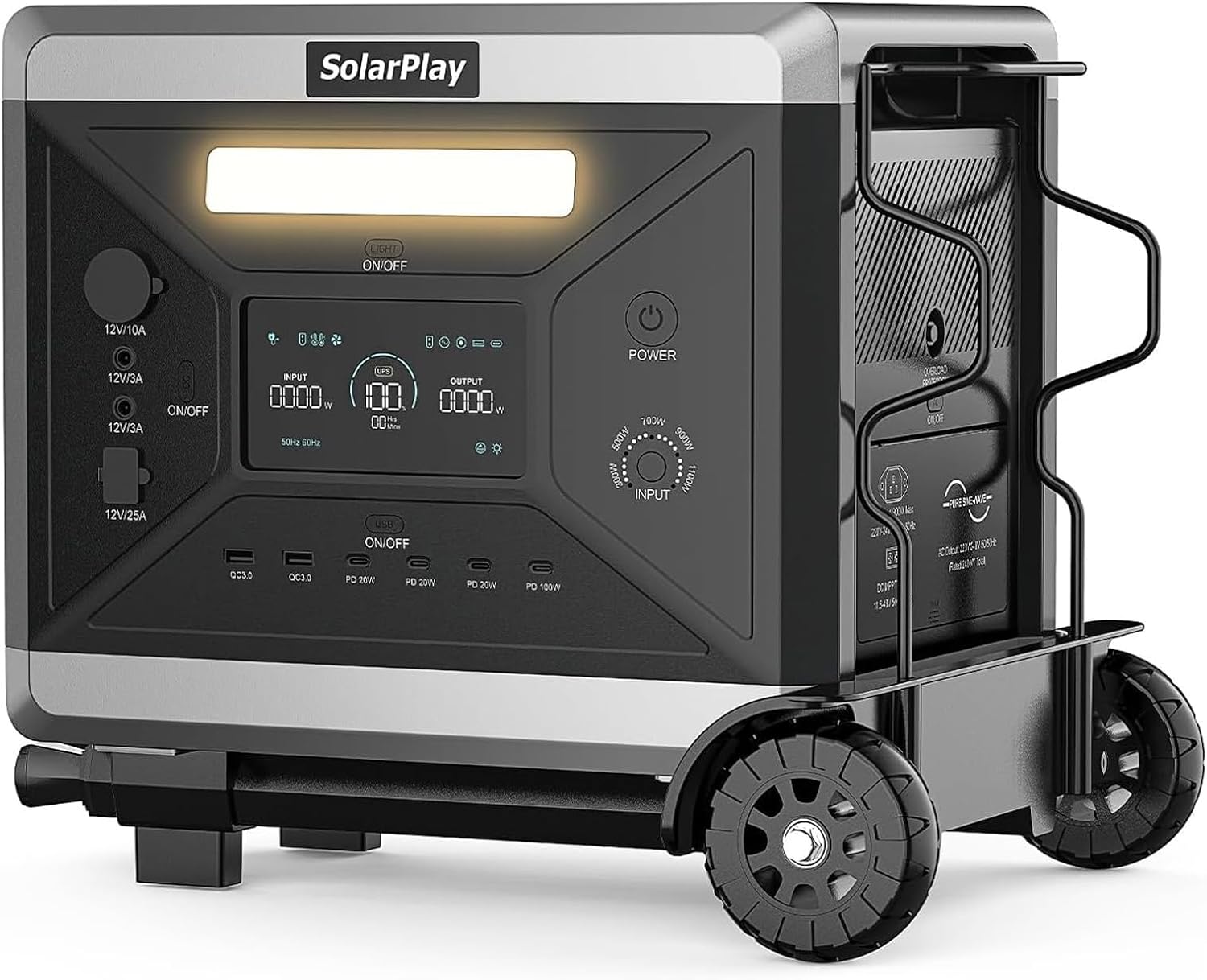
Рисунок 4.1: SolarPlay Q2501 Portable Power Station with Foldable Cart.
4.1. Расположение портов
The Q2501 features 14 output ports for versatile connectivity:
- 4 розетки переменного тока (общая мощность 2400 Вт)
- 2 x USB-A (QC3.0) Ports
- 3 x USB-C (PD 20W) Ports
- 1 x USB-C (PD 100W) Port
- 1 x Cigarette Lighter Port (12V/10A)
- 2 порта DC5521 (12 В/3 А)
- 1 x XT60 Output Port (12V/25A)
Input ports include AC Input (1100W) and XT90 Input Port for solar charging.
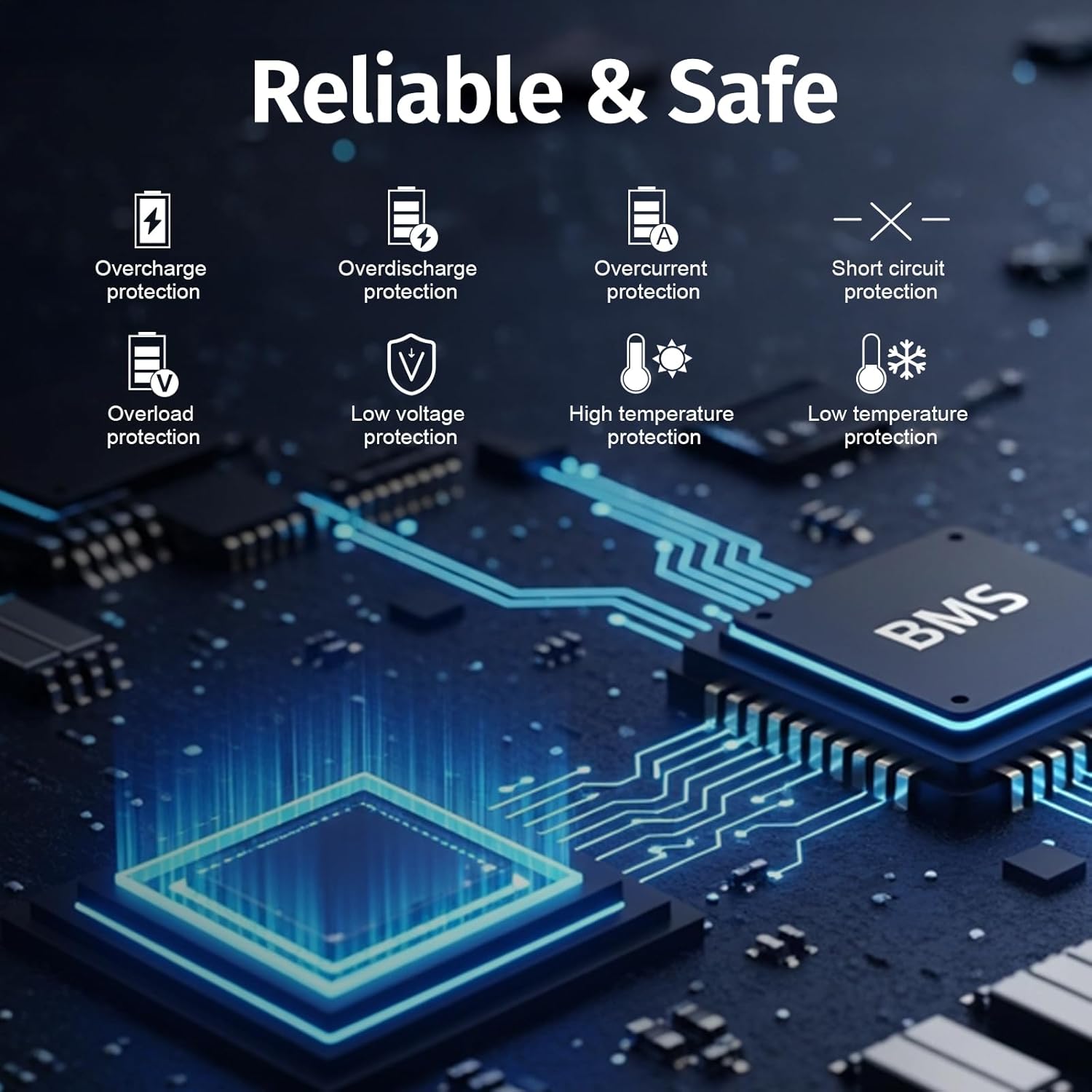
Рисунок 4.2: Q2501 Port Layout and Controls.
4.2. Foldable Cart
The included foldable cart facilitates easy transportation of the power station. Refer to the diagram for dimensions and assembly instructions.

Рисунок 4.3: Foldable Cart Dimensions.
5. Настройка
Перед первым использованием убедитесь, что электростанция полностью заряжена.
- Распаковать: Осторожно извлеките электростанцию и все принадлежности из упаковки.
- Осмотреть: Check the unit and accessories for any visible damage.
- Первоначальный сбор: Connect the power station to an AC outlet using the provided AC charging cable. Allow the unit to charge completely before its first use.
6. Инструкция по эксплуатации
6.1. Зарядка электростанции
The Q2501 supports multiple charging methods:
- Зарядка от сети переменного тока: Connect the AC charging cable to the AC input port and a standard wall outlet. The unit can be fully charged in approximately 2 hours at 1100W.
- Солнечная зарядка: Connect compatible solar panels (11.5V to 48V, max. 500W) to the XT90 input port using the MC4 XT90 solar charging cable.
- Зарядка автомобиля: Use a 12V/24V car cigarette socket.
- Двойная зарядка: Combine AC and solar charging for the fastest charge, achieving 0-100% in approximately 1.5 hours.
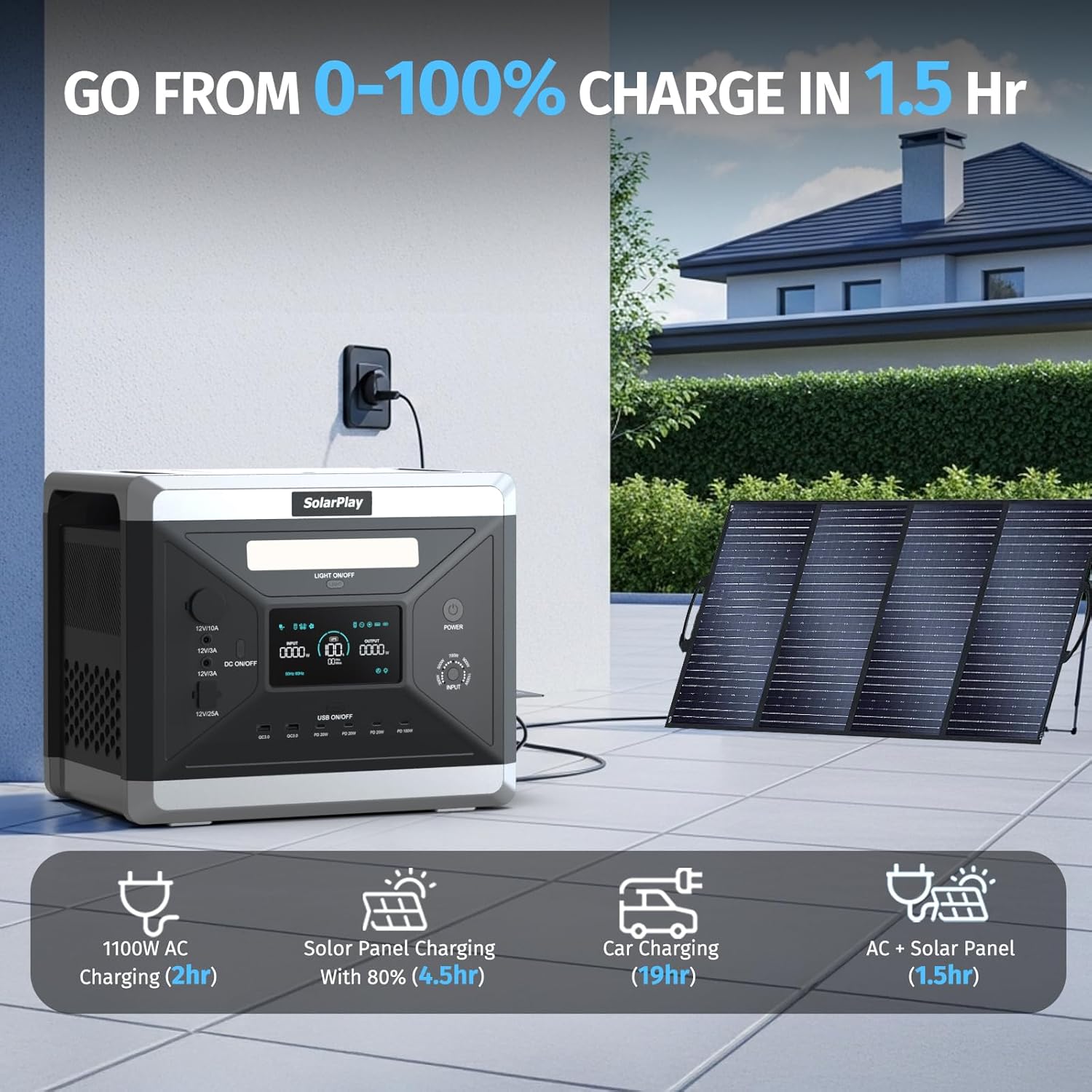
Рисунок 6.1: Multiple Charging Methods and Times.
6.2. Регулируемая входная мощность
The power station offers five adjustable input power levels (300W, 500W, 700W, 900W, 1100W). Adjusting the input power allows for charging according to environmental conditions and extends battery life by reducing stress on components.
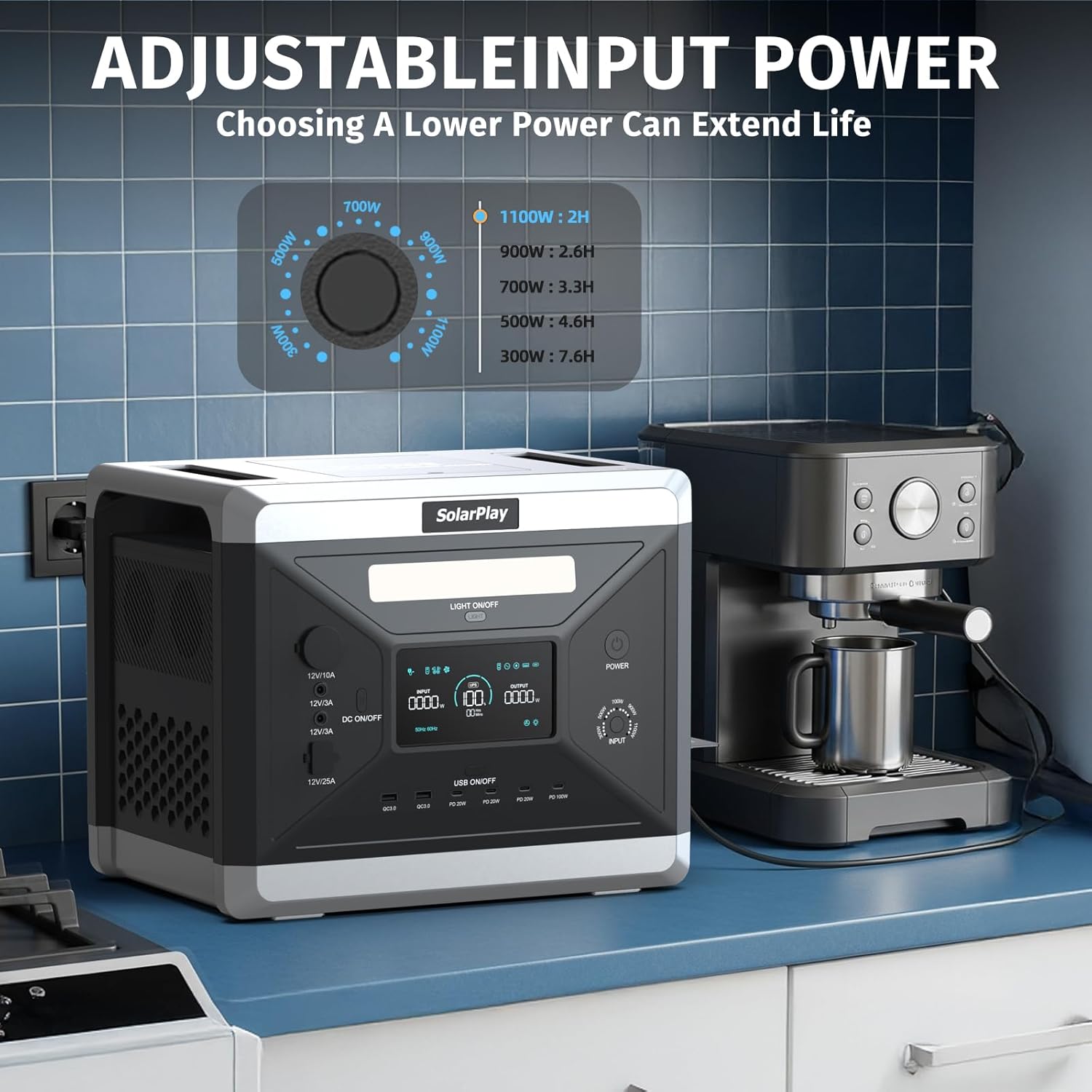
Рисунок 6.2: Adjustable Input Power Settings.
6.3. Discharging and Powering Devices
To power a device, connect it to the appropriate output port on the Q2501. Ensure the power station is turned on and the specific output section (e.g., AC, USB) is activated if necessary.
The Q2501 can power up to 14 devices simultaneously, including smartphones, laptops, power tools, cooking appliances, and more. Its 2160Wh capacity provides extended runtimes for various electronics and appliances.

Рисунок 6.3: Estimated Appliance Runtimes.
6.4. Функция источника бесперебойного питания (ИБП)
The Q2501 features a UPS function. When connected to an AC outlet and powering devices, it acts as a pass-through. In the event of a power outage, the unit automatically switches to battery power within 0.08 seconds, ensuring continuous operation for connected devices.

Рисунок 6.4: UPS Function in Action.
7. Техническое обслуживание
Proper maintenance ensures the longevity and optimal performance of your SolarPlay Q2501.
- Уход батареи: The Q2501 uses a high-quality LiFePO4 battery designed for over 3500 charge/discharge cycles, providing a lifespan of approximately 10-15 years with regular use. Avoid fully discharging the battery frequently to maximize its lifespan.
- Хранилище: Храните устройство в прохладном, сухом месте, вдали от прямых солнечных лучей и экстремальных температур. Для длительного хранения заряжайте устройство до 50-80% каждые 3-6 месяцев.
- Уборка: Для чистки внешней поверхности устройства используйте сухую мягкую ткань. Не используйте едкие химикаты или абразивные материалы.
- Вентиляция: Во время работы убедитесь, что вентиляционные отверстия свободны от препятствий, чтобы предотвратить перегрев.

Рисунок 7.1: LiFePO4 Battery Lifespan (3500+ Cycles).
8. Поиск Неисправностей
If you encounter issues with your SolarPlay Q2501, refer to the following common troubleshooting steps:
| Проблема | Возможная причина | Решение |
|---|---|---|
| Устройство не включается. | Батарея полностью разряжена; кнопка питания нажата неправильно. | Charge the unit using an AC adapter; Press and hold the power button for a few seconds. |
| Нет выхода из портов | Output port not activated; Device requires more power than available; Overload protection triggered. | Ensure the specific output section (AC/USB) is turned on; Check device power requirements; Reduce connected load and restart the unit. |
| Устройство не заряжается | Charging cable not connected properly; Charger fault; Input power setting too low for solar. | Verify cable connections; Try a different charging method; Adjust input power setting. |
| Перегрев | Затрудненная вентиляция; чрезмерная нагрузка. | Ensure vents are clear; Reduce connected load. Allow unit to cool down. |
If the problem persists after attempting these solutions, please contact SolarPlay customer support.
9. Технические характеристики
| Особенность | Спецификация |
|---|---|
| Бренд | SolarPlay |
| Название модели | Q2501 Power Station |
| Тип батареи | LiFePO4 |
| Емкость | 2160Втч |
| Номинальная выходная мощность | 2400 Вт |
| Пиковая выходная мощность | Not specified (typically higher than rated) |
| Вход переменного тока | 1100 Вт (регулируемая мощность) |
| Солнечный вход | 11.5V to 48V, Max 500W |
| Томtage | 110 Вольт |
| Вес товара | 51 фунта |
| Размеры продукта | 11.22"Д x 12.56"Ш x 15.39"В |
| Материал | АБС, Пластик |
| Особые возможности | Overload Protection, Portable, USB Port, UPS Function |
| Рекомендуемое использование | Camping, Коммерческая, Жилая |
| СКП | 698746308117 |
| Производитель | Shenzhen Qianxing Technology Co., Ltd |
10. Гарантия и поддержка
10.1. Информация о гарантии
The SolarPlay Q2501 Portable Power Station comes with a Гарантия производителя на 5 годДанная гарантия распространяется на дефекты материалов и изготовления при условии нормального использования. Сохраните чек о покупке для предъявления гарантийных претензий.
10.2. Поддержка клиентов
For technical assistance, warranty claims, or any questions regarding your SolarPlay Q2501, please contact SolarPlay customer support. Refer to the contact information provided in your product packaging or visit the official SolarPlay webсайт.