Введение
This manual provides detailed instructions for the installation, operation, and maintenance of your MekedeTech Android Touch Screen Head Unit for Volkswagen VW Tiguan models from 2017 to 2019. Please read this manual thoroughly before installation and use to ensure proper functionality and to maximize your experience with the device.
Продукт болееview и особенности
The MekedeTech Android Head Unit is a 9-inch IPS touch screen system designed to upgrade your vehicle's infotainment. It operates on Android 12 OS and features a 4-Core A53 1.7GHz CPU with 2GB RAM and 32GB ROM, providing a responsive and smooth user experience.
Основные характеристики:
- Операционная система: ОС Android 12
- Процессор: 4-Core A53 1.7GHz CPU
- Память: 2GB RAM, 32GB ROM
- Отображать: 9-inch IPS Touch Screen with 1024x600 resolution
- Связь: Встроенный Wi-Fi, Bluetooth 5.0
- Навигация: Built-in GPS navigation with support for various map applications
- Интеграция со смартфоном: Беспроводной CarPlay и Android Auto
- Аудиовыход: 4*50W Power Output
- Поддержка мультимедиа: 1080P video playback, various audio and video formats (APE/FLAC/WAV/MP3/WMA, MKV/RMVB/AVI/MP4/MDV)
- Интеграция автомобиля: Supports steering wheel controls, RCA input/output, rear USB port input, rear view вход камеры
Настройка и установка
The MekedeTech head unit is designed for straightforward installation. The package includes a frame kit and a plug-and-play harness, which simplifies the wiring process and retains factory steering wheel controls. No splicing of wires is typically required.
Установка завершенаview:
- Carefully remove the original radio unit from your Volkswagen VW Tiguan (2017-2019).
- Connect the provided plug-and-play harness to the vehicle's existing wiring and to the new head unit. Ensure all connections are secure.
- Integrate the new head unit into the dashboard using the supplied frame kit.
- Закрепите устройство на месте.
- Перед полной сборкой приборной панели проверьте все функции.
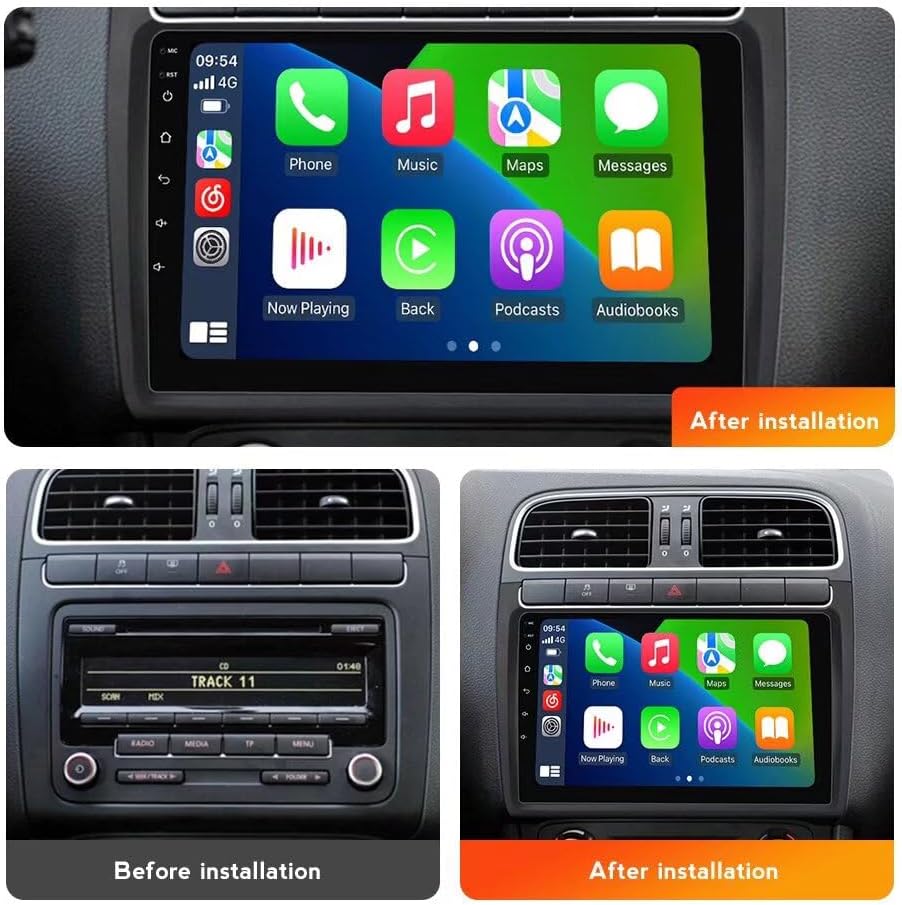
This image illustrates the appearance of the car's dashboard before and after the installation of the MekedeTech Android Head Unit, showcasing the integrated 9-inch display.
Cooling Fan Setup:
For optimal performance and longevity, especially in high temperatures, the unit supports an external cooling fan. Follow these steps to ensure proper cooling fan operation:
- Connect the cooling fan to the designated port on the head unit.
- Navigate to the device settings: Настройки > Устройство > Звук.
- Обеспечить AMP ON setting is enabled.
- The cooling fan will activate automatically when needed to manage internal temperatures.

This image details the internal components (CPU, RAM, ROM), the cooling fan mechanism, and a visual guide for setting up the cooling fan through the device's settings menu.
Инструкция по эксплуатации
Беспроводная связь CarPlay и Android Auto:
The head unit features built-in wireless CarPlay (for iOS devices) and Android Auto (for Android devices), allowing seamless integration of your smartphone's features.
Connection Steps (Wireless CarPlay/Android Auto):
- On the head unit, open the 'Car-Play' or 'Android Auto' application.
- On your smartphone, enable Bluetooth and connect to the head unit's Bluetooth signal.
- Once connected via Bluetooth, the system will prompt you to establish a wireless connection for CarPlay or Android Auto. Follow the on-screen instructions.
- Alternatively, a USB cable connection can be used for both CarPlay and Android Auto if wireless connection is not preferred or available.

This image provides a visual guide for connecting both iOS (Wireless CarPlay) and Android (Wireless Auto) devices to the head unit, detailing the Bluetooth connection steps.
GPS-навигация:
The unit includes a built-in global positioning system (GPS) with support for various navigation applications. It provides real-time traffic conditions and accurate positioning.
- Access navigation by tapping the 'Navigation' icon on the home screen.
- The system supports popular map types such as iGO, Navitel, Yandex, and Google Maps.
- Ensure the unit is connected to the internet via WiFi for real-time traffic updates and online map services.
Функциональность разделенного экрана:
The split-screen feature allows you to run two applications simultaneously on the 9-inch display, enhancing multitasking capabilities. For exampле, ты можешь view Навигация с одной стороны, управление музыкой с другой.
- To activate split screen, open an application, then long-press the recent apps button or drag another compatible app from the side of the screen.
- Adjust the size of each application window by dragging the divider bar.

This image demonstrates the split-screen functionality, showing navigation and music playing concurrently, and highlights the GPS navigation capabilities with supported map applications.
FM-радио:
Access the built-in FM radio tuner for local broadcasts. Use the touch screen to scan for stations, save presets, and adjust volume.
Bluetooth 5.0:
Connect your smartphone via Bluetooth for hands-free calling and wireless audio streaming. Pair your device through the Bluetooth settings menu on the head unit.
Управление на рулевом колесе:
The unit supports your vehicle's factory steering wheel controls, allowing you to manage audio, calls, and other functions without taking your hands off the wheel. This functionality is typically retained automatically with the plug-and-play harness.
Обслуживание
To ensure the longevity and optimal performance of your MekedeTech head unit, follow these maintenance guidelines:
- Очистка экрана: Используйте мягкую, безворсовую ткань, слегкаampСмочите экран водой или специальным средством для чистки экранов, предназначенным для электроники. Избегайте использования агрессивных химикатов и абразивных материалов.
- Обновления программного обеспечения: Periodically check for software updates through the system settings to ensure you have the latest features and security patches. A stable internet connection is required for updates.
- Контроль температуры: While the unit has a cooling fan, avoid exposing it to extreme temperatures for prolonged periods.
- Кабельные соединения: Убедитесь, что все кабели надежно подключены. Ненадежные соединения могут привести к периодическим проблемам.
Поиск неисправностей
If you encounter issues with your head unit, refer to the following common troubleshooting steps:
- Нет питания: Check all power connections. Ensure the vehicle's ignition is on. Verify the fuse for the radio circuit.
- Нет звука: Check volume levels on both the head unit and any connected devices. Ensure speaker wires are correctly connected. Verify the amplifier (if external) is powered on.
- Сенсорный экран не отвечает: Попробуйте перезапустить устройство. Если проблема не исчезнет, может потребоваться сброс настроек к заводским (обратите внимание: при этом будут удалены все пользовательские данные).
- GPS не работает: Убедитесь, что антенна GPS установлена правильно и имеет свободное пространство. view неба. Проверьте настройки GPS в системе.
- Проблемы с подключением Bluetooth/CarPlay/Android Auto: Ensure Bluetooth is enabled on both devices. Forget and re-pair the device. Check for software updates on both the head unit and your smartphone.
- Управление на рулевом колесе не работает: Verify the harness connections. Check the steering wheel control settings in the head unit's menu to ensure they are correctly mapped.
Если эти действия не помогли решить проблему, обратитесь в службу поддержки клиентов.
Технические характеристики
| Особенность | Спецификация |
|---|---|
| Операционная система | Андроид 12 |
| Процессор | 4-Core A53 1.7GHz |
| Память (ОЗУ) | 2 ГБ |
| Память (ПЗУ) | 32 ГБ |
| Размер дисплея | 9 дюйма |
| Разрешение дисплея | 1024x600 |
| Тип дисплея | IPS LCD Capacitive Touchscreen |
| Выходная мощность | 4*50 Вт |
| Версия Bluetooth | 5.0 |
| Связность | Wireless (WiFi, Bluetooth), USB |
| Особые возможности | Wireless CarPlay, Wireless Android Auto, GPS Navigation, Split Screen, Steering Wheel Control |
| Тип карты | Worldwide (supports iGO, Navitel, Yandex, Google Maps) |
| Форматы аудио | APE/FLAC/WAV/MP3/WMA и т. д. |
| Форматы видео | MKV/RMVB/AVI/MP4/MDV и т. д. |
| Форматы изображений | PNG/JPEG/JPG/GIF/WBMP/BNP и т. д. |
Гарантия и поддержка
Информация о гарантии:
This MekedeTech head unit comes with a Гарантия 1 год с даты покупки. Данная гарантия распространяется на производственные дефекты и неисправности при нормальном использовании. Сохраните чек о покупке для предъявления гарантийных претензий.
Служба поддержки клиентов:
For technical assistance, troubleshooting beyond this manual, or warranty inquiries, please contact MekedeTech customer support. Refer to the contact information provided with your product packaging or visit the official MekedeTech webсайт для вариантов поддержки.