
FOPATO D68
FOPATO D68 68% RGB Hot Swappable Gasket Structure 3-Mode Mechanical Keyboard User Manual
Модель: D68
1. Введение
This manual provides detailed instructions for the FOPATO D68 68% RGB Hot Swappable Gasket Structure 3-Mode Mechanical Keyboard. Please read this manual thoroughly before using the product to ensure proper operation and maintenance.
The FOPATO D68 keyboard features a compact 68% layout, RGB backlighting, hot-swappable switches, a gasket structure for enhanced typing feel, and versatile 3-mode connectivity (Bluetooth, 2.4GHz wireless, and USB-C wired). It also includes a smart interactive color screen and a multi-function knob.
2. Содержимое упаковки
Проверьте наличие всех предметов в упаковке:
- FOPATO D68 Mechanical Keyboard
- Aviation Connector Cable
- Magnetic Foot Mat
- Съемник Keycap
- Keyswitch Puller
3. Настройка
3.1 Зарядка клавиатуры
Before initial use, fully charge the keyboard using the provided USB-A to USB-C cable. Connect the USB-C end to the keyboard's port and the USB-A end to a power source (e.g., computer USB port, USB wall adapter).
The 0.9-inch TFT-LCD smart interactive color screen will display the battery percentage. A full charge ensures optimal wireless performance.

Figure 3.1: Keyboard displaying battery life information. The image shows the keyboard from a slight angle, highlighting the screen which indicates battery percentage and estimated usage times for different light settings.
3.2 Регулировка высоты клавиатуры
The keyboard includes magnetic foot mats that can be attached to the bottom to adjust the typing angle. An additional set of feet may be provided for further height adjustment.

Figure 3.2: Underside of the FOPATO D68 keyboard showing the magnetic cover for the 2.4GHz receiver and the magnetic foot mats.
4. Инструкция по эксплуатации
4.1 Режимы подключения
The FOPATO D68 keyboard supports three connection modes:
- Проводной USB-C: Подключите клавиатуру напрямую к устройству с помощью прилагаемого кабеля USB-A - USB-C.
- Беспроводная связь 2.4 ГГц: Use the 2.4GHz USB dongle. The dongle is stored under the magnetic cover on the bottom of the keyboard.
- Bluetooth: Клавиатура может быть сопряжена максимум с тремя устройствами, поддерживающими Bluetooth.
Use the switch on the side of the keyboard to select the desired connection mode (OFF, BT, 2.4G, Wired).

Figure 4.1: The FOPATO D68 keyboard highlighting its three connectivity modes (Bluetooth, 2.4GHz, USB-C wired) and ability to connect to up to five devices. Compatible systems include Windows, Android, macOS, iPadOS, and iOS.

Рисунок 4.2: Сторона view of the FOPATO D68 keyboard showing the physical switch for selecting between 2.4G wireless, Bluetooth, and Off modes.
4.2 Smart Interactive Color Screen and Knob
The 0.9-inch TFT-LCD smart interactive color screen displays various information such as time, connection mode, battery percentage, system switching, and custom GIF images. The multi-function knob can adjust multimedia volume and interact with the screen for mode switching.

Figure 4.3: Close-up of the FOPATO D68 keyboard's smart interactive color screen and the adjacent knob. The screen displays time, date, and connection status.
4.3 световых эффектов RGB
The keyboard features 22 RGB lighting effects with 5 adjustable levels of backlight brightness. Lighting effects can also synchronize with music.

Figure 4.4: The FOPATO D68 keyboard showcasing its full-color dynamic RGB backlighting, with keys illuminated in various colors.
4.4 Коммутаторы с возможностью горячей замены
The FOPATO D68 uses TTC 3-pin hot-swappable switch sockets, compatible with most 3-pin/5-pin switches on the market. This allows for easy customization and replacement of switches without soldering.

Figure 4.5: The FOPATO D68 keyboard with several keycaps removed, revealing the hot-swappable purple switches underneath.

Figure 4.6: A close-up image of the TTC Customized Purple Switch, highlighting its linear fast switch characteristics with an operating force of 40gf and a conduction stroke of 1.6mm.
4.5 Конструкция прокладки
The keyboard incorporates a gasket structure with multiple layers of soundproofing filling, including a custom silicone bottom. This design reduces internal gaps and eliminates most cavity sounds, providing a pure sound and soft, elastic touch.
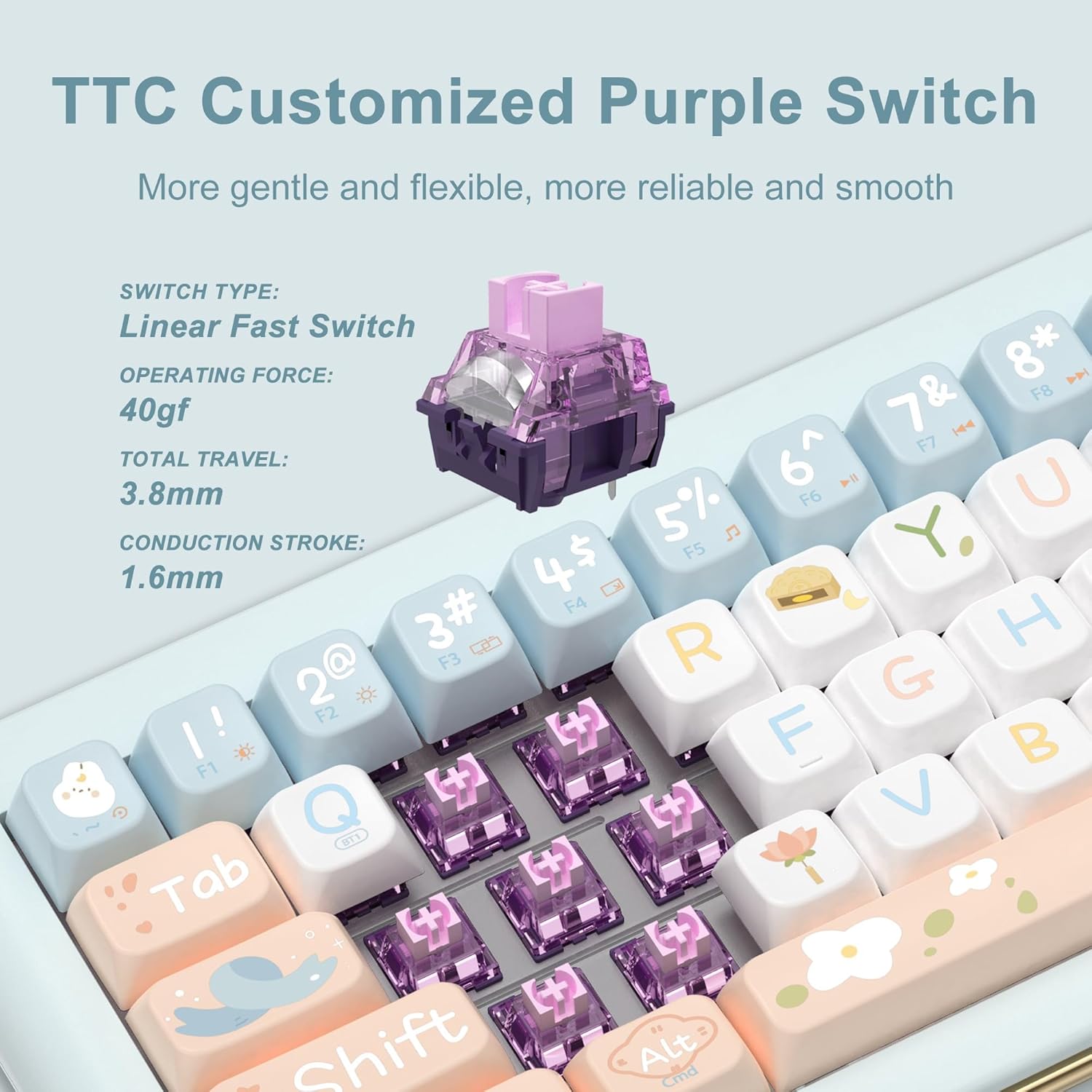
Рисунок 4.7: В разобранном виде view diagram illustrating the Gasket Mount structure of the FOPATO D68 keyboard, showing layers like the LCD Color Screen, PBT Keycaps, Upper Cover, Mechanical Switches, Transparent PC Positioning Board, Silicone Pad, Switch Underpad, Sound Optimization Pad, PCB, Silencing Bottom Cotton, Silencing Pad, Bottom Case, Magnetic Foot Mat, and 2.4G Receiver/Receiver Cover.
5. Техническое обслуживание
5.1 Очистка
Regularly clean the keyboard to prevent dust and debris buildup. Use a soft, dry cloth for the surface. For keycaps, a keycap puller can be used to remove them for deeper cleaning. Avoid using harsh chemicals or abrasive materials.
5.2 Замена клавиш и переключателя
Use the provided keycap puller to carefully remove keycaps. To replace switches, use the keyswitch puller. Ensure the new switch is aligned correctly with the pins before gently pressing it into the socket. Do not force switches, as this can bend the pins.

Figure 5.1: The FOPATO D68 keyboard with keycaps and switches removed, demonstrating the hot-swappable feature. Keycap and switch pullers are visible.
6. Поиск Неисправностей
6.1 Клавиатура не отвечает
- Check the battery level on the screen. Recharge if low.
- Ensure the mode switch (OFF/BT/2.4G/Wired) is set correctly for your desired connection.
- Для диапазона 2.4 ГГц убедитесь, что USB-ключ надежно подключен к устройству.
- Для подключения по Bluetooth убедитесь, что клавиатура сопряжена и выбрана в настройках Bluetooth вашего устройства. При необходимости попробуйте выполнить повторное сопряжение.
- For wired connection, ensure the USB-C cable is properly connected to both the keyboard and the device.
- Try connecting the keyboard to a different USB port or device to rule out port or device issues.
6.2 Connectivity Issues with Specific Devices
The keyboard is compatible with Windows 7+, Android 3.2+, macOS 10.5+, iPadOS, and iOS. Ensure your device's operating system meets these requirements. Some devices may require specific drivers or settings adjustments.
6.3 RGB-подсветка не работает
- Check the keyboard's battery level. Low battery can affect lighting performance.
- Adjust the brightness levels using the keyboard's function keys or dedicated software.
- Ensure no software conflicts are preventing lighting control.
7. Технические характеристики
| Размеры продукта | 13.2 x 5.61 x 1.46 дюйма |
| Вес товара | 1.92 фунта |
| Производитель | ФОПАТО |
| Номер модели | D68-MSZZ-Green |
| Аккумуляторы | Требуется 1 батарейка типа C (в комплекте) |
| Технология связи | 2.4GHz, Bluetooth 5.0, USB-A to C Wired |
| Описание клавиатуры | Механический |
| Особые возможности | Backlit, Hot-Swappable, Hotkeys and Media Keys, Programmable Keys, Rechargeable |
| Подсветка клавиатуры | РГБ |
| Совместимые устройства | Ноутбук, ПК, Smart TV, смартфон, планшет |
8. Гарантия и поддержка
For warranty information and technical support, please refer to the official FOPATO webили обратитесь в службу поддержки напрямую. Сохраните чек о покупке для предъявления гарантийных претензий.
You can visit the FOPATO Store for more information: FOPATO Store
9. Видеоролики о продуктах
9.1 FOPATO D68 Mechanical Keyboard - Official Product Display
Video 9.1: An official product display video from FOPATO showcasing the D68 Mechanical Keyboard's features and design. This video provides a comprehensive overview of the keyboard's aesthetics and functionality.
Ask a question about this manual
Ask about setup, troubleshooting, compatibility, parts, safety, or missing instructions. Manuals+ will review the question and use this page’s manual context to help answer it.