
DEVAISE ASJZ032
DEVAISE 48x24 Inch Electric Standing Desk with Drawers (Model ASJZ032) User Manual
Подробные инструкции по сборке, эксплуатации и обслуживанию.
Важная информация по безопасности
Внимательно прочтите все инструкции перед сборкой и использованием. Сохраните это руководство для дальнейшего использования.
- Always ensure that the total weight on the desk does not exceed 180 lbs (81.6 kg).
- Be cautious of obstructions when adjusting the desk height to avoid potential damage or injury.
- Utilize the anti-collision feature to prevent collisions with objects or people during height adjustments.
- Не допускайте детей и домашних животных к столу во время работы.
- Перед использованием убедитесь, что все винты и болты надежно затянуты. Периодически проверяйте соединения на наличие ослабления.
- Не сидите и не стойте на столе.
- Отключите питание перед чисткой или техническим обслуживанием.
Содержимое упаковки
Перед началом сборки убедитесь в наличии всех компонентов. Для визуальной идентификации деталей обратитесь к видеоролику по сборке.
Video: "Fast Assembly for DEVAISE Standing Desk with Drawers" - This video provides a visual guide to all included parts and the assembly process.
Пакет должен включать:
- Настольный компьютер (1 шт.)
- Ножки (2 шт.)
- Компоненты поперечины/рамы
- Motor and control box
- Панель управления
- Адаптер питания и кабели
- Ящики (2 шт.)
- Полка для хранения вещей
- Headphone hooks (2 pieces)
- Крепежные элементы (винты, болты, шестигранный ключ)
- Инструкция по эксплуатации
Инструкция по сборке
Follow these steps carefully for proper assembly. All parts are clearly labeled, and pre-drilled holes are provided for convenience. An Allen wrench is included for assembly.
- Step 1: Attach the Drive Rod to the Motor.
Insert the drive rod (part 4 in video) into the motor (part 5 in video). Ensure it is securely seated.

Изображение: В разобранном виде view of desk components, illustrating the quick installation process with labeled parts.
- Step 2: Assemble the Desk Legs.
Attach the foot supports to the bottom of each leg (parts 3 and 10 in video) using the provided screws (A) and Allen wrench (E).
- Step 3: Connect Legs with Crossbar.
Position the legs upright and connect them using the main crossbar (part 1 in video). Secure with screws (B) and Allen wrench (E).
- Step 4: Install Side Brackets.
Attach the side brackets (part 2 in video) to the top of the leg assembly, securing them with screws (B) and Allen wrench (E).
- Step 5: Prepare the Desktop.
Place the desktop (parts 7 and 18 in video) face down on a soft, clean surface. Attach the connecting plates (N) and wooden dowels (H) to join the desktop sections if applicable.
- Step 6: Attach Leg Assembly to Desktop.
Carefully align the assembled leg frame with the pre-drilled holes on the underside of the desktop. Secure the frame to the desktop using screws (C) and Allen wrench (E).
- Step 7: Connect Control Box and Cables.
Mount the control box (G) and connect all motor and control panel cables (F) as shown in the diagram. Ensure all connections are firm.
- Step 8: Assemble the Storage Shelf.
Assemble the storage shelf components (parts 11, 12, 13, 14, 15 in video) using screws (I), wooden dowels (H), and the provided tools (E, K, L).
- Step 9: Attach Storage Shelf to Desktop.
Carefully place the assembled storage shelf onto the desktop, aligning it with the designated holes. Secure it with screws (I) and wooden dowels (H).
- Step 10: Install Drawers and Hooks.
Insert the fabric drawers (part 16 in video) into their compartments. Attach the headphone hooks (part 8 in video) to the sides of the desk.

Image: Fully assembled DEVAISE Electric Standing Desk with two monitors, a laptop, and various office accessories, highlighting its functional design.
Инструкция по эксплуатации
This section details how to use the electric height adjustment and integrated features of your DEVAISE standing desk.
Электрическая регулировка высоты
The desk features a smooth electric height adjustment system, allowing you to switch between sitting and standing positions effortlessly. The height range is from 28.35 inches to 46.45 inches.
- Используйте Вверх (▲) и Вниз (▼) Стрелки на панели управления позволяют вручную регулировать высоту стола.
- На светодиодном дисплее будет отображаться текущая высота в дюймах.
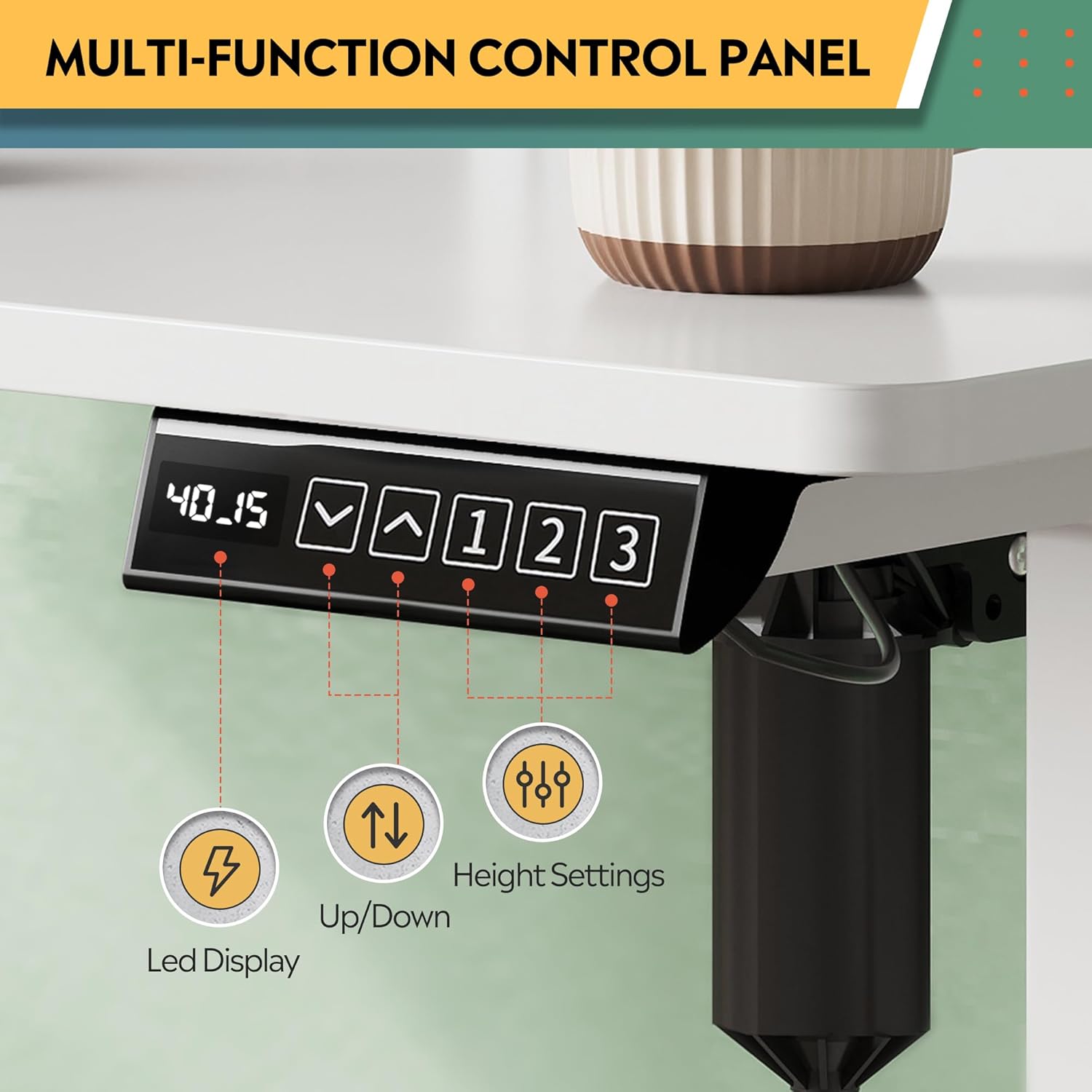
Image: Multi-function control panel showing LED display, up/down arrows, and memory preset buttons.
Предустановки памяти
The desk includes three programmable height settings for quick, one-touch adjustments to your preferred sitting or standing heights.
- Отрегулируйте высоту стола до желаемого уровня с помощью стрелок «Вверх»/«Вниз».
- Нажмите "М" button (or similar memory set button, if present) followed by one of the numbered preset buttons (1, 2 или 3) для сохранения текущей высоты.
- Чтобы вызвать сохраненную высоту, просто нажмите соответствующую кнопку с номером, указывающим на предустановленную высоту.1, 2 или 3).
Встроенные розетки и USB-порты
The desk is equipped with 2 AC outlets and 2 USB ports (12A, 110~125V) for convenient power access for your devices.
- Plug your monitors, laptops, and other devices directly into the AC outlets.
- Используйте USB-порты для зарядки смартфонов, планшетов и других устройств с питанием от USB.
Video: "DEVAISE Standing Desk with S" - Demonstrates the integrated power outlets, USB ports, and headphone hooks.
Функция предотвращения столкновений
The smart anti-collision feature automatically stops and reverses the desk's movement if an obstruction is detected, protecting both the desk and your belongings.
Video: "DEVAISE Electric Standing Desk for Home Office" - Illustrates the sit-to-stand functionality and the anti-collision system.
Обслуживание
Регулярное техническое обслуживание обеспечивает долговечность и оптимальную работу вашего стола для работы стоя.
- Уборка: Протрите поверхность стола мягкой, тряпкой.amp Ткань. Избегайте использования едких химикатов и абразивных чистящих средств, которые могут повредить покрытие.
- Инспекции: Периодически проверяйте затяжку всех винтов и соединений. При необходимости подтягивайте.
- Управление кабелями: Ensure cables are neatly organized and not interfering with the desk's movement. Use the provided cable management features.
- Уход за двигателем: The motor system is designed for maintenance-free operation. Do not attempt to open or service the motor or control box.
Поиск неисправностей
If you encounter any issues with your DEVAISE standing desk, refer to the following common problems and solutions.
| Проблема | Возможная причина | Решение |
|---|---|---|
| Стол не двигается. | Кабель питания отсоединен, кабель двигателя ослаблен, ошибка блока управления. | Check all power and motor connections. Unplug the desk for 10 seconds, then plug it back in to reset. |
| Стол двигается неравномерно или издает необычные звуки. | Неравномерная нагрузка, ослабленные винты, препятствие. | Ensure weight is evenly distributed. Check and tighten all assembly screws. Clear any obstructions. |
| Anti-collision feature triggers too often. | Sensitivity setting too high, minor obstruction. | Check the area for any subtle obstructions. Refer to the control panel manual for adjusting anti-collision sensitivity (if available). |
| Настройки памяти не работают. | Настройки сохранены некорректно. | Re-program the memory presets following the "Memory Presets" instructions in this manual. |
Если проблема не устранена, обратитесь в службу поддержки клиентов.
Технические характеристики
| Особенность | Деталь |
|---|---|
| Бренд | ДЕВАЙС |
| Номер модели | ASJZ032 |
| Дизайн стола | Постоянный стол |
| Размеры продукта (Д x Ш x В) | 27.6" Г x 47.24" Ш x 28.35" В (70.1 см Г x 120 см Ш x 72 см В) |
| Цвет | Белый |
| Минимальная высота | 28.35 дюйма (72 см) |
| Максимальная высота | 46.45 дюйма (118 см) |
| Максимальная грузоподъемность | 180 фунтов (81.6 кг) |
| Основной материал | Iron, Alloy Steel Frame |
| Верхний тип материала | Инженерная древесина |
| Количество ящиков | 2 |
| Розетки | 2 AC Outlets, 2 USB Ports (12A, 110~125V) |
| Особые возможности | Adjustable Height, Electric, Headphone Hooks, Storage Shelf |
| Требуется сборка | Да |
Гарантия и поддержка
Your DEVAISE Electric Standing Desk comes with a limited warranty. For specific details regarding the warranty period and coverage, please refer to the warranty card included in your package or contact DEVAISE customer support.
Служба поддержки клиентов: Should you require assistance with assembly, product operation, or any other inquiries, our U.S.-based customer support team is available to help. Please refer to the contact information provided in your product packaging or on the official DEVAISE webсайт.
Optional protection plans are available for purchase, offering extended coverage for 2-year or 3-year durations, or a monthly complete protect plan. Details can be found where the product was purchased.