
1. Введение
Thank you for choosing the DEVAISE ASJZ025 Electric Standing Desk. This manual provides detailed instructions for the safe assembly, operation, and maintenance of your new electric standing desk. Please read this manual thoroughly before use and retain it for future reference.

Figure 1.1: The DEVAISE 71-inch electric standing desk in maple finish, showcasing its spacious desktop accommodating multiple monitors and office accessories.
2 Важная информация по безопасности
ВНИМАНИЕ: Несоблюдение данных инструкций по технике безопасности может привести к травме или повреждению изделия.
- Always keep children and pets away from the desk when it is in motion.
- Utilize the child lock feature to prevent unintended height adjustments.
- Be aware of the anti-collision feature. Do not force the desk to move if it encounters an obstacle.
- Ensure all cables are properly managed to prevent entanglement during height adjustments.
- Не перегружайте стол. Максимальная грузоподъемность составляет 180 фунтов.
- Only use the desk for its intended purpose as a workstation.
3. Содержимое упаковки
Перед сборкой убедитесь в наличии всех компонентов. Если какие-либо детали отсутствуют или повреждены, обратитесь в службу поддержки клиентов.
- Desktop (Maple, 71 x 28 inches)
- Desk Legs (2) with Dual Motors
- Панель управления со светодиодным дисплеем
- Адаптер питания и кабель
- Crossbars and Support Frames
- Крючок для наушников
- Сборочные комплектующие (винты, болты, инструменты)
- Руководство по эксплуатации

Рисунок 3.1: В разобранном виде view showing all components for the DEVAISE Electric Standing Desk, including the desktop, leg frames, control panel, and various hardware pieces, indicating a quick installation process.
4. Настройка и сборка
Assembly is designed to be straightforward with pre-drilled holes and labeled parts. It is recommended to have a Phillips head screwdriver for some placements. For detailed visual guidance, refer to the included assembly instructions booklet.
- Распаковываем компоненты: Аккуратно извлеките все детали из упаковки. Осмотрите на наличие повреждений.
- Собрать раму: Attach the crossbars and support frames to the desk legs using the provided hardware. Ensure all connections are secure.
- Прикрепить рабочий стол: Place the desktop upside down on a soft, clean surface. Align the pre-drilled holes on the desktop with the frame. Secure the desktop to the frame using the provided screws.
- Установить панель управления: Mount the control panel to the underside of the desktop in the designated area. Connect the motor cables and power cable to the control panel.
- Управление кабелями: Используйте прилагаемые кабельные стяжки или зажимы, чтобы упорядочить и закрепить все кабели, предотвращая их помехи при перемещении стола.
- Начальное включение: Connect the power adapter to the desk and then to a power outlet.

Figure 4.1: The DEVAISE Electric Standing Desk set up in an office environment, showcasing its spacious maple desktop and white frame, accommodating multiple monitors and accessories.
5. Инструкция по эксплуатации
5.1. Панель управления оконченаview
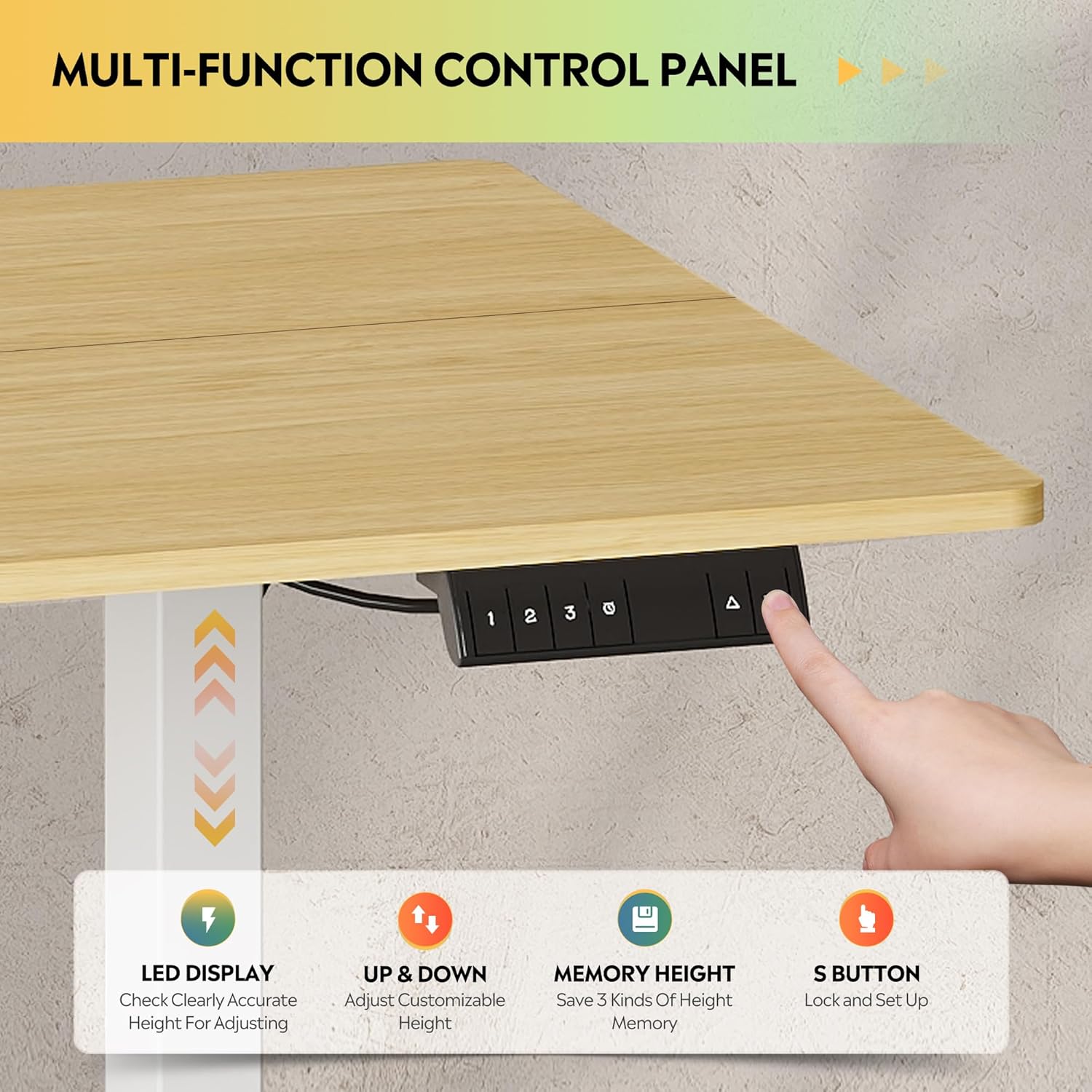
Рисунок 5.1: Подробный view of the multi-function control panel, featuring an LED display, up/down adjustment buttons, three memory preset buttons (1, 2, 3), and an 'S' button for saving settings and child lock.
- Светодиодный дисплей: Отображает текущую высоту стола в дюймах.
- Кнопки «Вверх/Вниз» (▲/▼): Press and hold to adjust the desk height manually. Release to stop.
- Memory Preset Buttons (1, 2, 3): Quickly move the desk to a saved height.
- Кнопка «S»: Used to save height presets and activate the child lock.
5.2. Регулировка высоты
The desk features a tri-motor system for quiet and smooth height transitions.
- Ручная настройка: Press and hold the ▲ button to raise the desk or the ▼ button to lower it. The desk will move smoothly between 28.35 inches and 46.45 inches.
- Использование предустановок памяти: Press one of the preset buttons (1, 2, or 3) to automatically move the desk to the corresponding saved height.

Figure 5.2: Illustration of the DEVAISE Electric Standing Desk's adjustable height range, demonstrating its ability to transition from a sitting height of 28.35 inches to a standing height of 46.45 inches.
5.3. Настройка параметров памяти
- Adjust the desk to your desired height using the ▲ or ▼ buttons.
- Press the 'S' button. The LED display will show "S-".
- Within 3 seconds, press the desired memory preset button (1, 2, or 3). The display will show "S-1", "S-2", or "S-3" to confirm the height has been saved.
5.4. Функция блокировки от детей.
To prevent accidental adjustments, activate the child lock:
- Активировать: Press and hold the 'S' button for 5 seconds until "LOC" appears on the LED display. All buttons will be disabled.
- Деактивировать: Press and hold the 'S' button again for 5 seconds until "LOC" disappears and the current height is displayed.
6. Техническое обслуживание
- Уборка: Протрите рабочий стол и раму мягкой тряпкой.amp Ткань. Избегайте использования абразивных чистящих средств и едких химикатов.
- Управление кабелями: Периодически проверяйте, чтобы все кабели были надежно уложены и не мешали перемещению стола.
- Проверка крепежа: Периодически проверяйте все винты и болты, чтобы убедиться в их надежной фиксации.
- Грузоподъемность: Do not exceed the maximum weight capacity of 180 lbs to ensure longevity and proper function.
7. Поиск Неисправностей
| Проблема | Возможная причина | Решение |
|---|---|---|
| Стол не двигается. | Power cable disconnected; Child lock active; Overload; Motor error. | Check power connection. Deactivate child lock (see Section 5.4). Reduce weight on desk. Unplug for 10 seconds, then plug back in to reset. |
| Стол двигается неравномерно или издает необычные звуки. | Ослабленные крепежные элементы; Засорение; Неравномерное распределение веса. | Check and tighten all assembly fasteners. Remove any obstructions. Distribute weight evenly on the desktop. |
| Функция предотвращения столкновений срабатывает часто. | Obstruction in path; Sensitivity setting (if adjustable, not specified). | Ensure clear path for desk movement. If problem persists, contact support. |
| Светодиодный дисплей показывает код ошибки. | Конкретная неисправность системы. | Refer to the full troubleshooting guide in the included manual or contact DEVAISE customer support with the error code. |
8. Технические характеристики
| Особенность | Деталь |
|---|---|
| Бренд | ДЕВАЙС |
| Номер модели | ASJZ025 |
| Размеры продукта (Д x Ш x В) | 27.59"Д x 70.86"Ш x 29.13"В |
| Цвет | Maple (Desktop), White (Frame) |
| Минимальная высота | 28.35 дюймов |
| Максимальная высота | 46.45 дюймов |
| Верхний тип материала | Инженерная древесина |
| Основной материал | Железо |
| Рекомендация по максимальному весу | 180 фунта |
| Особые возможности | 3-Button Memory Presets, Adjustable Height, Dual Motors, Electric, LED Touchscreen |
| Уровень шума | Under 50dB during adjustment |
| Включенные компоненты | Крючок для наушников |
| Требуемая сборка | Да |
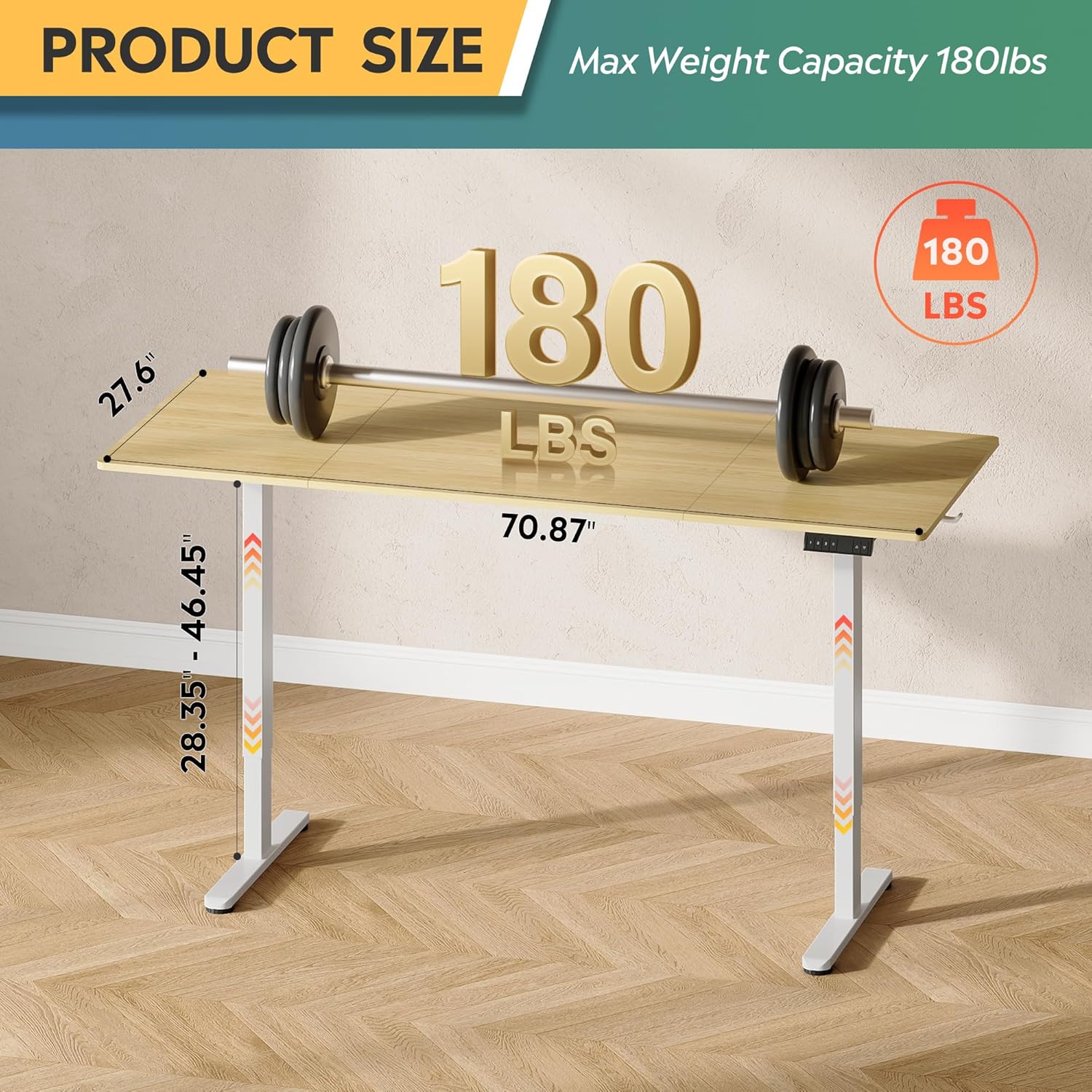
Figure 8.1: Diagram illustrating the product dimensions (70.87" width, 27.6" depth) and height adjustment range (28.35" - 46.45"), along with its maximum weight capacity of 180 lbs.
9. Гарантия и поддержка
9.1. Информация о гарантии
This DEVAISE Electric Standing Desk comes with a Ограниченная гарантия. Please refer to the warranty card included in your package for specific terms and conditions. Retain your proof of purchase for warranty claims.
9.2. Поддержка клиентов
For any questions regarding assembly, operation, troubleshooting, or product selection, please contact our U.S.-based product support team. Contact information can be found on the DEVAISE official webсайте или на упаковке вашего продукта.
You can also visit the official DEVAISE store for more information: DEVAISE Store