
1. Введение
Thank you for choosing the SAMA V40 Mid Tower ATX Case. This manual provides detailed instructions for the proper installation, operation, and maintenance of your new PC case. Please read this manual thoroughly before beginning assembly to ensure correct setup and optimal performance.
The SAMA V40 is designed for high-performance PC builds, featuring a dual-chamber layout, panoramic tempered glass panels, and efficient vertical airflow. It comes with six pre-installed 120mm ARGB PWM fans to provide excellent cooling and aesthetic customization.
2.Основные характеристики
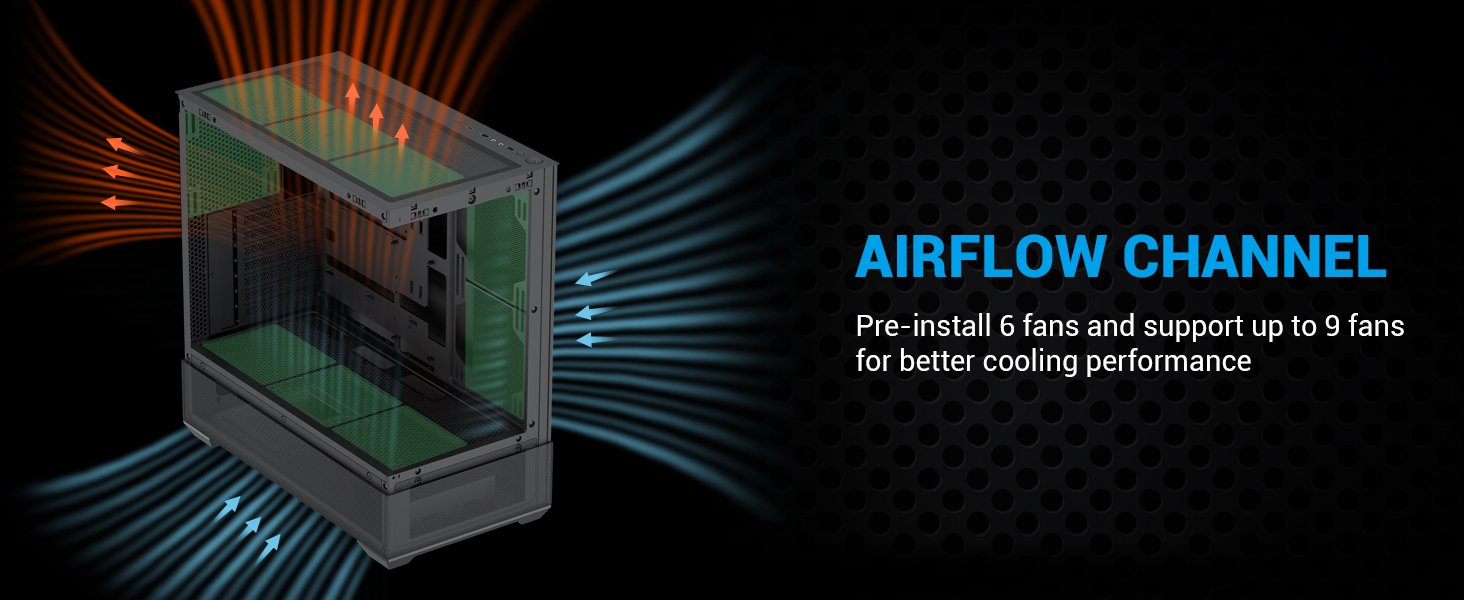
- Эффективное охлаждение: Six pre-installed 120mm ARGB PWM fans (3 bottom, 2 side, 1 rear) with support for up to 9 fans and 360mm water cooling on top.
- Панорамное закаленное стекло: Dual 270° tempered glass panels for an unobstructed view внутренних компонентов.
- Просторный салон: Supports ATX, Micro-ATX, and ITX motherboards, GPUs up to 410mm, and CPU coolers up to 181mm.
- Enhanced Vertical Airflow: Dual-chamber design optimizes airflow from bottom to top for superior thermal performance.
- Modern I/O Panel: Includes 1x USB 3.1 Type-C, 2x USB 3.0 ports, and HD audio jacks for convenient connectivity.
- Гибкое хранилище: Accommodates up to 3x 3.5" HDDs or 3x 2.5" SSDs.
- 7 Expansion Slots: Обеспечивает ample space for multi-GPU configurations and expansion cards.
3. Технические характеристики
| Особенность | Спецификация |
|---|---|
| Название модели | В40 |
| Тип корпуса | Средняя башня |
| Размеры (ДxШxВ) | 17.72 x 9.25 x 17.72 дюйма (453 x 235 x 450 мм) |
| Совместимость с материнской платой | ATX, Micro ATX, Mini ITX |
| Предустановленные вентиляторы | 6x 120mm ARGB PWM Fans (3 bottom, 2 side, 1 rear) |
| Максимальная поддержка вентиляторов | Up to 9x 120mm fans |
| Поддержка радиатора | Up to 360mm (top) |
| Максимальная длина графического процессора | 410 мм |
| Макс. высота кулера ЦП | 181 мм |
| Отсеки для дисков | 3x 3.5-дюймовых жестких диска, 3x 2.5-дюймовых твердотельных накопителя |
| Слоты расширения | 7 |
| Передние порты ввода / вывода | 1x USB 3.1 Type-C, 2x USB 3.0, HD Audio |
| Материалы | ABS, Alloy Steel, Tempered Glass |
| Цвет | Черный |
4. Содержимое упаковки
Пожалуйста, проверьте наличие всех предметов в вашей посылке:
- SAMA V40 Mid Tower ATX Case
- 6x 120mm ARGB PWM Fans (pre-installed)
- Accessory Box (screws, zip ties, standoffs, fan/ARGB hub)
- Руководство пользователя
5. Руководство по установке
5.1. Подготовка дела
Before installing components, carefully remove the tempered glass side panels. These panels are typically secured with thumbscrews at the rear of the case and can be gently pulled open or lifted off once unscrewed. Exercise caution to prevent damage to the glass.

5.2. Установка материнской платы
Install the necessary standoffs for your motherboard form factor (ATX, Micro-ATX, or ITX). Carefully place your motherboard into the case, aligning it with the standoffs and the I/O shield opening. Secure the motherboard with screws.
5.3. Fan and Cooling Installation
The SAMA V40 comes with six 120mm ARGB PWM fans pre-installed (three at the bottom, two on the side, and one at the rear). Additional fans can be installed to further enhance cooling. The case supports up to a 360mm radiator on the top panel.

5.4. Установка привода
The SAMA V40 offers flexible storage options. Install your 3.5" HDDs and 2.5" SSDs into the designated drive bays. Refer to the diagram for bay locations and capacity.

5.5. Установка источника питания
Install your ATX power supply into its designated compartment, typically located at the front-bottom of the case in the dual-chamber design. Secure it with screws from the rear of the case.
5.6. Разъемы ввода/вывода на передней панели
Connect the front panel cables (USB 3.1 Type-C, USB 3.0, HD Audio, Power, Reset, LED) to the corresponding headers on your motherboard. Consult your motherboard manual for exact header locations. The SAMA V40 features a unified front panel connector for easier installation.

6. Эксплуатация корпуса ПК
6.1. Включение
Once all components are securely installed and connected, close the side panels. Connect your power supply to a wall outlet and flip the PSU's power switch to the 'on' position. Press the power button on the case's front I/O panel to start your system.
6.2. Fan and ARGB Control
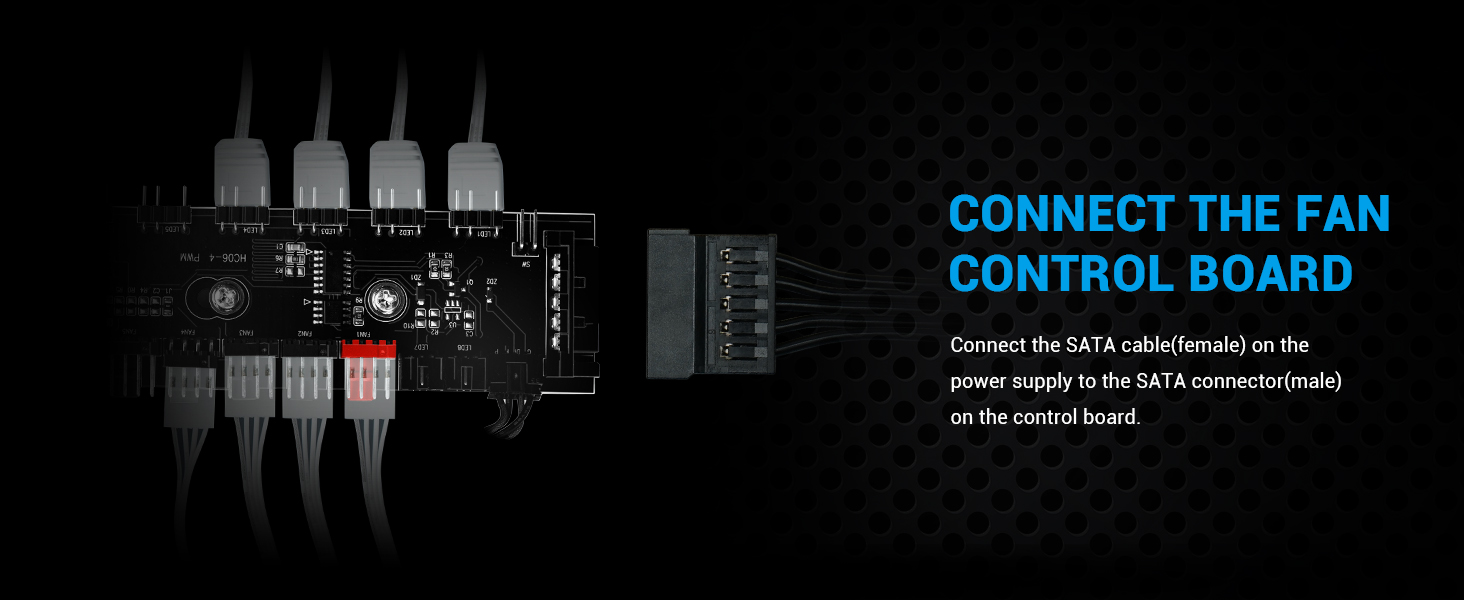
The pre-installed ARGB PWM fans can be controlled via your motherboard's fan control software (if supported) or through the integrated fan/ARGB hub. The hub allows for synchronization of lighting effects and adjustment of fan speeds. Refer to your motherboard's software for advanced customization options.
7. Техническое обслуживание
Регулярное обслуживание помогает обеспечить оптимальную производительность и долговечность компонентов вашего ПК.
- Пылевые фильтры: The SAMA V40 includes magnetic dust filters. Periodically remove and clean these filters to maintain optimal airflow and prevent dust buildup inside the case.
- Очистка корпуса: Use a soft, dry cloth to wipe down the exterior of the case and tempered glass panels. For stubborn smudges on glass, a mild glass cleaner can be used, applied to the cloth first, not directly to the glass.
- Внутренняя пыль: Every few months, or as needed, open the case and use compressed air to gently remove dust from fans, heatsinks, and other components.
8. Поиск Неисправностей
If you encounter issues with your SAMA V40 case, consider the following common solutions:
- Нет питания: Ensure the power supply is properly connected to the wall and the PSU switch is on. Verify all motherboard power cables (24-pin ATX, 8-pin CPU) are securely seated. Check front panel power button connection to the motherboard.
- Вентиляторы не вращаются/подсветка ARGB не работает: Confirm the fan/ARGB hub is receiving SATA power from the PSU. Ensure fan and ARGB cables are correctly connected to the hub and/or motherboard headers. Check motherboard software for fan speed and lighting settings.
- USB-порты не работают: Verify the USB 3.0 and USB 3.1 Type-C cables from the front panel are correctly plugged into their respective motherboard headers.
- Аудиоразъемы не работают: Ensure the HD Audio cable from the front panel is correctly connected to the motherboard's audio header.
For further assistance, please refer to your motherboard manual or contact SAMA customer support.
9. Гарантия и поддержка
SAMA products are manufactured to high-quality standards. For information regarding warranty coverage, terms, and conditions, please visit the official SAMA website or contact your local retailer. Technical support can be accessed through the SAMA official support channels, typically found on their webсайт.
SAMA Official Store: Visit SAMA Store on Amazon