
1 Важная информация по безопасности
Внимательно прочтите все инструкции перед сборкой и использованием. Несоблюдение этих инструкций может привести к травмам или повреждению изделия.
- Always keep children and pets away from the desk when in motion.
- Use the child lock feature (if available) to prevent unintended height adjustments.
- Be aware of the anti-collision feature; do not force the desk to move if it encounters an obstacle.
- Ensure all cables are properly managed to avoid entanglement during height adjustments.
- Не перегружайте стол. Максимальная грузоподъемность составляет 180 фунтов.
- Используйте стол только на ровной поверхности.
2. Содержимое упаковки
Перед сборкой убедитесь в наличии всех компонентов. Если какие-либо детали отсутствуют или повреждены, обратитесь в службу поддержки клиентов.
- Desktop (0.6" thick, Rustic Brown)
- Ножки стола (2)
- Подставки для ног (2)
- Crossbar/Frame Assembly
- Control Panel with LED Touchscreen
- Адаптер питания и кабель
- Крючок для наушников
- Assembly Hardware (screws, L-shaped installation tools)
- Руководство пользователя
3. Инструкция по сборке
The DEVAISE ASJZ021 desk is designed for quick and simple assembly, typically within 15 minutes. All holes are pre-drilled, and accessories are clearly labeled.
Необходимые инструменты:
- Крестовая отвертка (не входит в комплект)
- L-shaped installation tools (included)
Пошаговая сборка:
- Распаковываем компоненты: Осторожно извлеките все детали из упаковки и разложите их на чистой мягкой поверхности, чтобы не поцарапать.
- Прикрепите опорные площадки: Secure the foot pads to the bottom of each desk leg using the provided screws.
- Собрать раму: Connect the desk legs to the crossbar/frame assembly. Ensure all connections are tight and secure.
- Прикрепить рабочий стол: Carefully place the desktop onto the assembled frame. Align the pre-drilled holes on the desktop with the frame. Secure the desktop to the frame using the provided screws.
- Установить панель управления: Mount the LED touchscreen control panel to the underside of the desktop in the designated location. Connect the control panel cable to the motor.
- Подключите питание: Plug the power adapter into the desk's motor and then into a wall outlet.
- Прикрепите крючок для наушников: При желании закрепите крючок для наушников на боковой стороне стола.

Изображение: В разобранном виде view of desk components illustrating the 15-minute quick installation process.
4. Инструкция по эксплуатации
The DEVAISE ASJZ021 Electric Standing Desk features a tri-motor system for smooth and quiet height adjustments and a smart LED touchscreen controller.
Панель управления надview:

Изображение: подробное view of the multi-function control panel with LED display, up/down arrows, memory presets (1, 2, 3), and 'S' button.
- Светодиодный дисплей: Shows the current desk height in real-time.
- Стрелки вверх/вниз (▲ / ▼): Нажмите и удерживайте, чтобы отрегулировать высоту стола вручную. Отпустите, чтобы зафиксировать высоту на желаемом уровне.
- Предварительные настройки памяти (1, 2, 3): Store and recall up to three personalized height settings.
- Кнопка «S»: Used for saving memory presets and activating the child lock function.
Регулировка высоты:
The desk can be adjusted between 28.35 inches (sitting height) and 46.45 inches (standing height).

Image: Comparison of the desk at its minimum height of 28.35 inches and maximum height of 46.45 inches.
- Ручная настройка: Press and hold the ▲ (Up) or ▼ (Down) button until the desk reaches your desired height.
- Настройка параметров памяти:
- Отрегулируйте высоту стола по своему усмотрению с помощью кнопок «Вверх/Вниз».
- Press the 'S' button. The LED display will show 'S-'.
- Immediately press one of the memory buttons (1, 2, or 3). The display will show 'S-1', 'S-2', or 'S-3' to confirm the height is saved.
- Восстановление настроек памяти: Simply press the corresponding memory button (1, 2, or 3) once. The desk will automatically move to the saved height.
Тихая работа:
The tri-motor system operates quietly, typically below 50dB, ensuring minimal disruption in your workspace.

Image: Graphic illustrating the quiet operation of the desk, comparing its sound level (below 50dB) to soft breaths (10dB), whisper (25dB), and car horns (80dB).
5. Технические характеристики
Detailed technical specifications for the DEVAISE ASJZ021 Electric Standing Desk.
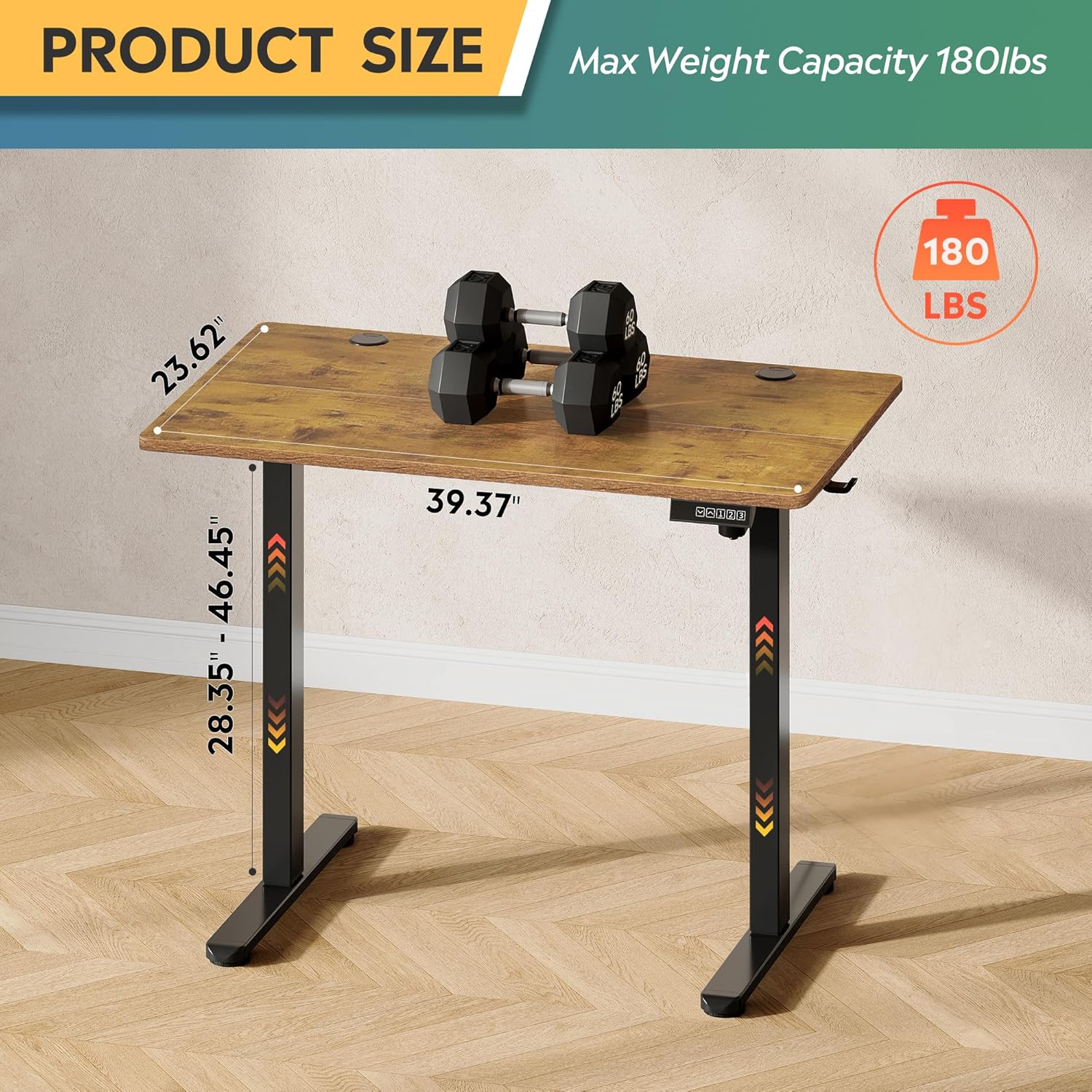
Image: Product dimensions (39.37"W x 23.62"D) and height range (28.35"-46.45"), highlighting the 180 lbs maximum weight capacity.
| Особенность | Спецификация |
|---|---|
| Номер модели | ASJZ021 |
| Размеры продукта (Д x Ш x В) | 23.62"Д x 39.37"Ш x 28.34"В |
| Минимальная высота | 28.35 дюйма |
| Максимальная высота | 46.45 дюйма |
| Толщина столешницы | 0.6 дюйма |
| Рекомендация по максимальному весу | 180 фунта |
| Вес товара | 37 фунта |
| Подъемный механизм | Electric (Tri-motor system) |
| Количество позиций по высоте | 3 Предустановки памяти |
| Уровень шума | <50дБ |
| Верхний тип материала | Инженерная древесина |
| Основной материал | Железо |
| Цвет | Rustic Brown (Desktop), Black (Base) |
| Особые возможности | Adjustable Height, Compact, Electric, LED Touchscreen |
6. Техническое обслуживание
Regular maintenance helps ensure the longevity and optimal performance of your standing desk.
- Уборка: Протрите рабочий стол и раму мягкой тряпкой.amp Ткань. Избегайте использования едких химикатов и абразивных чистящих средств, которые могут повредить покрытие.
- Управление кабелями: Periodically check and organize cables to prevent them from snagging or getting pinched during height adjustments.
- Затяжка винтов: Периодически проверяйте все винты и болты, чтобы убедиться в их надежной фиксации. При необходимости подтяните.
- Проверка двигателя: Listen for any unusual noises during operation. If you notice any issues, refer to the troubleshooting section or contact support.
7. Поиск Неисправностей
If you encounter any issues with your DEVAISE ASJZ021 Electric Standing Desk, please refer to the following common problems and solutions.
| Проблема | Возможная причина | Решение |
|---|---|---|
| Стол не двигается | Кабель питания отсоединен; Перегрузка; Ошибка двигателя | Check power connections. Reduce weight on desk. Unplug for 10 seconds, then plug back in. |
| Неравномерная регулировка высоты | Засорение; Проблема с датчиком | Clear any obstructions. Perform a reset (refer to control panel instructions or contact support). |
| На дисплее отображается код ошибки. | Конкретная системная ошибка | Note the error code and consult the DEVAISE support webДля получения конкретных рекомендаций посетите веб-сайт или обратитесь в службу поддержки клиентов. |
| Desk stops moving unexpectedly | Anti-collision activated; Overheating protection | Check for obstructions. Allow the motor to cool down for 20 minutes before attempting to operate again. |
If the problem persists after attempting these solutions, please contact DEVAISE customer support.
8. Гарантия и поддержка
DEVAISE is committed to providing quality products and customer satisfaction. Your purchase is backed by our support services.
- Служба поддержки клиентов: For any questions, concerns, or assistance with assembly or operation, please contact our 24/7 US-based support team. Refer to your purchase documentation for contact details.
- Информация о гарантии: Specific warranty terms and conditions may vary. Please refer to the warranty card included with your product or visit the official DEVAISE webсайт для получения подробной информации.