
1. Введение
This manual provides essential information for the proper setup, operation, maintenance, and troubleshooting of your Meizu mblu 21 4G LTE smartphone. Please read this manual thoroughly before using your device to ensure optimal performance and longevity.
The Meizu mblu 21 features a 6.79-inch HD display, a 13MP dual camera system, and runs on Android 14. It is designed for efficient performance and reliable connectivity.
2. Настройка
2.1 Содержимое упаковки
Убедитесь, что ваш пакет содержит следующие предметы:
- Meizu mblu 21 Smartphone
- Адаптер питания
- Краткое руководство пользователя (если включено)
2.2 Установка SIM-карты и карты MicroSD
The Meizu mblu 21 supports Dual Nano SIM cards and a MicroSD card for expandable storage.
- Найдите лоток для SIM-карты на боковой панели устройства.
- Insert the SIM ejector tool (not included, use a thin pin if necessary) into the small hole on the SIM tray to eject it.
- Place your Nano SIM card(s) and/or MicroSD card into the designated slots on the tray, ensuring proper orientation.
- Аккуратно вставьте лоток SIM-карты обратно в телефон до щелчка.
2.3 Первоначальное включение и настройка сети
- Press and hold the power button until the Meizu logo appears.
- Следуйте инструкциям на экране, чтобы завершить первоначальную настройку, включая выбор языка, подключение к Wi-Fi и создание учетной записи Google.
- For cellular connectivity, ensure your SIM card is active. This device is an international version and in the USA market, it operates exclusively on T-Mobile's 4G LTE network. Outside the USA, it is compatible with various carriers worldwide.
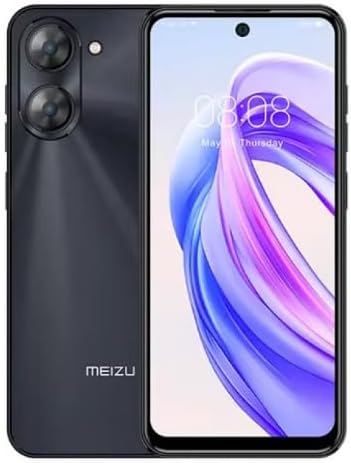
Изображение 2.3.1: Передние и задние view of the Meizu mblu 21 smartphone. The front displays the screen with a punch-hole camera, while the rear shows the dual camera module and the Meizu branding.
3. Инструкция по эксплуатации
3.1 Базовая навигация (Android 14)
Your Meizu mblu 21 runs on Android 14, offering an intuitive user experience. Use gestures or on-screen navigation buttons to move between apps, access settings, and manage notifications.
3.2 Использование камеры
The device features a 13MP Smart Camera on the rear and an 8MP front camera. Open the Camera app to capture photos and videos. Utilize various modes and settings for optimal results.
3.3 Функции безопасности
Unlock your device using the side-mounted fingerprint sensor for instant access or the 8MP front camera for Smart Face Unlock.
3.4 Связь
- Wi-Fi: Supports Dual-Band Wi-Fi (2.4GHz and 5GHz) for stable internet access.
- Bluetooth: Bluetooth 5.0 for connecting to wireless accessories.
- VoLTE: Enjoy clearer voice calls with VoLTE HD Calls.

Изображение 3.4.1: Visual representation of key connectivity and operating system features, including Android 14, Dual-Band Wi-Fi, Bluetooth 5.0, and VoLTE HD Calls.
4. Техническое обслуживание
4.1 Общий уход
- Держите устройство в сухом месте и вдали от экстремальных температур.
- Протирайте экран и корпус мягкой безворсовой тканью. Избегайте использования агрессивных химикатов.
- Защитите экран защитной пленкой, а корпус — защитным чехлом, чтобы предотвратить царапины и повреждения.
4.2 Управление аккумулятором
The 4900mAh battery is designed for all-day performance. To prolong battery life:
- Избегайте частой полной разрядки аккумулятора.
- Для зарядки используйте прилагаемый адаптер питания.
- Optimize background app usage and screen brightness in settings.

Изображение 4.2.1: Внутренний view of the Meizu mblu 21 smartphone highlighting the 4900mAh battery, emphasizing its capacity for extended use.
5. Поиск Неисправностей
5.1 Общие проблемы и решения
- Устройство не включается: Убедитесь, что батарея заряжена. Подключите к адаптеру питания и попробуйте снова.
- Проблемы с сетевым подключением: Check if your SIM card is properly inserted and active. Verify network settings and ensure you are within T-Mobile's coverage area in the USA.
- Низкая производительность: Закройте ненужные фоновые приложения. Очистите кэш и временные файлы. files. Restart the device.
- Аккумулятор быстро разряжается: Reduce screen brightness, disable unused features like Bluetooth or GPS, and check for power-intensive apps.
If problems persist, consider performing a factory reset (back up your data first) or contacting customer support.
6. Технические характеристики
| Номер модели | М416Л |
| Операционная система | Андроид 14 |
| Отображать | 6.79 Inches HD, 2340 x 1080 Resolution, 90Hz Adaptive Refresh Rate |
| Процессор | Octa Core 1.6GHz ARM Mali-G57 |
| Память | 64 GB Internal Storage, 4 GB RAM |
| Аккумулятор | 4900mAh (4.9E+3 Milliamp Hours) Lithium Polymer |
| Задняя камера | 13MP Smart Camera, 5P Precision Lens |
| Передняя камера | 8МП |
| Сотовые технологии | 4G LTE FDD: 2,3,4,5,7,8,12,17,26,28,66; 3G WCDMA: 2/4/5/8; 2G Quad Band |
| Тип SIM-карты | Dual Nano SIM + MicroSD |
| Wi-Fi | Двухдиапазонный (2.4 ГГц и 5 ГГц) |
| Bluetooth | 5.0 |
| Аудиоразъем | USB-тип C |
| Вес товара | 14 унции |
| Идентификатор FCC | 2ANQ6-M416L |

Изображение 6.1: The Meizu mblu 21 smartphone presented in its Titan Black color variant, showcasinг его дизайн.
7. Гарантия и поддержка
For warranty information, please refer to the warranty card included with your product or consult the retailer where the device was purchased. Meizu provides support for its products. For further assistance, please visit the official Meizu webсайт или свяжитесь с их службой поддержки.