
1. Введение
This manual provides essential information for the safe and efficient operation of your Meizu mblu 21 smartphone. Please read it thoroughly before using the device.
The Meizu mblu 21 features a Prism Edge Design with a radiant gradient and a large immersive 6.79-inch HD display. It is equipped with a 13MP main camera and an 8MP front camera, powered by Android 14. The device includes a 4900mAh battery for extended use and supports 4G LTE connectivity, Dual-Band Wi-Fi, and Bluetooth 5.0.
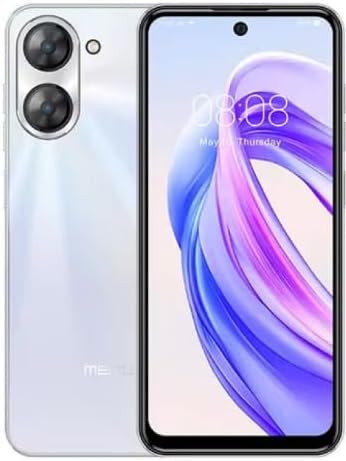
Рисунок 1.1: Вид спереди и сзади view of the Meizu mblu 21 smartphone in White Diamond color.
2. Что в коробке
Проверьте наличие всех предметов в упаковке:
- Meizu mblu 21 Smartphone
- Адаптер питания
- USB-кабель
- Инструмент для извлечения SIM-карты
- Краткое руководство пользователя

Figure 2.1: Meizu mblu 21 smartphone alongside its power adapter.
3. Настройка
3.1. Установка SIM-карт и карты MicroSD
The Meizu mblu 21 supports Dual Nano SIM cards and a MicroSD card for expandable storage. Locate the SIM tray on the side of the device.
- Power off the device before inserting or removing SIM/MicroSD cards.
- Чтобы открыть лоток для SIM-карты, воспользуйтесь прилагаемым инструментом для извлечения SIM-карты.
- Carefully place the Nano SIM cards and/or MicroSD card into the designated slots on the tray, ensuring correct orientation.
- Аккуратно задвиньте лоток обратно в устройство до упора.
3.2. Мастер первоначального включения и настройки
- Press and hold the Power button until the Meizu logo appears.
- Следуйте инструкциям на экране, чтобы завершить первоначальную настройку, включая выбор языка, подключение к сети Wi-Fi и создание учетной записи Google.
4. Управление вашим устройством
4.1. Дисплей и навигация
The 6.79-inch HD display features a 90Hz adaptive refresh rate for smooth visuals. Navigate the interface using touch gestures: tap, swipe, pinch-to-zoom.
4.2. Функции камеры
The device is equipped with a 13MP main camera and an 8MP front camera. Open the Camera application to capture photos and videos.
- 13MP Smart Camera: Ideal for capturing everyday moments with sharpness and true-to-life colors.
- Фронтальная камера 8 МП: Designed for clear selfies and video calls.
4.3. Функции безопасности
- Side Unlock: A fast and secure fingerprint sensor integrated into the side power button for instant access.
- Smart Face Unlock: Use the front camera to unlock your device quickly and conveniently.
4.4. Связь
Your mblu 21 supports various connectivity options:
- 4G LTE: For mobile data connectivity. In the USA, this device is compatible with T-Mobile. Outside the USA, it works with any carrier worldwide.
- Двухдиапазонный Wi-Fi: Supports both 2.4GHz and 5GHz bands for seamless internet access.
- Bluetooth 5.0: For connecting wireless accessories with improved energy efficiency.
- VoLTE HD Calls: Enjoy sharper, clearer voice calls over LTE networks.

Figure 4.1: Key technology features of the Meizu mblu 21, including Android 14, Dual-Band Wi-Fi, Bluetooth 5.0, and VoLTE.
5. Техническое обслуживание
5.1. Уход за аккумулятором
The mblu 21 is equipped with a 4900mAh battery. To maximize battery lifespan:
- Избегайте экстремальных температур.
- Use only the provided power adapter or certified compatible chargers.
- Избегайте частой полной разрядки аккумулятора.

Рисунок 5.1: Внутренний view of the Meizu mblu 21, showcasing the 4900mAh battery and internal components.
5.2. Очистка устройства
Для чистки экрана и корпуса телефона используйте мягкую безворсовую ткань. Избегайте использования едких химикатов или абразивных материалов.
5.3. Обновления программного обеспечения
Regularly check for and install software updates to ensure optimal performance and security. Updates can be found in the device's settings menu.
6. Поиск Неисправностей
If you encounter issues with your Meizu mblu 21, try the following solutions:
- Устройство не отвечает: Нажмите и удерживайте кнопку питания в течение 10–15 секунд, чтобы принудительно перезагрузить компьютер.
- Проблемы с сетевым подключением:
- Убедитесь, что SIM-карта правильно вставлена.
- Включать и выключать режим полета.
- Проверьте сетевые настройки (APN, предпочтительный тип сети).
- Батарея быстро разряжается:
- Закройте неиспользуемые приложения, работающие в фоновом режиме.
- Уменьшите яркость экрана.
- Отключайте ненужные функции, такие как GPS или Bluetooth, когда они не используются.
- Проблемы с производительностью:
- Clear cache and data of problematic apps.
- Освободите место для хранения.
- Consider a factory reset (Note: This will erase all data on your device. Back up important data first.).
7. Технические характеристики
| Особенность | Деталь |
|---|---|
| Название модели | mblu 21 |
| Номер модели | М416Л |
| Операционная система | Андроид 14 |
| Размер экрана | 6.79 дюйма |
| Емкость памяти | 64 ГБ |
| Установленный размер оперативной памяти | 4 ГБ |
| Емкость аккумулятора | 4900 миллиamp Часы |
| Основная камера | 13 МП |
| Передняя камера | 8 МП |
| Оператор беспроводной связи (США) | T-Mobile |
| Сотовые технологии | 4G LTE |
| Технологии подключения | 4G, Dual-Band Wi-Fi, Bluetooth 5.0 |
| Вес товара | 14 унции |
| Размеры упаковки | 7 x 4 x 2 дюйма |
| Цвет | White Diamond |
8. Гарантия и поддержка
Your Meizu mblu 21 smartphone comes with a manufacturer's warranty. Please refer to the warranty card included in your product packaging for specific terms and conditions.
For technical support, service, or further inquiries, please contact Meizu customer support through their official channels. Contact information can typically be found on the manufacturer's webсайте или в документации по продукту.