
ATN BlazeHunter
Руководство пользователя тепловизионного монокуляра ATN BlazeHunter
Model: BlazeHunter (640x512; 3.5-28x LRF)
1. Введение и окончаниеview
The ATN BlazeHunter Thermal Imaging Monocular is a high-performance device designed for outdoor enthusiasts, hunters, and professionals requiring advanced thermal detection capabilities. It features a professional-grade, sub 18mK NETD uncooled focal plane detector, ensuring exceptional sensitivity and clear thermal imagery in various environmental conditions. This monocular integrates a built-in laser rangefinder for precise distance measurements, enhancing accuracy in the field. With its robust design, long battery life, and versatile viewing modes, the BlazeHunter is an essential tool for observation and tracking.

Image: The ATN BlazeHunter Thermal Imaging Monocular, showcasinг его компактный и эргономичный дизайн.
2. Что в коробке
Upon unboxing your ATN BlazeHunter, please verify that all components are present:
- ATN BlazeHunter Thermal Imaging Monocular Unit
- Две (2) перезаряжаемые батареи
- Зарядное устройство для аккумулятора
- Кабель USB-C
- Защитный чехол для переноски
- Ткань для чистки линз
- Краткое руководство пользователя
3. Особенности продукта
The BlazeHunter is equipped with advanced features to optimize your thermal observation experience:
3.1. Pro-Grade Image Sensor
Equipped with a vanadium oxide uncooled focal plane detector with NETD <18mK for exceptional thermal imaging and detection of even the smallest temperature differences, providing enhanced clarity and precision in all conditions.

Image: Visual representation of the pro-grade image sensor's capability to detect subtle thermal variations, showing a clear thermal signature of an animal.
3.2. Множественный ViewРежимы ИНГ
Настройте свой view with six distinct color palettes: White Hot, Black Hot, High Red, Iron Red, Green Hot, and Sepia. These modes are tailored to your preferences for enhanced target detection and optimal visibility in any environment.

Image: A quad-panel display showing different thermal color palettes (White Hot, Black Hot, High Red, Iron Red) applied to a scene, demonstrating the variety of viewing варианты.
3.3. Video Record Functionality
Record and relive your thermal observations with high-quality video capture, perfect for enhancing your hunting and scouting trips. The device supports video recording at 60 frames per second (fps).
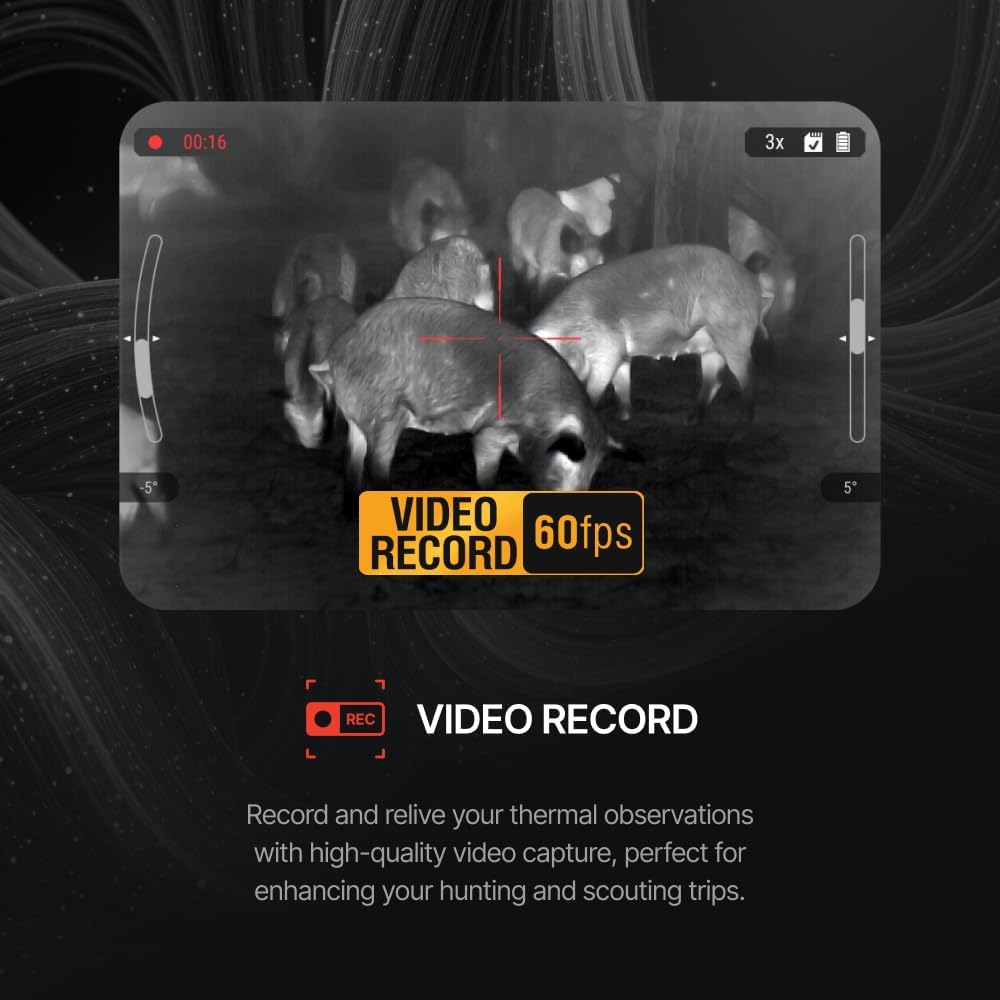
Image: A thermal view of multiple animals, with an overlay indicating video recording is active at 60fps, highlighting the device's video capture capability.
3.4. Built-in Laser Rangefinder (LRF)
The BlazeHunter thermal monocular includes a built-in Laser Range Finder for fast and precise distance measurement. This feature simplifies rangefinding, providing essential data without the need for additional devices, whether tracking wildlife or navigating rugged terrain.

Image: A thermal image of an animal with a red overlay indicating the laser rangefinder's beam, showing a distance measurement of 1000 yards, illustrating the integrated LRF function.
3.5. Large Full-Color High Definition OLED Display
Featuring a large 0.41-inch OLED display with a 1440x1080 resolution, the BlazeHunter delivers twice the pixel density of other viewers, ensuring every detail is sharp and crystal clear, giving you a significant advantage in any situation.

Image: A thermal image of an animal within a frame, with arrows pointing outwards and text indicating "LARGER DIMENSIONS" and "BETTER RESOLUTION," emphasizing the superior display quality.
3.6. Длительное время работы от батареи
BlazeHunter's replaceable battery design, complete with two rechargeable batteries and a charger, provides users with up to 14 hours of uninterrupted operation. This extended battery life is ideal for prolonged adventures or long hunting sessions.

Image: An icon depicting two batteries with a central circle showing "14h," symbolizing the extended 14-hour battery life provided by the dual rechargeable battery system.
3.7. Легкая и компактная конструкция
Compact and lightweight—under 0.8 lbs (320 grams)—the BlazeHunter fits comfortably in your hand and is effortless to carry, making it perfect for extended use without fatigue.

Image: The BlazeHunter monocular resting on a metallic disc, with a feather icon and text "LIGHTWEIGHT," visually representing its light and portable nature.
3.8. Built-in Wi-Fi for Easy Sharing
Share the experience in real-time with up to 4 people simultaneously via the app, allowing you to instantly connect and share your view or photos, no matter where you are.

Image: A graphic showing the monocular transmitting a signal to multiple devices (phone, PC, TV, tablet PC), with text "4 viewers live via Wi-Fi," illustrating its real-time sharing capability.
4. Настройка
- Зарядка аккумуляторов: Before first use, fully charge both rechargeable batteries using the provided charger. Insert the batteries into the charger and connect the charger to a power source. The indicator light will show charging status.
- Установите аккумулятор: Open the battery compartment on the BlazeHunter unit. Insert one charged battery, ensuring correct polarity. Close the compartment securely.
- Включение питания: Press and hold the Power button (refer to the Quick Start Guide for button layout) for a few seconds until the display illuminates.
- Первоначальная настройка фокуса: Point the monocular at an object approximately 10-20 meters away. Rotate the diopter adjustment ring (near the eyepiece) until the on-screen display and image appear sharp and clear to your eye.
5. Инструкция по эксплуатации
5.1. Основные операции
- Включение/выключение питания: Нажмите и удерживайте кнопку питания.
- Режим ожидания: A short press of the Power button will put the device into standby mode to conserve battery. Press again to wake up.
- Увеличить: Use the designated zoom buttons (typically + and -) to adjust the digital magnification.
5.2. Изменение Viewing Modes (Color Palettes)
The BlazeHunter offers six color palettes. To cycle through them, locate the dedicated palette button (refer to your Quick Start Guide for exact button location) and press it repeatedly until your desired mode (White Hot, Black Hot, High Red, Iron Red, Green Hot, Sepia) is active.
5.3. Using the Laser Rangefinder (LRF)
To activate the LRF, aim the monocular at your target. Press the LRF button (usually distinct from other controls). A reticle will appear on screen, and the distance to the target will be displayed. Ensure the target is within the LRF's effective range for accurate readings.
5.4. Видеозапись и фотосъемка
- Видеозапись: Press the Video Record button once to start recording. Press it again to stop. A recording indicator will typically appear on the display.
- Фотосъемка: Press the Photo Capture button (often a quick press of the Video Record button or a separate button) to take a still image.
- Доступ к медиа: Connect the device to a computer via USB-C cable or use the Wi-Fi app to access recorded videos and photos.
5.5. Подключение к Wi-Fi и использование приложений
The BlazeHunter features built-in Wi-Fi for real-time streaming and media management. Download the official ATN app on your smartphone or tablet. Enable Wi-Fi on the monocular (refer to settings menu). Connect your smart device to the monocular's Wi-Fi network. Once connected, you can view live feed, control settings, and download media.
6. Техническое обслуживание
- Очистка линз: Use the provided lens cleaning cloth or a soft, lint-free cloth specifically designed for optics. Gently wipe the lens surfaces. For stubborn smudges, use a small amount of lens cleaning solution applied to the cloth, not directly to the lens.
- Очистка кузова: Протрите корпус монокуляра мягкой тряпкой.amp Ткань. Избегайте использования едких химикатов и абразивных материалов.
- Уход батареи: Store batteries in a cool, dry place. If storing the device for extended periods, remove the battery.
- Хранилище: Store the monocular in its protective carrying case when not in use to prevent dust and physical damage. Avoid extreme temperatures and high humidity.
7. Поиск Неисправностей
| Проблема | Возможная причина | Решение |
|---|---|---|
| Устройство не включается | Low or uncharged battery; Incorrect battery insertion | Ensure battery is fully charged and inserted correctly. Try the second battery. |
| Изображение размыто или не в фокусе | Diopter not adjusted; Lens dirty | Adjust the diopter ring. Clean the objective and eyepiece lenses. |
| Невозможно подключиться к Wi-Fi | Wi-Fi not enabled on device; Incorrect password; App issues | Ensure Wi-Fi is enabled on the monocular. Verify Wi-Fi password. Restart both devices. Reinstall the app if necessary. |
| Laser Rangefinder not working | Target out of range; Obstruction; Low battery | Ensure target is within specified range. Clear any obstructions. Check battery level. |
| No video/photo recording | No storage space; SD card error (if applicable); Incorrect button press | Check available storage. Ensure memory card is properly inserted and formatted (if applicable). Refer to manual for correct button operation. |
8. Технические характеристики
| Особенность | Спецификация |
|---|---|
| Название модели | BlazeHunter |
| Размеры продукта | 5.98 x 2.93 x 1.67 дюйма (15.19 x 7.44 x 4.24 см) |
| Вес товара | 11.3 унции (320 граммов) |
| Диаметр объектива | 35 миллиметра |
| Описание фокусного расстояния | 3.5x |
| Тип фокусировки | Автофокус |
| искателя | Прямо через |
| Аккумуляторы | 1 Lithium Ion battery required (included), replaceable design with 2 batteries provided |
| Срок службы батареи | До 14 часов |
| Отображать | 0.41-inch OLED, 1440x1080 resolution |
| Датчик изображения | Vanadium oxide uncooled focal plane detector, NETD <18mK |
| Связность | Built-in Wi-Fi, USB-C |
| Совместимые устройства | Смартфон, Планшет |
9. Информация о гарантии и поддержке
For specific warranty details, including coverage period and terms, please refer to the warranty card included with your product packaging or visit the official ATN webСохраните чек о покупке для предъявления гарантийных претензий.
For technical support, troubleshooting assistance beyond this manual, or service inquiries, please contact ATN customer support through their official website or the contact information provided in your product documentation. Always provide your product model and serial number when seeking support.
В описании товара, предназначенном для встраивания в данное руководство, от продавца не было предоставлено официальных видеороликов.