
1. Введение
Спасибо за покупкуasing the LONPOO LP-816 Compact Micro HiFi System. This manual provides essential information for the safe and efficient operation of your new audio system. Please read this manual thoroughly before use and retain it for future reference.
2. Инструкции по технике безопасности
- Источник питания: Убедитесь, что источник питания vol.tage соответствует номинальным параметрам, указанным на устройстве.
- Вентиляция: Не закрывайте вентиляционные отверстия. Оставьте вокруг устройства достаточно места для свободной циркуляции воздуха.
- Вода и влага: Не подвергайте устройство воздействию дождя, влаги, капель/брызг жидкостей. Не ставьте на устройство предметы, наполненные жидкостью, например, вазы.
- Нагревать: Держите устройство вдали от источников тепла, таких как радиаторы, обогреватели, печи или другие приборы (включая amp(жирообразующие вещества), которые вырабатывают тепло.
- Уборка: Перед чисткой отключите устройство от розетки. Используйте только мягкую сухую ткань. Не используйте жидкие или аэрозольные чистящие средства.
- Обслуживание: Не пытайтесь ремонтировать этот продукт самостоятельно. Поручите все обслуживание квалифицированному обслуживающему персоналу.
- Размещение: Установите устройство на устойчивую ровную поверхность, чтобы предотвратить его падение.
3. Содержимое упаковки
Убедитесь, что все перечисленные ниже предметы включены в ваш пакет:
- LONPOO LP-816 Micro HiFi System Unit
- Дистанционное управление
- Адаптер питания
- FM-антенна
- Руководство пользователя (этот документ)
4. Продукт закончилсяview
4.1 Front and Rear Panel Controls
Familiarize yourself with the various buttons, ports, and indicators on your LP-816 system.
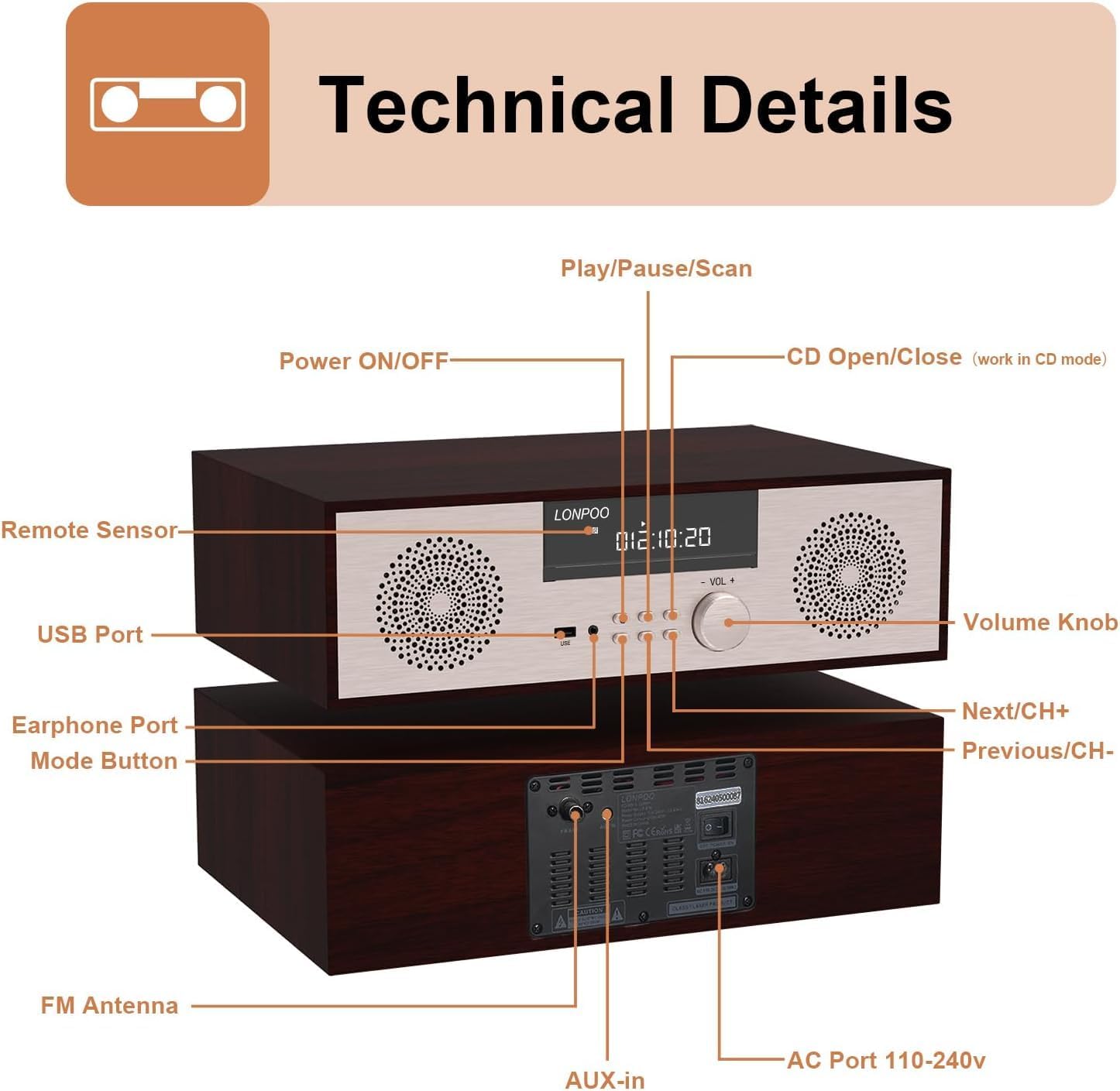
Изображение: спереди и сзади view of the LONPOO LP-816 system, highlighting the LCD display, control buttons, volume knob, USB port, earphone port, mode button, remote sensor, CD compartment, AUX-in, FM antenna port, and AC power port.
- Включение/выключение питания: Включает и выключает устройство.
- ЖК-дисплей: Отображает текущий режим, информацию о маршруте, частоту и время.
- Отделение для компакт-дисков: Для вставки аудио-CD.
- USB-порт: Подключите USB-флеш-накопители для воспроизведения аудио.
- Порт для наушников: Разъем 3.5 мм для подключения наушников.
- Кнопка режима: Switches between CD, FM, Bluetooth, AUX, and USB modes.
- Play/Pause/Scan Button: Управляет воспроизведением и запускает сканирование FM-диапазона.
- Кнопка Next/CH+: Skips to the next track or FM preset.
- Кнопка «Предыдущий/CH»: Skips to the previous track or FM preset.
- Ручка регулировки громкости: Регулирует громкость звука.
- Дистанционный датчик: Принимает сигналы от пульта дистанционного управления.
- AUX-вход: Разъем 3.5 мм для подключения внешних аудиоустройств.
- FM-антенна: Connects the included FM antenna for radio reception.
- AC Port 110-240V: Подключает адаптер питания.
Пульт дистанционного управления 4.2
The remote control provides convenient access to all functions of the LP-816 system.

Image: Close-up of the LONPOO LP-816 remote control, showing various buttons for power, mode selection, volume, track control, EQ, and numeric input.
Вставьте две батарейки типа ААА (не входят в комплект) в пульт дистанционного управления, соблюдая полярность.
5. Настройка
5.1 Размещение
Place the LP-816 system on a flat, stable surface. Ensure there is adequate space around the unit for proper ventilation. Avoid placing it near strong magnetic fields or direct sunlight.
5.2 Подключение FM-антенны
Connect the supplied FM antenna to the 'FM Antenna' port on the rear of the unit. Extend the antenna fully for optimal FM reception.
5.3 Подключение питания
Connect the power adapter to the 'AC Port 110-240V' on the rear of the unit, then plug the adapter into a wall outlet.
6. Инструкция по эксплуатации
6.1 Включение/выключение питания
Press the 'Power ON/OFF' button on the front panel or the remote control to turn the unit on or off.
6.2 Воспроизведение компакт-дисков
To play an audio CD:
- Press the 'Mode' button until 'CD' mode is selected on the display.
- Press the 'CD Open/Close' button (if available on the unit or remote) or gently insert the CD into the slot. The unit will automatically load the CD.
- The CD will begin playing automatically. If not, press the 'Play/Pause' button.
- Use the 'Next/CH+' and 'Previous/CH-' buttons to skip tracks.
- Press 'Play/Pause' to pause or resume playback.

Image: The LONPOO LP-816 system with its CD player compartment open, ready to accept a disc.
6.3 FM-радио
Для прослушивания FM-радио:
- Нажимайте кнопку «Режим», пока не будет выбран режим «FM».
- Автоматическое сканирование: Press and hold the 'Play/Pause/Scan' button to automatically scan and save available FM stations.
- Ручная настройка: Use the 'Next/CH+' and 'Previous/CH-' buttons to manually tune to a specific frequency.
- Выбор предустановок: Use the 'Next/CH+' and 'Previous/CH-' buttons (short press) to cycle through saved preset stations.

Image: The LONPOO LP-816 system displaying an FM radio frequency (87.50 MHz) on its screen, with a visual representation of the FM band.
6.4 Bluetooth-соединение
Чтобы подключить Bluetooth-устройство:
- Press the 'Mode' button until 'BT' (Bluetooth) mode is selected. The display will show 'BT' and the unit will enter pairing mode.
- На вашем устройстве с поддержкой Bluetooth (например, смартфоне) включите Bluetooth и выполните поиск доступных устройств.
- Select 'LP-816' from the list of devices.
- Once paired, the unit will indicate a successful connection, and you can play audio from your device through the LP-816.

Image: The LONPOO LP-816 system displaying 'BT' on its screen, with a smartphone nearby showing a successful Bluetooth connection to 'LP-816'.
6.5 Подключение AUX-входа
To play audio from an external device via AUX-in:
- Connect a 3.5mm audio cable (not included) from the headphone jack or line-out of your external device to the 'AUX-in' port on the rear of the LP-816.
- Press the 'Mode' button until 'AUX' mode is selected.
- Play audio from your external device. The sound will be output through the LP-816 speakers.
6.6 Воспроизведение через USB
Для воспроизведения аудио fileс USB-флешки:
- Insert a USB flash drive into the 'USB Port' on the front panel.
- Press the 'Mode' button until 'USB' mode is selected.
- Устройство автоматически обнаружит и начнет воспроизводить совместимое аудио. fileс USB-накопителя.
- Use the 'Next/CH+' and 'Previous/CH-' buttons to skip tracks.

Image: A close-up of the LONPOO LP-816 system's front panel, showing a USB flash drive inserted into the USB port.
6.7 Выход для наушников
Connect standard 3.5mm headphones to the 'Earphone Port' on the front panel for private listening. When headphones are connected, sound will no longer be output from the main speakers.
7. Техническое обслуживание
7.1 Очистка
To clean the unit, first unplug it from the power outlet. Use a soft, dry, lint-free cloth to wipe the exterior surfaces. Do not use abrasive cleaners, waxes, or solvents as they may damage the finish.
7.2 Уход за CD-плеером
Handle CDs by their edges to avoid fingerprints and scratches. If a CD is dirty, wipe it gently with a soft, dry cloth from the center outwards. Do not use solvents or abrasive cleaners on CDs.
8. Поиск Неисправностей
| Проблема | Возможная причина | Решение |
|---|---|---|
| Нет электричества | Кабель питания не подключен; Розетка питания неактивна. | Убедитесь, что кабель питания надёжно подключён. Попробуйте использовать другую розетку. |
| Нет звука | Volume too low; Mute function active; Incorrect mode selected; Headphones connected | Increase volume. Deactivate mute. Select correct input mode. Disconnect headphones. |
| CD не воспроизводится | CD inserted incorrectly; CD is dirty or scratched; CD format not supported | Reinsert CD correctly. Clean or replace CD. Ensure CD is an audio CD. |
| Bluetooth не подключается | Bluetooth not in pairing mode; Device too far; Device already connected to another unit | Убедитесь, что устройство находится в режиме сопряжения по Bluetooth. Поднесите устройство ближе. Отключитесь от других устройств. |
| Плохой прием FM | Antenna not extended; Weak signal; Interference | Extend and adjust FM antenna. Relocate unit for better signal. |
9. Технические характеристики
- Модель: ЛП-816
- Размеры продукта (Д x Ш x В): 15.8 x 10.5 x 4.5 дюйма
- Вес товара: 11.57 фунта
- Технологии подключения: Вспомогательный, Bluetooth, USB
- Тип динамика: Стерео
- Аудиовыход: 40 Вт RMS
- Функции: CD Player, FM Radio, Bluetooth, AUX-in, Headphone Output, DSP Technology
10. Гарантия и поддержка
LONPOO products are designed and manufactured to the highest quality standards. For warranty information and technical support, please refer to the warranty card included with your product or visit the official LONPOO webСохраните чек в качестве подтверждения покупки.