
1. Введение
Thank you for choosing the Jesverty DC Power Supply Variable and Digital Multimeter. This comprehensive instruction manual provides detailed information on the safe operation, setup, and maintenance of your new devices. The DC Power Supply (SPS-3010V) offers adjustable voltage and current output, along with convenient USB charging ports. The Digital Multimeter (HK33B) is a versatile tool for measuring various electrical parameters, including AC/DC voltage, current, resistance, temperature, and more. Please read this manual thoroughly before use to ensure proper functionality and safety.
2. Инструкции по технике безопасности
Always observe the following safety precautions to prevent electric shock, injury, or damage to the devices.
- Общая безопасность:
- Не используйте устройства, если они выглядят поврежденными или неисправными.
- Ensure proper ventilation for the power supply to prevent overheating.
- Keep the devices away from water, moisture, and flammable materials.
- Use only the specified power cord and accessories.
- DC Power Supply Safety:
- Always connect the load to the output terminals before turning on the output.
- Не превышайте максимальную громкостьtage и текущие рейтинги.
- Ensure correct polarity when connecting to a circuit.
- Digital Multimeter Safety:
- Никогда не применяйте объемtage or current that exceeds the maximum rated input for each function.
- Do not use the multimeter on circuits with voltages превышает 600В.
- Ensure the test leads are properly inserted into the correct input jacks for the selected measurement.
- Do not measure current on a live circuit without breaking the circuit and connecting the meter in series.
- Заменяйте батареи и предохранители только на батареи и предохранители указанных типов.
3. Содержимое упаковки
Проверьте комплектацию на наличие следующих предметов:
- Jesverty SPS-3010V DC Power Supply Variable
- Jesverty HK33B Digital Multimeter
- Power Cord for DC Power Supply
- Test Leads for Digital Multimeter
- K-Type Thermocouple (for Multimeter)
- Руководство пользователя (этот документ)
4. Продукт закончилсяview: DC Power Supply (SPS-3010V)
The Jesverty SPS-3010V is an adjustable DC power supply featuring precise control and multiple output options.
4.1 Компоновка передней панели

Описание изображения: This image displays the front panel of the Jesverty SPS-3010V DC Power Supply. Key features visible include the large 4-digit LED display showing voltage, current, and power, along with indicators for CV (Constant Voltage) and CC (Constant Current) modes. On the right side, there are four encoder knobs: V-COARSE, V-FINE, A-COARSE, and A-FINE for precise voltage and current adjustment. Below the display, USB-C and USB-A quick-charge ports are present, along with OCP (Over Current Protection) and OUT (Output) buttons. The main POWER button is located at the bottom left, and the output terminals (GND, +, -) are at the bottom right.
- Светодиодный дисплей: Показывает громкость в реальном времениtage (V), current (A), and power (W) output.
- Ручки V-COARSE / V-FINE: Отрегулируйте выходную громкостьtage. V-COARSE sets the integer part, V-FINE sets the decimal part.
- Ручки с грубым и мелким срезом: Adjust output current limit. A-COARSE sets the integer part, A-FINE sets the decimal part.
- Порты USB-A и USB-C: 20W quick-charge outputs for external devices.
- Кнопка OCP: Toggles Over Current Protection.
- Кнопка ВЫХОД: Переключает основной выход постоянного тока.
- Кнопка питания: Включает / выключает устройство.
- Output Terminals (GND, +, -): Connect test leads for DC output.
4.2 Функция зарядки через USB
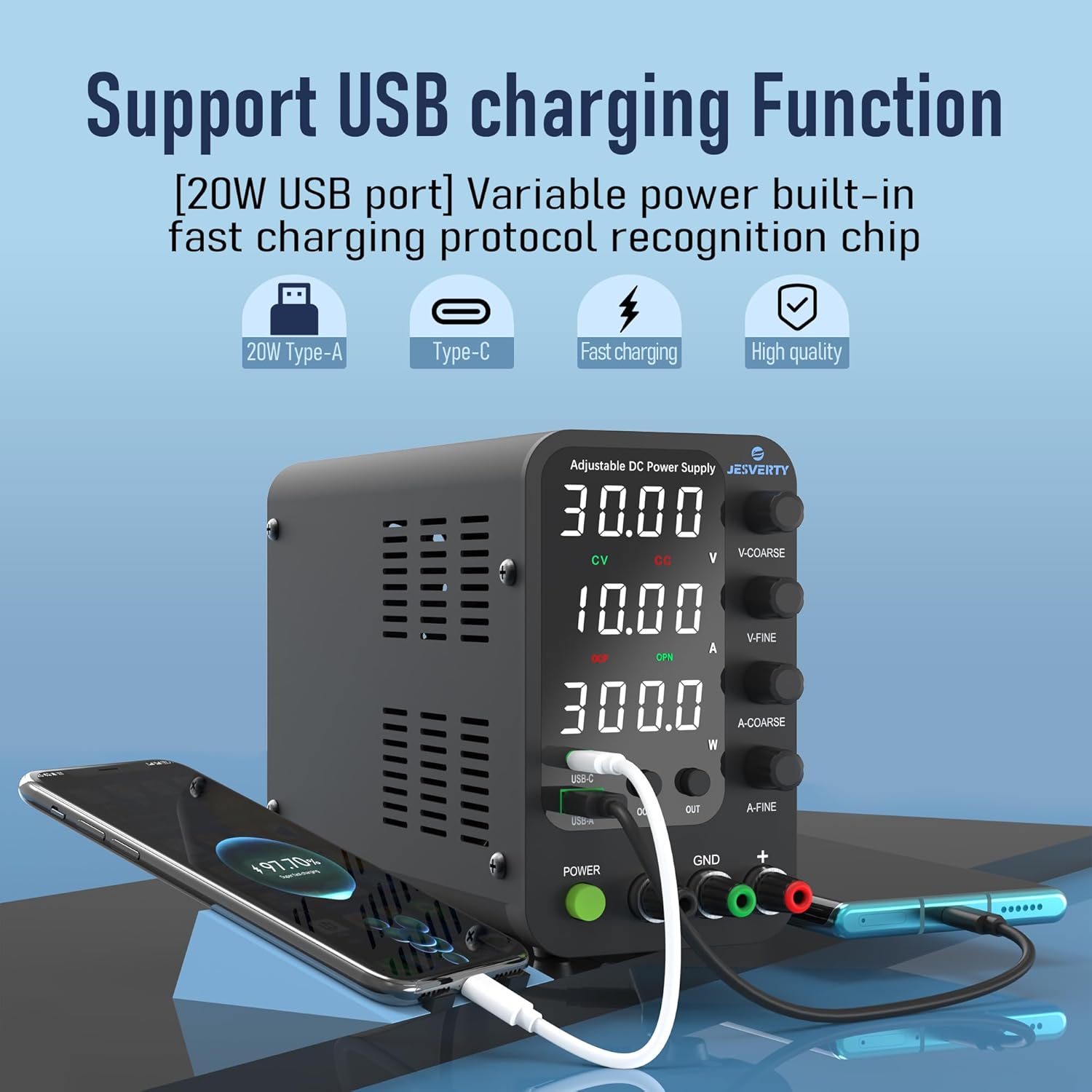
Описание изображения: This image shows the Jesverty SPS-3010V DC Power Supply actively charging a smartphone via its USB-C port and another device via its USB-A port. The display shows voltage and current settings. This highlights the integrated 20W USB-A and Type-C quick-charge functionality, allowing users to power or charge compatible devices directly from the power supply.
5. Продукт закончилсяview: Digital Multimeter (HK33B)
The Jesverty HK33B is a 2000-count digital multimeter designed for accurate and versatile electrical measurements.
5.1 Multimeter Layout and Functions
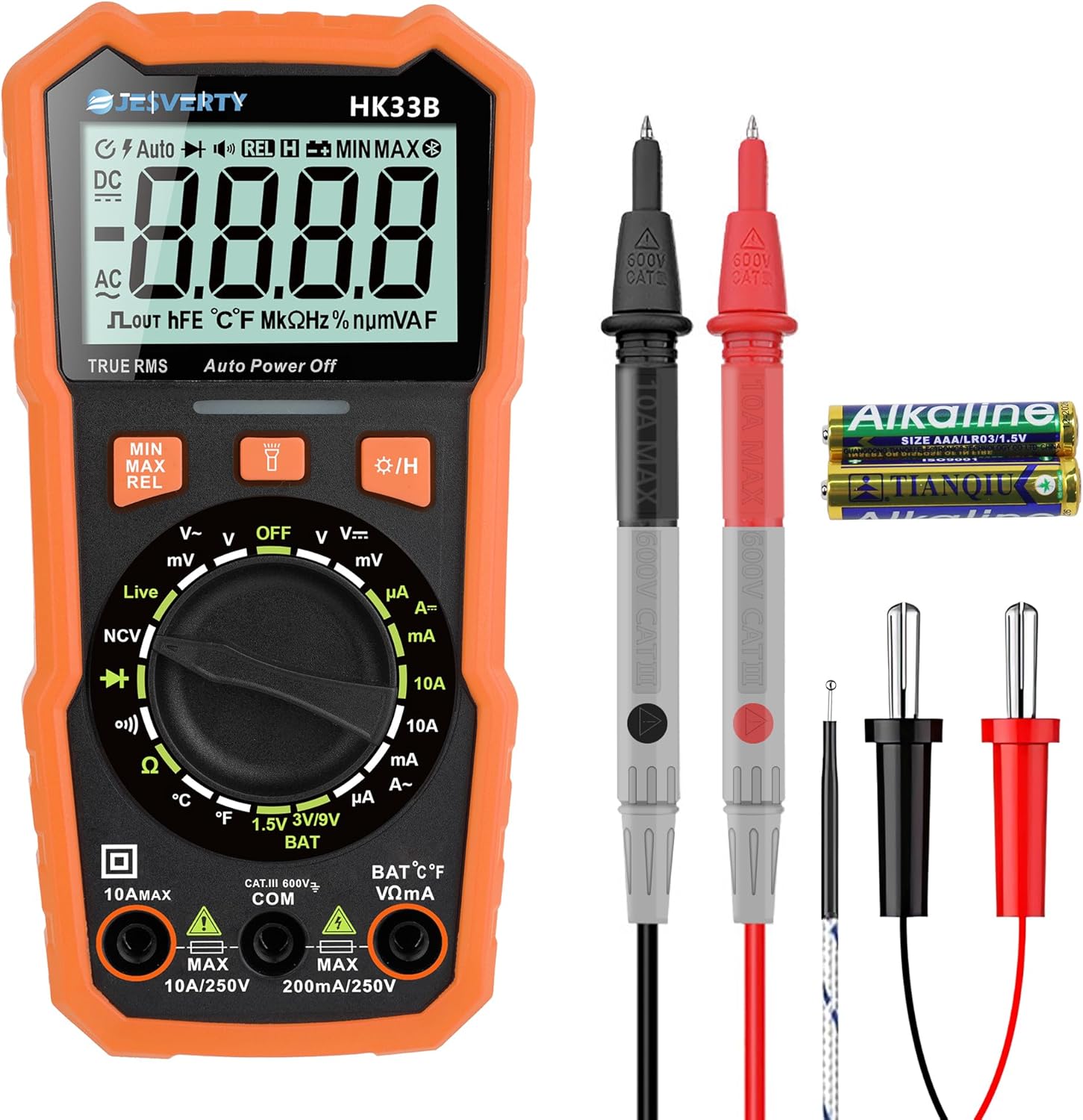
Описание изображения: This image displays the Jesverty HK33B Digital Multimeter along with its red and black test probes and a K-type thermocouple. The multimeter features a large LCD display, a central rotary dial for function selection, and several buttons for additional features like MIN/MAX, REL, and backlight. Input jacks for test leads are located at the bottom. This visual aids in identifying the device and its primary accessories.

Описание изображения: This image provides a close-up of the Jesverty HK33B Digital Multimeter's display and function indicators. It highlights the various measurement capabilities, including DC Voltagд, переменный ток объемtage, Live Wire detection, Battery Test, Duty Cycle, Diode, Resistance, DC Current, Continuity, Temperature (°C/°F), and AC Current. The clear icons and text on the display and around the rotary dial make it easy to understand the multimeter's extensive features.
- ЖК-дисплей: 2000 counts, shows measurement readings, units, and function indicators.
- Поворотный циферблат: Выбирает функции измерения (громкость)tage, Current, Resistance, Diode, Continuity, Temperature, NCV, Live).
- Функциональные кнопки: Include MIN/MAX, REL (Relative Measurement), Data Hold, Backlight, and Flashlight.
- Входные разъемы: COM (Common), VΩmA (Voltage, Resistance, small Current), 10A MAX (High Current).
- NCV (Бесконтактный объемtage) Датчик: Обнаруживает переменный токtagе без прямого контакта.
- Обнаружение провода под напряжением: Определяет наличие электрических проводов под напряжением.
6. Настройка
6.1 DC Power Supply Setup
- Размещение: Place the power supply on a stable, level surface with adequate ventilation around all sides.
- Подключение питания: Connect the provided power cord to the AC input on the rear panel of the power supply, then plug it into a suitable AC outlet.
- Первоначальное включение: Нажмите ВЛАСТЬ button on the front panel. The display should illuminate.
6.2 Digital Multimeter Setup
- Установка аккумулятора: Open the battery compartment on the back of the multimeter. Insert the required batteries (typically AAA, check compartment for specifics) ensuring correct polarity. Close the compartment securely.
- Подключение испытательного провода:
- Вставьте черный щуп в КОМ (Обычный) домкрат.
- Для большинства измерений (объемtage, resistance, continuity, diode, temperature, small current), insert the red test lead into the ВОммА Джек.
- Для измерения высоких токов (до 10 А) вставьте красный измерительный щуп в... 10А МАКС. Джек.
7. Operating Instructions: DC Power Supply (SPS-3010V)
7.1 Настройка громкостиtagе и ток
- Регулировка громкостиtage:
- Поверните V-грубый knob to set the integer part of the desired voltage.
- Поверните V-FINE knob to set the decimal part of the desired voltage (0.01V resolution).
- Регулировка ограничения тока:
- Поверните Грубый knob to set the integer part of the desired current limit.
- Поверните Отлично! knob to set the decimal part of the desired current limit (0.001A resolution).
- The current limit prevents damage to the connected load by limiting the maximum current drawn.
7.2 Enabling Output
- После установки желаемого уровня громкостиtage and current limit, connect your load to the output terminals (GND, +, -).
- Нажмите ВНЕ button to enable the DC output. The display will show the actual output voltagе и ток.
- Нажмите ВНЕ Нажмите кнопку еще раз, чтобы отключить вывод.
7.3 Защита от перегрузки по току (OCP)
- Нажмите ОКП button to activate or deactivate the Over Current Protection function.
- When OCP is active, if the output current exceeds the set current limit, the power supply will automatically cut off the output to protect the load and the power supply itself.
- To reset OCP, disable the output, resolve the overcurrent condition, and then re-enable the output.
7.4 USB-A & USB-C Quick-Charge Ports
The integrated USB-A and USB-C ports provide 20W fast charging for compatible devices. These ports operate independently of the main DC output and can be used simultaneously.
- Connect your smartphone, Arduino UNO, Raspberry Pi, or other electronic modules to the USB-A or USB-C port using a compatible cable.
- The device will automatically negotiate the appropriate charging protocol.
8. Operating Instructions: Digital Multimeter (HK33B)
8.1 Основные измерения
Turn the rotary dial to the desired function. Ensure test leads are connected to the correct input jacks.
- DC / AC VoltagИзмерение (В~ / В=):
- Set the rotary dial to V~ for AC voltage or V= for DC voltage.
- Подключите измерительные щупы параллельно цепи или компоненту.
- DC/AC Current Measurement (A~ / A=):
- Set the rotary dial to A~ for AC current or A= for DC current.
- Важный: Break the circuit and connect the multimeter in series with the load. Ensure the red lead is in the appropriate current jack (mA or 10A).
- Измерение сопротивления (Ом):
- Set the rotary dial to Ω.
- Ensure the circuit is de-energized before measuring resistance. Connect test leads across the component.
- Тест непрерывности (Ω)))):
- Set the rotary dial to the continuity symbol.
- Непрерывный звуковой сигнал указывает на низкое сопротивление цепи (непрерывность цепи).
- Проверка диода (→|):
- Set the rotary dial to the diode symbol.
- Connect test leads across the diode. A good diode will show a voltage drop in one direction and open circuit in the other.
- Измерение температуры (°C/°F):
- Set the rotary dial to °C/°F.
- Connect the K-type thermocouple to the input jacks (observe polarity).
- The display will show the temperature. Use the function button to switch between Celsius and Fahrenheit.
8.2 специальные функции
- NCV (Бесконтактный объемtagд):
- Set the rotary dial to NCV.
- Поднесите верхнюю часть мультиметра к источнику переменного тока.tage source. The device will beep and flash if AC voltagе обнаружен.
- Обнаружение провода под напряжением:
- Set the rotary dial to Live.
- Insert the red test lead into the VΩmA jack and touch the probe to the wire. The display will indicate if it's a live wire with an alarm.
- Хранение данных: Нажмите ДЕРЖАТЬ Кнопка для фиксации текущего показания на дисплее. Нажмите еще раз для снятия фиксации.
- Подсветка/фонарик: Press the backlight button to turn on the display backlight. Long press to activate the flashlight.
- МИН МАКС: Нажмите МИН МАКС button to record the minimum and maximum readings during a measurement session.
9. Техническое обслуживание
9.1 Очистка
- Протрите устройства сухой мягкой тканью. Не используйте абразивные чистящие средства или растворители.
- Ensure the devices are powered off and disconnected from all power sources before cleaning.
9.2 Хранение
- Храните устройства в прохладном, сухом месте, вдали от прямых солнечных лучей и экстремальных температур.
- If storing the multimeter for an extended period, remove the batteries to prevent leakage.
9.3 Multimeter Battery and Fuse Replacement
Refer to the back panel of the multimeter for specific battery and fuse types. Always replace with identical specifications.
- Замена батареи: Open the battery compartment, remove old batteries, insert new ones with correct polarity, and close the compartment.
- Замена предохранителя: Fuses are typically located under the back cover. Disconnect test leads, remove the back cover screws, carefully replace the blown fuse with a new one of the correct rating, and reassemble.
10. Поиск Неисправностей
- DC Power Supply Not Powering On:
- Убедитесь, что шнур питания надежно подключен как к устройству, так и к розетке переменного тока.
- Убедитесь, что розетка переменного тока исправна.
- No Output from DC Power Supply:
- Обеспечить ВНЕ button is pressed and the output is enabled.
- Check if OCP is active due to an overcurrent condition. Resolve the load issue and reset.
- Убедитесь, что томtage и текущие пределы установлены выше нуля.
- Multimeter Display is Blank or Faint:
- Check and replace the batteries if they are low or depleted.
- Ensure the rotary dial is not in the OFF position.
- Неверные показания мультиметра:
- Verify that the test leads are correctly inserted into the appropriate input jacks for the selected measurement.
- Ensure the rotary dial is set to the correct function.
- Check if the multimeter's fuses are intact (for current measurements).
- Ensure the circuit is de-energized when measuring resistance or continuity.
11. Технические характеристики
11.1 Jesverty SPS-3010V DC Power Supply
- Vol входtage: AC 110V/220V (switchable)
- Выход Voltage: 0-32 В (регулируемое)
- Выходной ток: 0-10А (регулируемый)
- Отображать: 4-Digit LED (Voltagе, Ток, Мощность)
- ТомtagРазрешение: 0.01В
- Текущее разрешение: 0.001А
- USB-выход: USB-A & USB-C, 20W Quick-Charge each
- Защита: Защита от перегрузки по току (OCP)
- Размеры: Approx. 18cm (7.1") x 9cm (3.6") x 16cm (6.2")
- Масса: Приблизительно 1.14 кг

Описание изображения: This image illustrates the dimensions of the Jesverty SPS-3010V DC Power Supply, showing its approximate measurements as 18cm (7.1 inches) in length, 9cm (3.6 inches) in width, and 16cm (6.2 inches) in height. The image also highlights features such as low noise operation, USB-A/Type-C fast charging, a cooling fan, and a short circuit alarm, providing a comprehensive overview of its physical attributes and key functionalities.
11.2 Jesverty HK33B Digital Multimeter
- Отображать: 2000 Counts Backlight LCD
- DC Томtage: До 600 В
- том переменного токаtage: До 600 В
- Постоянный ток: До 10А
- Переменный ток: До 10А
- Сопротивление: До 20 МОм
- Температура: °C / °F (with K-type thermocouple)
- Особые характеристики: NCV, Live Wire Test, Continuity, Diode, Data Hold, Backlight, Flashlight, MIN/MAX, Auto Power Off.
- Источник питания: Battery Powered (e.g., AAA batteries)
- Рейтинг безопасности: КАТ.III 600В

Описание изображения: This image highlights several practical features of the Jesverty HK33B Digital Multimeter. It shows the audible assurance (BUZZ) for continuity testing, the NCV (Non-Contact Voltage) function detecting live wires from a wall outlet, temperature measurement using a K-type thermocouple in a liquid, and the integrated support stand on the back of the device, which can be adjusted up to 90 degrees for convenient viewинж.
12. Информация о гарантии
Jesverty products are manufactured to high-quality standards. This product is covered by a limited warranty against defects in materials and workmanship from the date of purchase. Please retain your proof of purchase for warranty claims. The warranty does not cover damage caused by misuse, unauthorized modification, accident, or neglect. For specific warranty terms and conditions, please refer to the product packaging or contact customer support.
13. Поддержка клиентов
If you have any questions, encounter issues, or require technical assistance with your Jesverty DC Power Supply or Digital Multimeter, please do not hesitate to contact our customer support team. We are committed to providing excellent service and support.
- Контактная информация: Refer to the contact details provided on the product packaging or the official Jesverty webсайт.
- Интернет-ресурсы: Visit the Jesverty brand store on Amazon or the official website for FAQs, product updates, and additional resources.