
1. Введение
This manual provides comprehensive instructions for the installation, operation, and maintenance of your MekedeTech DUDUAUTO DUDU7 2K Android Car Radio. Designed specifically for Ford F150 models from 2009 to 2014, this intelligent navigation head unit offers a 9.5-inch 2K touch screen, advanced connectivity, and multimedia capabilities. Please read this manual thoroughly before installation and use to ensure proper functionality and safety.
2. Содержимое упаковки
Убедитесь, что все перечисленные ниже предметы входят в комплект. Если какие-либо предметы отсутствуют или повреждены, обратитесь в службу поддержки клиентов.
- MekedeTech DUDUAUTO DUDU7 Head Unit (9.5 inch 2K Touch Screen)
- Dash frame for Ford F150 2009-2014
- Power harness with Canbus plug and Play for Ford F150 2009-2014
- Reverse cable
- USB cables (multiple)
- RCA harness
- GPS-антенна
- Радио антенна
- Микрофон

Рисунок 2.1: Included Package Contents. This image displays the main unit, power cables, Canbus box, microphone, RCA cables, reversing camera cable, USB plugs, Fakra 4G antenna, Fakra GPS antenna (for DUDU7), and Fakra GPS antenna (for DUDU6).
3. Продукт закончилсяview
The MekedeTech DUDUAUTO DUDU7 is an advanced Android car radio designed to upgrade the infotainment system in your Ford F150 (2009-2014). It features a high-resolution 9.5-inch 2K+ touch screen, an Octa-core processor, 8GB RAM, and 128GB ROM for smooth performance. The unit supports a wide range of features including wireless CarPlay, Android Auto, dual-band GPS, and 360-degree camera integration.

Рисунок 3.1: MekedeTech DUDUAUTO DUDU7 Head Unit with Dash Kit.
4. Настройка и установка
The DUDUAUTO DUDU7 is designed for a plug-and-play installation in compatible Ford F150 models (2009-2014). While the unit comes with a precision-fit frame kit and wiring harness, professional installation is recommended to ensure correct wiring and functionality.
4.1. Контрольный список перед установкой
- Перед началом установки убедитесь, что аккумулятор автомобиля отключен.
- Убедитесь, что все содержимое посылки присутствует.
- Review your vehicle's specific dashboard removal and installation procedures.
4.2. Этапы установки
- Carefully remove the original factory radio and dashboard trim. Refer to your vehicle's service manual for specific instructions.
- Connect the provided wiring harness to the vehicle's factory wiring. The Canbus box ensures compatibility with steering wheel controls and other vehicle systems.
- Connect the GPS antenna, radio antenna, and any optional accessories (e.g., reverse camera, USB cables) to the corresponding ports on the DUDU7 head unit.
- Mount the DUDU7 head unit into the provided dash frame.
- Carefully re-install the assembled unit into the dashboard opening, ensuring all cables are tucked away and not pinched.
- Снова подключите аккумуляторную батарею автомобиля.
- Включите устройство и выполните первоначальную настройку и тестирование.

Рисунок 4.1: Dashboard appearance before and after DUDU7 installation.
5. Инструкция по эксплуатации
The DUDUAUTO DUDU7 operates on the Android 13 OS, offering a familiar and intuitive user experience similar to a tablet or smartphone.
5.1. Основные операции
- Включение/выключение питания: Нажмите и удерживайте кнопку питания (если она есть) или включите/выключите зажигание автомобиля.
- Сенсорный экран: Для навигации по интерфейсу используйте касания, свайпы и масштабирование на 9.5-дюймовом дисплее.
- Регулятор громкости: Adjust volume using the on-screen controls or retained steering wheel controls.
- Главный экран: Customize with widgets and app shortcuts. The DUDU OS 3.0 supports dynamic wallpapers.
5.2. Android OS Features
- Установка приложения: Download and install applications from the Google Play Store or other trusted sources.
- Настройки: Access system settings to configure Wi-Fi, Bluetooth, display, sound, and other preferences.
- Многозадачность: Run multiple applications simultaneously, such as navigation and music playback.

Рисунок 5.1: DUDU OS 3.0 User Interface.
5.3. Связь
- Беспроводная связь CarPlay и Android Auto: Connect your smartphone wirelessly for seamless integration of navigation, music, calls, and messages. Wired connection is also supported.
- Bluetooth 5.0: Pair your phone for hands-free calling and audio streaming. Features a Qualcomm 3031 chip for stable and fast transmission.
- Двухдиапазонный Wi-Fi: Connect to Wi-Fi hotspots for internet access, app updates, and online streaming.
- 4G LTE: Utilize the built-in 4G LTE connectivity for internet access on the go (requires a SIM card, not included).
5.4. Навигация и GPS
The DUDU7 features a built-in Dual Band GPS 6-mode positioning chip (L1+L5) for enhanced positioning speed and accuracy. This supports lane-level navigation and precise location tracking.

Рисунок 5.2: Dual Band GPS and Digital Noise Cancelling Microphone.
5.5. Аудиовозможности
Experience immersive audio with the integrated DSP (Digital Signal Processor) featuring AKM7739 Velvet Audio Technology. This allows for precise sound tuning and customization through an equalizer, optimizing your car's speaker system. The unit also includes a digital noise-canceling microphone for clear voice calls.

Рисунок 5.3: AKM7739 DSP Velvet Audio Technology.
5.6. 360° Camera Support
The DUDU7 supports connection to a 4-channel camera system (sold separately) to provide a real-time 360-degree bird's-eye view of your vehicle. This feature assists with parking and maneuvering in tight spaces.
6. Техническое обслуживание
Proper maintenance ensures the longevity and optimal performance of your DUDUAUTO DUDU7 car radio.
- Очистка экрана: Используйте мягкую, безворсовую ткань, слегкаampПромойте водой или специальным средством для чистки экранов, предназначенным для электроники. Избегайте абразивных материалов и агрессивных химикатов.
- Обновления программного обеспечения: Regularly check for and install firmware updates (OTA - Over-The-Air) to ensure the system has the latest features, improvements, and security patches.
- Условия окружающей среды: Не подвергайте устройство воздействию экстремальных температур, прямых солнечных лучей в течение длительного времени или чрезмерной влажности.
7. Поиск Неисправностей
If you encounter issues with your DUDUAUTO DUDU7, refer to the following common problems and solutions. If the problem persists, contact customer support.
| Проблема | Возможная причина | Решение |
|---|---|---|
| Устройство не включается | Ненадежное соединение электропитания, перегоревший предохранитель, проблема с аккумулятором транспортного средства. | Check power harness connections. Inspect vehicle fuses. Ensure vehicle battery is charged. |
| Нет звука | Слишком низкая громкость, неправильный источник звука, проблема с проводкой динамиков. | Увеличьте громкость. Выберите правильный источник звука. Проверьте подключение динамиков. |
| Сигнал GPS слабый или неточный | GPS antenna obstruction, antenna not properly connected. | Убедитесь, что антенна GPS имеет чистое пространство. view с неба. Проверьте подключение антенны к устройству. |
| CarPlay/Android Auto не подключается | Bluetooth/Wi-Fi off, phone compatibility, incorrect settings. | Ensure Bluetooth and Wi-Fi are enabled on both devices. Check phone compatibility. Restart phone and head unit. |
| Сенсорный экран не реагирует | Зависание системы, временный сбой программного обеспечения. | Perform a soft reset (refer to device settings for reset option). If unresponsive, disconnect and reconnect vehicle battery. |
8. Технические характеристики
Key technical specifications for the MekedeTech DUDUAUTO DUDU7 model.
| Особенность | Спецификация |
|---|---|
| Название модели | MKD-DUDU7-8-128 |
| Размер дисплея | 9.5 дюйма |
| Разрешение дисплея | 2000x1200 (2K+) |
| Процессор | Octa-core (UIS 7870, A76 2.7GHz 6nm process) |
| БАРАН | 8 ГБ |
| ПЗУ (хранилище) | 128 ГБ (UFS 3.1) |
| Операционная система | Android 13 (API=33) |
| CarPlay / Android Авто | Беспроводная и проводная поддержка |
| Bluetooth | Bluetooth 5.0 (Qualcomm 3031 chip) |
| Wi-Fi | Двухдиапазонный Wi-Fi |
| Сеть | 4G LTE external card slot |
| GPS | Dual Band 6-mode positioning (L1+L5) |
| Режим аудиовыхода | Digital (AKM7739 DSP Velvet Audio Technology) |
| Микрофон | Digital Noise Cancelling Mic |
| Вес товара | 5.26 фунта |
| Размеры упаковки | 16.93 x 13.54 x 5.51 дюйма |
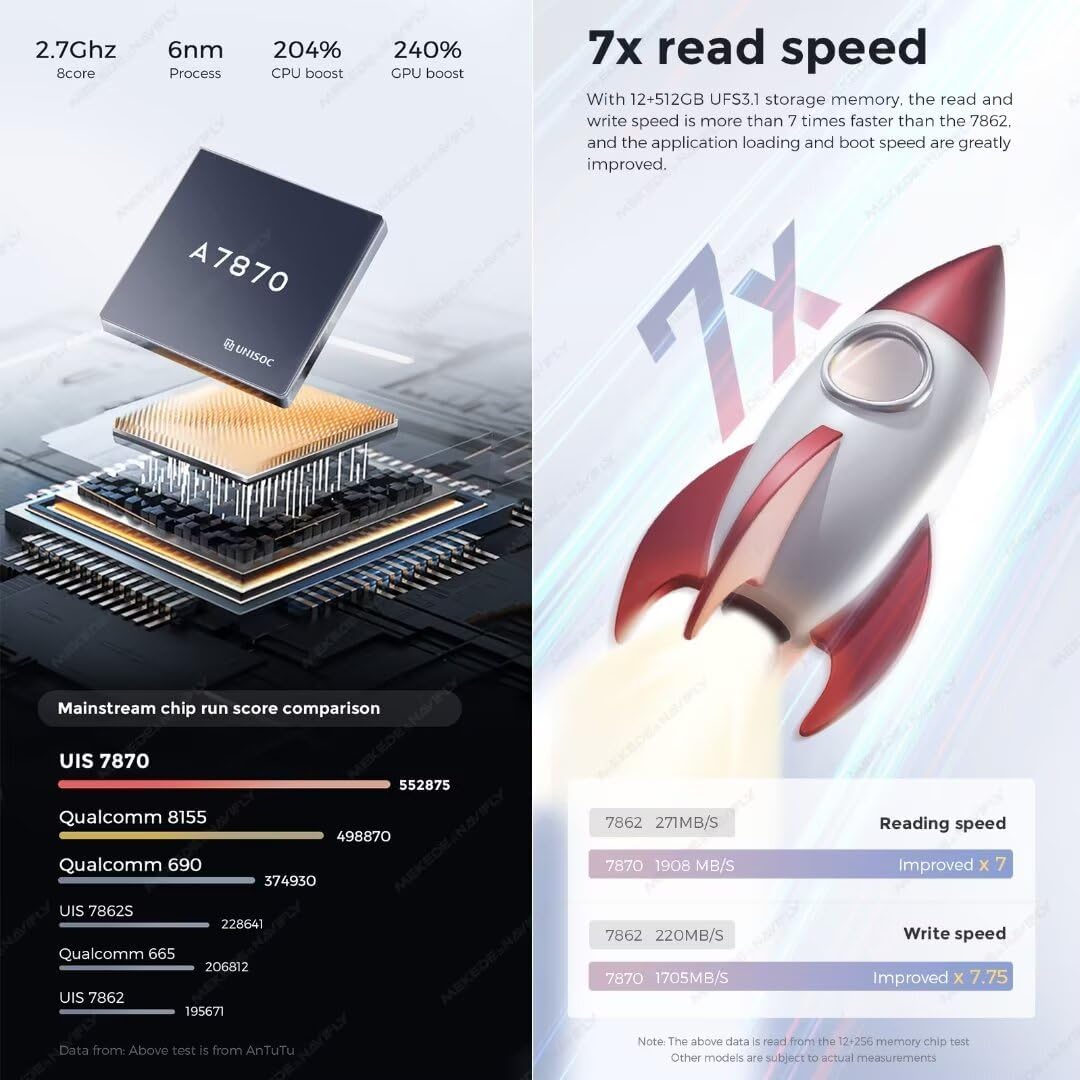
Рисунок 8.1: DUDU Series Model Comparison.

Рисунок 8.2: CPU Performance and Read Speed.
9. Гарантия и поддержка
The MekedeTech DUDUAUTO DUDU7 comes with a Гарантия 1 год Гарантия действует с даты покупки. Гарантия распространяется на производственные дефекты и гарантирует соответствие изделия заявленным эксплуатационным характеристикам.
For technical assistance, troubleshooting, or warranty claims, please contact MekedeTech customer support. Free firmware updates are available directly via OTA (Over-The-Air) to keep your device optimized.