
NOILLER ZY-BB2
NOILLER 4.3" Video Baby Monitor User Manual
Model: ZY-BB2
Введение
Thank you for choosing the NOILLER 4.3" Video Baby Monitor. This device is designed to provide a reliable and convenient way to monitor your baby, offering both a dedicated monitor unit and smartphone app connectivity. Please read this manual thoroughly before use to ensure proper operation and safety.
Содержимое упаковки
- Детская видеокамера
- 4.3" LCD Monitor Unit
- Адаптер питания для камеры
- Адаптер питания для монитора
- USB-кабель для зарядки
- Руководство пользователя (этот документ)
Продукт болееview
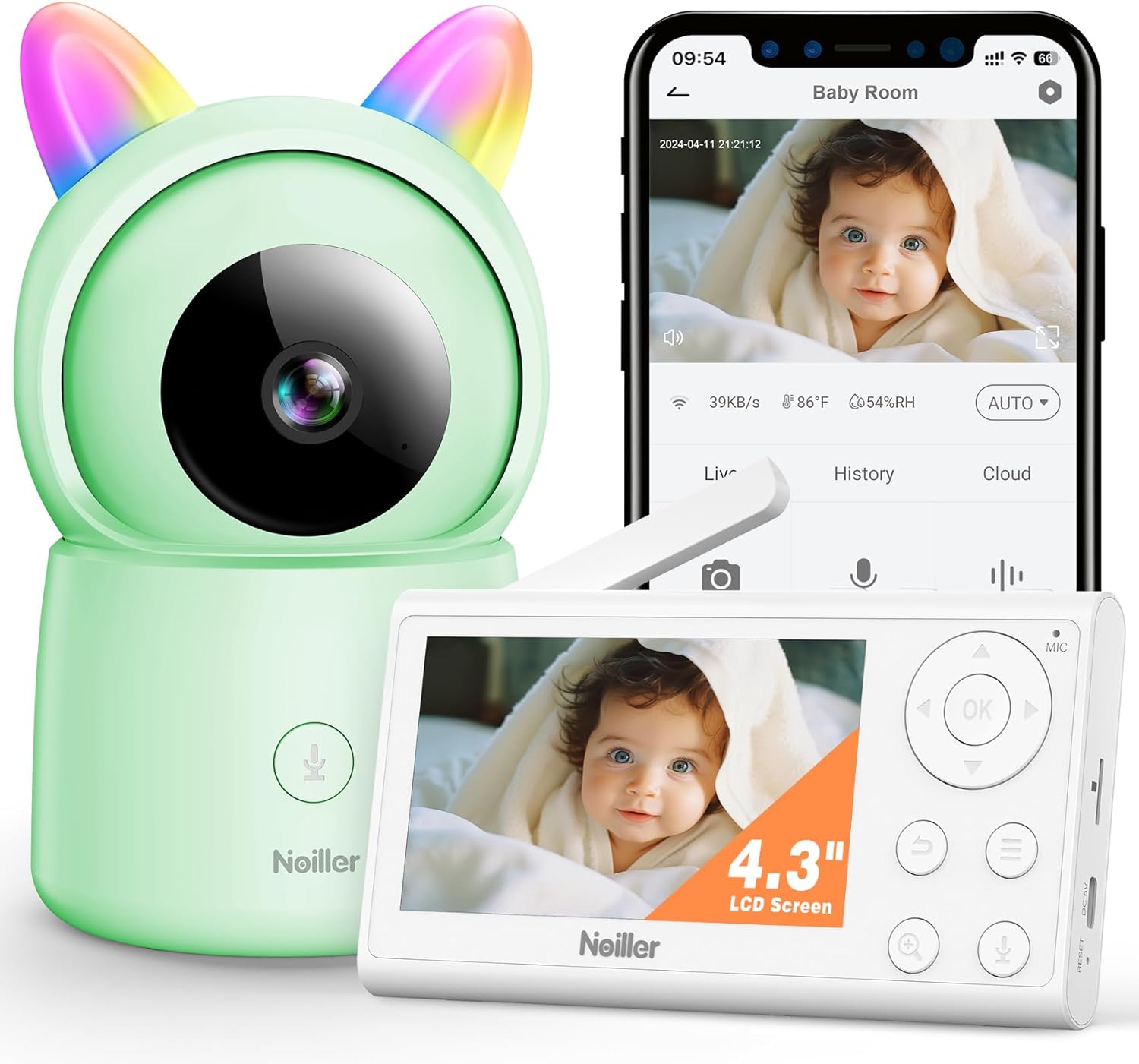
Изображение: The NOILLER 4.3" Video Baby Monitor system, featuring the green camera unit with rainbow ears, the white 4.3-inch LCD monitor, and a smartphone displaying the "Safeview" app interface with a live baby feed. The monitor shows control buttons for navigation, microphone, and zoom. The camera has a microphone button on its base.
The NOILLER Baby Video Monitor system consists of two main components: the Camera Unit and the Monitor Unit. It also supports a smartphone application for remote viewинж.
Характеристики блока камеры:
- Объектив HD-камеры 1080P
- Инфракрасные светодиоды для ночного видения
- Microphone and Speaker for Two-Way Talk
- Датчики температуры и влажности
- RGB Night Lights (on ears)
- Входной порт питания
- Кнопка сброса
Monitor Unit Features:
- 4.3-дюймовый ЖК-дисплей
- Кнопки навигации (Вверх, Вниз, Влево, Вправо, ОК)
- Микрофон и динамик
- Регулятор громкости
- Функция масштабирования
- Кнопка меню
- Two-Way Talk Button
- Входной порт питания
- Антенна
Руководство по настройке
1. Включение устройств
- Connect the camera unit to a power outlet using its dedicated power adapter. Ensure the adapter is securely plugged in.
- Connect the monitor unit to a power outlet using its dedicated power adapter. The monitor unit has a built-in rechargeable battery for portable use, but it is recommended to charge it fully before first use.
- Чтобы включить монитор, нажмите и удерживайте кнопку питания на нем.
2. Pairing the Camera and Monitor
The camera and monitor units are pre-paired at the factory. If they do not connect automatically, or if you need to add another camera (sold separately), follow these steps:
- On the monitor unit, press the Меню кнопка.
- Перейдите к Камера icon and select it.
- Choose an available camera channel (e.g., Camera 1, Camera 2).
- Выберите Сопряжение option. The monitor will begin searching for a camera.
- В течение 30 секунд нажмите кнопку Сопряжение button on the back of the camera unit.
- Once paired, the monitor will display the camera's live feed.
3. Smartphone App Setup (Optional)
Для удаленного viewing and additional features, download the "Safeview" app:
- Scan the QR code provided in the package or search for "Safeview" in your smartphone's app store (iOS/Android).
- Зарегистрируйте новую учетную запись или войдите в систему, если она у вас уже есть.
- Follow the in-app instructions to add your camera device. This typically involves connecting the camera to your 2.4G Wi-Fi network.
- Ensure your smartphone is connected to a 2.4G Wi-Fi network during the initial setup process.
4. Размещение камеры
Place the camera on a flat, stable surface such as a dresser or shelf, ensuring it has a clear, unobstructed view of the baby's crib or play area. Keep the camera and its power cord out of reach of children (at least 3 feet / 1 meter away from the crib).
Инструкция по эксплуатации
Жить View
Once the camera and monitor are paired, the monitor will automatically display the live video feed. On the smartphone app, select the camera from your device list to view прямая трансляция.
Двусторонний разговор
- Блок монитора: Press and hold the microphone button on the monitor unit to speak. Release the button to hear your baby.
- Приложение для смартфона: Tap the microphone icon on the app interface to speak.
Ночное Видение
The camera automatically switches to infrared night vision in low-light conditions, providing clear black and white images. No manual adjustment is required.
Функция масштабирования
On the monitor unit, press the Увеличить button to digitally zoom in or out on the video feed.
Колыбельные
The monitor unit allows you to play pre-programmed lullabies through the camera's speaker. Access this feature via the Меню on the monitor unit.
Ночная подсветка RGB
The camera unit features RGB night lights on its "ears." These can be controlled via the monitor unit's menu or the smartphone app to provide a soothing glow in the baby's room.
Мониторинг температуры и влажности
The monitor unit and smartphone app display the real-time temperature and humidity of the baby's room, as detected by the camera's sensors.
Режим VOX (голосовая активация)
The monitor can be set to VOX mode, where the screen and audio activate only when sound is detected from the baby's room. You can adjust the sensitivity level in the monitor's settings.
Обслуживание
Уборка
Wipe the camera and monitor units with a soft, dry, lint-free cloth. Do not use cleaning agents, solvents, or abrasive cleaners. Avoid getting moisture into any openings.
Battery Care (Monitor Unit)
- Чтобы продлить срок службы аккумулятора, избегайте его частой полной разрядки.
- Charge the monitor unit regularly, especially if it will not be used for an extended period.
- Когда устройство не используется, храните его в сухом прохладном месте.
Хранилище
If storing the device for a long period, ensure both units are powered off and stored in a dry, dust-free environment.
Поиск неисправностей
| Проблема | Возможная причина | Решение |
|---|---|---|
| No image/signal on monitor |
|
|
| Плохое качество изображения |
|
|
| Нет звука или искаженный звук |
|
|
| App cannot connect to camera |
|
|
Технические характеристики
| Особенность | Деталь |
|---|---|
| Название модели | ZY-BB2 |
| Размер дисплея монитора | 4.3-дюймовый ЖК-дисплей |
| Разрешение видеозахвата | 1080p |
| Технология связи | Wireless Monitor & 2.4G WiFi Smartphone APP |
| Источник питания | Battery Powered Monitor & Corded Electric Camera |
| Использование внутри и снаружи помещений | В помещении |
| Тип контроллера | Mobile Phone APP, LCD Monitor |
| Тип крепления | Настольное крепление |
| Размеры изделия (Д x Ш x В) | 5 x 3 x 2 дюйма |
| Вес товара | 1.43 фунта |
| Аккумуляторы | Требуется 1 литий-ионный аккумулятор (входит в комплект) |
| СКП | 750961862307 |
Гарантия и поддержка
NOILLER products are designed for reliability and performance. For warranty information, please refer to the warranty card included in your product packaging or visit the official NOILLER website. If you encounter any issues or have questions regarding your product, please contact our customer support team:
- Электронная почта: support@noiller.com
- Webсайт: www.noiller.com
- Please have your model number (ZY-BB2) and purchase details ready when contacting support.