
1. Продукт закончилсяview
The MiBOXER Y3 RGB+CCT Vertical Remote provides comprehensive control over compatible RGB+CCT LED lighting systems. This remote allows for precise adjustments of RGB colors, color temperature (CCT), and brightness. Utilizing 2.4GHz wireless technology, it ensures reliable communication with your lighting devices. Its ergonomic vertical design and intuitive interface are designed for ease of use, enabling users to effortlessly customize lighting for various environments.
Основные характеристики:
- RGB, CCT, and Brightness Control: Adjust colors, color temperature, and brightness with ease.
- Беспроводная технология 2.4 ГГц: Ensures reliable, long-range connectivity.
- Вертикальный дизайн: Ergonomic and easy-to-use layout for quick adjustments.
- Multi-Color and Dimmable: Create customized lighting scenes with vibrant colors and dimming options.
- Универсальная совместимость: Works with MiBOXER RGB+CCT lighting products.
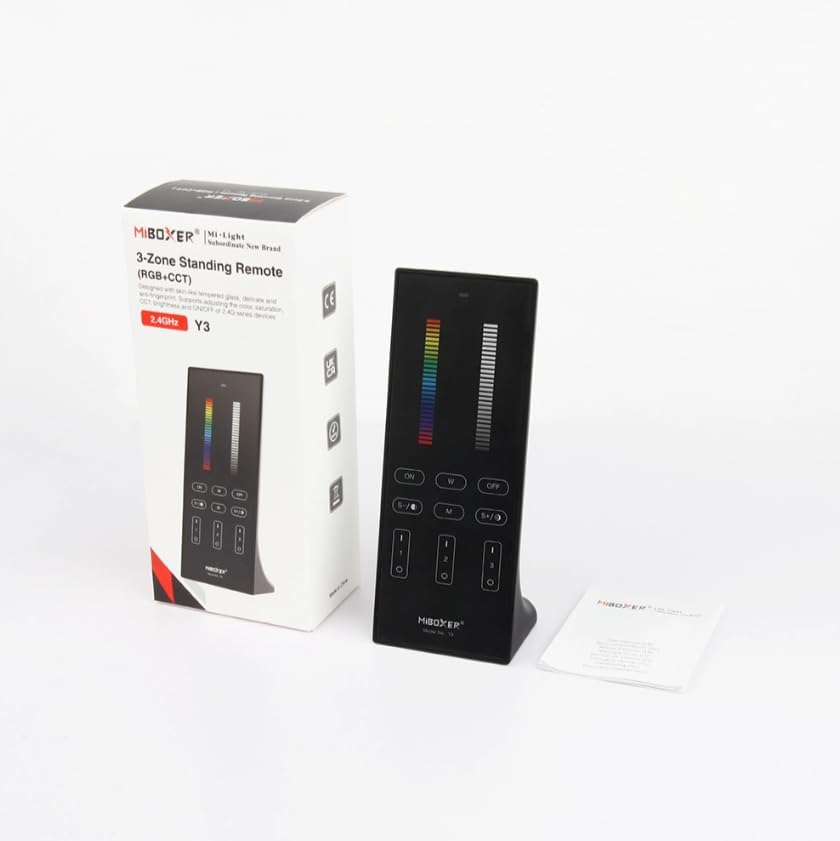
Figure 1: MiBOXER Y3 RGB+CCT Vertical Remote with its retail packaging.
2. Инструкции по настройке
2.1 Установка аккумулятора
The MiBOXER Y3 remote requires two AAA batteries (not included). To install:
- Найдите крышку батарейного отсека на задней панели пульта дистанционного управления.
- Чтобы открыть крышку, сдвиньте ее вниз.
- Вставьте две батарейки типа ААА, соблюдая правильную полярность (+ и -).
- Сдвиньте крышку на место до надежного щелчка.
2.2 Подключение пульта дистанционного управления к осветительным приборам
To control your MiBOXER RGB+CCT lighting devices, the remote must be linked to them. This process typically involves a specific sequence of actions on both the remote and the lighting device. Refer to your specific MiBOXER lighting product's manual for detailed linking instructions, as the procedure may vary slightly between different light models. A common linking procedure is as follows:
- Ensure the lighting device is powered off.
- Power on the lighting device.
- Within 3 seconds of powering on the light, press the "Zone ON" button (labeled "I" or "1") on the remote for the desired zone.
- The light should flash several times, indicating successful linking.
- If linking fails, repeat the process.
To unlink a device from a zone, power on the light and within 3 seconds, press the "Zone ON" button (labeled "I" or "1") five times rapidly for the corresponding zone. The light should flash multiple times to confirm unlinking.
3. Инструкция по эксплуатации
The MiBOXER Y3 remote features an intuitive layout for controlling various lighting parameters. Familiarize yourself with the buttons and sliders as shown in Figure 2.

Figure 2: MiBOXER Y3 Remote Control button layout and functions.
3.1 Функции кнопок:
| Кнопка/управление | Функция |
|---|---|
| Индикаторная лампа | Flashes to confirm button presses. |
| RGB-слайдер | Slide to select desired RGB color. |
| Ползунок яркости | Slide to adjust light brightness (0-100%). |
| Master ON (I/ON) | Включает все связанные между собой лампы. |
| Master OFF (O/OFF) | Выключает все связанные между собой светильники. |
| White Light (W) | Activates pure white light mode. |
| Speed-/CCT-/Saturation- | Decreases speed in dynamic mode, decreases color temperature (warmer white), or decreases color saturation. |
| Speed+/CCT+/Saturation+ | Increases speed in dynamic mode, increases color temperature (cooler white), or increases color saturation. |
| Dynamic Mode (M) | Cycles through various dynamic lighting effects. Press repeatedly to change effects. |
| Zone ON (1, 2, 3 - "I") | Turns ON lights linked to the specific zone. Used for linking/unlinking. |
| Zone OFF (1, 2, 3 - "O") | Выключает освещение, связанное с определенной зоной. |
3.2 Общие операции:
- Включение/выключение света: Use the "Master ON" or "Master OFF" buttons for all lights, or "Zone ON" / "Zone OFF" for specific zones.
- Настройка цвета: Slide your finger along the "RGB Slider" to select your desired color.
- Регулировка яркости: Slide your finger along the "Brightness Slider" to increase or decrease the light intensity.
- Регулировка цветовой температуры (CCT): In white light mode, use the "CCT-" and "CCT+" buttons to make the white light warmer or cooler.
- Динамические режимы: Press the "M" button to activate dynamic lighting modes. Use "Speed-" and "Speed+" to adjust the speed of the current dynamic effect.
- Регулировка насыщенности: In RGB mode, use "Saturation-" and "Saturation+" to adjust the intensity of the color.
4. Техническое обслуживание
Proper maintenance ensures the longevity and optimal performance of your MiBOXER Y3 remote.
- Уборка: Wipe the remote with a soft, dry cloth. Do not use abrasive cleaners, solvents, or wet cloths, as these can damage the surface or internal components.
- Замена батареи: Replace batteries when the indicator light becomes dim or the remote's response becomes inconsistent. Always use new AAA batteries and dispose of old batteries responsibly.
- Хранилище: Храните пульт дистанционного управления в прохладном, сухом месте, вдали от прямых солнечных лучей и экстремальных температур. При длительном хранении извлеките батарейки, чтобы предотвратить их протечку.
- Избегайте попадания влаги: This remote is not waterproof. Keep it away from water and high humidity environments.
5. Поиск Неисправностей
If you encounter issues with your MiBOXER Y3 remote, refer to the following troubleshooting steps:
| Проблема | Возможная причина | Решение |
|---|---|---|
| Remote not responding to button presses. | Разряженные или разряженные батареи. Пульт дистанционного управления не подключен к освещению. Вне зоны доступа. | Замените батареи. Re-link the remote to the lighting devices (refer to Section 2.2). Move closer to the lighting devices. |
| Свет не меняет цвет/яркость. | Выбран неправильный режим. Remote not linked to the specific zone. | Ensure you are in the correct mode (e.g., RGB for color, CCT for white temperature). Verify the remote is linked to the correct zone. |
| Indicator light not flashing. | Разряженные аккумуляторы. Внутренняя ошибка. | Замените батареи. Если проблема сохраняется после замены батареи, обратитесь в службу поддержки клиентов. |
| Interference with other 2.4GHz devices. | Proximity to other wireless devices. | Move the remote or other 2.4GHz devices further apart. |
6. Технические характеристики
Technical specifications for the MiBOXER Y3 RGB+CCT Vertical Remote.
| Особенность | Деталь |
|---|---|
| Номер модели | Y3 |
| Бренд | МиБОКСЕР |
| Тип управления | RGB+CCT Vertical Remote |
| Беспроводные технологии | 2.4ГГц |
| Источник питания | 2 батарейки ААА (не входят в комплект) |
| Специальная характеристика | RGB/CCT/brightness dimmable |
| Вес товара | 4.8 унций (приблизительно 136 граммов) |
| Размеры упаковки | 6.5 x 3 x 2 дюйма (прибл. 16.5 x 7.6 x 5.1 см) |


Figure 3: Dimensions of the MiBOXER Y3 Remote Control and its packaging.
7. Гарантия и поддержка
For warranty information, please refer to the documentation provided with your specific MiBOXER lighting product or contact the retailer where the product was purchased. MiBOXER products typically come with a manufacturer's warranty covering defects in materials and workmanship.
Для получения технической поддержки или дополнительной помощи, пожалуйста, посетите официальный сайт MiBOXER. website or contact their customer service department. Contact details are usually available on the product packaging or the brand's official online presence.