
1. Введение
The MiBOXER TRI-PW 500W AC Triac Dimmer is designed for precise control of lighting systems in residential and commercial environments. This device integrates WiFi and 2.4GHz technology, allowing for remote operation via compatible applications and MiBOXER remote controls. It supports triac dimming, ensuring compatibility with a wide range of lighting fixtures, including LED, halogen, and incandescent lights, for smooth and consistent dimming from full brightness to a soft glow.
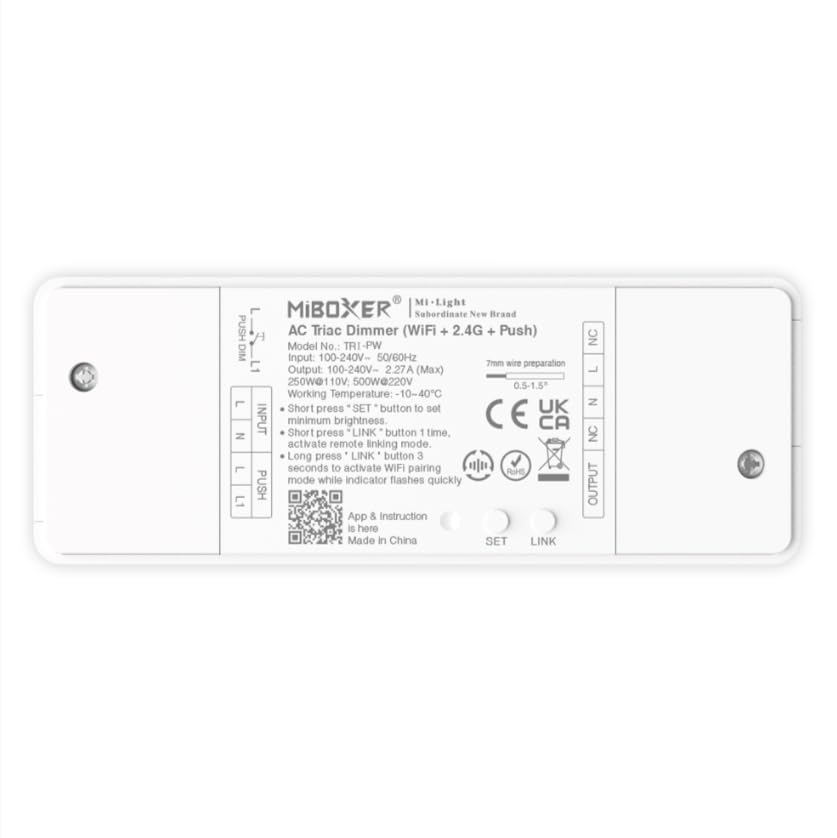
Изображение 1.1: оконченоview of the MiBOXER TRI-PW 500W AC Triac Dimmer unit.
2. Информация по технике безопасности
- Электрическая инсталяция: Установка должна выполняться квалифицированным электриком в соответствии с местными электротехническими нормами и правилами.
- Отключение питания: Always disconnect power at the circuit breaker before installing or servicing the dimmer.
- Томtagе Совместимость: Обеспечьте входной объемtage matches the dimmer's specifications (100-240V AC).
- Грузоподъемность: Do not exceed the maximum load capacity of 500W. Overloading can cause damage or fire.
- Только для использования в помещении: This device is intended for indoor use in dry locations. Avoid exposure to moisture or extreme temperatures.
- Совместимость: Use only with compatible dimmable lighting fixtures (LED, halogen, incandescent).
3. Содержимое упаковки
Убедитесь, что в упаковке присутствуют все компоненты:
- MiBOXER TRI-PW 500W AC Triac Dimmer Unit
- User Manual (may be included as a separate document)

Image 3.1: MiBOXER TRI-PW Dimmer unit shown with its packaging and a user manual.
4. Особенности продукта
- Powerful 500W Capacity: Supports high-power loads, suitable for various lighting fixtures.
- Triac Dimming Technology: Provides flicker-free dimming for LED, halogen, and incandescent lights.
- WiFi & 2.4GHz Control: Integrates with WiFi and MiBOXER 2.4GHz systems for smartphone or remote control.
- Push Control Compatibility: Allows for quick, on-site dimming adjustments via a push button.
- Приложение и голосовое управление: Compatible with major smart home platforms for app-based and voice command control.
- Функция памяти: Retains previous lighting settings after power cycles.
5. Технические характеристики
| Особенность | Деталь |
|---|---|
| Бренд | МиБОКСЕР |
| Название модели | ТРИ-ПВ |
| Специальная характеристика | Триаковый диммер переменного тока, 500 Вт |
| Класс диапазона частот | Однополосный |
| Стандарт беспроводной связи | 802.11б |
| Совместимые устройства | Поддержка PUSH затемнения |
| Рекомендуемое использование | Home lighting systems |
| Технология связи | Wi-Fi |
| Совместимость с умным домом | Smart Home Compatible (e.g., Amazon Alexa, Google Assistant) |
| Покрытие | LED, halogen, incandescent, high-power loads |
| Частота | 2.4 ГГц |
| Размеры (приблизительные) | 117 мм (Д) x 45 мм (Ш) x 24 мм (В) |
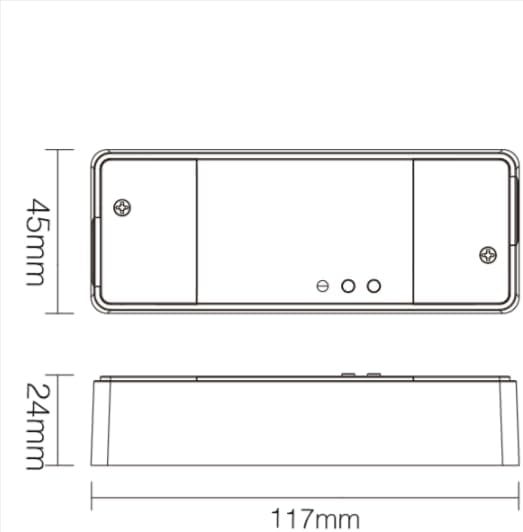
Image 5.1: Technical drawing showing the approximate dimensions of the TRI-PW dimmer.

Image 5.2: Packaging dimensions for the MiBOXER TRI-PW dimmer.
6. Настройка и установка
Важный: Перед началом установки убедитесь, что электропитание отключено на автоматическом выключателе.
Схема электропроводки
The MiBOXER TRI-PW dimmer supports two primary wiring methods for integration with a push switch. Both methods are suitable for triac dimming LED lights, traditional filament lampс, и галоген лamps.

Image 6.1: Wiring diagrams for connecting the MiBOXER TRI-PW dimmer with a push switch.
Method 1: Single-Wire Push Switch Connection
- Connect the Live (L) and Neutral (N) input wires from your power supply (100-240V~) to the corresponding 'INPUT' terminals on the dimmer.
- Connect the Live (L) and Neutral (N) output wires to your lighting fixture (100-240V~) from the 'OUTPUT' terminals.
- Connect one wire from the push switch to the 'PUSH' terminal on the dimmer.
- Connect the other wire from the push switch to the Live (L) input terminal.
Method 2: Two-Wire Push Switch Connection
- Connect the Live (L) and Neutral (N) input wires from your power supply (100-240V~) to the corresponding 'INPUT' terminals on the dimmer.
- Connect the Live (L) and Neutral (N) output wires to your lighting fixture (100-240V~) from the 'OUTPUT' terminals.
- Connect the two wires from the push switch directly to the 'PUSH' terminals on the dimmer.
After wiring, secure the dimmer in a suitable electrical box or enclosure. Restore power at the circuit breaker.
7. Инструкция по эксплуатации
7.1. Push Switch Control
- Короткое нажатие: Turn the lights ON or OFF.
- Длительное нажатие: Adjust the brightness level. Release the button to set the desired brightness.
7.2. Управление через приложение Wi-Fi
The TRI-PW dimmer supports control via a smart app (e.g., Tuya Smart app). No additional 2.4G gateway is required for app control.
- Download the compatible smart home app from your device's app store.
- Зарегистрируйтесь или войдите в свою учетную запись.
- Put the dimmer into pairing mode (refer to the app's instructions or the dimmer's specific pairing procedure, usually involving a long press of the 'SET' button or power cycling).
- Follow the in-app instructions to add the device to your network.
- Once connected, you can control the dimmer's ON/OFF state and brightness from your smartphone.
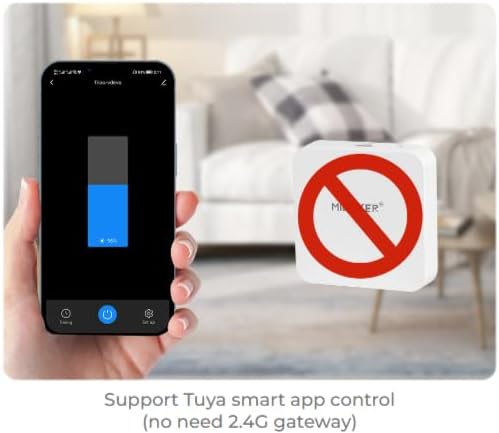
Изображение 7.1: Примерample of controlling the dimmer using a smartphone application.
7.3. 2.4GHz Remote Control
The dimmer can be paired with MiBOXER 2.4GHz remote controls for direct wireless control.
- Убедитесь, что диммер включен.
- Refer to your MiBOXER 2.4GHz remote control's manual for specific pairing instructions. Typically, this involves pressing a "Link" or "Pair" button on the remote within a few seconds of powering on the dimmer or pressing the dimmer's 'SET' button.
- A successful pairing is usually indicated by the connected light flashing.
7.4. Голосовое управление (Alexa/Google Assistant)
The TRI-PW dimmer is compatible with smart home voice assistants like Amazon Alexa and Google Assistant when integrated through a compatible smart home app.
- Ensure your dimmer is successfully connected to the smart home app (e.g., Tuya Smart).
- Откройте приложение Amazon Alexa или Google Home.
- Enable the skill or service for the smart home app you are using (e.g., "Tuya Smart" skill).
- Discover devices. Your dimmer should appear in the list.
- Assign a name to your dimmer (e.g., "Living Room Light").
- You can now control your light using voice commands, such as "Alexa, turn on Living Room Light" or "Hey Google, dim Living Room Light to 50%."

Image 7.2: The dimmer is compatible with voice control platforms like Amazon Alexa and Google Assistant.
8. Техническое обслуживание
- Уборка: Disconnect power before cleaning. Wipe the dimmer with a soft, dry cloth. Do not use liquid cleaners or aerosols.
- Инспекция: Периодически проверяйте надежность соединения проводов, а также наличие признаков износа или повреждений.
- Обновления прошивки: If available, check the smart home app for firmware updates to ensure optimal performance and security.
9. Поиск Неисправностей
| Проблема | Возможная причина | Решение |
|---|---|---|
| Свет не включается. | No power, incorrect wiring, faulty bulb, dimmer not paired. | Check circuit breaker. Verify wiring according to diagrams. Test bulb. Re-pair dimmer with app/remote. |
| Свет мигает или гудит. | Incompatible bulb, overloaded circuit, loose wiring. | Ensure bulbs are dimmable and compatible with triac dimmers. Reduce load. Check wiring connections. |
| Dimmer not responding to app/remote. | Dimmer out of range, WiFi issue, not paired. | Ensure dimmer is within WiFi/2.4GHz range. Check WiFi router. Re-pair dimmer with app/remote. |
| Невозможно подключиться к Wi-Fi. | Incorrect WiFi password, 5GHz network, dimmer not in pairing mode. | Verify WiFi password. Ensure you are connecting to a 2.4GHz network. Put dimmer into WiFi pairing mode. |
10. Гарантия и поддержка
This MiBOXER TRI-PW dimmer comes with a Гарантия 2 год с даты покупки. Данная гарантия распространяется на дефекты материалов и изготовления при нормальном использовании.
The warranty does not cover damage caused by improper installation, misuse, unauthorized modifications, or acts of nature.
For technical support or warranty claims, please contact your retailer or the manufacturer directly. Please have your purchase receipt and product model number (TRI-PW) available when contacting support.
Для получения более подробной информации вы можете посетить Магазин MiBOXER на Amazon.