
Введение
Welcome to the DOOGEE Blade10 Power user manual. This guide provides essential information for setting up, operating, maintaining, and troubleshooting your new rugged smartphone. The Blade10 Power is designed for durability and high performance, featuring a large battery, advanced camera, and robust protection against environmental elements.
Что в коробке?
Carefully unpack your DOOGEE Blade10 Power and ensure all items are present:
- 1 x DOOGEE Blade10 Power Smartphone
- 1 x USB-кабель Type-C
- 1 х Адаптер питания
- 1 x Pre-applied Screen Protector Film
- 1 x Thickened Screen Protector Film
- 1 х Упаковочная коробка
- 1 x Руководство пользователя (этот документ)

Image: Package contents for the DOOGEE Blade10 Power.
Настраивать
1. Установка SIM-карты и TF-карты
The DOOGEE Blade10 Power supports dual SIM cards and one TF (microSD) card for expanded storage. Locate the SIM card tray on the side of the device. Use the provided SIM ejector tool to open the tray. Insert your Nano-SIM cards and TF card into the designated slots as shown in the diagram. Ensure the tray is securely closed to maintain water and dust resistance.
2. Первоначальная зарядка и включение
Before first use, fully charge your device using the provided USB Type-C cable and power adapter. Connect the adapter to a power outlet and the cable to the phone's USB-C port. The charging indicator will show the charging status. Once charged, press and hold the Power button (usually on the side) until the DOOGEE logo appears to power on the device.
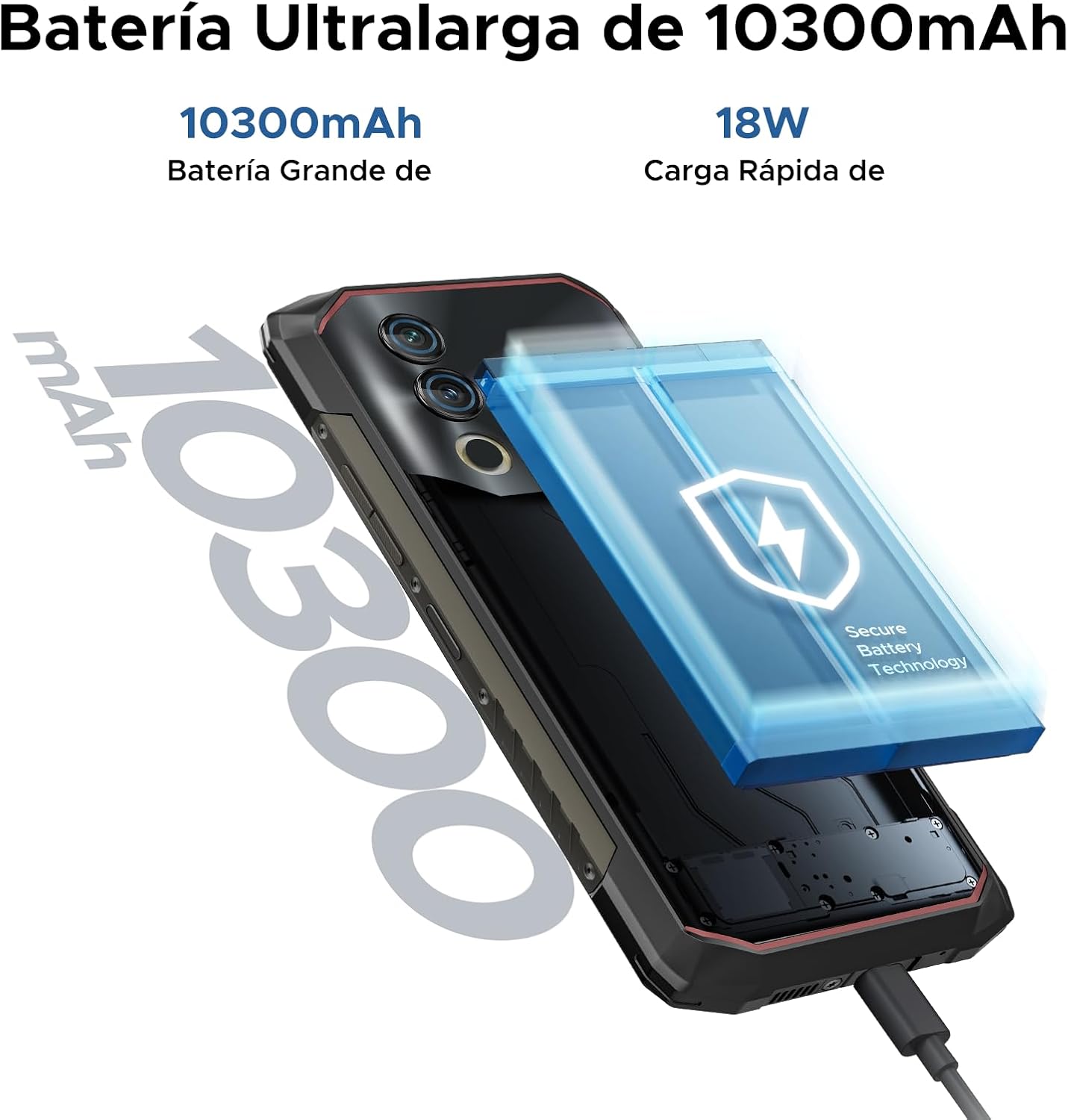
Image: The 10300mAh battery and 18W fast charging feature of the Blade10 Power.
Инструкция по эксплуатации
Базовая навигация
Your DOOGEE Blade10 Power runs on Android 14, offering an intuitive user experience. Use gestures for navigation: swipe up from the bottom for the app drawer, swipe down from the top for notifications and quick settings, and tap icons to open applications.
Security Features: Fingerprint and Face ID
For enhanced security and quick access, set up Fingerprint Recognition and Face ID. The fingerprint sensor is located on the side of the device. Navigate to Настройки > Безопасность > Разблокировка по отпечатку пальца or Разблокировка по лицу to register your biometrics. The device offers ultra-fast unlocking in approximately 0.19 seconds.

Image: Facial Recognition and Side Fingerprint Sensor.
Функциональность NFC
The integrated NFC (Near Field Communication) allows for quick and secure mobile payments with Google Pay and easy data transfer with compatible devices. Enable NFC in Настройки > Подключенные устройства > NFC.
Precise Navigation
The device supports multiple global navigation satellite systems including GPS, Glonass, Galileo, and Beidou, ensuring accurate positioning for navigation and location-based services.
Customizable Button and Gesture Control
Utilize the customizable button for quick access to frequently used functions or apps. Explore Smart Gesture Controls in settings for additional convenient interactions.
Режим перчаток
For users who need to operate the phone while wearing gloves, the Glove Mode feature ensures precise recognition of finger movements, providing a fluid and uninterrupted user experience. Activate this mode in Settings > Smart Assistant > Glove Mode.

Image: Glove Mode in action, allowing touch interaction while wearing gloves.
Характеристики камеры
The DOOGEE Blade10 Power is equipped with a 50MP AI main camera and an 8MP front camera, designed to capture clear and vibrant images and videos.
Задняя камера
The 50MP main camera, enhanced with AI, delivers high-resolution photos with rich detail and accurate colors. It supports various modes including HDR and Panorama for diverse photographic scenarios. Rear flashes provide illumination in low-light conditions.
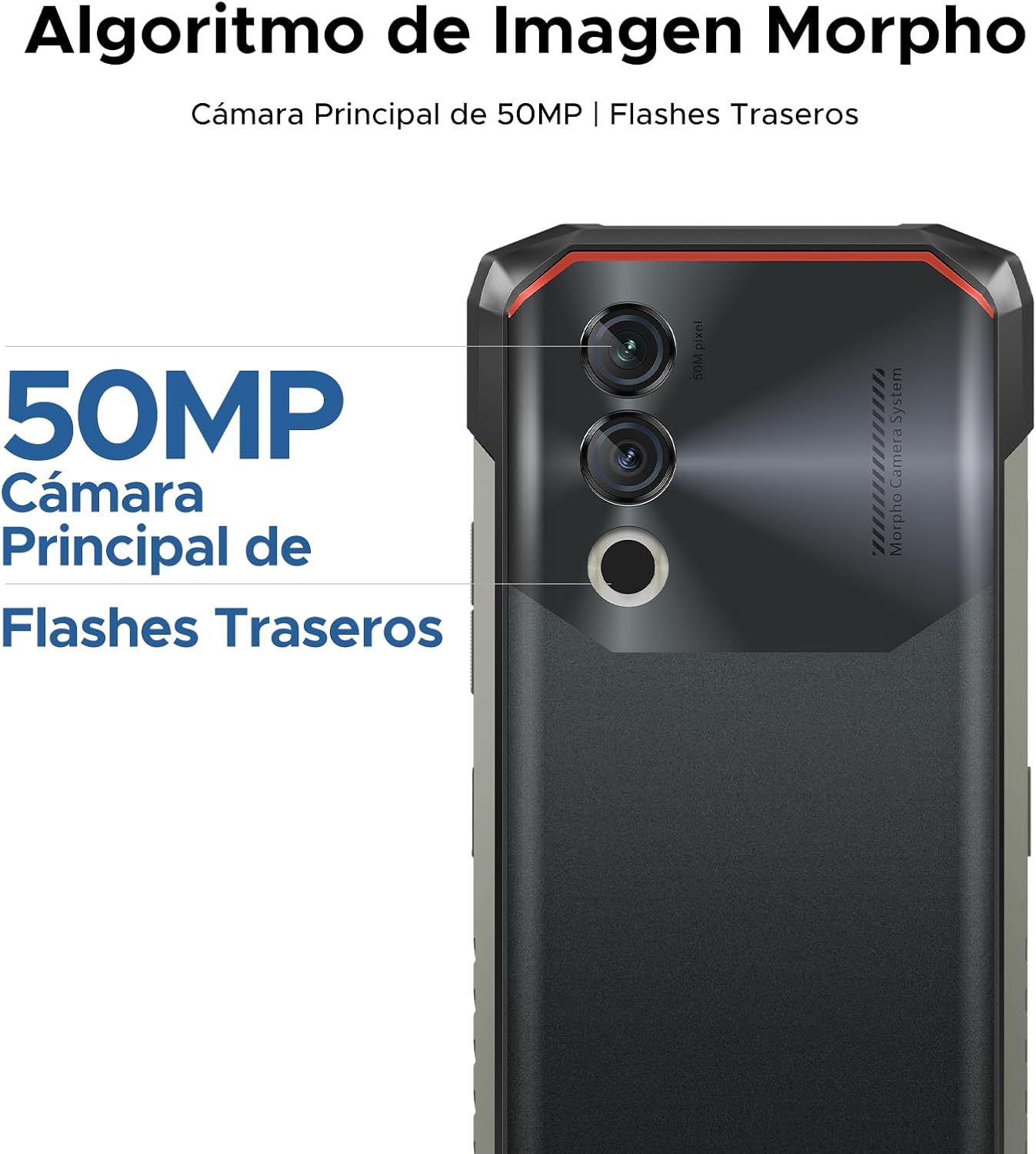
Image: 50MP Main Camera and Rear Flashes.
Передняя камера
The 8MP front camera is ideal for selfies and video calls, capturing clear images.

Изображение: Бывшийamples of photos taken with the 8MP Ultra Sharp Front Camera.
Режимы фотосъемки
Explore various photography modes to enhance your shots:
- Панорама: Capture wide landscapes.
- Портретный режим: Создавайте фотографии профессионального вида с размытым фоном.
- Профессиональный режим: Для опытных пользователей предусмотрено ручное управление настройками камеры.
- Режим HDR: Improve dynamic range in challenging lighting conditions.

Image: Photography modes: Panorama, Portrait, Pro, and HDR.
Видеозапись
Record videos in 1080P at 30 frames per second, ensuring smooth and detailed footage.
Характеристики дисплея
The DOOGEE Blade10 Power features a 6.6-inch HD+ IPS display for a clear and immersive visual experience.
- Размер: 6.6-дюймовый полныйview Отображать
- Разрешение: 720*1612 HD+
- Частота обновления: 90Hz for smooth scrolling and gaming
- Цвета: 16.7 миллионов цветов
- Яркость: 380cd/m² for visibility in various lighting conditions
- Коэффициент контрастности: 1500:1
- Соотношение экрана к корпусу: 84%

Image: 6.6-inch Ultra Sharp Notch-less Screen with 90Hz refresh rate.
Поддержка Widevine L1
With Widevine L1 certification, you can enjoy high-quality streaming content from platforms like Netflix and Amazon Prime Video in full HD resolution, without restrictions.

Image: Real 90Hz Smoothness and Widevine L1 Support.
Производительность и хранение
The Blade10 Power is engineered for smooth performance and ampле емкость хранения.
Процессор
Powered by an Octa-Core T615 processor, the device offers improved performance for multitasking and gaming. This processor provides a 19% improvement in single-core CPU performance, 5% in multi-core CPU performance, and 35% in GPU performance.

Image: Powerful Octa-core T615 Processor.
RAM and Storage
The phone features up to 24GB of RAM (6GB physical + 18GB expanded virtual RAM) and 256GB of internal storage. This ample memory ensures smooth operation across multiple applications. Storage can be further expanded up to 2TB using a TF (microSD) card, allowing you to store a vast amount of photos, videos, and files.
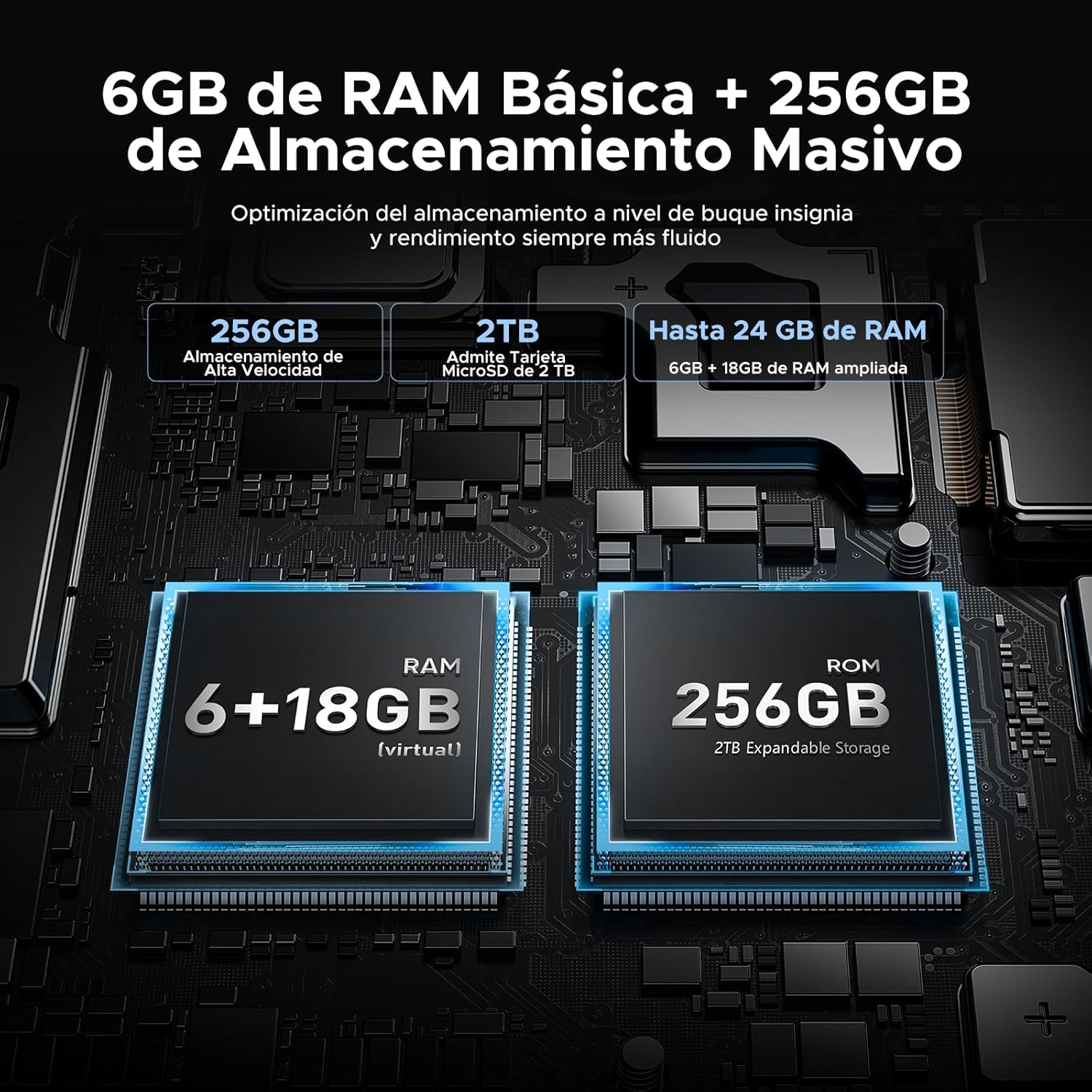
Image: 24GB RAM + 256GB Massive Storage with 2TB Expansion.
Прочность и защита
The DOOGEE Blade10 Power is built to withstand harsh environments, featuring IP68/IP69K and MIL-STD-810H certifications.
- ИП68: Water and dust resistant, capable of immersion in water up to 1.5 meters for 30 minutes.
- IP69K: Устойчив к воздействию струй воды высокого давления и высокой температуры.
- MIL-STD-810H: Military-grade durability against drops, shocks, and extreme temperatures. Withstands drops from up to 1.5 meters.
Its 360° comprehensive protection ensures reliable performance even in challenging outdoor or work environments.

Image: IP68, IP69K, and MIL-STD-810H certifications for drop, dust, and water resistance.
Прочная конструкция
The phone's construction includes a high-resistance cover, aviation-grade titanium alloy, aviation-grade alloy material, TPU protection, and a composite board, all contributing to its exceptional durability.

Изображение: подробное view of the phone's layered construction for enhanced durability.
Особенности Android 14
The DOOGEE Blade10 Power runs on the latest Android 14 operating system, offering enhanced stability, fluidity, and overall performance compared to previous versions.
- Режим фокусировки: Помогает сосредоточиться, приостанавливая работу отвлекающих приложений.
- Супербуфер обмена: Расширенные функции буфера обмена для управления скопированным содержимым.
- Lift to Wake: Automatically wakes the screen when you lift the phone.
- Двухсистемный режим: Используйте две отдельные среды: для работы и для личного пользования.
- Улучшение изображения: Optimized display settings for better viewинж.
- Карманный режим: Prevents accidental touches when the phone is in your pocket.
- Screen Sensors: Improved sensor management for various functionalities.
- Контроль конфиденциальности: Enhanced privacy settings to manage app permissions and data access.
- Разделенный экран: Multitask efficiently by using two apps simultaneously.

Image: More Information About Android 14 features.
Обслуживание
To ensure the longevity and optimal performance of your DOOGEE Blade10 Power, follow these maintenance guidelines:
- Уборка: Регулярно протирайте экран и корпус мягкой тряпкой.amp Протрите салфеткой. Для удаления стойких загрязнений используйте слабый мыльный раствор. Перед зарядкой или подключением аксессуаров убедитесь, что все порты сухие.
- Воздействие воды: While the phone is waterproof, avoid prolonged immersion in saltwater or chlorinated water. If exposed, rinse with fresh water and dry thoroughly. Ensure all port covers are sealed before water exposure.
- Температура: Избегайте длительного воздействия на телефон экстремальных температур (очень высоких или очень низких), так как это может повлиять на срок службы батареи и внутренние компоненты.
- Обновления программного обеспечения: Keep your phone's software updated to the latest version to benefit from performance improvements, security patches, and new features. Check for updates in Настройки > Система > Обновление системы.
- Уход батареи: Избегайте частой полной разрядки батареи. Для оптимального состояния батареи старайтесь поддерживать уровень заряда в пределах от 20% до 80%.
Поиск неисправностей
If you encounter issues with your DOOGEE Blade10 Power, refer to the following common troubleshooting steps:
Устройство не включается
- Убедитесь, что аккумулятор заряжен. Подключите телефон к зарядному устройству как минимум на 30 минут.
- Нажмите и удерживайте кнопку питания в течение 10–15 секунд, чтобы принудительно перезагрузить устройство.
Экран не отвечает
- Перезагрузите устройство, удерживая кнопку питания.
- Если экран физически поврежден, обратитесь в службу поддержки клиентов.
Poor Call Quality / Low Speaker Volume
- Check the volume settings during a call.
- Ensure the speaker and microphone are not obstructed by dirt or debris. Clean gently if necessary.
- Test with headphones to determine if the issue is with the phone's speaker/mic or the network.
Приложения вылетают или зависают
- Закройте и снова откройте проблемное приложение.
- Очистите кэш и данные приложения в Настройки > Приложения > [Название приложения] > Хранилище > Очистить кэш/Очистить данные.
- Убедитесь, что приложение обновлено до последней версии.
- Если проблема не устранена, удалите и переустановите приложение.
Network Connectivity Issues (Wi-Fi/Mobile Data)
- Выключите и включите Wi-Fi или мобильные данные.
- Перезагрузите роутер, если возникли проблемы с Wi-Fi.
- Проверьте правильность установки SIM-карты и убедитесь, что она активна у вашего оператора связи.
- Сбросить сетевые настройки в Настройки > Система > Сброс параметров > Сброс Wi-Fi, мобильной связи и Bluetooth.
Сброс к заводским настройкам (последняя мера)
If other troubleshooting steps fail, you may consider a factory reset. This will erase all data on your phone, so ensure you back up important information first. Go to Настройки > Система > Параметры сброса > Удалить все данные (сброс к заводским настройкам).
Технические характеристики
Below are the detailed technical specifications for the DOOGEE Blade10 Power smartphone:
| Особенность | Спецификация |
|---|---|
| Номер модели | Blade 10 Power |
| Размеры | 17.85 х 8.31 х 1.79 см |
| Масса | 560 г |
| Операционная система | Андроид 14 |
| Процессор | Восьмиядерный процессор T615 (1.8 ГГц) |
| БАРАН | 24 ГБ (6 ГБ физической + 18 ГБ виртуальной) |
| Внутреннее хранилище | 256 ГБ |
| Расширяемое хранилище | До 2 ТБ (TF-карта) |
| Размер дисплея | 6.6 дюйма |
| Тип дисплея | HD+ IPS |
| Разрешение дисплея | 720 x 1612 пикселей |
| Частота обновления | 90 Гц |
| Основная камера | 50 МП |
| Передняя камера | 8 МП |
| Видеозапись | 1080p при 30 кадрах в секунду |
| Емкость аккумулятора | 10300 мАч (литий-ионный) |
| Зарядка | 18W Fast Charging, USB Type-C, OTG Support |
| Сетевые технологии | 4G LTE |
| Слоты для SIM-карты | Две SIM-карты |
| Связность | NFC, GPS (Glonass, Galileo, Beidou) |
| Безопасность | Face ID, боковой сканер отпечатков пальцев |
| Прочность | IP68, IP69K, MIL-STD-810H (водонепроницаемый, пылезащитный, ударопрочный) |
Гарантия и поддержка
Компания DOOGEE стремится предоставлять качественную продукцию и обеспечивать удовлетворенность клиентов.
- 30-дневная гарантия возврата денег: Если вы не удовлетворены своей покупкой, вы можете иметь право на возврат средств в течение 30 дней.
- Ограниченная гарантия сроком на 2 года: Your DOOGEE Blade10 Power comes with a 2-year limited warranty covering manufacturing defects. Please retain your proof of purchase.
- 24/7 онлайн-поддержка: For any technical assistance or inquiries, DOOGEE offers 24/7 online support. Please visit the official DOOGEE webсайт для получения контактной информации и ресурсов поддержки.

Image: After-sales Support details.
Официальные видеоролики о продуктах
Официальных видеороликов о продукте от продавца, подходящих для встраивания в данное руководство, найдено не было.