
Введение
This manual provides detailed instructions for the setup, operation, maintenance, and troubleshooting of your XIWBSY T08-FR Projector. Please read this manual thoroughly before using the projector to ensure proper function and to maximize your viewопыт. Сохраните это руководство для дальнейшего использования.

Image: The XIWBSY T08-FR Projector displaying a high-definition image, highlighting its 4K support, 180° rotation, 30000 Lumen brightness, and Android 12 operating system.
Продукт болееview
Основные характеристики
- Подставка с поворотом на 180°: Features an innovative, detachable stand allowing projection from various angles (wall, table, ceiling, outdoor).
- ОС Android 12: Integrated operating system providing access to over 8,000 applications, including Netflix, YouTube, Prime Video, and Hulu.
- WiFi Mirroring: Supports screen mirroring for iOS and Android devices.
- Дисплей высокой четкости: Native 1080P resolution, 4K supported, 30000 Lumen brightness, 20000:1 contrast ratio, and HDR10+ for enhanced image quality.
- Большой размер проекции: Up to 300 inches with 50% to 100% zoom function.
- Иммерсивный звук: Equipped with dual 15W stereo speakers for 360° 3D stereo Hi-Fi audio. Can connect to external Bluetooth speakers.
- Расширенные возможности подключения: Dual-band 5G+2.4G WiFi and Bluetooth 5.2 for stable and fast connections.
- Офисный пакет: Integrated software for viewing PPT, Excel, and Word documents.
- Универсальный монтаж: Supports 360° image flip for front, rear, and ceiling projection.

Image: This visual highlights the projector's advanced 8-layer lens system, 30000 Lumen brightness, 50000-hour lamp life, and superior contrast, contributing to its high-definition image quality.
Компоненты и порты
Ознакомьтесь с компонентами проектора и разъемами подключения.
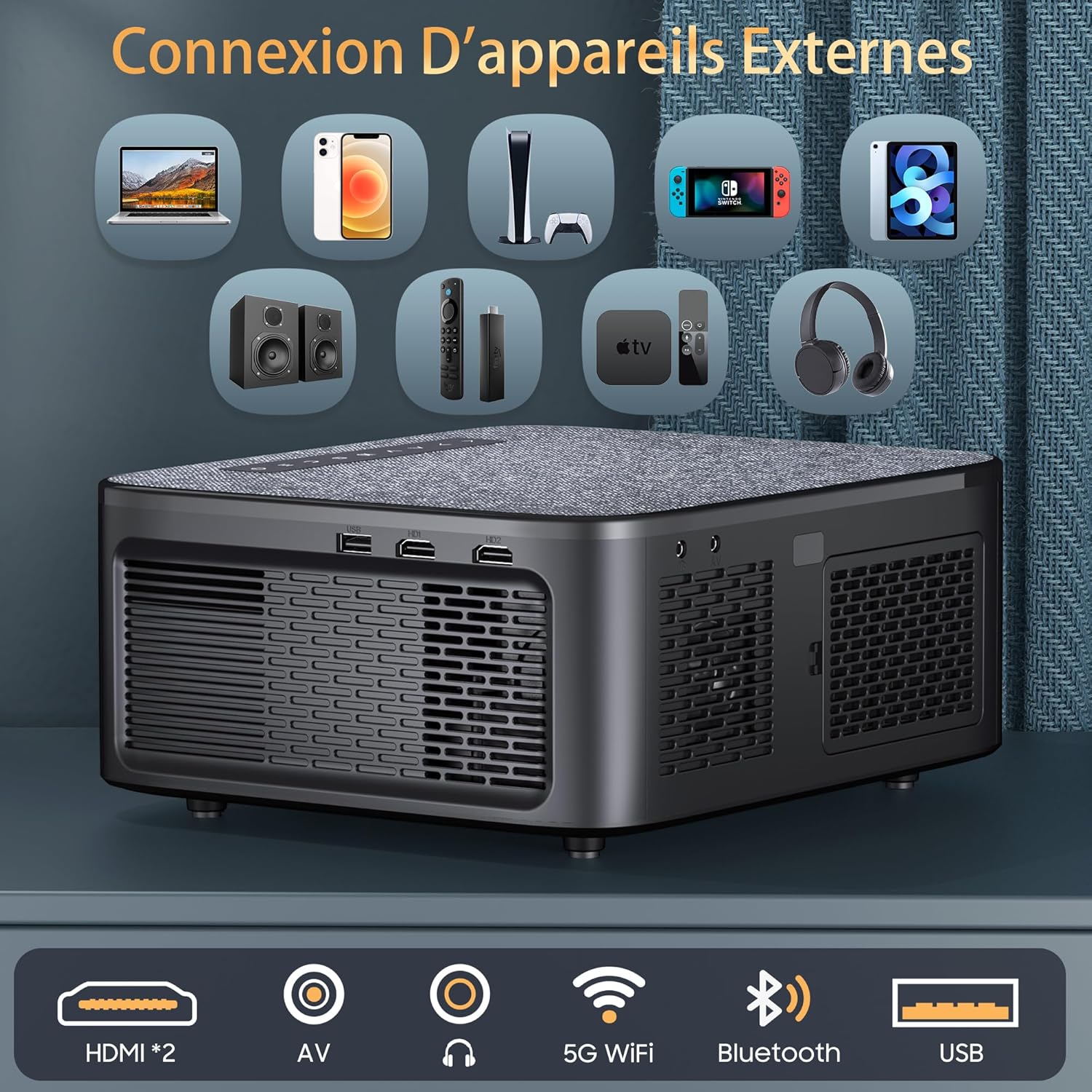
Image: Rear panel of the projector, illustrating the available connectivity options including two HDMI ports, AV input, audio output, 5G WiFi, Bluetooth, and USB port.
- Порты HDMI (x2): For connecting devices such as laptops, game consoles, and streaming sticks.
- USB-порт: Для подключения USB-накопителей для воспроизведения медиафайлов files.
- AV-вход: For connecting older devices with composite video and stereo audio output.
- Аудио выход: Для подключения внешних аудиосистем или наушников.
- Потребляемая мощность: Для подключения адаптера питания.
- Кольцо фокусировки: Ручная настройка четкости изображения.
- Коррекция трапецеидальных искажений: Manual or automatic adjustment for image shape.
Настраивать
1. Физическое размещение
Place the projector on a stable, flat surface or mount it using a compatible ceiling mount. Ensure adequate ventilation around the projector.

Image: The projector positioned on a bedside table, utilizing its 180-degree rotatable stand to project an image onto the ceiling, demonstrating flexible viewуглы.
- The 180° rotatable and detachable stand allows for flexible projection angles, including walls, tables, and ceilings.
- For ceiling mounting, the projector supports 360° image flip.
2. Подключение питания
- Подключите адаптер питания к входному разъему питания проектора.
- Подключите адаптер питания к розетке.
- Нажмите кнопку питания на проекторе или пульте дистанционного управления, чтобы включить его.
3. Первоначальная настройка
- Upon first power-on, follow the on-screen prompts to select your preferred language.
- Connect to a Wi-Fi network: Navigate to Настройки > Сеть > Wi-Fi and select your network. Enter the password if required.
Инструкция по эксплуатации
1. Основные операции
- Включение/выключение питания: Нажмите кнопку питания на проекторе или пульте дистанционного управления.
- Регулировка фокуса: Поверните кольцо фокусировки на объективе проектора до тех пор, пока изображение не станет четким.
- Коррекция трапецеидальных искажений: Use the remote control or on-screen menu to adjust the image shape (4D/4P keystone correction, auto-vertical correction up to ±50°).

Image: Visual representation of the projector's keystone correction capabilities, including 4D/4P correction, auto-vertical adjustment, and zoom function, showing how the image can be adjusted for various screen sizes and angles.
2. Источники входных данных
- HDMI: Connect your device (laptop, game console, etc.) to an HDMI port. Select the corresponding HDMI input from the projector's source menu.
- USB: Insert a USB drive into the USB port. The projector will typically prompt you to open the media player.
- СРЕДНИЙ: Connect devices using an AV cable. Select AV input from the source menu.
3. Беспроводная связь
- Wi-Fi (5 ГГц + 2.4 ГГц): For internet access and streaming. Configure in Настройки > Сеть > Wi-Fi.
- Bluetooth 5.2: For connecting external audio devices (headphones, speakers). Go to Настройки > Bluetooth, enable Bluetooth, and pair with your device. Note: Bluetooth only supports audio transmission, not video.

Изображение: Демонстрация проектораasing its Bluetooth 5.2 bidirectional connectivity for external audio devices and its internal dual Hi-Fi speakers, emphasizing sound quality.
4. Smart Features (Android 12 & Apps)
Проектор работает на операционной системе Android 12, обеспечивая доступ к различным приложениям.

Image: A projected display showing the Android 12 interface with various streaming and utility applications such as YouTube, Netflix, Hulu, and Aptoide, indicating the projector's smart capabilities.
- Доступ к приложениям: From the home screen, navigate to the desired application (e.g., Netflix, YouTube).
- Зеркалирование экрана: To mirror your smartphone screen, activate the WiFi mirroring function on the projector and connect your iOS/Android device. Note: Due to HDCP copyright protection, some protected content may not have sound or image during screen mirroring.
- Офисный пакет: Use the integrated office suite to open and view PPT, Excel, and Word documents directly.

Image: The projector wirelessly mirroring content from a smartphone, illustrating its 5G+2.4G dual-band WiFi capability for stable and fast screen sharing across Android, iOS, and Windows devices.
5. Настройки проекции
- Увеличить: Adjust the projection size from 50% to 100% via the menu settings.
- Соотношение сторон: Supports 4:3 and 16:9 aspect ratios. Adjust in the display settings.
- Переворот изображения: For different mounting orientations (front, rear, ceiling), adjust the image flip setting in the menu.
Обслуживание
1. Уборка
- Объектив: Используйте мягкую безворсовую ткань, специально предназначенную для оптических линз. Не используйте абразивные чистящие средства.
- Экстерьер: Протрите корпус проектора мягкой сухой тканью. Избегайте использования жидких чистящих средств непосредственно на устройстве.
- Вентиляция: Убедитесь, что вентиляционные отверстия свободны от пыли и посторонних предметов, чтобы предотвратить перегрев.
2. Хранение
When not in use, store the projector in a cool, dry place, away from direct sunlight and extreme temperatures. Use the lens cap to protect the lens from dust and scratches.
Поиск неисправностей
- Нет питания:
- Check if the power cable is securely connected to the projector and the power outlet.
- Убедитесь, что розетка исправна.
- Нет изображения:
- Verify that the correct input source (HDMI, USB, AV) is selected.
- Проверьте соединительные кабели между проектором и источником сигнала.
- Убедитесь, что исходное устройство включено и выдает сигнал.
- Размытое изображение:
- Отрегулируйте кольцо фокусировки на объективе проектора.
- Убедитесь, что проекционная поверхность ровная, а проектор находится на оптимальном расстоянии.
- Если изображение искажено, отрегулируйте коррекцию трапецеидальных искажений.
- Нет звука:
- Увеличьте громкость на проекторе и источнике сигнала.
- Check if external speakers are properly connected or paired via Bluetooth.
- Ensure the audio output setting is correct in the projector's menu.
- Note: Some copyrighted content mirrored from smartphones may not transmit audio due to HDCP.
- Проблемы с подключением к Wi-Fi:
- Убедитесь, что пароль Wi-Fi введен правильно.
- Перезагрузите проектор и Wi-Fi-роутер.
- Чтобы улучшить качество сигнала, переместите проектор ближе к Wi-Fi роутеру.
Технические характеристики
| Бренд | XIWBSY |
| Номер модели | T08-FR |
| Технология отображения | ЖК-дисплей |
| Собственное разрешение | 1920 x 1080 (1080P Full HD) |
| Максимальное разрешение дисплея | 4096 x 2160 (поддерживается 4K) |
| Яркость | 30000 люмен |
| Коэффициент контрастности | 20000:1 |
| Поддержка HDR | HDR10+ |
| Операционная система | Андроид 12 |
| Беспроводное подключение | 5G+2.4G Wi-Fi, Bluetooth 5.2 |
| Проводное подключение | 2x HDMI, 1x USB, AV, Audio Out |
| Встроенные динамики | Двойные стереодинамики мощностью 15 Вт |
| Размер проекции | До 300 дюймов |
| Функция масштабирования | 50% - 100% |
| Коррекция трапецеидальных искажений | 4D/4P, Auto-vertical (±50°) |
| Размеры (Д x Ш x В) | 25.7 см х 22 см х 11.5 см |
| Совместимые устройства | Игровая приставка, колонка, ноутбук, смартфон, планшет |
Гарантия и поддержка
For any questions or assistance, our customer service team is available 24 hours a day, 7 days a week. Please do not hesitate to contact us at:
Конкретные условия гарантии см. в документации о покупке.