
1. Введение
This manual provides detailed instructions for the HOU Keyboard Case designed for the iPad Pro 13-inch M5/M4 models. Please read this manual carefully before use to ensure proper operation and to maximize the product's lifespan.
1.1 Совместимость
This keyboard case is specifically designed for the iPad Pro 13-inch M5/M4 (2025 models). Compatible iPad models include: А2925, А2926, А3007.
Important: This case is NOT compatible with iPad Air 13 (M2) 2024 (models A2898, A2899, A2900) or iPad Pro 12.9-inch (2017-2022) (6th/5th/4th/3rd/2nd/1st generation).
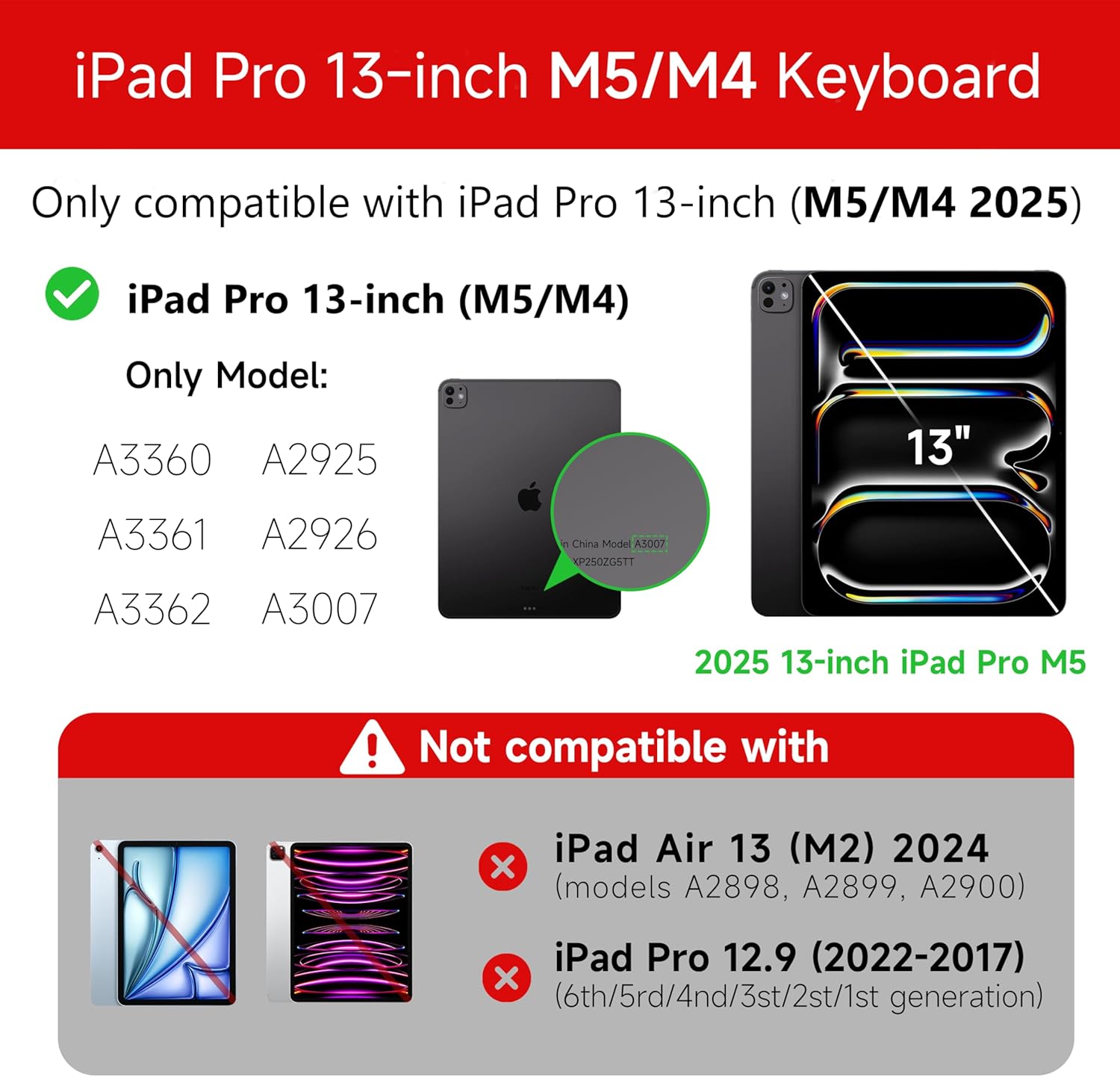
Figure 1: Compatibility details for the HOU iPad Pro 13-inch Keyboard Case.
2. Настройка
2.1 Зарядка клавиатуры
Before initial use, fully charge the keyboard. Connect the provided USB-C cable to the charging port on the keyboard and to a power source. The charging indicator light will show the charging status.
- Порт зарядки: Тип-С
- Время зарядки: Approximately <2 hours
- Емкость аккумулятора: 500мАч
2.2 Подключение iPad Pro
The keyboard case features a magnetic design for secure attachment. Align your iPad Pro 13-inch with the magnetic back panel of the case. The strong magnets will securely hold your iPad in place, providing stability.

Figure 2: Magnetic attachment for secure iPad placement.
2.3 Bluetooth-соединение
To connect the keyboard to your iPad Pro via Bluetooth:
- Убедитесь, что клавиатура заряжена и включена.
- На вашем iPad перейдите в Настройки > Bluetooth и включите Bluetooth.
- На клавиатуре нажмите и удерживайте Fn + Control + R в течение 3 секунд, пока индикатор не начнет мигать, указывая на режим сопряжения.
- On your iPad, select the keyboard from the list of available devices (e.g., "HOU Keyboard").
- После подключения индикатор на клавиатуре перестанет мигать.
After the initial connection, the keyboard should automatically reconnect to your iPad when both devices are powered on and Bluetooth is enabled.
3. Инструкция по эксплуатации
3.1 Регулируемый Viewуглы
The keyboard case features a floating design that allows for angle adjustment up to 135 degrees. The keyboard base opens at a 45-degree angle, providing enhanced stability for various viewПозиции оператора ввода и печатания.
Рисунок 3: Регулируемый viewугол поворота до 135 градусов.
3.2 Функция подсветки
The keyboard features an adaptive backlight with 7 different colors and 3 adjustable brightness levels. This allows for comfortable typing in various lighting conditions, including low-light environments.

Figure 4: Keyboard backlight in use for typing at night.
3.3-дюймовая мультисенсорная сенсорная панель
The integrated multi-touch trackpad supports full-area press and various swipe gestures, transforming your iPad into a laptop-like experience. It provides responsive controls for scrolling, dragging, input, and media control.
Adjusting Trackpad Sensitivity: You can adjust the trackpad sensitivity directly from your iPad's settings to match your personal preference.
- Перейти к Настройки на вашем iPad.
- Перейти к Доступность.
- Find and adjust Чувствительность отслеживания.

Figure 5: Multi-touch trackpad functionality and sensitivity adjustment.
3.4 сочетания клавиш
The keyboard includes a series of shortcut keys to boost productivity. Refer to the keyboard layout for specific functions.
4. Техническое обслуживание
The exterior of the keyboard case is made from a semi-silicone material, which is wear-resistant and designed to resist fingerprints and stains, making it easy to clean.
- Для очистки аккуратно протрите поверхность мягкой тряпкой.amp ткань.
- Избегайте использования агрессивных химикатов или абразивных материалов, так как они могут повредить покрытие.
- Ensure the charging port and keys are free from dust and debris.
5. Поиск Неисправностей
5.1 Клавиатура не подключается через Bluetooth
- Убедитесь, что клавиатура полностью заряжена.
- Убедитесь, что Bluetooth включен на вашем iPad.
- Re-enter pairing mode on the keyboard by pressing and holding Fn + Control + R в течение 3 секунд.
- Удалите устройство из настроек Bluetooth на вашем iPad и попробуйте выполнить сопряжение снова.
- Перезагрузите iPad и клавиатуру.
5.2 Задержка или неработоспособность тачпада
- This can sometimes occur due to Bluetooth connectivity. Try turning the keyboard off and then back on.
- Ensure there are no obstructions between the keyboard and the iPad that might interfere with the Bluetooth signal.
- Check for any available iPadOS updates, as software improvements can sometimes resolve connectivity issues.
5.3 Подсветка не работает
- Убедитесь, что аккумулятор клавиатуры достаточно заряжен.
- Check the keyboard's function keys for backlight control (usually a dedicated key or Fn combination).
6. Технические характеристики
| Особенность | Деталь |
|---|---|
| Бренд | ХОУ |
| Совместимые устройства | 2025 (M4/M5) iPad Pro 13-inch (A2925/A2926/A3007) |
| Технология связи | Блютус 5.2 |
| Описание клавиатуры | Multi-functional with Trackpad |
| Рекомендуемое использование | Личный |
| Особые возможности | Trackpad, Backlit, Hot Keys & Media Keys, Rechargeable, Lightweight |
| Цвет | Белый |
| Цвета подсветки | 7 цветов RGB |
| Размеры продукта (Д x Ш x В) | 32 х 24.2 х 2.7 см |
| Материал | Aluminum, Metal, ABS, Polyurethane (PU), Semi-silicone |
| Вес товара | 1.1 Килограмма |
| Источник питания | Питание от батареи |
| Емкость аккумулятора | ~500 мАч |
| Рабочий ток | <10мА |
| Время в режиме ожидания | ≥ 30 дней |
| Рабочее расстояние | ≤10м |
7 Поддержка
For any questions or further assistance, please contact the seller directly through your Amazon account:
- Войдите в свою учетную запись Amazon.
- Перейдите в раздел «История заказов».
- Locate your order for the HOU iPad Pro 13-inch Keyboard Case.
- Нажмите «Связаться с продавцом».