
1. Введение
This manual provides essential information for the installation, operation, and maintenance of your ANTEC GSK750 ATX3.1 80PLUS GOLD Power Supply Unit (PSU). Please read this manual thoroughly before installing and using the product to ensure proper function and safety. The ANTEC GSK750 is a high-efficiency, durable power supply designed for modern PC systems.
2. Особенности
- 80PLUS GOLD certification for high efficiency.
- Full modular design for improved cable management.
- Compact design with a depth of 140 mm.
- Active PFC and universal AC input support.
3. Настройка и установка
3.1. Содержимое упаковки
Убедитесь, что в упаковке присутствуют все компоненты:
- ANTEC GSK750 ATX3.1 80PLUS GOLD PSU
- Модульный комплект кабелей
- Шнур питания переменного тока
- Крепежные винты
- Руководство пользователя (этот документ)
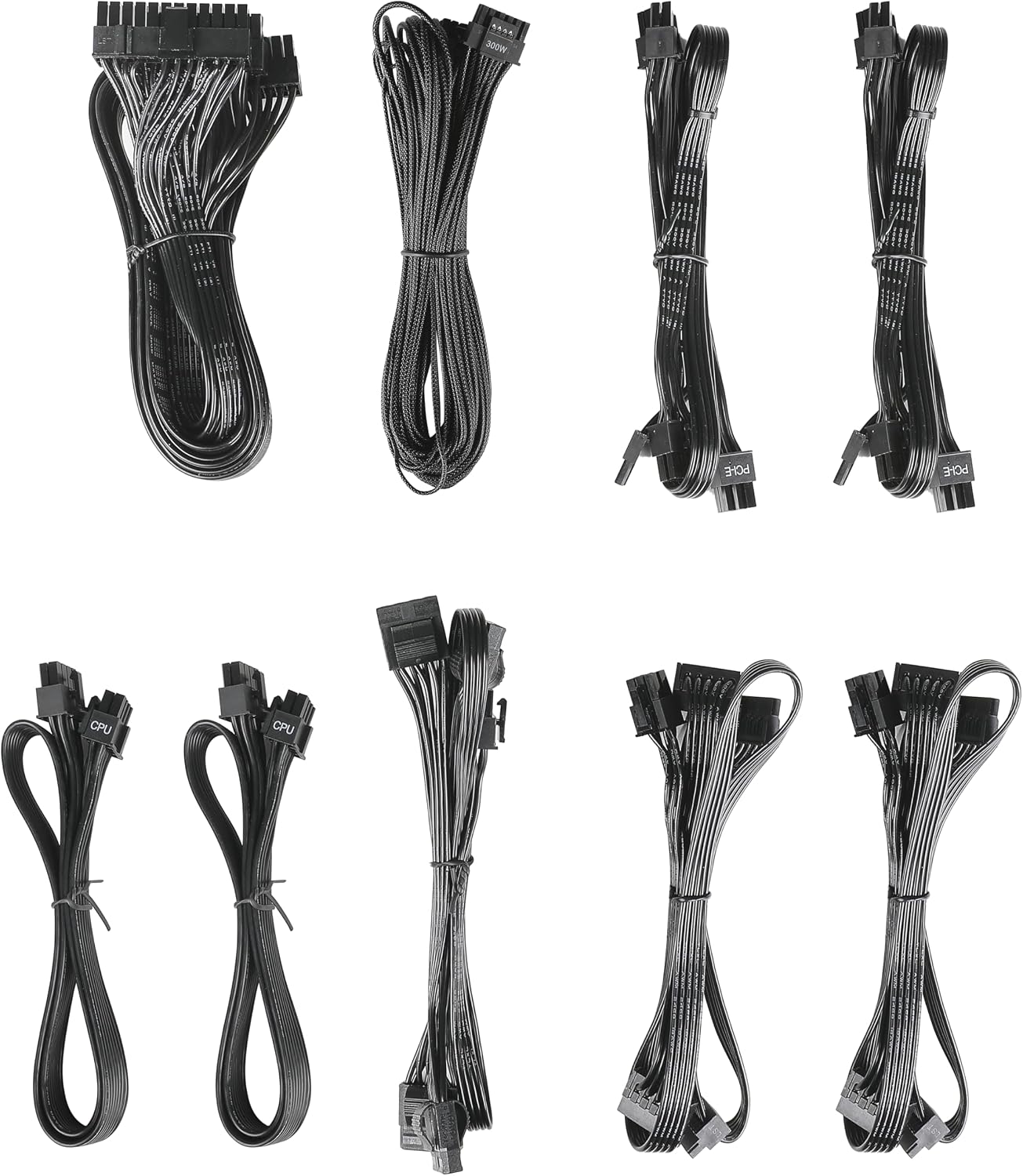
Image: The modular cable set included with the ANTEC GSK750 power supply unit. This includes various cables for motherboard, CPU, PCIe, SATA, and Molex connections.
3.2. Физическая установка
- Убедитесь, что ваш компьютер выключен и отсоединен от розетки.
- Mount the PSU into the designated PSU bay in your computer case using the provided screws. Ensure the fan is oriented correctly for optimal airflow (typically facing downwards if there's a bottom vent, or upwards if not).

Изображение: вид сверху вниз view of the ANTEC GSK750 power supply unit, showing the fan grille and overall compact form factor.
3.3. Кабельные соединения
Connect the necessary modular cables to the PSU and your system components. The full modular design allows you to connect only the cables you need, reducing clutter.
- 24-Pin Main Power: Подключитесь к материнской плате.
- 8-Pin (4+4) CPU Power: Connect to your motherboard's CPU power connector.
- PCI-E (6+2 контакта): Подключитесь к вашей видеокарте (видеокартам).
- Питание SATA: Подключайтесь к SSD-накопителям, HDD-накопителям и оптическим приводам.
- Molex Power: Подключайте старые периферийные устройства или корпусные вентиляторы.

Image: The modular connector panel on the side of the ANTEC GSK750 power supply, clearly labeled for PCI-E, CPU, SATA/Molex, and M/B (motherboard) connections.
3.4. Первоначальное включение
After all connections are secure, plug the AC power cord into the PSU and then into a wall outlet. Flip the main power switch on the back of the PSU to the 'ON' position. You can then power on your computer.
4. Инструкция по эксплуатации
4.1. Hybrid Mode
The ANTEC GSK750 features a Hybrid Mode switch located on the rear of the unit. When Hybrid Mode is enabled, the PSU fan will remain off under low load conditions, providing silent operation. The fan will automatically activate when the load increases to maintain optimal temperatures. When Hybrid Mode is disabled, the fan will operate continuously.

Image: The rear panel of the ANTEC GSK750 power supply, featuring the main power switch, AC input, and the 'Hybrid Mode' toggle switch.
5. Техническое обслуживание
To ensure the longevity and optimal performance of your PSU, follow these maintenance guidelines:
- Уборка: Periodically clean the exterior of the PSU and the fan grille to prevent dust buildup. Use compressed air to gently clear dust from the fan and internal components. Ensure the PSU is unplugged before cleaning.
- Расход воздуха: Ensure that the PSU has adequate airflow within your computer case. Avoid blocking the intake or exhaust vents.
6. Поиск Неисправностей
If you encounter issues with your ANTEC GSK750 PSU, consider the following:
- Нет питания: Check all cable connections, especially the 24-pin motherboard connector and the CPU power connector. Ensure the AC power cord is securely plugged into both the PSU and the wall outlet. Verify the main power switch on the PSU is in the 'ON' position.
- Нестабильность системы/сбои: Убедитесь, что ваш блок питания работаетtage is sufficient for all your components. Overloading the PSU can lead to instability. Check for loose connections.
- Шум вентилятора: If the fan is excessively noisy and Hybrid Mode is off, ensure there is no obstruction. If Hybrid Mode is on, the fan will spin up under load, which is normal.
If problems persist, consult the ANTEC support webсайт или свяжитесь со службой поддержки клиентов.
7. Технические характеристики
Detailed specifications for the ANTEC GSK750 ATX3.1 80PLUS GOLD PSU:

Image: The specification label of the ANTEC GSK750 power supply, detailing output voltages, currents, and total wattage.
| Спецификация | Ценить |
|---|---|
| Бренд | ANTEC |
| Номер модели | GSK750 ATX3.1 |
| Выход Втtage | 750 Вт |
| Форм-фактор | АТХ |
| Сертификация эффективности | 80 ПЛЮС ЗОЛОТО |
| Размеры продукта (ДxШxВ) | 14 х 15 х 8.6 см |
| Вес продукта | 2.5 кг |
| Минимальная входная громкостьtage | 100 вольт (переменный ток) |
| System Bus Connector Type | 24 Штифт |
| Количество болельщиков | 2 |
| СКП | 761345200547 |
| Страна происхождения | Китай |
8. Гарантия и поддержка
8.1. Информация о гарантии
The ANTEC GSK750 ATX3.1 80PLUS GOLD Power Supply Unit comes with a Гарантия 7 год с даты покупки. Данная гарантия распространяется на дефекты материалов и изготовления при условии нормального использования. Сохраните чек для предъявления гарантийных претензий.
8.2. Поддержка клиентов
For technical assistance, troubleshooting, or warranty inquiries, please visit the official ANTEC website or contact their customer support department. Contact information can typically be found on the ANTEC webсайта или упаковки продукта.