
1. Введение
The Radtel RT16 FRS Two Way Radio is designed for reliable, license-free communication across 16 channels. Featuring a durable build, USB-C charging, and VOX functionality, it is suitable for various environments from outdoor activities to commercial settings.
Содержимое упаковки
Your Radtel RT16 package includes:
- 2x Radtel RT16 Two Way Radios
- 2x Rechargeable Lithium-Ion Batteries (2000mAh)
- 2 зажима для ремня
- 2x USB-C Charger Cables
- 2x Earpieces
- 1x Руководство пользователя
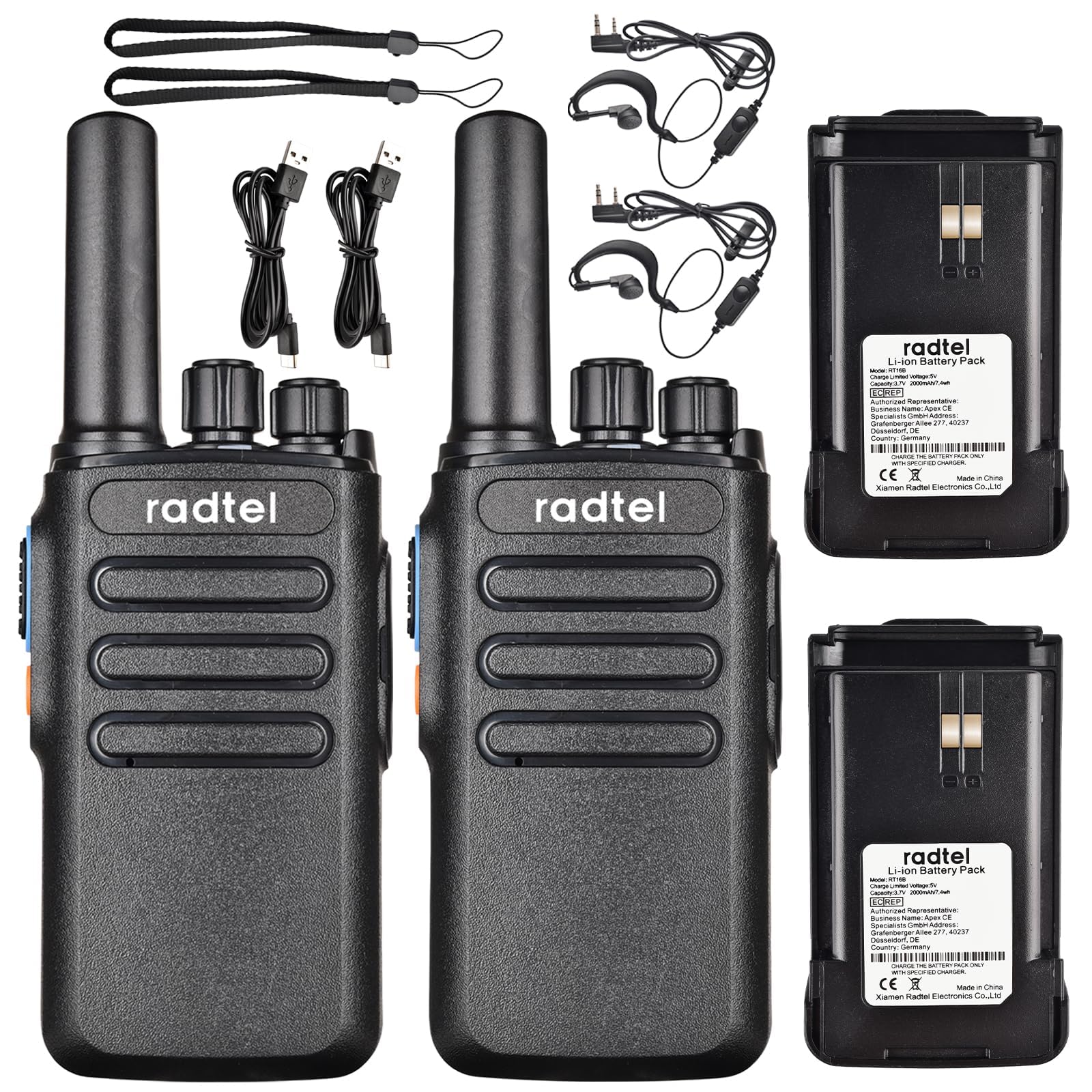
Image 1.1: Radtel RT16 Two Way Radios and included accessories.
2. Настройка
2.1 Установка аккумулятора
- Убедитесь, что радио выключено.
- Найдите батарейный отсек на задней стороне радиостанции.
- Вставьте батарейку в отсек до щелчка.

Image 2.1: Battery compartment and belt clip attachment.
2.2 Крепление зажима для ремня
- Совместите зажим для ремня с соответствующими пазами на задней панели рации.
- Push the clip firmly until it locks into position.
2.3 Зарядка аккумулятора
The RT16 radios feature convenient USB-C charging. Use the provided USB-C cable to charge the radio. The charging port is located at the bottom of the radio.
- Connect the USB-C cable to the charging port on the radio.
- Connect the other end of the cable to a compatible USB power source (e.g., phone charger, power bank, car adapter).
- The indicator light on the radio will show charging status (refer to the LED indicator section for details).

Image 2.2: USB-C charging options for the RT16.
3. Инструкция по эксплуатации
3.1 Включение/выключение питания и регулировка громкости
To power on the radio, rotate the top-left knob clockwise until you hear a click and a voice prompt indicating the current channel. Continue rotating to adjust the volume. To power off, rotate the knob counter-clockwise until it clicks off.
3.2 Выбор канала
The RT16 has 16 available channels. To select a channel, rotate the top-right knob. The radio will announce the selected channel number.

Изображение 3.1: Верх view of the RT16 showing power/volume and channel knobs.
3.3 Кнопка PTT
To transmit your voice, press and hold the large button on the side of the radio. Release the button to listen.
3.4 Подключение гарнитуры
The radio supports a 2-pin K-connector headset for hands-free operation. Open the rubber cover on the side of the radio and plug in the headset connectors.

Image 3.2: Headset connection port on the RT16.
3.5 Voice Operated Exchange (VOX) Function
The VOX function allows for hands-free transmission without pressing the PTT button. The radio will automatically transmit when it detects your voice. This feature requires software activation for first use and offers 9 adjustable levels.

Image 3.3: Illustration of VOX function for hands-free use.
Activating VOX Mode
To activate VOX mode, hold down the small side button while powering on the radio. Continue holding until you hear a beep indicating activation.
Video 3.1: Demonstrates how to activate the voice control (VOX) mode on the Radtel RT16 radio.
Deactivating VOX Mode
To deactivate VOX mode, hold down the small side button while powering on the radio. Continue holding until you hear two beeps, confirming deactivation.
Video 3.2: Demonstrates how to deactivate the voice control (VOX) mode on the Radtel RT16 radio.
3.6 Language Switch Operation
The radio supports both Chinese and English voice prompts. To switch the language, turn the channel knob to channel 16. Then, power off the radio. While powering on, hold down the small side button until you hear a beep. This will switch the language mode.
Video 3.3: Instructions for switching between Chinese and English voice prompts on the Radtel RT16 radio.
4. Техническое обслуживание
- Поддерживайте чистоту радиоприемника, протирая его мягкой тряпкой.amp ткань. Избегайте использования агрессивных химикатов или растворителей.
- Do not immerse the radio in water as it is not water resistant.
- Когда радио не используется, храните его в прохладном, сухом месте.
- Ensure the USB-C port cover is securely closed to prevent dust and moisture ingress.
5. Поиск Неисправностей
| Проблема | Возможная причина | Решение |
|---|---|---|
| Нет электричества | Батарея разряжена или установлена неправильно. | Зарядите аккумулятор или надежно установите его на место. |
| Невозможно связаться с другими радиостанциями | Радиостанции работают на разных каналах или находятся вне зоны действия сети. | Убедитесь, что обе рации работают на одном канале. Подойдите ближе к другой рации. Проверьте наличие препятствий. |
| Плохое качество звука | Слабый сигнал, помехи или низкая громкость. | Adjust volume. Move to an area with fewer obstructions. Change channel if interference is present. |
| VOX не работает | VOX не активирован или чувствительность слишком низкая. | Activate VOX mode (see Section 3.5). Adjust VOX sensitivity level via programming software. |
6. Технические характеристики
| Особенность | Деталь |
|---|---|
| Бренд | Радтель |
| Номер модели | РТ16 |
| Количество каналов | 16 |
| Диапазон частот | 462/467 MHz (FRS Band) |
| Максимальный диапазон разговора | Up to 5 Kilometers (open outdoor areas) |
| Выходная мощность | 2W |
| Тип батареи | Литий-ионный (2000 мАч) |
| Зарядка | USB-C |
| Особые возможности | Long Range, Type-C rechargeable battery, VOX Function, Channel Scan |
| Уровень водонепроницаемости | Не водостойкий |
| Размеры продукта | 1.37"Д x 2.16"Ш x 5.9"В |
| Вес товара | 0.39 фунта |
| Совместимые устройства | Other FRS two-way radios, Standard earpieces |
7. Гарантия
The Radtel RT16 FRS Two Way Radio comes with a 1-Year Warranty from the manufacturer, Xiamen Radtel Electronics Co.,Ltd.
8 Поддержка
For further assistance or to explore other Radtel products, please visit the official Radtel Store: