
1. Введение
Спасибо за покупкуasing the LONPOO Mini Hi-Fi Ampпожизненнее AMP-615B. This 2-channel stereo amplifier предназначен для обеспечения высококачественного звука amplification for your passive speakers, offering versatile connectivity options including Bluetooth 5.3, Optical, Coaxial, USB, and AUX inputs. This manual provides detailed instructions for setup, operation, and maintenance to ensure optimal performance and longevity of your device.
2. Инструкции по технике безопасности
- Источник питания: Обеспечить amplifier is connected to a power supply within the specified voltage range (AC 100-240V ~ 50/60Hz).
- Вентиляция: Не закрывайте вентиляционные отверстия. Обеспечьте достаточную циркуляцию воздуха вокруг устройства, чтобы предотвратить перегрев.
- Влага: Держите ampФильтр следует хранить вдали от воды, влаги и помещений с высокой влажностью. Не используйте фильтр мокрыми руками.
- Нагревать: Не размещайте устройство вблизи источников тепла, таких как радиаторы, обогреватели, печи и другие приборы, выделяющие тепло.
- Уборка: Перед чисткой отсоедините шнур питания. Используйте сухую мягкую ткань. Не используйте жидкие или аэрозольные чистящие средства.
- Обслуживание: Не пытайтесь ремонтировать этот продукт самостоятельно. Поручите все обслуживание квалифицированному обслуживающему персоналу.
- Размещение: Установите устройство на устойчивую ровную поверхность, чтобы предотвратить его падение.
3. Содержимое упаковки
Carefully unpack the box and ensure all items listed below are present and in good condition. If any item is missing or damaged, please contact your retailer.

The package includes the LONPOO Mini Hi-Fi Amplifier, a remote control for convenient operation, an AC power cord, an optical cable for digital audio, and a quick start guide.
- 1x LONPOO Mini Hi-Fi Ampпожизненный (AMP-615Б)
- 1x пульт дистанционного управления
- Сетевой шнур 1x
- 1x оптический кабель
- 1x Руководство пользователя (Краткое руководство)
4. Продукт закончилсяview
4.1 Передняя панель

The front panel features Treble and Bass controls, a multi-function knob for volume and input selection, AUX IN, USB input, IR receiver, and an indicator light.
- Управление высокими частотами: Регулирует уровни высокочастотного звука.
- Регулятор басов: Регулирует уровни низкочастотного звука.
- Multi-Function Knob (VOLUME +/- / MODE / POWER ON/OFF):
- Rotate: Adjusts volume.
- Short Press: Cycles through input modes (Bluetooth, AUX, USB, Coaxial, Optical).
- Long Press: Powers the unit On/Off.
- AUX-вход (3.5 мм): Audio input for devices with a 3.5mm audio jack.
- USB-вход: Для воспроизведения аудио files from a USB flash drive (supports MP3, WAV formats).
- ИК (инфракрасный) приемник: Принимает сигналы от пульта дистанционного управления.
- Световой индикатор: Displays the current status/input mode:
- Red: Standby (Power Off)
- Blue: Bluetooth Input
- Green: AUX Input
- Yellow: Coaxial Input
- Light Blue: Optical Input
4.2 Задняя панель
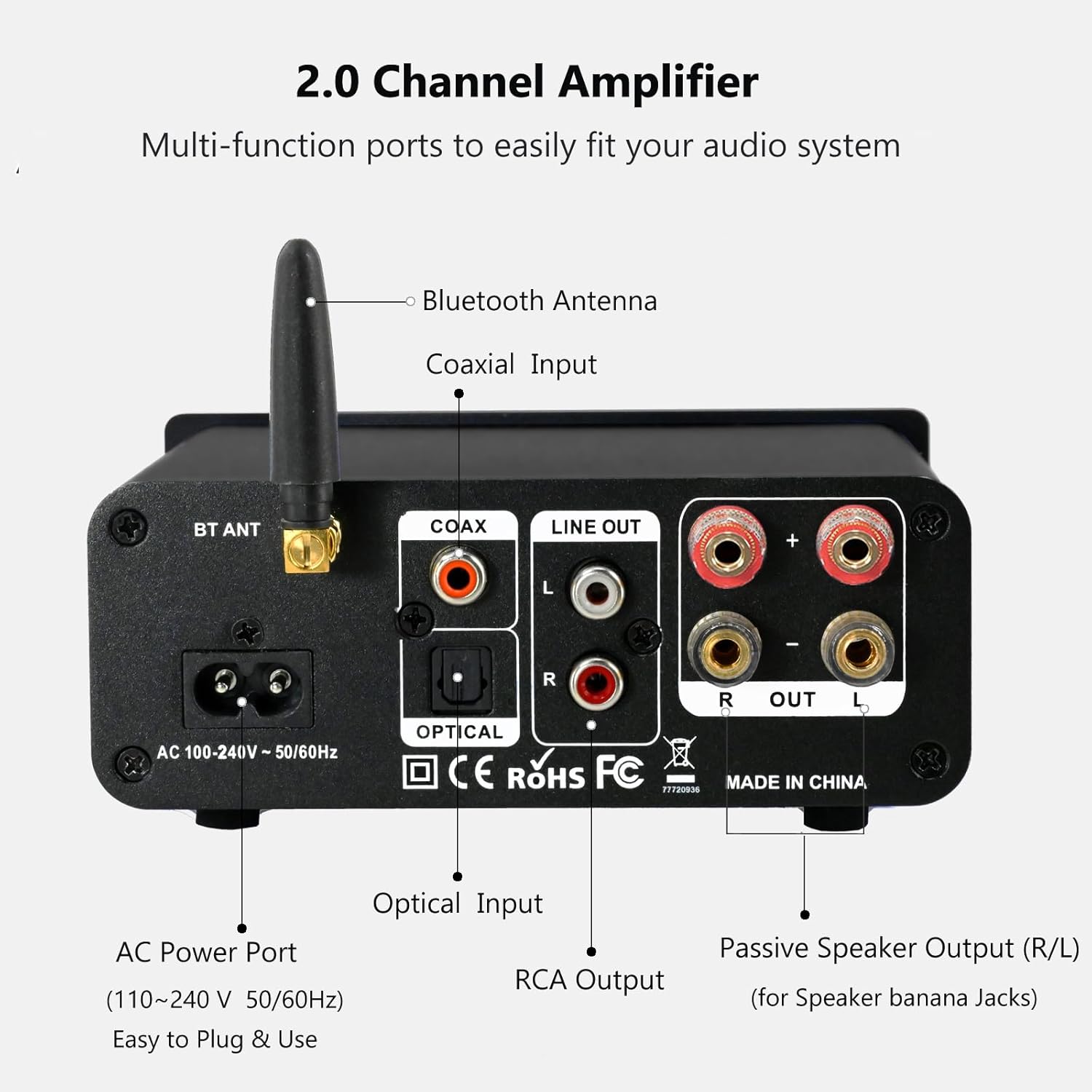
The rear panel provides connections for the Bluetooth antenna, Coaxial and Optical inputs, RCA Line Out, passive speaker outputs, and the AC power port.
- BT ANT (Bluetooth Antenna): Connect the included Bluetooth antenna for optimal wireless range and stability.
- COAX (Coaxial Input): Digital audio input for devices with a coaxial output.
- OPTICAL (Optical Input): Digital audio input for devices with an optical (Toslink) output.
- LINE OUT (RCA L/R): Analog audio output for connecting to powered speakers or a subwoofer.
- PASSIVE SPEAKER OUTPUT (R/L): Connect passive speakers using banana plugs or bare speaker wire.
- AC POWER PORT: Connect the supplied AC power cord (100-240V ~ 50/60Hz).
5. Настройка
5.1 Подключение динамиков

The LONPOO Mini Hi-Fi Amplifier seamlessly integrates with your home audio setup, providing clear sound to passive bookshelf speakers.
- Пассивные динамики: Connect your passive bookshelf speakers to the PASSIVE SPEAKER OUTPUT (R/L) terminals on the rear panel. Ensure correct polarity (+ to + and - to -) for each speaker. You can use banana plugs or strip the speaker wire ends and insert them into the terminals.
- Powered Speakers/Subwoofer: If you wish to connect powered speakers or a subwoofer, use an RCA cable to connect them to the LINE OUT (RCA L/R) порты на задней панели.
5.2 Подключение источников звука
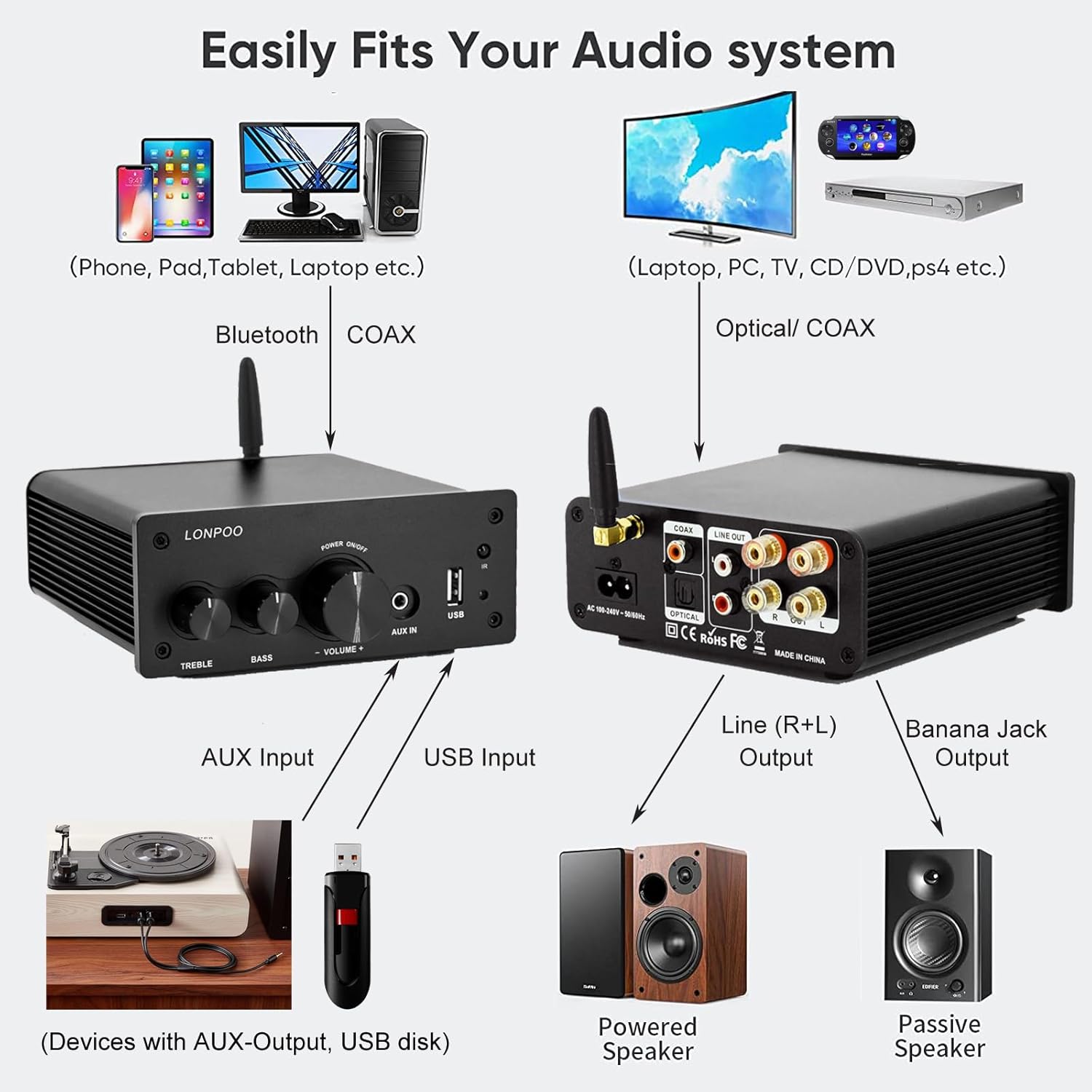
This diagram illustrates how the amplifier connects to a wide range of audio sources and output devices, including phones, PCs, TVs, CD players, powered speakers, and passive speakers.
- Bluetooth: Ensure the Bluetooth antenna is connected to the БТ АНТ порт.
- Вход AUX: Connect your smartphone, tablet, or other audio device using a 3.5mm audio cable to the AUX IN порт на передней панели.
- USB-вход: Вставьте USB-флеш-накопитель с аудиофайлами в формате MP3 или WAV. files в Вход USB порт на передней панели.
- Оптический вход: Connect your TV, CD player, or game console with an optical output to the ОПТИЧЕСКИЙ port on the rear panel using the provided optical cable.
- Коаксиальный вход: Connect your TV, DVD player, or other audio source with a coaxial output to the КОАКСИАЛЬНЫЙ порт на задней панели.
5.3 Подключение питания
Подключите прилагаемый сетевой шнур переменного тока к ПОРТ ПИТАНИЯ ПЕРЕМЕННОГО ТОКА на задней панели amplifier, then plug the other end into a wall outlet.
6. Инструкция по эксплуатации
6.1 Включение/выключение питания
Чтобы включить ampлифер, долгое нажатие то Многофункциональная ручка on the front panel. The indicator light will illuminate. To power off, долгое нажатие the knob again.
6.2 Выбор входа
To select an audio input source, короткое нажатие то Многофункциональная ручка. Each short press will cycle through the available inputs: Bluetooth, AUX, USB, Coaxial, and Optical. The Индикаторная лампа will change color to reflect the active input mode (refer to Section 4.1 for color codes).
6.3 Регулировка громкости
Поверните Многофункциональная ручка По часовой стрелке для увеличения громкости и против часовой стрелки для ее уменьшения.
6.4 Управление тоном
Используйте ВЫСОКИЕ и BASS knobs on the front panel to adjust the high and low frequencies of the audio output according to your preference.
6.5 Сопряжение по Bluetooth

Connect your smartphone or other Bluetooth-enabled devices wirelessly to the amplifier for convenient audio streaming.
- Убедитесь, что антенна Bluetooth надежно подключена.
- Включите питание amplifier and select the Bluetooth input mode (the indicator light will turn blue).
- На вашем устройстве с поддержкой Bluetooth (например, смартфоне, планшете) выполните поиск доступных устройств Bluetooth.
- Select "LONPOO AMP-615" from the list to pair.
- После сопряжения amplifier will play a confirmation sound, and you can stream audio wirelessly.
6.6 Воспроизведение через USB

The amplifier supports direct audio input via 3.5mm AUX and USB, allowing for plug-and-play functionality with various devices.
Вставьте USB-накопитель в Вход USB порт. amplifier will automatically detect and begin playing supported audio files (MP3, WAV). Use the remote control for playback functions like play/pause, next/previous track.
Пульт дистанционного управления 6.7
Входящий в комплект пульт дистанционного управления обеспечивает удобное управление устройством. amplifier from a distance. Functions include:
- Включение/выключение питания
- Увеличение/уменьшение громкости
- Немой
- Input Source Selection (BT, AUX, USB, COAX, OPT)
- USB Playback Controls (Play/Pause, Next/Previous Track)
7. Поиск Неисправностей
If you encounter any issues with your LONPOO Mini Hi-Fi AmpДля устранения неполадок, пожалуйста, обратитесь к следующему руководству по устранению неполадок:
| Проблема | Возможная причина | Решение |
|---|---|---|
| Нет звука |
|
|
| Низкое качество звука (искажения, низкая громкость) |
|
|
| Проблемы с подключением Bluetooth |
|
|
| Optical/Coaxial audio dropouts or no sound |
|
|
| Жужжащий или гудящий шум |
|
|
8. Технические характеристики
| Номер модели | AMP-615 |
| Выходная мощность | 100 Вт + 100 Вт (всего 200 Вт) |
| Каналы | 2.0 Стерео |
| Версия Bluetooth | 5.3 |
| Входы | Bluetooth, Optical, Coaxial, USB, 3.5mm AUX |
| Выходы | RCA Line Out (L/R), Passive Speaker Output (Banana Jack compatible) |
| Источник питания | 100-240 В переменного тока ~ 50/60 Гц |
| Размеры (Ш x В x Г) | 132 мм x 55 мм x 140 мм (прибл. 5.19 x 2.16 x 5.51 дюйма) |
| Масса | 1.09 кг (прибл. 2.4 фунта) |
| Включенные компоненты | Hi-Fi Amplifier, AC Cable, Remote Control, Optical Cable |
9. Техническое обслуживание
- Уборка: Перед чисткой отключите питание. Протрите внешнюю поверхность мягкой сухой тканью. ampНе используйте абразивные чистящие средства или растворители.
- Хранилище: Если хранить ampЕсли усилитель не использовался длительное время, отключите его от источника питания и храните в прохладном, сухом месте.
- Управление кабелями: Убедитесь, что все кабели аккуратно уложены и не находятся под натяжением, чтобы предотвратить их повреждение.
10. Гарантия и поддержка
This product comes with a standard manufacturer's warranty. For specific warranty details, please refer to the documentation provided with your purchase or contact your retailer. For technical support, troubleshooting assistance, or inquiries regarding spare parts, please contact LONPOO customer service or your authorized dealer. Information regarding spare parts availability is currently unavailable.