
MELONARE MWM-81F
MELONARE 8-Channel Wireless Microphone System
Model: MWM-81F
Введение
The MELONARE MWM-81F is an advanced 8-channel UHF wireless microphone system designed for professional audio applications. It features a digital circuit for minimal interference, 24-bit/48kHz sampling rate for high-fidelity sound, and a robust 240ft operating range. This system is ideal for singing, karaoke, church events, meetings, and weddings, providing clear and reliable audio performance.

Рисунок 1: Болееview of the MELONARE MWM-81F Wireless Microphone System, showing the receiver unit and eight handheld microphones.
Содержимое упаковки
Убедитесь, что все перечисленные ниже предметы включены в ваш пакет:
- 1 x беспроводной приемник
- 8 ручных микрофона
- 16 x AA Batteries (for immediate use)
- 1 х Адаптер питания
- 1 x 1/4" аудиокабель
- 1 x 6.35mm to 3.5mm Cable Adapter
- 1 х Руководство пользователя
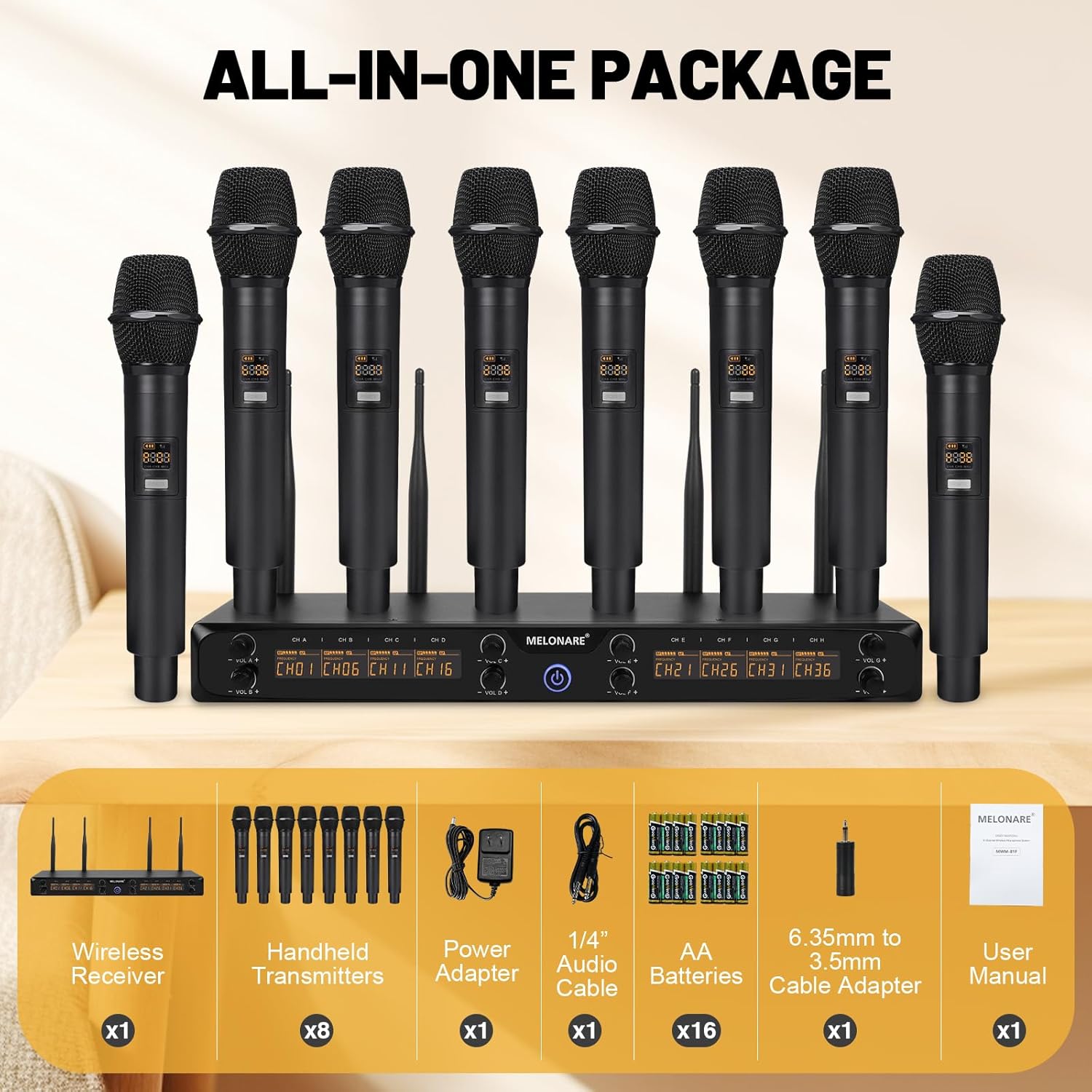
Figure 2: Contents of the MWM-81F package, illustrating all included accessories.
Характеристики продукта
UHF Digital Circuit & High Sampскорость
The system utilizes a UHF digital circuit to minimize interference, ensuring pure sound quality. A 24-bit/48kHz sampling rate provides enhanced sound dynamics and ultra-CD-quality audio reproduction. Balanced EQ tuning further refines audio clarity across all frequencies, while cardioid dynamic cartridges ensure precise sound capture and effective noise isolation.

Figure 3: Key audio features including UHF digital transmission and 24-bit/48kHz sampling rate for superior sound.
Seamless Wireless Connectivity & Extended Range
Benefit from expansive 240 ft coverage with UHF 500 MHz signal clarity. The system offers excellent wireless performance with frequency hopping, allowing selection of clear frequencies free from interference. Its 8x5 frequency groups support simultaneous use of up to 2 sets, providing exceptional convenience for extensive setups.

Figure 4: The system provides an extended wireless range of up to 240 feet for flexible use.

Figure 5: The system supports 8x5 frequency groups for multi-system use and interference resistance.
User-Friendly Design & Built-in Antenna
The handheld microphones feature a diamond-edged design to prevent rolling. The main unit's clear screen display shows channel assignments for easy identification and switching. A built-in fixed antenna eliminates the need for frequent disassembly, simplifying transportation and setup.

Figure 6: Smart design elements of the microphone, including anti-rolling features and clear indicators.
Руководство по настройке
- Распакуйте и осмотрите: Carefully remove all components from the packaging. Inspect for any signs of damage. Refer to the "Package Contents" section to ensure all items are present.
- Размещение приемника: Place the wireless receiver on a stable, flat surface. Ensure there is adequate ventilation around the unit. The built-in antennas are fixed and do not require assembly.
- Подключение питания: Connect the provided power adapter to the DC IN jack on the back of the receiver and plug it into a suitable power outlet.
- Установка батареи в микрофон: Unscrew the bottom cap of each handheld microphone. Insert two AA batteries into each microphone, observing the correct polarity (+/-). Replace the bottom cap securely.
- Подключение аудиовыхода:
- For individual microphone outputs, connect XLR cables (not included) from the Balanced XLR Output ports on the receiver to your audio mixer or PA system.
- For a mixed output, use the provided 1/4" audio cable from the 1/4" Audio Output Jack on the receiver to your amplifier, speaker, or karaoke machine. Use the 6.35mm to 3.5mm adapter if connecting to a 3.5mm input.
- Включение питания: Press the power button on the receiver to turn it on. The LCD display will illuminate. Turn on each handheld microphone by pressing and holding its power button. The microphone display will show its channel and battery status.
- Синхронизация частот: The system is designed for automatic synchronization. If a microphone is not connecting, ensure it is within range and its frequency group matches one of the receiver's channels. Refer to the "Operating" section for changing frequencies if needed.
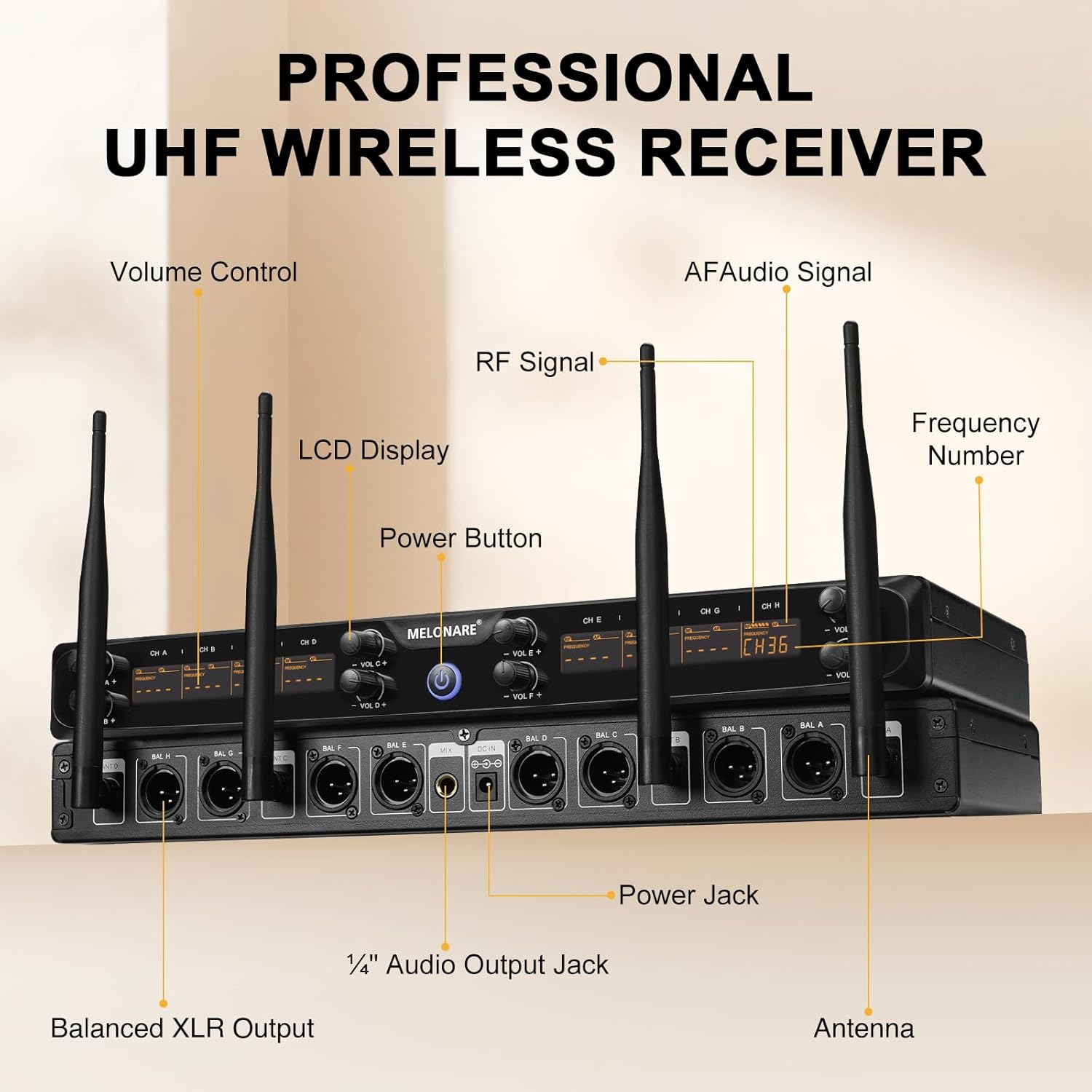
Рисунок 7: Подробная информация view of the receiver's front and back panels, indicating connection points.

Figure 8: Connection diagram for various audio devices, illustrating how to integrate the system with existing equipment.
Инструкция по эксплуатации
Работа микрофона
- Включение/выключение питания: Long press the power button on the microphone for 3 seconds to turn it on or off.
- Функция отключения звука: Short press the power button (1 second) to mute the microphone. The display will flash while muted. Short press again to unmute.
- Переключение частоты: Each microphone has a "SET" button. Short press this button to cycle through available frequencies within its assigned group. The display will show the new frequency number. Note: To sync a new frequency with the receiver, you may need to power cycle the receiver after changing the microphone's frequency.
- Индикатор заряда батареи: The microphone's display shows a real-time battery indicator. Replace batteries when the indicator shows low power to ensure uninterrupted performance.

Figure 9: Controls and indicators on the handheld microphone for power, mute, and frequency selection.
Операция приемника
- Регулятор громкости: Adjust the individual volume knobs on the receiver for each channel (CH A to CH H) to control the output level of each microphone.
- ЖК-дисплей: The receiver's LCD display shows the active channel assignments and signal status for each microphone.
- Индикатор радиочастотного сигнала: Observe the RF signal indicators on the receiver to ensure a strong wireless connection for each channel.
- AF Audio Signal Indicator: The AF audio signal indicators light up when audio is being received from the corresponding microphone.
Обслуживание
- Уборка: Use a soft, dry cloth to clean the receiver and microphones. Do not use abrasive cleaners or solvents.
- Замена батареи: Always replace all AA batteries in a microphone simultaneously with new ones. Do not mix old and new batteries or different battery types. Remove batteries if the microphones will not be used for an extended period to prevent leakage.
- Хранилище: Храните систему в прохладном, сухом месте, вдали от прямых солнечных лучей и экстремальных температур.
- Умение обращаться: Handle microphones with care. While designed to be durable, excessive drops or impacts can cause damage.
Поиск неисправностей
| Проблема | Возможная причина | Решение |
|---|---|---|
| Нет звука с микрофона. | Microphone off, muted, low battery, out of range, incorrect frequency, receiver off, audio cable disconnected. | Ensure microphone and receiver are powered on. Check microphone battery level and replace if low. Verify microphone is not muted. Ensure microphone is within 240ft range. Confirm microphone frequency matches receiver channel. Check audio cable connections to mixer/speaker. |
| Помехи или статический шум. | Other wireless devices, strong electromagnetic fields, multiple systems on same frequency, too far from receiver. | Change the microphone's frequency using the SET button. Ensure no other wireless devices are operating on the same frequency. Reduce distance between microphone and receiver. Avoid placing receiver near strong electrical interference sources. |
| Microphone display is dim or off. | Низкий заряд батареи. | Replace both AA batteries in the microphone. |
| Difficulty changing frequencies. | Неправильная процедура. | Ensure you are short-pressing the "SET" button on the microphone. If the receiver needs to sync, power cycle the receiver after changing the microphone's frequency. |
| Plosives or sibilance in audio. | Microphone technique, lack of pop filter. | Maintain proper distance from the microphone. Consider using an external pop filter or windscreen. Adjust EQ settings on your mixer if available. |
Технические характеристики
| Бренд | МЕЛОНАРЭ |
| Номер модели | MWM-81F |
| Форм-фактор микрофона | Ручной |
| Количество каналов | 8 |
| Диапазон частот | 530 - 580 МГц |
| Отношение сигнал / шум | 96 дБ |
| Уровень шума | 50 дБ |
| Частотная характеристика | 16000 Гц |
| Источник питания | Питание от батареек (микрофоны), питание от сети переменного тока (приемник) |
| Требуются батареи | 16 батарейки типа АА (в комплекте) |
| Материал | Металл, Пластик |
| Технология связи | XLR |
| Совместимые устройства | Amplifier, Audio Mixer, Karaoke Machine, PA System, Voice Recorder |
| Вес товара | 8.23 фунта |
| Размеры упаковки | 18.9 x 11.1 x 5.5 дюйма |
Гарантия и поддержка
Specific warranty details are not provided in the product information. For warranty claims, technical support, or further assistance, please contact MELONARE customer service directly or visit the official MELONARE brand store.
You can visit the MELONARE store at: MELONARE Brand Store
Ask a question about this manual
Ask about setup, troubleshooting, compatibility, parts, safety, or missing instructions. Manuals+ will review the question and use this page’s manual context to help answer it.