
Корсар CW-9061023-WW
CORSAIR iCUE Link Titan 360 RX LCD Liquid CPU Cooler User Manual
Model: CW-9061023-WW | Brand: Corsair
Введение
The CORSAIR iCUE LINK TITAN RX LCD CPU Cooler is designed to provide high-performance, low-noise cooling for your CPU. It integrates seamlessly into the iCUE LINK ecosystem, offering simplified connectivity and a customizable 2.1” IPS LCD screen for displaying system information or personalized content. This manual provides essential information for setting up, operating, and maintaining your cooler.
Основные характеристики
- All-in-One CPU Cooling with iCUE LINK: High-performance, low-noise AIO cooling with simplified, streamlined connections through the iCUE LINK ecosystem.
- Brilliant IPS LCD Display: A 2.1” IPS LCD screen (480x480 resolution, 600cd/m² backlight, 30 FPS, 16.7 million colors) for real-time CPU temperature, animated GIFs, or custom content.
- Effortless Connectivity and Intelligent Design: iCUE LINK technology allows sequential connection of components using universal connectors to a single port on the included iCUE LINK System Hub, reducing cable clutter.
- Система охлаждения FlowDrive: Features a high-performance three-phase pump and a precision-engineered cold plate surface profile for optimal thermal contact and efficiency.
- Pre-Mounted iCUE LINK RX RGB Fans: RX RGB fans with AirGuide technology and Magnetic Dome bearings are optimized for high airflow and static pressure, ensuring superior cooling and quiet operation.
- Широкая совместимость: Supports Intel LGA 1851/1700 and AMD AM5/AM4 CPU sockets.
Настройка и установка
The CORSAIR iCUE LINK TITAN RX LCD CPU Cooler is designed for straightforward installation. For detailed, step-by-step instructions, please refer to the official installation guide provided by Corsair. A QR code for the digital guide is typically found within the product packaging or can be accessed via the link below.
The iCUE LINK system simplifies cable management by allowing components to be connected in a daisy-chain fashion, reducing the number of cables needed for your build.
Совместимость: This cooler is compatible with a wide range of modern CPU sockets, including Intel LGA 1851, Intel LGA 1700, AMD AM5, and AMD AM4.
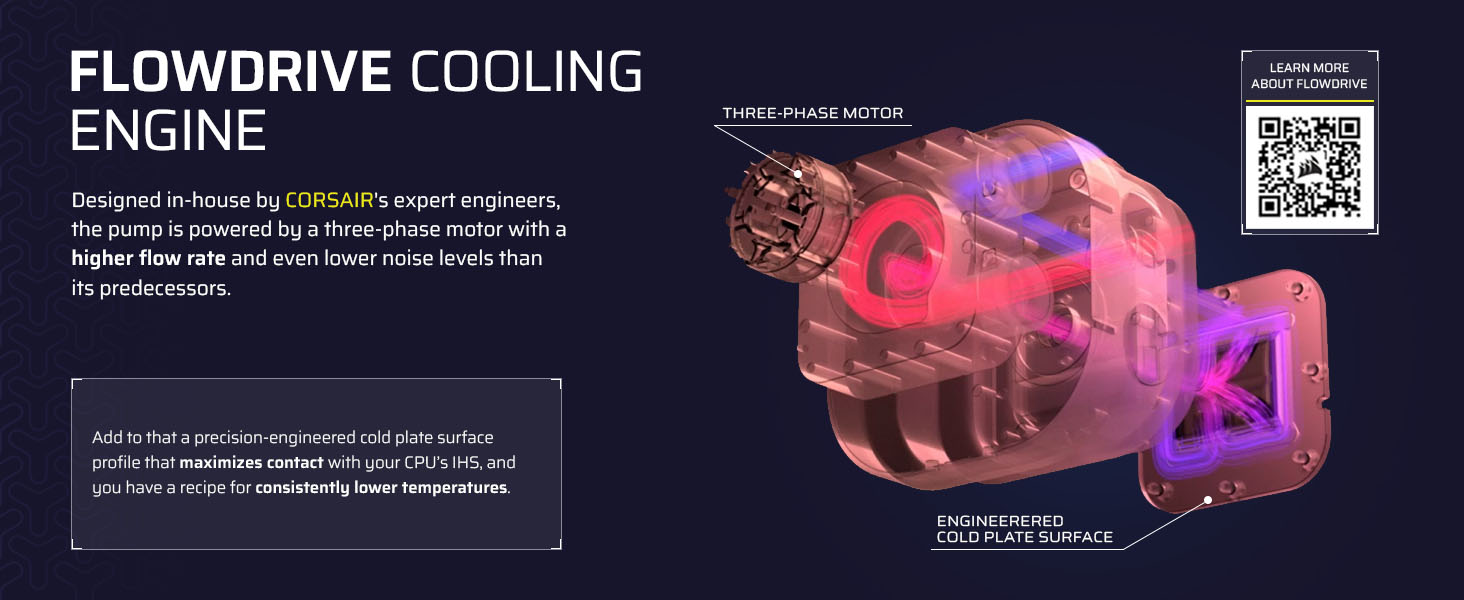
Image: Compatibility with Intel and AMD CPU sockets.

Image: Simplified cable management with the iCUE Link System Hub.
For the official installation guide, visit: Corsair Quick Start Guide
Official Product Video: CORSAIR iCUE LINK TITAN RX RGB AIO Trailer
Video: An official trailer showcasing the CORSAIR iCUE LINK TITAN RX RGB AIO Cooler's features and aesthetics.
Эксплуатация охладителя
The primary control and customization of your CORSAIR iCUE LINK TITAN RX LCD CPU Cooler are managed through the iCUE software. This software allows you to:
- Monitor real-time CPU temperature and other system parameters.
- Customize the content displayed on the 2.1” IPS LCD screen, including animated GIFs, images, or system stats.
- Control the dynamic RGB lighting of the pump and RX RGB fans.
- Adjust fan speeds and pump performance via PWM control, including Zero RPM mode for silent operation at low loads.

Image: The customizable 2.1" IPS LCD display on the pump head.

Image: Customizable pump cap and fan lighting.
Ensure you download and install the latest version of the iCUE software from the official Corsair website for full functionality and optimal performance.
Performance and Cooling Technology
The TITAN RX LCD cooler is engineered for superior thermal management:
- Система охлаждения FlowDrive: This engine features a high-performance three-phase pump designed for efficient coolant circulation and a precision-engineered cold plate surface profile to maximize contact with your CPU's integrated heat spreader.
- RX RGB Fans: The included RX RGB fans are specifically designed for radiator cooling, providing high airflow and static pressure. They utilize CORSAIR AirGuide technology for directed airflow and Magnetic Dome bearings for quiet and durable operation.
- Pre-Applied Thermal Paste: The cooler comes with pre-applied CORSAIR XTM70 Extreme Performance Thermal Paste, ensuring excellent heat transfer from your CPU to the cold plate right out of the box.

Image: Three RX RGB fans designed for optimal radiator performance.

Изображение: внутреннее view of the FlowDrive Cooling Engine.

Image: Performance comparison of pre-applied thermal paste.
Обслуживание
To ensure the longevity and optimal performance of your liquid CPU cooler, regular maintenance is recommended:
- Очистка от пыли: Периодически очищайте рёбра радиатора и лопасти вентилятора, чтобы предотвратить скопление пыли, которая может препятствовать циркуляции воздуха и снижать эффективность охлаждения. Используйте сжатый воздух или мягкую щётку.
- Осмотрите трубки и соединения: Occasionally check the tubing for any signs of kinks, leaks, or damage. Ensure all iCUE LINK connections are secure.
- Обновления программного обеспечения: Keep your iCUE software updated to the latest version to benefit from performance improvements, bug fixes, and new features.
Поиск неисправностей
If you encounter issues with your CORSAIR iCUE LINK TITAN RX LCD CPU Cooler, consider the following common troubleshooting steps:
- Cooler Not Detected by iCUE: Ensure all iCUE LINK cables are properly connected to the iCUE LINK System Hub and the hub is connected to your motherboard's USB header and power supply. Try restarting the iCUE software or your system.
- Высокие температуры процессора: Verify that the pump is running (you may feel a slight vibration or hear a faint hum). Check that the cold plate is securely mounted to the CPU and that the thermal paste application is adequate. Ensure fans are spinning and not obstructed.
- Проблемы с ЖК-дисплеем: If the display is not working or showing incorrect information, check the iCUE software settings for the display. Ensure the cooler is properly detected and firmware is up to date.
- Необычные шумы: Investigate any new or unusual noises. This could indicate air bubbles in the loop (which often resolve over time), or a fan bearing issue.
For more in-depth troubleshooting or technical support, please visit the official Corsair support webсайт.
Технические характеристики
| Особенность | Деталь |
|---|---|
| Номер модели | CW-9061023-WW |
| Размеры продукта | 15.59 x 4.72 x 1.06 дюйма |
| Вес товара | 3.75 фунта |
| Совместимые устройства | Настольные ПК |
| Метод охлаждения | Водяное охлаждение |
| Уровень шума | 36 дБ (максимум) |
| Максимальная скорость вращения | 2100 об/мин |
| Тип разъема питания | 4-контактный |
| Поддерживаемые процессорные разъемы | Intel LGA 1851/1700, AMD AM5/AM4 |
| СКП | 840440482956 |
| Страна происхождения | Тайвань |
Гарантия и поддержка
The CORSAIR iCUE LINK TITAN RX LCD CPU Cooler's FlowDrive cooling engine is backed by a Гарантия 6 год, гарантируя долгосрочную надежность и спокойствие.
For comprehensive support, including warranty claims, technical assistance, and access to the latest drivers and software, please visit the official Corsair support webсайт:
Связанные документы - CW-9061023-WW
 |
CORSAIR iCUE LINK TITAN 240/360 RX LCD: Краткое руководство пользователя Подробное руководство по быстрому запуску жидкостных кулеров CORSAIR iCUE LINK TITAN 240 и 360 RX LCD для экстремально высокой производительности процессора, охватывающее установку, настройку и конфигурацию программного обеспечения для оптимального охлаждения ПК и эстетичного внешнего вида. |
 |
Кулер для процессора CORSAIR iCUE LINK TITAN RX LCD: Краткое руководство пользователя и инструкция. Ознакомьтесь с CORSAIR iCUE LINK TITAN 240/360 RX LCD — высокопроизводительной системой жидкостного охлаждения процессора. В этом руководстве представлены инструкции по настройке, подробная информация об оборудовании и конфигурация программного обеспечения для оптимального охлаждения ПК. |
 |
Руководство по установке жидкостного кулера для процессора Corsair H60x | H100x RGB ELITE Performance RGB Подробное руководство по установке систем жидкостного охлаждения процессора Corsair H60x и H100x RGB ELITE Performance RGB. Включает списки оборудования, пошаговые инструкции для платформ Intel и AMD, схемы подключения и ответы на часто задаваемые вопросы. |
 |
Руководство по установке системы жидкостного охлаждения ЦП CORSAIR iCUE H100i/H115i/H150i ELITE Performance В этом руководстве содержатся инструкции по установке систем жидкостного охлаждения процессоров CORSAIR iCUE серий H100i, H115i и H150i ELITE. В нём описывается аппаратное обеспечение, пошаговая настройка для платформ Intel и AMD, а также ответы на часто задаваемые вопросы. |
 |
Инструкция по установке жидкостного кулера для процессора CORSAIR iCUE ELITE LCD H100i/H150i/H170i Extreme Performance LCD Подробное руководство по установке жидкостных кулеров для процессоров CORSAIR iCUE ELITE LCD Series (H100i, H150i, H170i), включающее информацию о входящем в комплект оборудовании, этапы установки для платформ Intel и AMD, подключения и ответы на часто задаваемые вопросы. |
 |
CORSAIR iCUE ELITE LCD H100i | H150i | H170i Installation Guide Installation guide for CORSAIR iCUE ELITE LCD H100i, H150i, and H170i liquid CPU coolers. Covers setup, hardware, and compatibility for Intel and AMD systems. |
Ask a question about this manual
Ask about setup, troubleshooting, compatibility, parts, safety, or missing instructions. Manuals+ will review the question and use this page’s manual context to help answer it.