
1. Введение
This manual provides comprehensive instructions for the safe and efficient use of your Samsung Galaxy AI Watch 7 (Model SM-L300). Please read this manual thoroughly before using the device to ensure proper operation and to prevent damage.
The Samsung Galaxy AI Watch 7 is a sophisticated wearable device designed to enhance your daily life with advanced health monitoring, fitness tracking, and smart connectivity features, powered by Galaxy AI.
2. Что в коробке
Убедитесь, что в упаковке присутствуют все компоненты:
- Samsung Galaxy AI Watch 7 (SM-L300)
- Док-станция
- 15W Dual Port Charger
- Quick Start Guide (separate document, if applicable)
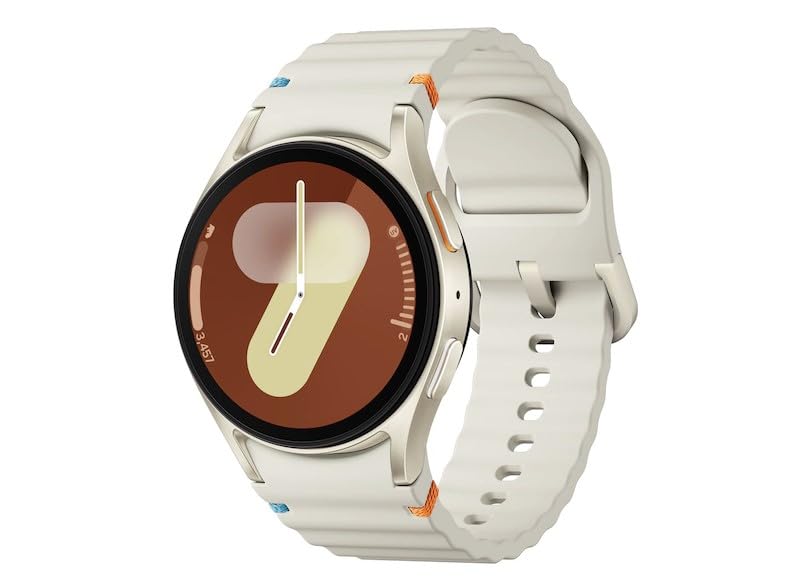
Figure 2.1: Samsung Galaxy AI Watch 7 (SM-L300) - Cream variant. This image shows the smartwatch from an angled perspective, highlighting its circular display and the textured cream-colored strap. The watch face displays a stylized '9' and a time indicator.
3. Настройка
3.1 Зарядка устройства
- Connect the 15W Dual Port Charger to a power outlet.
- Place the Galaxy AI Watch 7 onto the Dock Station. Ensure the charging pins align correctly.
- The watch display will indicate charging status. Allow the watch to fully charge before first use.
3.2 Первоначальное сопряжение со смартфоном
- Ensure your smartphone has Bluetooth enabled.
- Загрузите и установите последнюю версию Galaxy Носимое приложение из магазина приложений вашего смартфона.
- Turn on the Galaxy AI Watch 7 by pressing and holding the Power key.
- Откройте приложение Galaxy Wearable на своем смартфоне и следуйте инструкциям на экране, чтобы выполнить сопряжение часов.
- Для обеспечения полной функциональности необходимо предоставить все необходимые разрешения.
4. Управление устройством
4.1 Базовая навигация
- Сенсорный экран: Swipe left/right to navigate through tiles, swipe up/down for notifications/quick panel. Tap to select.
- Кнопка «Домой» (верхняя кнопка): Press to go to the Watch face or App screen. Double-press for a customizable shortcut.
- Кнопка «Назад» (нижняя кнопка): Нажмите, чтобы вернуться к предыдущему экрану.
4.2 Отслеживание здоровья и фитнеса
The Galaxy AI Watch 7 offers comprehensive health and fitness tracking:
- Мониторинг сердечного ритма: Continuously tracks your heart rate. Access data via the Samsung Health app.
- Мониторинг сна: Анализирует сонtages and provides a sleep score. Offers personalized sleep coaching.
- Отслеживание активности: Automatically detects and tracks various workouts. Manual tracking available for specific exercises.
- Энергетический индекс: Provides insights into your body's readiness based on sleep, heart rate, and activity.
- Советы по здоровому образу жизни: Personalized advice based on your Samsung Health data.
4.3 Water Lock Mode
Activate Water Lock mode before engaging in water activities to prevent accidental touches and ensure proper water resistance. This mode disables the touchscreen and wake-up gestures.
5. Техническое обслуживание
5.1 Очистка устройства
- Протирайте часы и ремешок мягкой безворсовой тканью.
- Для удаления стойких загрязнений слегкаampСмочите ткань водой. Не используйте едкие химикаты или абразивные чистящие средства.
- Перед зарядкой убедитесь, что часы полностью высохли.
5.2 Уход за аккумулятором
- Не подвергайте часы воздействию экстремальных температур.
- Charge the battery regularly, avoiding complete discharge for extended periods.
6. Поиск Неисправностей
6.1 Общие проблемы и решения
| Проблема | Возможная причина | Решение |
|---|---|---|
| Часы не включаются | Низкий заряд батареи | Зарядите часы с помощью прилагаемого зарядного устройства. |
| Невозможно подключиться к смартфону | Bluetooth выключен, проблемы с приложением или часы не находятся в режиме сопряжения. | Ensure Bluetooth is on, restart both devices, try pairing again via Galaxy Wearable app. |
| Датчик сердечного ритма не работает | Watch fit too loose, sensor dirty | Tighten the watch strap, clean the sensor on the back of the watch. |
6.2 Сброс к заводским настройкам
Если проблема не устранена, может потребоваться сброс настроек к заводским. Предупреждение: This will erase all data on your watch. Navigate to Settings > General > Reset на ваших часах.
7. Технические характеристики
| Особенность | Деталь |
|---|---|
| Название модели | Samsung Galaxy AI Watch 7 |
| Номер модели | СМ-Л300 |
| Тип дисплея | Супер AMOLED |
| Размер дисплея | 1.3 дюйма (33.3 мм) |
| Разрешение | 432 х 432 |
| Операционная система | Галактический ИИ |
| Процессор | 1.6 ГГц, 1.5 ГГц |
| Емкость памяти | 32 ГБ |
| Емкость аккумулятора | 300 миллиamp Часы (литий-ионный) |
| Связность | Bluetooth v5.3, Wi-Fi 802.11a/b/g/n 2.4GHz+5GHz, NFC (Latin America only) |
| Расположение технологии | GPS, ГЛОНАСС, Бейдоу, Галилео |
| Датчики | Accelerometer, Barometer, Bioelectrical Impedance Analysis Sensor, Electrical Heart Sensor, Gyro Sensor, Geomagnetic Sensor, Infrared Temperature Sensor, Light Sensor, Optical Heart Rate Sensor |
| Вес товара | 140 г |
8. Информация о гарантии
This product is covered by Samsung's standard limited warranty. For detailed warranty terms and conditions, please refer to the warranty card included with your product or visit the official Samsung support webСохраните чек о покупке для предъявления гарантийных претензий.
- Total Protection Plan for 1 Year (Optional purchase)
- Extended Warranty (Optional purchase)
9 Поддержка
Для получения дополнительной помощи, технической поддержки или по вопросам обслуживания, пожалуйста, свяжитесь со службой поддержки клиентов Samsung или посетите официальный сайт поддержки Samsung. webсайт:
- Официальный представитель Samsung Webсайт: www.samsung.com
- Поддержка Samsung: Refer to your region's specific support page for contact numbers and service center locations.