
Введение
This manual provides detailed instructions for the proper use and maintenance of your Deli 1700 240F Scientific Calculator. Please read this manual thoroughly before using the calculator to ensure correct operation and to maximize its lifespan. This calculator is designed for a wide range of mathematical and scientific computations, featuring a two-line display and 10+2 digits for enhanced functionality.
Настраивать
1. Установка аккумулятора
The Deli 1700 240F Scientific Calculator operates on both solar power and two nonstandard batteries. For optimal performance, ensure batteries are installed correctly.
- Найдите крышку батарейного отсека на задней панели калькулятора.
- Using a small screwdriver, carefully remove the screw and slide off the battery compartment cover.
- Insert two nonstandard batteries, ensuring the positive (+) and negative (-) terminals are aligned correctly as indicated inside the compartment.
- Установите на место крышку батарейного отсека и закрепите ее винтом.
Note: The calculator also utilizes solar power. Ensure adequate light exposure for solar operation, especially when batteries are low or not installed.
2. Первоначальное включение
Нажмите [НА] button to turn on the calculator. The display should show '0' or a similar initial state. If the display does not appear, check battery installation or ensure sufficient light for solar power.
Инструкция по эксплуатации
The Deli 1700 240F features a two-line display, showing the input expression on the upper line and the result on the lower line. It supports 240 types of functions.

Image: The Deli 1700 Scientific Calculator's two-line display, illustrating its ability to show both input and results simultaneously. This image highlights the clear numerical output and function indicators.
1. Basic Arithmetic Operations
Вводите числа с помощью цифровой клавиатуры. Используйте [+], [-], [×], и [÷] Нажмите клавиши для сложения, вычитания, умножения и деления соответственно. [=] чтобы получить результат.
2. Научные функции
The calculator includes various scientific functions accessible via the [СДВИГ] ключ. Нажмите [СДВИГ] followed by the desired function key to activate its secondary function (indicated above the key).
- Тригонометрические функции: [SIN], [COS], [TAN] и их обратные функции ([СДВИГ] + [SIN⁻¹], и т. д.).
- Логарифмические функции: [LOG] (основание 10) и [LN] (натуральный логарифм).
- Степенные и корневые функции: [x²], [√], [xʸ], [ʸ√x].
- Factorial: [x!].
3. Функции памяти
Сохранение и воспроизведение значений с помощью клавиш памяти:
- [М+]: Adds the displayed value to memory.
- [М-]: Subtracts the displayed value from memory.
- [МИСТЕР]: Recalls the value from memory.
- [МС]Очищает память.
4. Угловые единицы
The calculator supports Degree (DEG), Radian (RAD), and Grad (GRA) angle units. Press [РЕЖИМ] repeatedly to cycle through the angle units. The current unit is indicated on the display.
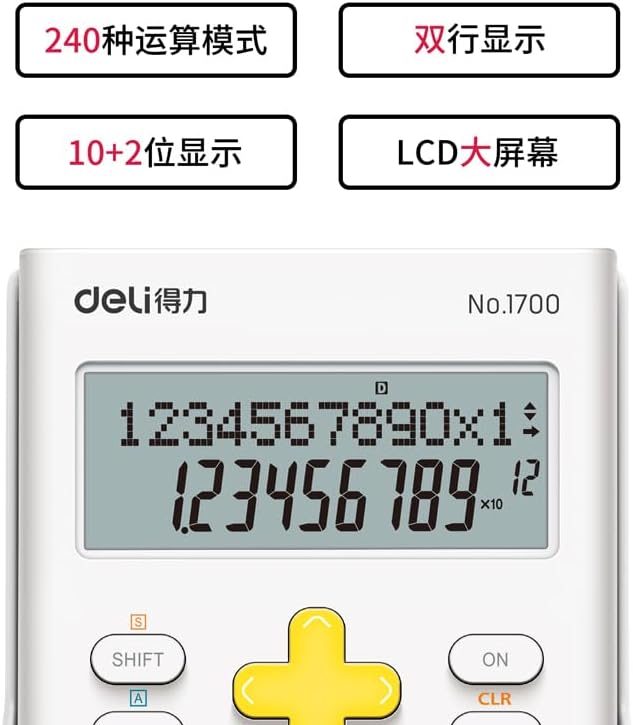
Изображение: Подробный view of the Deli 1700 Scientific Calculator's display and key layout. This image emphasizes the model number and the clarity of the 10+2 digit display, along with key labels like SHIFT and ALPHA.
Обслуживание
1. Уборка
Для чистки калькулятора используйте мягкую сухую ткань. Не используйте абразивные чистящие средства, растворители и не распыляйте их непосредственно на калькулятор. Избегайте чрезмерной влажности.
2. Замена батареи
When the display becomes dim or calculations are incorrect, it may be time to replace the batteries. Follow the battery installation steps outlined in the Setup section. Always replace both batteries at the same time with new ones of the same type.
3. Хранение
Store the calculator in a cool, dry place away from direct sunlight and extreme temperatures. Avoid dropping the calculator or subjecting it to strong impacts.
Поиск неисправностей
| Проблема | Возможная причина | Решение |
|---|---|---|
| Дисплей пустой или тусклый. | Low batteries or insufficient light for solar power. | Replace batteries or move to a brighter area. |
| Неверные результаты расчетов. | Incorrect mode setting (e.g., angle unit) or input error. | Check angle unit (DEG/RAD/GRA). Clear all memory and re-enter calculation. Press [CLR] to clear current calculation. |
| Калькулятор не реагирует на нажатия клавиш. | Temporary system error or very low power. | Нажимать [НА]/[OFF] to restart. If issue persists, remove and reinsert batteries. |
Технические характеристики
- Бренд: гастроном
- Модель: 1700
- Название модели: 240Ф
- Тип калькулятора: Инженерное/Научное
- Тип дисплея: LCD, Two-line display
- Цифры: 10+2 цифры
- Источник питания: Solar Powered & Battery
- Количество батарей: 2 нестандартная батарея (обязательно)
- Размер экрана: 1 Centimeter (approximate view(способная зона)
- Цвет: Белый
- Материал корпуса: Пластик
- Производитель: гастроном
Информация о гарантии
This Deli 1700 240F Scientific Calculator is covered by a standard manufacturer's warranty. Please refer to the packaging or contact your retailer for specific warranty terms and conditions. Keep your proof of purchase for warranty claims.
Поддержка клиентов
For further assistance, technical support, or inquiries regarding your Deli 1700 240F Scientific Calculator, please contact Deli customer service through their official website or the contact information provided with your purchase. Ensure you have your model number (1700 240F) ready when contacting support.