
Продукт болееview
The TP-Link Archer MR505 is a 4G+ Cat6 AC1200 Wireless Dual Band Gigabit Router designed to provide reliable internet connectivity. This router supports dual-band Wi-Fi (2.4 GHz and 5 GHz) and features Gigabit Ethernet ports for high-speed wired connections. It is compatible with 4G+ Cat6 networks, offering mobile broadband access.

Рисунок 1: Передняя часть view of the Archer MR505 router.
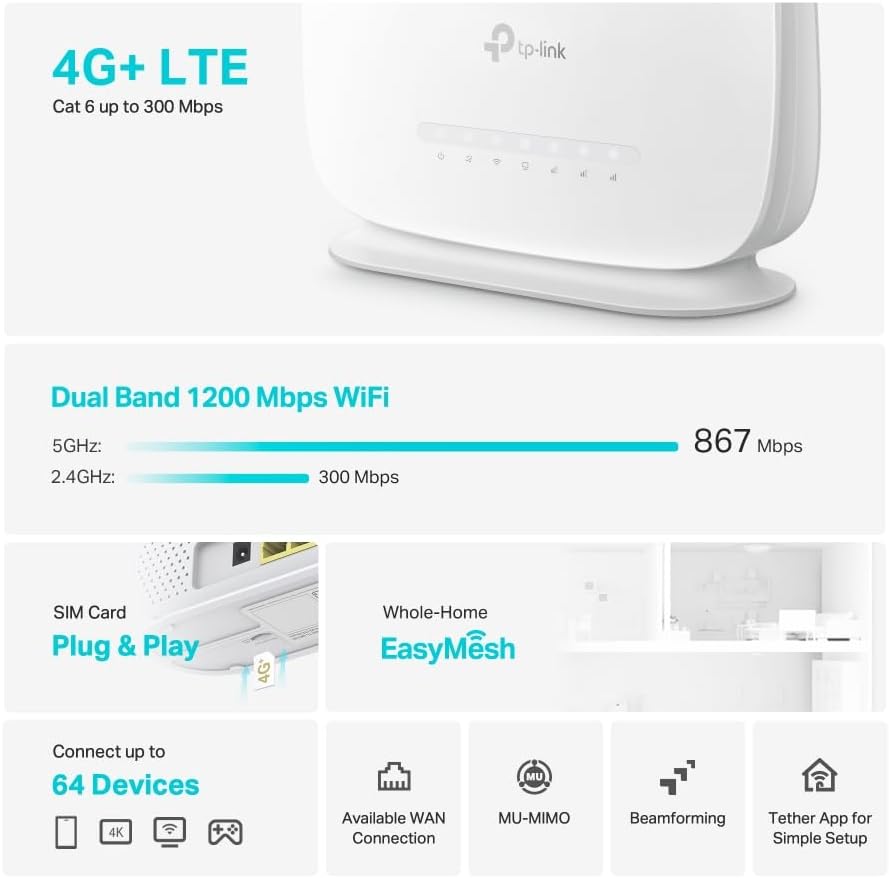
Рисунок 2: Сторона view of the Archer MR505 router.
Содержимое упаковки
Проверьте наличие всех предметов в посылке:
- Маршрутизатор TP-Link Archer MR505
- Адаптер питания
- Краткое руководство по установке
- Кабель Ethernet RJ45

Figure 3: Key features and components of the Archer MR505.
Инструкции по установке
Follow these steps to set up your Archer MR505 router:
- Вставьте сим карту: Locate the SIM card slot on the router. Insert your 4G/LTE SIM card into the slot until it clicks into place. Ensure the SIM card is a normal data SIM for optimal compatibility. Some data-only SIM cards may require specific configurations or may not be fully compatible.
- Подключите питание: Connect the provided power adapter to the router's power port and then plug it into a power outlet. The router will power on automatically.
- Дождитесь инициализации: Allow a few minutes for the router to boot up and establish a connection to the 4G/LTE network. The LED indicators on the front panel will show the connection status.
- Первоначальное подключение к Wi-Fi:
- Find the default Wi-Fi network name (SSID) and password printed on the label at the bottom of the router.
- Подключите свой компьютер или мобильное устройство к этой сети Wi-Fi.
- Управление маршрутизатором доступа:
- Откройте web браузер и введите адрес управления по умолчанию (например, http://tplinkwifi.net or http://192.168.1.1).
- Войдите в систему, используя имя пользователя и пароль по умолчанию (обычно админ/админ or specified on the label).
- Настройте параметры сети: Follow the on-screen Quick Setup wizard to configure your internet connection, change the Wi-Fi network name (SSID), and set a strong, unique password for both your Wi-Fi and router management interface.
- Tether App Setup (Optional): Download the TP-Link Tether app from your device's app store. The app provides an intuitive way to manage your router settings from your smartphone or tablet.
- Внешняя антенна (опционально): If using external antennas (not included), connect them to the designated ports on the back of the router. You may need to manually enable external antenna usage through the router's web интерфейс или приложение Tether.
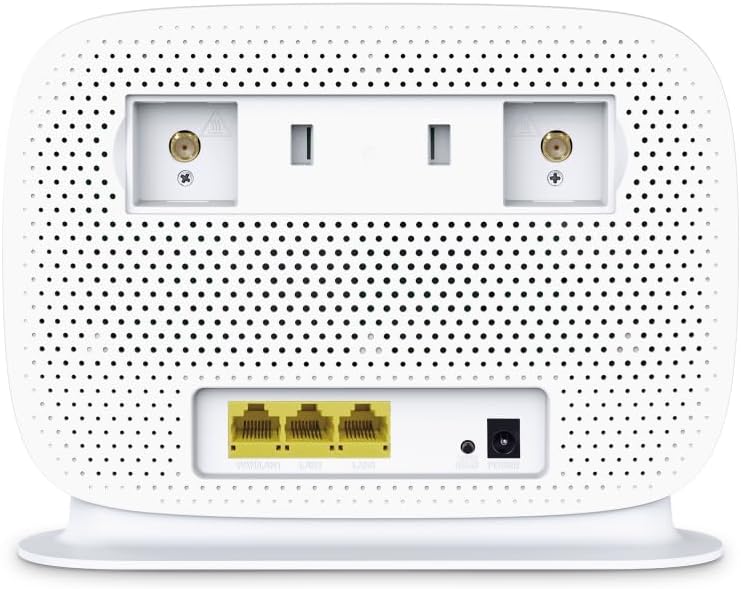
Figure 4: Rear panel of the Archer MR505 with ports and SIM slot.

Figure 5: Archer MR505 in various usage scenarios.
Инструкция по эксплуатации
The Archer MR505 provides robust wireless and wired connectivity:
- Двухдиапазонный Wi-Fi: The router operates on both 2.4 GHz and 5 GHz bands, offering speeds up to 300 Mbps and 867 Mbps respectively, for a total of AC1200 Wi-Fi.
- 4G+ Cat6 Connectivity: Enjoy mobile broadband speeds up to 300 Mbps download and 300 Mbps upload (maximum upstream data transfer rate).
- Гигабитные порты Ethernet: Four Gigabit LAN ports (1000 Mbps) are available for high-speed wired connections to devices like computers, gaming consoles, or smart TVs. One port can also function as a WAN port for traditional broadband connections.
- Емкость устройства: The router can support connectivity for up to 64 devices simultaneously.
- Умное соединение: This feature automatically assigns devices to the best available Wi-Fi band (2.4 GHz or 5 GHz) for optimized performance.
- Совместимость с EasyMesh: The Archer MR505 is compatible with TP-Link EasyMesh, allowing you to create a seamless whole-home mesh Wi-Fi network by adding compatible range extenders.
- Передовые технологии: Features like MU-MIMO and Beamforming enhance Wi-Fi efficiency and range, especially for multiple connected devices.
- Безопасность: The router supports WPA3 encryption for enhanced network security.

Figure 6: Versatile connectivity and speed capabilities.

Figure 7: Whole-Home EasyMesh integration.
Обслуживание
To ensure optimal performance and security of your router:
- Обновления прошивки: Регулярно проверяйте и устанавливайте последние обновления прошивки с официального сайта TP-Link. website or via the Tether app. Firmware updates often include security patches and performance improvements.
- Безопасные пароли: Use strong, unique passwords for your Wi-Fi network and router management interface. Change them periodically.
- Физическое размещение: Для максимального расширения зоны покрытия Wi-Fi разместите роутер в центральном месте, вдали от препятствий и источников помех (например, микроволновых печей, беспроводных телефонов).
- Уборка: Содержите роутер в чистоте и не допускайте попадания пыли. Убедитесь, что вентиляционные отверстия не заблокированы.
- Периодически перезапускать: Restarting the router occasionally can help resolve minor network issues and improve performance.
Поиск неисправностей
If you encounter issues with your Archer MR505 router, consider the following:
- No Internet Connection via 4G/LTE:
- Убедитесь, что ваша SIM-карта правильно вставлена и активирована.
- Verify that your SIM card is a normal data SIM. Some data-only SIM cards may require specific APN settings or might not be fully compatible. Contact your mobile service provider for details.
- Check the 4G/LTE signal strength indicated by the router's LEDs. If the signal is weak, try repositioning the router or consider using external antennas (if supported and configured).
- Перезагрузите маршрутизатор и подключенные к нему устройства.
- Проблемы с подключением к Wi-Fi:
- Убедитесь, что ваше устройство находится в зоне действия Wi-Fi маршрутизатора.
- Убедитесь, что вы используете правильный пароль Wi-Fi.
- If a device frequently connects and disconnects, try restarting that specific device.
- Проверьте наличие помех от других электронных устройств.
- Низкая скорость интернета:
- Check your 4G/LTE signal strength. Weak signal can significantly reduce speed.
- Убедитесь, что никакие другие приложения или устройства не потребляют чрезмерную пропускную способность.
- If using Wi-Fi, try connecting to the 5 GHz band for faster speeds, if your device supports it.
- Выполните проверку скорости, чтобы подтвердить фактическую скорость, которую вы получаете.
- Невозможно получить доступ к странице управления маршрутизатором:
- Убедитесь, что ваше устройство подключено к сети маршрутизатора (через Wi-Fi или кабель Ethernet).
- Verify you are entering the correct management address (e.g., http://tplinkwifi.net).
- Попробуйте очистить кэш браузера или использовать другой браузер.
Технические характеристики
| Бренд | TP-Link |
| Название модели | Арчер MR505 |
| Беспроводной стандарт | 802.11ac (Wi-Fi 5) |
| Класс диапазона частот | Двухдиапазонный (2.4 ГГц и 5 ГГц) |
| Скорость передачи данных Wi-Fi | Up to 300 Mbps (2.4 GHz), Up to 867 Mbps (5 GHz) - AC1200 Total |
| 4G+ Cat6 Speed | Up to 300 Mbps Download, Up to 300 Mbps Upload |
| Ethernet-порты | 4 x Gigabit LAN Ports (1000 Mbps), 1 x WAN/LAN Port |
| Тип антенны | Internal (External antenna support available) |
| Протокол безопасности | WPA3 |
| Метод контроля | App (TP-Link Tether) |
| Совместимые устройства | Laptop, Personal Computer, Smart Television, Smartphone, Tablet |
| Входная мощность | 12 Вольт |
| Вес товара | 0.93 Килограмма |
| Включенные компоненты | Archer MR505, Power Adapter, Quick Installation Guide, RJ45 Ethernet Cable |
Гарантия и поддержка
Информацию о гарантии см. в гарантийном талоне, прилагаемом к продукту, или посетите официальный сайт TP-Link. website for your region. Support resources, including FAQs, firmware downloads, and contact information, are available on the TP-Link support website and through the TP-Link Tether app.
Официальный TP-Link Webсайт: https://www.tp-link.com
Приложение TP-Link Tether: Available on iOS App Store and Google Play Store.