1. Продукт закончилсяview
The XTRONS 14.9 Inch Android 13 Car Stereo is an advanced multimedia navigation system designed to upgrade your vehicle's infotainment experience. Featuring a large 2K IPS touch screen, this unit offers robust performance with an Octa-core processor, 4GB DDR4 RAM, and 64GB Solid State ROM. It supports global 4G LTE connectivity, wireless CarPlay, and wireless/wired Android Auto, providing seamless integration with your smartphone and access to a wide range of applications.

Image 1.1: The XTRONS 14.9 Inch Android 13 Car Stereo main unit, showcasing its large 2K IPS screen and user interface.
2. Применимые модели и годы выпуска
This car stereo is specifically designed for the following left-hand drive Audi models with the MIB2 System:
- AUDI A4 (B9): 2016-2020
- AUDI A5 (B9): 2016-2020

Image 2.1: Visual representation of the car stereo installed in an Audi dashboard, highlighting compatible models and years.
3 Основные характеристики
- 14.9 Inch 2K IPS Touch Screen: Experience enhanced clarity and vibrant colors with the fully-laminated, ultra-slim 2K IPS screen. It features an ultra-wide 32:9 aspect ratio for expansive visuals.
- Latest Android 13 with Octa Core: Powered by an Octa-core processor with 4GB DDR4 RAM and 64GB Solid State ROM, ensuring responsive performance and ampхранилище для приложений.
- Global 4G LTE Connectivity: Insert a Micro-SIM card (not included) to access 4G mobile broadband connection with download speeds up to 300Mbps. Supports 99% of carriers worldwide.
- Built-in Wireless CarPlay and Wireless/Wired Android Auto: Seamlessly integrate your iPhone via Bluetooth for wireless CarPlay, or connect your Android phone wirelessly via Bluetooth or with a USB cable for Android Auto. Access GPS, calls, music, and voice assistants.
- Dual Wi-Fi Band: Connects to both 2.4GHz and 5GHz Wi-Fi bands for faster and more flexible internet access.
- Multi-task Display & Picture-in-Picture (PIP): Run two applications simultaneously on the 14.9-inch screen, such as navigation and music. PIP allows you to watch videos while using other apps.
- Блютус 5.0: Provides stable connections and high-quality transmission for hands-free calls and music streaming.
- Retains Original Functions: The system is designed to retain your vehicle's original amplifier system, radio, CD player, Bluetooth, backup camera display, and steering wheel control functions.
4. Содержимое упаковки
Убедитесь, что все перечисленные ниже предметы включены в ваш пакет:
- 1 x жгут проводов ISO
- 1 x 4G SIM Card Slot
- 1 мини-микрофон
- 1 x 4G-антенна
- 1 аудиокабель
- 1 кабель AMI
- 1 мини-динамик
- 1 х GPS-антенна
- 1 х Руководство пользователя
- 1 х Инструкция по установке
- 3 x Trim Strip

Image 4.1: A visual display of all components and accessories included in the product package.
5. Примечания по установке
Прежде чем начать установку, пожалуйста, повторноview the following important notes:
- Audi Music Interface (AMI): If your vehicle is equipped with an Audi music interface, you must connect the provided XTRONS AMI cable (connected with the audio extension cable) to the Audi music interface. Both cables are included in the package.
- Original Bracket: Retain the original head unit mounting bracket from your vehicle. It is required as a part to complete the installation of the new stereo.
Refer to the dedicated "Installation Instruction" document included in your package for detailed step-by-step guidance.
Изображение 5.1: Подробно view of the Audi Music Interface and the importance of retaining the original bracket during installation.
6. Настройка
After physical installation, follow these general steps for initial setup:
- Включить питание: Turn on your vehicle's ignition to power on the XTRONS unit.
- Начальная конфигурация: The system may guide you through initial language, time zone, and network settings. Follow the on-screen prompts.
- Сетевое подключение: Connect to a Wi-Fi network or insert a 4G Micro-SIM card for internet access.
- Bluetooth-сопряжение: Pair your smartphone via Bluetooth for hands-free calling and audio streaming.
- Настройка GPS: Ensure the GPS antenna is properly connected and the system acquires a satellite signal for navigation.
- Обновления системы: Check for any available system updates to ensure optimal performance and access to the latest features.
7. Инструкция по эксплуатации
The XTRONS unit features an intuitive touch screen interface. Navigate through menus by tapping icons and swiping. Key operating features include:
- Навигация: Access pre-installed GPS navigation or download your preferred navigation apps from the Google Play Store.
- Воспроизведение медиа: Play audio and video files from various sources, including USB, Bluetooth, and streaming apps.
- Multi-task Display: Utilize the large screen to run two applications side-by-side. For example, display navigation on one side and music controls on the other.
- Картинка в картинке (PIP): While using another application, you can minimize a video to a small window, allowing you to continue watching without interrupting your main task.

Image 7.1: Demonstration of the multi-task display and Picture-in-Picture features on the XTRONS unit.
Видео 7.1: Генералview video of an XTRONS 14.9 Inch Car Stereo. While this video specifically mentions Audi A6/A7, it provides a useful visual demonstration of the user interface and features common to XTRONS 14.9-inch units.
8. Варианты подключения
The unit offers versatile connectivity to keep you connected on the go:
- Глобальный 4G LTE: Insert a Micro-SIM card into the dedicated slot to enable 4G mobile data. This allows for internet access, online navigation, and streaming without relying on your phone's hotspot.
- Dual Wi-Fi Band (2.4GHz/5GHz): Connect to available Wi-Fi networks for faster data transfer and stable connections.
- Блютус 5.0: For wireless audio streaming, hands-free calling, and connecting Bluetooth-enabled devices.

Image 8.1: Illustration of the 4G LTE and dual-band Wi-Fi capabilities for internet access.
9 Интеграция со смартфоном
Integrate your smartphone for a safer and more convenient driving experience:
- Беспроводной CarPlay: Connect your iPhone wirelessly via Bluetooth to access iOS features like navigation, music, messages, and Siri voice control directly on the car stereo screen.
- Wireless/Wired Android Auto: Connect your Android phone wirelessly via Bluetooth or using a USB cable to use Android Auto. This provides access to Google Maps, music apps, Google Assistant, and more.
- Зеркальное отображение экрана: Wirelessly mirror your smartphone's screen content directly onto the XTRONS unit, allowing you to view apps and media from your phone.

Image 9.1: Visual representation of Wireless CarPlay, Android Auto, and Screen Mirroring in action.
10. Retained Original Functions
The XTRONS system is engineered to seamlessly integrate with your Audi's existing features, ensuring no loss of functionality:
- Ampжизненная система: Retains the original amplifier system for continued high-quality audio output.
- Оригинальное радио: Maintains access to your vehicle's original FM/AM radio tuner.
- Оригинальный CD-плеер: The functionality of the original CD player is preserved.
- Bluetooth: Original Bluetooth functionality is retained alongside the new unit's Bluetooth.
- Backup Camera Display: Your vehicle's existing backup camera display will continue to function.
- Функция управления рулевым колесом: All original steering wheel controls remain operational for convenience and safety.

Изображение 10.1: оконченоview of the original vehicle functions that are retained after installing the XTRONS car stereo.
11. Wiring Harness Diagram
The following diagram illustrates the various ports and connections on the wiring harness. Refer to this diagram during installation to ensure correct connections.
- 360 camera system port
- Порт LVDS
- Порт для внешнего микрофона
- Original CD port
- жгут проводов ISO
- USB-порт 1
- USB-порт 2
- Reverse control cable
- Вход для задней камеры
- Rear Camera ACC
- Земля
- Аудиовыход
- АСС
- Мини-динамик
- Слот для карты 4G
- 4G Антенна
- GPS-антенна
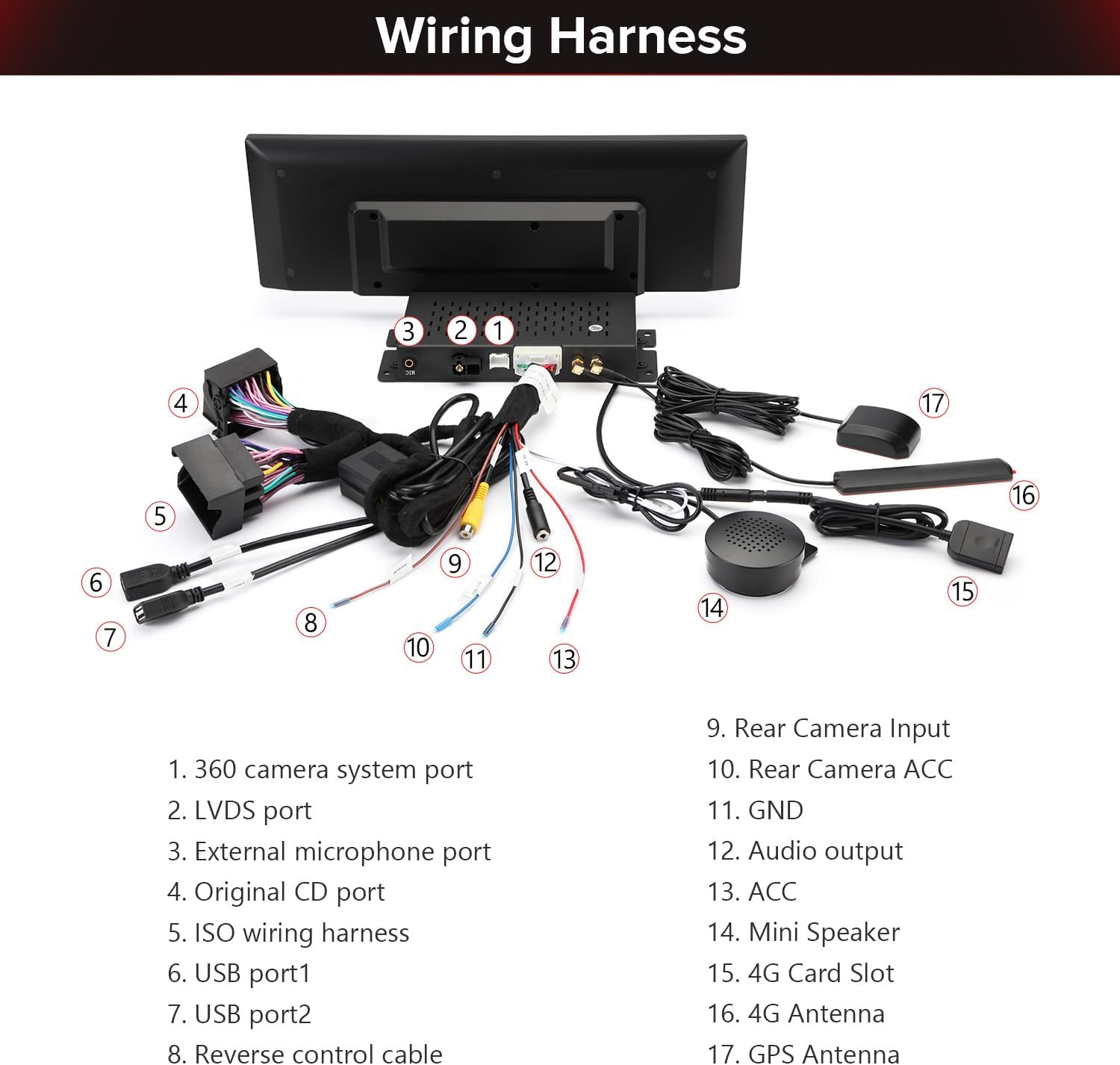
Image 11.1: A comprehensive diagram labeling each port and cable on the XTRONS wiring harness.
12. Размеры продукта
The main unit has the following approximate dimensions:
- Ширина: 372 мм
- Высота: 122 мм
Image 12.1: Diagram illustrating the width and height measurements of the XTRONS 14.9-inch car stereo unit.
13. Техническое обслуживание
Для обеспечения долговечности и оптимальной работы вашей автомобильной стереосистемы XTRONS следуйте этим рекомендациям по техническому обслуживанию:
- Очистка экрана: Используйте мягкую, безворсовую ткань, слегкаampПромойте водой или специальным средством для чистки экранов, предназначенным для электронных дисплеев. Избегайте использования агрессивных химикатов или абразивных материалов.
- Обновления программного обеспечения: Periodically check for and install system software updates. These updates often include performance improvements, bug fixes, and new features. Access updates through the system settings menu.
- Избегайте экстремальных температур: Do not expose the unit to prolonged direct sunlight or extreme cold, as this can affect performance and screen longevity.
- Кабельные соединения: Ensure all cables are securely connected. Loose connections can lead to intermittent issues.
14. Поиск Неисправностей
Если у вас возникли проблемы с автомобильной магнитолой XTRONS, воспользуйтесь следующими распространенными шагами по устранению неполадок:
- Нет питания: Check all power connections, including the ISO wiring harness and ACC wire. Ensure your vehicle's ignition is on.
- Нет звука: Verify speaker connections. Check audio settings in the system menu. Ensure the volume is not muted or set too low. If using original amplifier, confirm AMI cable connection.
- Сенсорный экран не отвечает: Try restarting the unit. If the issue persists, perform a system reset (refer to the full user manual for instructions on how to perform a reset).
- Потеря сигнала GPSУбедитесь, что GPS-антенна правильно установлена и имеет свободное пространство. view неба. Проверьте настройки GPS в системном меню.
- Проблемы с Bluetooth-соединением: Ensure Bluetooth is enabled on both the stereo and your smartphone. Delete previous pairings and try re-pairing.
- CarPlay/Android Auto не подключается.: For wireless connections, ensure Bluetooth and Wi-Fi are enabled. For wired Android Auto, try a different USB cable. Check phone settings for CarPlay/Android Auto permissions.
- Система зависает/работает медленно: Close unnecessary background applications. Clear cache if possible. If frequent, consider a factory reset (backup data first).
For more complex issues, consult the detailed User Manual or contact XTRONS customer support.
15. Технические характеристики
| Бренд | ЭКСТРОНС |
| Название модели | QLA42A4NL |
| Операционная система | Андроид 13 |
| Размер экрана | 14.9 дюйма |
| Разрешение | 2048 х 1080 |
| Тип дисплея | LCD, IPS Panel |
| Тип сенсорного экрана | емкостный |
| Емкость памяти | 64 ГБ |
| БАРАН | 4 ГБ DDR4 |
| Технология связи | Bluetooth 5.0, USB, Wi-Fi (2.4GHz/5GHz), 4G LTE |
| Supported Navigation System | GPS (Worldwide Map Type) |
| Ввод данных через интерфейс пользователя | Микрофон, сенсорный экран |
| Совместимые устройства | Смартфон, iPhone |
| Вес товара | 2.7 Килограмма |
16. Гарантия и поддержка
В комплект вашей автомобильной стереосистемы XTRONS входит Гарантия производителя на 1 год с даты покупки. Данная гарантия распространяется на дефекты материалов и изготовления при нормальном использовании.
For warranty claims, technical support, or any questions regarding the operation or installation of your device, please contact XTRONS customer service through their official website or the retailer where the product was purchased. Please have your model number (QLA42A4NL) and proof of purchase ready when contacting support.