
Thomson 145G
Руководство пользователя Thomson Streaming Stick 4K 145G
Модель: 145G
Введение
This user manual provides comprehensive instructions for the setup, operation, maintenance, and troubleshooting of your Thomson Streaming Stick 4K 145G. Please read this manual carefully before using the device to ensure proper functionality and to avoid damage.

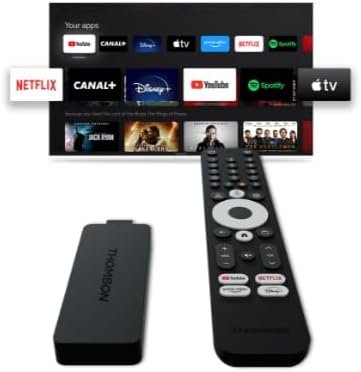
Image: The Thomson Streaming Stick 4K 145G alongside its remote control, illustrating the main components of the product.
Что в коробке?
Upon unboxing your Thomson Streaming Stick 4K 145G, please verify that all components are present:
- Thomson Streaming Stick 4K 145G
- Дистанционное управление
- Адаптер питания
- USB-кабель (для питания)
- HDMI Extender (optional, may be included)
- Краткое руководство пользователя
Руководство по настройке
Follow these steps to set up your Thomson Streaming Stick 4K 145G:
- Connect the Streaming Stick: Plug the Thomson Streaming Stick 4K 145G directly into an available HDMI port on your television. If space is limited, use an HDMI extender if provided.
- Подключите питание: Connect the provided USB cable to the power input port on the streaming stick and then connect the other end to the power adapter. Plug the power adapter into a wall outlet.
- Включите телевизор и выберите вход: Turn on your television and select the HDMI input to which the streaming stick is connected.
- Начальная настройка: The device will boot up and guide you through the initial setup process on your TV screen. This typically includes:
- Выбор языка.
- Подключение к сети Wi-Fi.
- Signing in with your Google account (required for Google TV features and app downloads).
- Принятие положений и условий.
- Сопряжение дистанционного управления: The remote control should automatically pair with the device. If not, follow the on-screen instructions or press and hold the Home and Back buttons simultaneously on the remote until pairing is complete.
Изображение: Подробный view of the Thomson Streaming Stick 4K 145G, highlighting its HDMI connector for TV input and the power input port.
Инструкция по эксплуатации
Once set up, you can begin using your Thomson Streaming Stick 4K 145G to access various streaming services and content.
Функции дистанционного управления
Ознакомьтесь с кнопками пульта дистанционного управления:
- Кнопка питания: Turns the device on or off (standby).
- Кнопка Google Ассистента: Активирует голосовые команды для поиска и управления.
- Навигационная панель (круг): Use up, down, left, right to navigate menus.
- Кнопка OK/Выбрать: Подтверждает выбор.
- Кнопка «Назад»: Возврат к предыдущему экрану.
- Домашняя кнопка: Возврат на главный экран Google TV.
- Кнопки регулировки громкости (+/-): Регулирует громкость телевизора.
- Кнопка выключения звука: Mutes TV volume.
- Кнопки быстрого доступа к приложению: Dedicated buttons for Netflix, Disney+, YouTube, and Prime Video for quick access.

Image: The Thomson Streaming Stick 4K 145G and its remote control, showing the layout of the buttons on the remote.
Навигация по Google ТВ
The Google TV interface organizes content from your streaming services into a single, personalized experience.
- Главный экран: Отображает рекомендуемый контент, установленные приложения и ваш список просмотра.
- Приложения: Access all your installed applications. You can download more from the Google Play Store.
- Библиотека: Find your purchased movies and TV shows from Google Play.
- Поиск: Use the search icon or Google Assistant button to find content by title, genre, or actor.
To stream content, simply select an app or a recommended title from the home screen. Ensure you have an active subscription for paid services.
Обслуживание
Proper maintenance ensures the longevity and optimal performance of your streaming stick.
- Уборка: Use a soft, dry, lint-free cloth to clean the device and remote control. Do not use liquid cleaners or aerosols.
- Вентиляция: Ensure the streaming stick is placed in a well-ventilated area and not covered, as proper airflow prevents overheating.
- Обновления программного обеспечения: The device will automatically check for and install software updates. Ensure it remains connected to the internet for these updates.
- Хранилище: Если устройство не используется в течение длительного времени, храните его в прохладном, сухом месте, вдали от прямых солнечных лучей.
Поиск неисправностей
If you encounter issues with your Thomson Streaming Stick 4K 145G, refer to the following common problems and solutions:
| Проблема | Возможная причина | Решение |
|---|---|---|
| Нет питания/устройство не включается | Power adapter not connected, faulty outlet, or damaged cable. | Убедитесь, что адаптер питания надежно подключен к устройству и к исправной розетке. Попробуйте использовать другую розетку. |
| Нет сигнала на телевизоре | Incorrect HDMI input selected, loose HDMI connection, or device not powered on. | Verify the TV is on the correct HDMI input. Re-seat the HDMI cable. Ensure the streaming stick has power. |
| Пульт не отвечает | Batteries low/dead, remote not paired, or obstruction. | Replace batteries. Re-pair the remote by holding Home and Back buttons. Ensure no obstructions between remote and device. |
| Буферизация или плохое качество потоковой передачи | Weak Wi-Fi signal, internet speed issues, or network congestion. | Move the device closer to the Wi-Fi router. Restart your router. Check your internet speed. Reduce other network activity. |
| Приложения вылетают или зависают | Устаревшее приложение, нехватка памяти или программный сбой. | Restart the device. Check for app updates in the Google Play Store. Clear app cache (Settings > Apps > [App Name] > Clear cache). |
If the issue persists after trying these solutions, you may need to perform a factory reset (Settings > System > About > Factory reset). Note that a factory reset will erase all data and settings on the device.
Технические характеристики
Key technical specifications for the Thomson Streaming Stick 4K 145G:
- Название модели: STREAMING STICK 4K THOMSON 145G
- Номер модели: 145G
- Разрешение: 4K UHD
- Связь: Wi-Fi, USB, Ethernet (via adapter), HDMI, IR
- Тип разъема: HDMI
- Поддерживаемые интернет-сервисы: Netflix, Disney+, Prime Video, YouTube, Spotify (and others via Google Play Store)
- Тип контроллера: Дистанционное управление
- Форм-фактор: ТВ-приставка
- Цвет: Черный
- Размеры продукта: 1.3 х 9.3 х 3.4 см
- Масса: 460 г
- Производитель: Томсон
- Первая доступная версия: 8 августа 2024 г.
Гарантия и поддержка
For warranty information and technical support, please refer to the documentation included with your purchase or visit the official Thomson support webСохраните чек о покупке для предъявления гарантийных претензий.
Производитель: Томсон
Гарантированные обновления программного обеспечения до: Неизвестно (согласно данным о продукте)
Ask a question about this manual
Ask about setup, troubleshooting, compatibility, parts, safety, or missing instructions. Manuals+ will review the question and use this page’s manual context to help answer it.