
1. Введение
Thank you for choosing the Hama DR2002BT Digital Radio. This device offers a comprehensive audio experience with FM, DAB/DAB+ digital radio reception, and Bluetooth connectivity. Its user-friendly design, featuring large buttons and a clear 4.3-inch TFT color display, makes it suitable for all users. This manual will guide you through the setup, operation, and maintenance of your new digital radio.
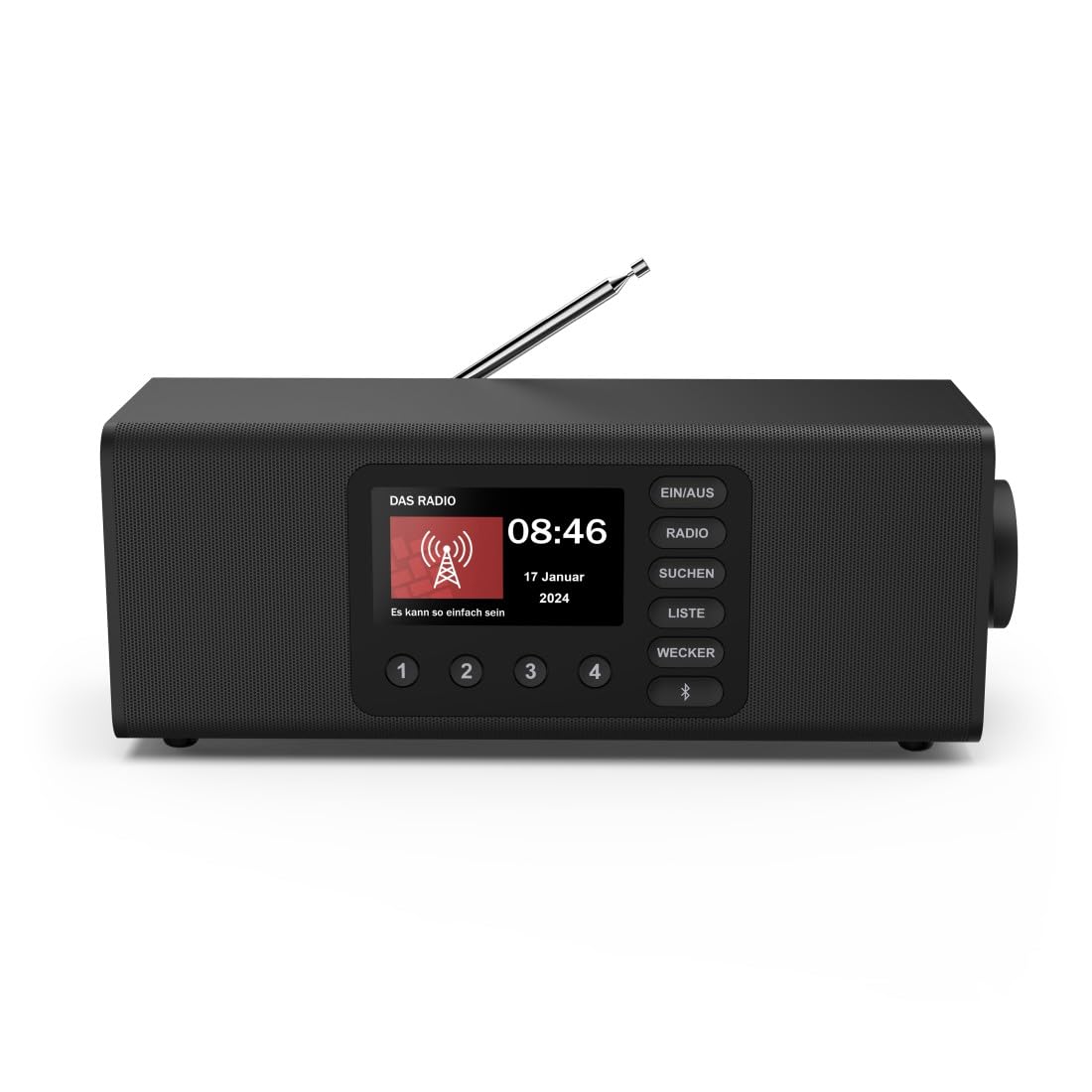
Изображение: Спереди view of the Hama DR2002BT Digital Radio, showcasing его дисплей и кнопки управления.
2. Информация по технике безопасности
Внимательно прочтите данные инструкции по технике безопасности перед использованием устройства. Сохраните это руководство для дальнейшего использования.
- Не подвергайте устройство воздействию влаги, дождя или экстремальных температур.
- Не размещайте устройство рядом с источниками тепла или под прямыми солнечными лучами.
- Не открывайте устройство casing. Ремонтные работы должны выполняться только квалифицированным персоналом.
- Используйте только прилагаемый адаптер питания.
- Обеспечьте надлежащую вентиляцию вокруг устройства.
3. Содержимое упаковки
При распаковке убедитесь в наличии всех предметов:
- Hama DR2002BT Digital Radio
- Адаптер питания
- Руководство пользователя
4. Продукт закончилсяview
4.1 Органы управления и дисплей на передней панели

Image: Front panel of the radio highlighting the display and control buttons, with icons for Bluetooth, DAB+, and Alarm functions.
The front panel features a 4.3-inch TFT color display, large control buttons, and a rotary knob for easy navigation and selection. Key buttons include:
- EIN/AUS (ON/OFF): Включает и выключает устройство.
- РАДИО: Switches between FM and DAB/DAB+ modes.
- SUCHEN (SEARCH): Инициирует сканирование станции.
- LISTE (LIST): Accesses the list of available stations.
- WECKER (ALARM): Настраивает параметры будильника.
- Кнопка Bluetooth: Активирует режим сопряжения Bluetooth.
- Кнопки предустановки (1-4): Быстрый доступ к сохраненным избранным станциям.
- Rotary Knob (LAUTSTÄRKE/NAVIGIEREN): Controls volume and navigates menus.
4.2 Соединения на задней панели
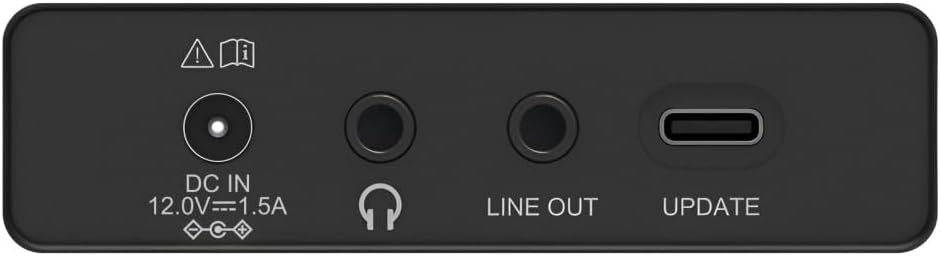
Image: Close-up of the rear panel showing the DC IN, Headphone, Line Out, and UPDATE (USB-C) ports.
На задней панели предусмотрены основные возможности подключения:
- DC IN 12.0V --- 1.5A: Power input for the external adapter.
- Разъем для наушников (3.5 мм): Для частного прослушивания.
- СТРОКА ВЫХОДА: Аудиовыход для подключения к внешнему устройству. ampораторами или динамиками.
- UPDATE (USB-C): Для обновления прошивки.
- Телескопическая антенна: For FM and DAB/DAB+ reception.

Изображение: сзади view of the Hama DR2002BT Digital Radio with its telescopic antenna extended for optimal signal reception.
5. Настройка
5.1 Подключение питания
- Подключите прилагаемый адаптер питания к DC ВХОД порт на задней панели радиостанции.
- Подключите адаптер питания к подходящей розетке.
- Радиоприемник включится автоматически или перейдет в режим ожидания.
5.2 Расположение антенны
For optimal FM and DAB/DAB+ reception, fully extend the telescopic antenna. Position the radio near a window if reception is poor.
5.3 Первоначальная настройка (первое использование)
Upon first power-on, the radio may guide you through an initial setup process, including language selection and an automatic DAB station scan. Follow the on-screen prompts.
6. Инструкция по эксплуатации
6.1 Включение/выключение питания
Нажмите EIN / AUS кнопка включения или выключения радио.
6.2 Режим радио DAB/DAB+
- Нажмите РАДИО кнопку для выбора режима DAB.
- If this is the first time in DAB mode or if you want to rescan, press SUCHEN to perform a full scan for available stations.
- Use the rotary knob to navigate through the station list. Press the knob to select a station.
- К view the station list, press the СПИСОК кнопка.
6.3 Режим FM-радио
- Нажмите РАДИО кнопку для выбора режима FM.
- Нажимать SUCHEN для автоматического поиска следующей доступной FM-станции.
- Alternatively, use the rotary knob to manually tune to a frequency.
6.4 Сохранение и вызов предустановок
The radio allows you to store up to 4 favorite stations using the dedicated preset buttons (1-4).
- Настройтесь на нужную станцию (DAB или FM).
- Press and hold one of the preset buttons (1-4) until the display confirms the station has been saved.
- To recall a preset station, simply press the corresponding preset button (1-4).
6.5 Работа Bluetooth

Изображение: Спереди view of the radio with Bluetooth and stereo speaker icons, indicating its wireless audio streaming capability.
The Hama DR2002BT can stream audio from your smartphone, tablet, or laptop via Bluetooth 5.0.
- Press the Bluetooth button on the front panel to enter Bluetooth pairing mode. The display will show a pairing indicator.
- На внешнем устройстве (смартфоне, планшете) включите Bluetooth и выполните поиск доступных устройств.
- Select "Hama DR2002BT" from the list of devices to pair.
- Once paired, you can play audio from your device, and it will be output through the radio's speakers.
6.6 Функция будильника

Image: A person waking up with the Hama DR2002BT Digital Radio placed on a bedside table, illustrating its alarm clock functionality.
The radio features two independent alarm settings.
- Нажмите ВЕККЕР кнопка для доступа к настройкам будильника.
- Use the rotary knob to select Alarm 1 or Alarm 2.
- Configure the alarm time, source (buzzer or radio station), and repetition (once, daily, weekdays, weekends, or specific days).
- Press the rotary knob to confirm each setting.
- To quickly activate/deactivate an alarm, press the ВЕККЕР button and use the rotary knob to toggle the alarm status.

Image: A person interacting with the Hama DR2002BT Digital Radio, demonstrating its ease of use for setting functions like alarms or tuning stations.
7. Техническое обслуживание
To ensure the longevity and optimal performance of your Hama DR2002BT Digital Radio, follow these maintenance guidelines:
- Уборка: Для очистки корпуса радиоприемника используйте мягкую, сухую, безворсовую ткань. Не используйте абразивные чистящие средства, воски или растворители.
- Пыль: Regularly dust the device to prevent accumulation in vents and ports.
- Хранилище: При длительном хранении радиоприемника отключите его от источника питания и храните в прохладном, сухом месте.
- Антенна: Обращайтесь с телескопической антенной осторожно, чтобы избежать её изгиба или поломки.
8. Поиск Неисправностей
Если у вас возникли проблемы с радио, ознакомьтесь со следующими распространенными проблемами и решениями:
| Проблема | Возможная причина | Решение |
|---|---|---|
| Нет электричества | Адаптер питания не подключен; розетка неисправна | Проверьте подключение адаптера питания; попробуйте другую розетку. |
| Плохой прием радиосигнала (DAB/FM) | Антенна не выдвинута; Зона слабого сигнала; Помехи | Fully extend the telescopic antenna; Reposition the radio (e.g., near a window); Perform a new station scan. |
| Сбой сопряжения Bluetooth | Bluetooth not enabled on external device; Radio not in pairing mode; Device too far | Ensure Bluetooth is on and visible on your device; Press the Bluetooth button on the radio; Move devices closer (within 10m). |
| Нет звука | Volume too low; Mute activated; Incorrect source selected | Increase volume using the rotary knob; Check if mute is active; Ensure the correct mode (DAB, FM, Bluetooth) is selected. |
| Будильник не звучит | Alarm not activated; Incorrect alarm time/day set | Verify alarm is enabled in settings; Check alarm time and repetition settings. |
9. Технические характеристики

Image: Diagram showing the dimensions of the Hama DR2002BT Digital Radio: 35 cm (width), 12.5 cm (depth), and 13 cm (height).
| Особенность | Деталь |
|---|---|
| Номер модели | DR2002BT (00054298) |
| Прием | DAB, DAB+, FM |
| Версия Bluetooth | 5.0 |
| Выходная мощность (RMS) | 10 W (Stereo) |
| Отображать | 4.3-дюймовый цветной TFT-дисплей |
| Связи | 3.5mm Jack (Headphone), USB-C (Update), Line Out, DC IN |
| Источник питания | Внешний адаптер питания |
| Размеры (Ш x Г x В) | 35 х 12.5 х 13 см |
| Масса | 1788 грамм |
| Материал | Пластик |
| Цвет | Черный |
| Дополнительные возможности | Alarm Function (2 alarms), Direct Selection Keys |
10. Гарантия и поддержка
Hama GmbH & Co KG provides a warranty for this product. Please refer to the warranty card included in your package or visit the official Hama webсайт для получения подробных условий гарантии.
For technical support, troubleshooting assistance, or spare parts, please contact Hama customer service or visit their website. The availability of spare parts in the EU is guaranteed for 7 years.
- Производитель: Хама ГмбХ & Ко КГ
- Страна происхождения: Германия
- Наличие запасных частей в ЕС: 7 года