
1. Введение
This manual provides detailed instructions for the installation, operation, and maintenance of the Yitouniu EWeLink 2-Channel Smart WiFi Switch Relay. This device enables remote control of household appliances and electronic devices via a mobile application, RF remote control, and voice commands through smart assistants like Alexa and Google Home. It supports various operating modes and timing functions to enhance smart home automation.
2. Информация по технике безопасности
- Перед установкой или обслуживанием убедитесь, что питание отключено, чтобы избежать поражения электрическим током.
- Installation should be performed by qualified personnel or under strict adherence to electrical safety guidelines.
- Не превышайте максимальный ток и громкость.tagУказаны рейтинги, соответствующие данному устройству.
- Держите устройство вдали от воды, влаги и экстремальных температур.
- Перед восстановлением электропитания убедитесь, что все проводные соединения надежно закреплены и правильно выполнены.
3. Продукт закончилсяview
The Yitouniu EWeLink Smart WiFi Switch Relay is a compact, 2-channel device designed for integrating traditional appliances into a smart home system. It features WiFi and Bluetooth connectivity for app control and supports RF 433MHz for remote control.

Изображение 3.1: Спереди view of the Yitouniu EWeLink Smart WiFi Switch Relay. The device is white with branding and connection labels visible.

Изображение 3.2: Крупный план view of the Yitouniu EWeLink Smart WiFi Switch Relay, showing input terminals (N, L), output terminals (NO, COM, NC), and model information.

Image 3.3: The compact size of the Yitouniu EWeLink Smart WiFi Switch Relay, held in a hand for scale.
4. Технические характеристики
| Параметр | Ценить |
|---|---|
| Vol входtage | AC/DC 85-250V, Micro USB 5V input |
| Максимальный ток | 10А |
| Максимальная мощность | 2200 Вт |
| Стандарт WiFi | WiFi 2.4GHz b/n/g + Bluetooth (IEEE 802.11b/g/n) |
| Рабочая температура | -20°С до 70°С |
| Материал | Огнестойкий АБС-пластик |
| Размеры продукта | 2.76 x 1.77 x 1.1 дюйма |
| Вес товара | 1.76 унции |
| Тип контакта | Нормально открытый |
| Международный рейтинг защиты | IP65 |
| Сертификация | ФКС |
5. Настройка и установка
5.1 Инструкции по подключению
The device supports both AC/DC 85-250V input and Micro USB 5V input. Ensure correct wiring based on your application. The relay has Normally Open (NO), Common (COM), and Normally Closed (NC) contacts for controlling external devices.
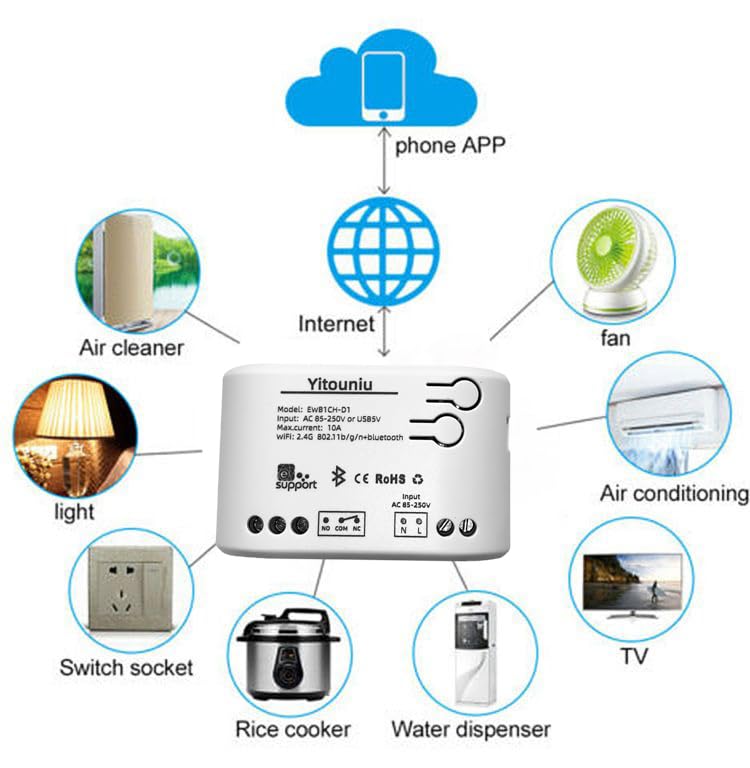
Image 5.1: Diagram illustrating the connectivity of the Yitouniu EWeLink Smart WiFi Switch Relay to various household appliances like lights, fans, and air conditioners, all controlled via a phone app and the internet.
5.2 Загрузка приложения и сопряжение
- Загрузить eWeLink приложение из Apple App Store или Google Play Store.
- Зарегистрируйте учетную запись и войдите в систему.
- Power on the Smart WiFi Switch Relay.
- Open the eWeLink app, tap the '+' icon to add a device.
- Следуйте инструкциям на экране, чтобы подключить устройство к вашей сети Wi-Fi 2.4 ГГц.

Image 5.2: Screenshots of the eWeLink app interface, showing controls for a garage door (ON/OFF) and a scheduling function for setting specific times.
6. Режимы работы
The device supports three operating modes: self-locking, interlocking, and inching (micromotion). These modes can typically be configured within the eWeLink app or via physical buttons on the device, depending on the specific model variant.
- Режим самоблокировки: Each channel operates independently. Pressing the button (or app control) turns the relay ON, pressing it again turns it OFF.
- Режим блокировки: When one channel is turned ON, all other channels are automatically turned OFF. This is useful for applications where only one device should be active at a time.
- Inching (Micromotion) Mode: The relay turns ON for a set duration (e.g., 0.5 seconds to 1 hour) and then automatically turns OFF. This is suitable for momentary actions like garage door openers or pulse controls.
7. Управление через приложение и голосовое управление
7.1 eWeLink App Features
The eWeLink app provides comprehensive control over your Smart WiFi Switch Relay:
- Дистанционное включение/выключение: Control connected devices from anywhere with an internet connection.
- Функции синхронизации: Set schedules, countdowns, or recurring timers for automatic on/off operations.
- Независимый контроль: Each of the two channels can be controlled independently.
- Совместное использование устройств: Предоставьте членам семьи доступ к управлению вашими устройствами.
- Групповой контроль: Organize multiple smart devices into groups for simultaneous control.

Image 7.1: A user remotely controlling home lighting via the eWeLink mobile application, demonstrating the convenience of app-based control.

Image 7.2: Illustration of the eWeLink app's group control and sharing functions, allowing multiple users to manage devices across different rooms.

Image 7.3: The timing function interface within the eWeLink app, enabling users to set specific on/off times for connected appliances.
7.2 Интеграция голосового управления
The Yitouniu Smart WiFi Switch Relay is compatible with popular voice assistants, including Amazon Alexa and Google Home/Nest. To enable voice control:
- Ensure your Smart WiFi Switch Relay is successfully paired with the eWeLink app.
- Откройте приложение Alexa или Google Home.
- Перейдите в раздел «Навыки» или «Работает с Google».
- Искать and enable the 'eWeLink Smart Home' skill/service.
- Link your eWeLink account when prompted.
- Discover devices. Your Smart WiFi Switch Relay should now be controllable via voice commands.
Example команды:
- «Алекса, включи свет в гостиной».
- «Эй, Google, выключи вентилятор».

Image 7.4: A user interacting with voice assistants like Amazon Alexa and Google Home to control smart devices, highlighting the voice control capability of the relay.
8. Техническое обслуживание
The Yitouniu Smart WiFi Switch Relay requires minimal maintenance. Follow these guidelines:
- Уборка: Wipe the device with a dry, soft cloth. Do not use liquid cleaners or solvents.
- Проверка связи: Периодически проверяйте надежность соединений проводов.
- Обновления прошивки: Keep the eWeLink app updated to receive the latest firmware for the device, which may include performance improvements and new features.
9. Поиск Неисправностей
- Устройство не подключается к Wi-Fi:
- Убедитесь, что ваша сеть Wi-Fi имеет частоту 2.4 ГГц. Устройство не поддерживает сети с частотой 5 ГГц.
- Проверьте правильность пароля WiFi, введенного в приложении.
- Поднесите устройство ближе к вашему Wi-Fi роутеру.
- Перезагрузите устройство и маршрутизатор.
- Устройство отключено от сети в приложении:
- Убедитесь, что ваше домашнее интернет-соединение активно.
- Проверьте, подключено ли устройство к источнику питания.
- Перезагрузите устройство.
- Голосовое управление не работает:
- Confirm the eWeLink skill/service is enabled and linked in your Alexa or Google Home app.
- Ensure the device is named clearly in the eWeLink app and discovered by your voice assistant.
- Проверьте подключение к Интернету.
- Устройство не реагирует на радиочастотный пульт дистанционного управления:
- Ensure the RF remote is paired with the switch. Refer to the RF pairing instructions (if applicable to your specific remote).
- Check the battery in the RF remote.
10. Что в коробке
Открыв упаковку продукта, вы должны обнаружить следующее:
- 1 x Yitouniu Wifi 2-Channel Relay Switch
- 1 x Руководство по эксплуатации (этот документ)
11. Гарантия и поддержка
This product comes with a standard manufacturer's warranty. For specific warranty terms, conditions, and duration, please refer to the documentation included with your purchase or contact Yitouniu customer support. For technical assistance or further inquiries, please visit the official Yitouniu webсайт или свяжитесь с их каналами обслуживания клиентов.