
1. Введение
This manual provides detailed instructions for the assembly, installation, operation, and maintenance of your TOOQ DB1202TN-B Dual Monitor Desk Mount with Laptop Tray. Please read this manual thoroughly before installation and use to ensure proper setup and safe operation. Keep this manual for future reference.

Figure 1: TOOQ DB1202TN-B Dual Monitor Desk Mount with Laptop Tray in use.
2. Информация по технике безопасности
- Прочтите все инструкции: Ensure you understand all instructions and warnings before installation and use.
- Грузоподъемность: Do not exceed the maximum weight capacity of 9 kg (19.8 lbs) per monitor arm and 9 kg (19.8 lbs) for the laptop tray. Exceeding this limit may result in serious injury or property damage.
- Размер монитора: Данное крепление предназначено для мониторов с диагональю от 17 до 32 дюймов.
- Размеры ноутбука: The tray is suitable for laptops between 12 and 17 inches.
- VESA-совместимость: Ensure your monitors are VESA compatible (75x75mm or 100x100mm).
- Толщина стола: Verify your desk thickness is within the specified range for clamp или установка заглушек.
- Сборка: Assemble the product according to the instructions. Incorrect assembly can lead to product failure or injury.
- Дети: Храните мелкие детали в недоступном для детей месте.
- Обслуживание: Regularly check that the mount is secure and all fasteners are tight.
3. Содержимое упаковки
Перед началом установки убедитесь, что все компоненты присутствуют и не повреждены. Если какие-либо детали отсутствуют или повреждены, обратитесь в службу поддержки клиентов.
- 1x Main Pole
- 2x Monitor Arms
- 1x Laptop Tray
- 1x Desk Clamp Сборка
- 1x Grommet Mount Assembly
- 1x Hardware Kit (screws, washers, Allen keys)
- 1x Руководство по эксплуатации

Figure 2: Included mounting hardware (M-A: M4x12, M-B: M5x12, M-C: D5 washers).
4. Технические характеристики
| Особенность | Деталь |
|---|---|
| Модель | ДБ1202ТН-Б |
| Совместимость размеров монитора | 17" - 32" |
| Контролируемая грузоподъемность | 9 кг (19.8 фунта) на каждую руку |
| Совместимость размеров ноутбуков | 12" - 17" |
| Laptop Tray Weight Capacity | 9 кг (19.8 фунта) |
| Совместимость с VESA | 75x75мм, 100x100мм |
| Угол наклона | +45° / -45° |
| Угол поворота | +90° / -90° |
| Угол поворота | +180° / -180° |
| Материал | Легированная сталь |
| Цвет | Черный |
| Размеры продукта | 43.5 x 29.5 x 13.5 см (приблизительно, в упаковке) |
| Вес продукта | 5.4 кг |

Figure 3: Detailed technical drawing with dimensions.
5. Настройка и установка
The TOOQ DB1202TN-B offers two installation options: desk clamp или крепление через отверстие в столешнице. Выберите способ, наиболее подходящий для вашего стола.
5.1 рабочий столamp Установка
- Прикрепите стол clamp base to the main pole using the provided screws.
- Расположите clamp on the edge of your desk. Ensure the desk thickness is compatible with the clamp's range.
- Затяните крепление.amp Затягивайте винты до тех пор, пока крепление не будет надежно зафиксировано на столе. Не перетягивайте.

Рисунок 4: Столamp установка.
5.2 Установка крепления с помощью уплотнительного кольца
- Если в вашем столе есть отверстие для кабеля, снимите существующую крышку этого отверстия.
- Assemble the grommet base components as per the diagram in the manual (not provided here, but implied).
- Insert the main pole through the grommet hole.
- Secure the grommet base from underneath the desk using the provided plate and nut. Tighten firmly.

Figure 5: Grommet mount installation.
5.3 Attaching Monitor Arms and Laptop Tray
- Slide the monitor arms onto the main pole at your desired height. Secure them with the locking collars.
- Slide the laptop tray arm onto the main pole and secure it.
- Attach the VESA plates to the back of your monitors using the appropriate M4x12 or M5x12 screws and D5 washers from the hardware kit. Ensure the screws are not overtightened and do not damage the monitor.
- Carefully slide the monitors (with VESA plates attached) onto the monitor arms. Ensure they click into place securely.
- Place your laptop onto the laptop tray. Adjust the width-adjustable claws to securely hold your laptop.

Figure 6: Attaching monitor arms and adjusting height.

Figure 7: Laptop holder with adjustable width claws (276-472mm).
6. Инструкция по эксплуатации и регулировка
This monitor mount offers various adjustment options to achieve an ergonomic setup.
- Регулировка высоты: Loosen the locking collar on the main pole to slide the monitor arms and laptop tray up or down. Retighten the collar once the desired height is reached.
- Регулировка наклона: The monitor and laptop tray can be tilted +45° to -45°. Use the provided Allen key to adjust the tension if the screen does not hold its position.
- Регулировка поворота: Swivel your monitors up to 90° horizontally or vertically.
- Регулировка вращения: Rotate your monitors +180° to -180° for portrait or landscape orientation.
- Laptop Tray Tilt: The laptop tray also offers tilt adjustment for comfortable typing and viewуглы.
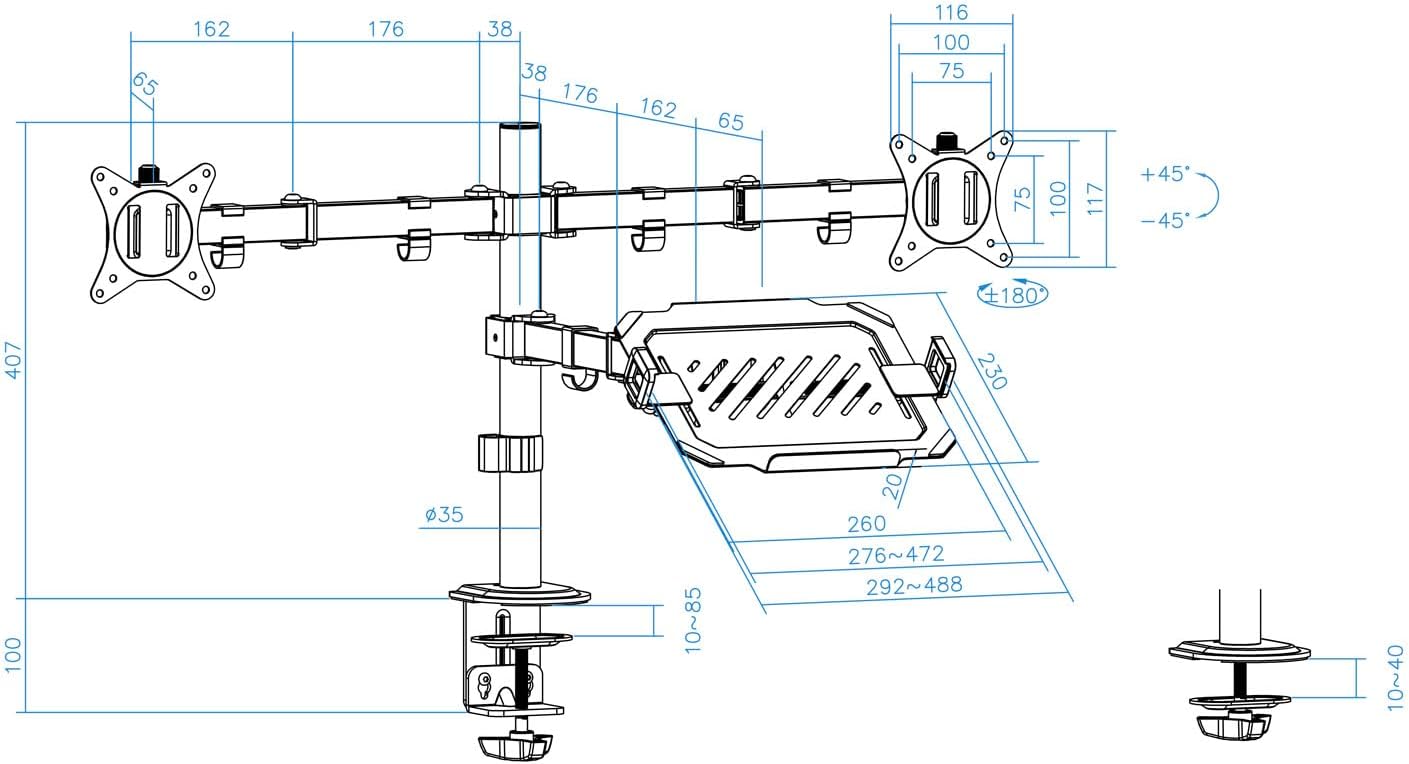
Figure 8: Laptop tray tilt adjustment.

Figure 9: Monitor swivel and rotation capabilities.
6.1 Управление кабелями
Utilize the integrated cable clips along the arms and main pole to route and organize your monitor and laptop cables. This helps maintain a clean and tidy workspace.

Figure 10: Cable management clips.
7. Техническое обслуживание
- Уборка: Протрите крепление мягкой тряпкой.amp Ткань. Избегайте использования абразивных чистящих средств и растворителей.
- Проверка герметичности: Periodically check all screws and fasteners to ensure they remain tight and secure. Retighten as necessary.
- Смазка: No lubrication is required for normal operation.
8. Поиск Неисправностей
- Монитор провисает или не держит положение:
- Ensure the monitor weight does not exceed the maximum capacity (9 kg per arm).
- Tighten the tilt adjustment screw on the VESA plate using the provided Allen key.
- Крепление нестабильно:
- Verify the desk clamp или крепление через отверстие надежно зафиксировано на столе.
- Ensure the main pole and arm collars are tightened.
- Laptop tray sags:
- Ensure the laptop weight does not exceed the maximum capacity (9 kg).
- Tighten the tilt adjustment screw for the laptop tray.
- Недостающие части:
- Refer to the "Package Contents" section. If parts are missing, contact customer support.
9. Гарантия и поддержка
For warranty information or technical support, please refer to the documentation included with your purchase or visit the official TOOQ webСохраните чек в качестве подтверждения покупки.