
Введение
The ATN BlazeSeeker-210 Thermal Imaging Monocular is a compact and powerful device designed for enhanced visibility in various conditions. Featuring a 256x192 thermal sensor with 12 micron pixel size and a <35 NETD rating, it provides clear thermal imagery up to 460 meters. This monocular offers multiple color palettes, video recording, photo capture, and Wi-Fi connectivity for seamless integration with smart devices. Its low power consumption ensures up to 9 hours of continuous operation, making it ideal for extended use.
Что в коробке?
- КАБЕЛЬ USB-C
- SOFT CARRYING CASE
- ATN BlazeSeeker-210 Thermal Imaging Monocular
Основные характеристики
- Quality Thermal Sensor: 256x192 (25 HZ) 12 µm (microns) pixel size and a 7 mm and 10mm lens for detection range up to 460m.
- NETD Rating <35mK: Low NETD rating for good sensitivity to temperature variations, creating an overall better image.
- Несколько ViewРежимы работы: Five color palettes to choose from: White Hot, Black Hot, Iron Red, Alarm, Sepia, and Green Hot for a custom viewопыт.
- Video Record and Photo: Built-in still image and video recording capabilities. Videos and pictures can be stored on a MicroSD card with a capacity of up to 256GB.
- Built-in Wi-Fi and App Connectivity: Wireless connect to smartphone and App to adjust the monocular, take photos, or record thermal video directly from the smartphone.
Настраивать
- Распаковка: Carefully remove the ATN BlazeSeeker-210 monocular and all accessories from the packaging. Inspect for any damage.
- Зарядка аккумулятора: The monocular includes a built-in Lithium Ion battery. Connect the provided USB-C cable to the monocular's charging port and to a compatible USB power source (e.g., wall adapter, computer USB port). The charging indicator will show the charging status. Ensure the device is fully charged before first use for optimal battery life.
- Установка карты MicroSD (необязательно): For video recording and photo storage, insert a MicroSD card (up to 256GB, not included) into the designated slot. Ensure the card is inserted correctly according to the diagram near the slot.
- Включение/выключение питания: Нажмите и удерживайте кнопку питания (обычно обозначенную символом питания), чтобы включить или выключить устройство.
Инструкция по эксплуатации
Основная операция
- Viewing: Hold the monocular to your eye and adjust the diopter (if available) for a clear view дисплея.
- Регулировка фокуса: Rotate the focus ring on the objective lens to achieve a sharp image of your target.
- Увеличить: Use the designated zoom buttons (often marked with '+' and '-' or up/down arrows) to adjust the magnification.
ViewРежимы ИНГ
The BlazeSeeker-210 offers multiple color palettes to optimize viewing for different environments and preferences. Cycle through these modes using the dedicated mode button (refer to your device's button layout for exact location).
- Раскаленный добела: Нагретые предметы кажутся белыми, холодные — чёрными.
- Черный горячий: Нагретые предметы кажутся чёрными, холодные — белыми.
- Железный красный: Displays a spectrum of colors from black to red to yellow, indicating temperature differences.
- Тревога: Highlights the hottest areas in a distinct color.
- Сепия: Provides a warm, brown-toned image.
- Зеленый горячий: Displays a green-toned image, often preferred for reduced eye strain during prolonged use.
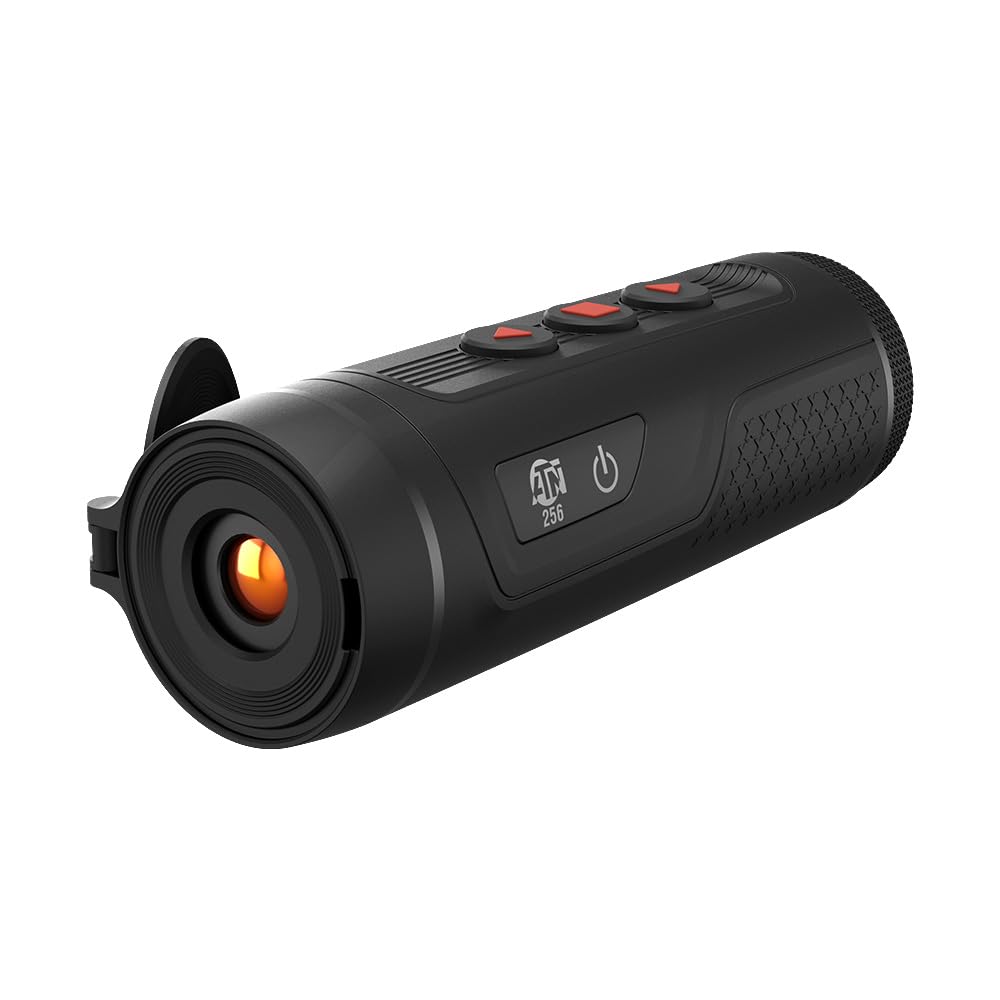
Image: The ATN BlazeSeeker-210 Thermal Monocular in use, demonstrating various thermal viewing modes like green hot, black hot, and a thermal sensor overlay.
Видео: Официальное лицоview of the ATN BlazeSeeker Thermal Hunting Monocular, showcasing its features and thermal imaging capabilities in various modes.
Video Recording and Photo Capture
The monocular allows you to capture still images and record videos directly to an inserted MicroSD card.
- Фотографирование: Briefly press the photo capture button (usually a dedicated button or a short press of a multi-function button). The screen may briefly flash or display an icon to confirm capture.
- Запись видео: Press the video record button (often a dedicated button or a long press of a multi-function button) to start recording. Press it again to stop recording. A recording indicator (e.g., a red dot or timer) will typically appear on the display during recording.
- Доступ к медиа: Captured photos and videos can be reviewed on the device or by connecting the monocular to a computer via USB-C, or by removing the MicroSD card and inserting it into a card reader.

Image: The ATN BlazeSeeker-210 Thermal Monocular demonstrating its video record and photo capabilities, with a smartphone showing captured thermal footage.
Wi-Fi и подключение к приложениям
The ATN BlazeSeeker-210 can connect wirelessly to your smartphone via Wi-Fi, allowing you to control the monocular, view жить фуtage, and manage media through a dedicated mobile application.
- Загрузите приложение: Download the official ATN app from your smartphone's app store (iOS or Android).
- Enable Wi-Fi on Monocular: Turn on the Wi-Fi feature on your BlazeSeeker-210 (refer to the device's menu for the Wi-Fi setting).
- Подключитесь к Wi-Fi: On your smartphone, go to Wi-Fi settings and connect to the network broadcast by your monocular (e.g., "ATN_BlazeSeeker_XXXX"). The default password is often "12345678" or found in the device's menu.
- Запустить приложение: Open the ATN app. It should automatically detect and connect to your monocular, providing access to live view, settings, and media management.

Image: The ATN BlazeSeeker-210 Thermal Monocular highlighting its built-in Wi-Fi and app connectivity features.
Обслуживание
- Уборка: Use a soft, lint-free cloth to clean the exterior of the monocular. For the lens, use a specialized lens cleaning cloth and solution. Avoid abrasive materials.
- Хранилище: Store the monocular in its soft carrying case in a cool, dry place when not in use. Avoid extreme temperatures and humidity.
- Уход батареи: Для длительного хранения убедитесь, что батарея заряжена примерно на 50%. Периодически подзаряжайте батарею, если она хранится длительное время, чтобы предотвратить глубокий разряд.
- Обновления прошивки: Periodically check the ATN website for firmware updates. Follow the instructions provided by ATN for safe and proper firmware installation.
Поиск неисправностей
| Проблема | Возможная причина | Решение |
|---|---|---|
| Устройство не включается. | Низкий или разряженный аккумулятор. | Зарядите аккумулятор с помощью прилагаемого кабеля USB-C. |
| Изображение размыто или не в фокусе. | Неправильная настройка фокуса. | Adjust the objective lens focus ring and diopter for your vision. |
| Невозможно подключиться к Wi-Fi/приложению. | Wi-Fi not enabled on monocular; incorrect password; app not updated. | Ensure Wi-Fi is enabled on the device. Verify Wi-Fi password. Update the ATN app to the latest version. |
| Невозможно записывать видео или делать фотографии. | Карта MicroSD не вставлена или карта заполнена/повреждена. | Insert a compatible MicroSD card. Check card capacity and format if necessary. |
| Короткое время работы батареи. | Frequent use of power-intensive features (Wi-Fi, recording); battery degradation. | Reduce use of Wi-Fi and continuous recording. Ensure full charge before use. If battery life significantly degrades, contact support. |
Технические характеристики
| Особенность | Деталь |
|---|---|
| Тепловой датчик | 256x192 (25 Гц) |
| Размер пикселя | 12 мкм |
| NETD Rating | <35 мК |
| Диапазон обнаружения | До 460 метров |
| Увеличение | 1.5-12x |
| Цветовые палитры | White Hot, Black Hot, Iron Red, Alarm, Sepia, Green Hot |
| Видеозапись | Да |
| Фото захват | Да |
| Хранилище | Карта MicroSD до 256 ГБ |
| Wi-Fi | Yes (App Connectivity) |
| Срок службы батареи | До 9 часов |
| Размеры продукта | 5.9 x 2 x 2.2 дюйма |
| Вес товара | 9.6 унции |
| Номер модели товара | TIMNBLS210 |
| Тип батареи | 1 литий-ионный (входит в комплект) |

Image: The compact and lightweight design of the ATN BlazeSeeker-210 Thermal Monocular, illustrating its dimensions and portability.

Image: The ATN BlazeSeeker-210 Thermal Monocular highlighting its low power consumption, providing over 9 hours of operation.
Гарантия и поддержка
For warranty information, please refer to the documentation included with your product or visit the official ATN website. For technical support, product inquiries, or service, please contact ATN customer support directly. Contact details can typically be found on the manufacturer's webсайте или в упаковке продукта.
Предупреждение о предложении 65: Этот продукт может содержать химические вещества, которые, по данным штата Калифорния, вызывают рак, врождённые дефекты или другие нарушения репродуктивной функции. Для получения дополнительной информации перейдите по ссылке www.P65Warnings.ca.gov.