
1. Введение
Thank you for choosing the XIAOVV 4G LTE Solar Outdoor Security Camera. This manual provides essential information for the proper installation, operation, and maintenance of your device. Please read it carefully before use and retain it for future reference. This camera is designed for outdoor surveillance, offering reliable monitoring with 4G LTE connectivity and solar power.
2. Продукт закончилсяview
The XIAOVV P5plus is a robust outdoor security camera featuring a solar panel for continuous power and 4G LTE connectivity for remote access without relying on Wi-Fi. It offers high-definition imaging, advanced night vision, and intelligent security functions.
Основные характеристики:
- Возможность подключения 4G LTE: Supports 4G bands B1/B3/B5/B38/B39/B40/B41 for remote access in areas without Wi-Fi.
- Солнечная энергия: Integrated solar panel provides continuous power, ensuring 365 days of uninterrupted monitoring.
- 5MP HD Imaging & 1080p Video: Captures clear 5-megapixel still images and records 1080p high-definition video.
- Цветное ночное видение: Advanced Starlight color night vision ensures clear, detailed footage даже в условиях низкой освещенности.
- 360° Monitoring: Dual-lens design allows for comprehensive 360-degree coverage without blind spots, with PTZ (Pan-Tilt-Zoom) capabilities.
- Smart Security Functions: AI-based person detection, dual PIR and radar alarms, automatic motion detection, and two-way audio communication.
- Локальное и облачное хранилище: Supports up to 128GB Micro SDHC card for local storage and optional cloud storage.
- Сжатие H.265: Efficient video compression for longer storage times and stable recordings.
- Всепогодный дизайн: IP66 rated for outdoor use, protecting against dust and powerful water jets.
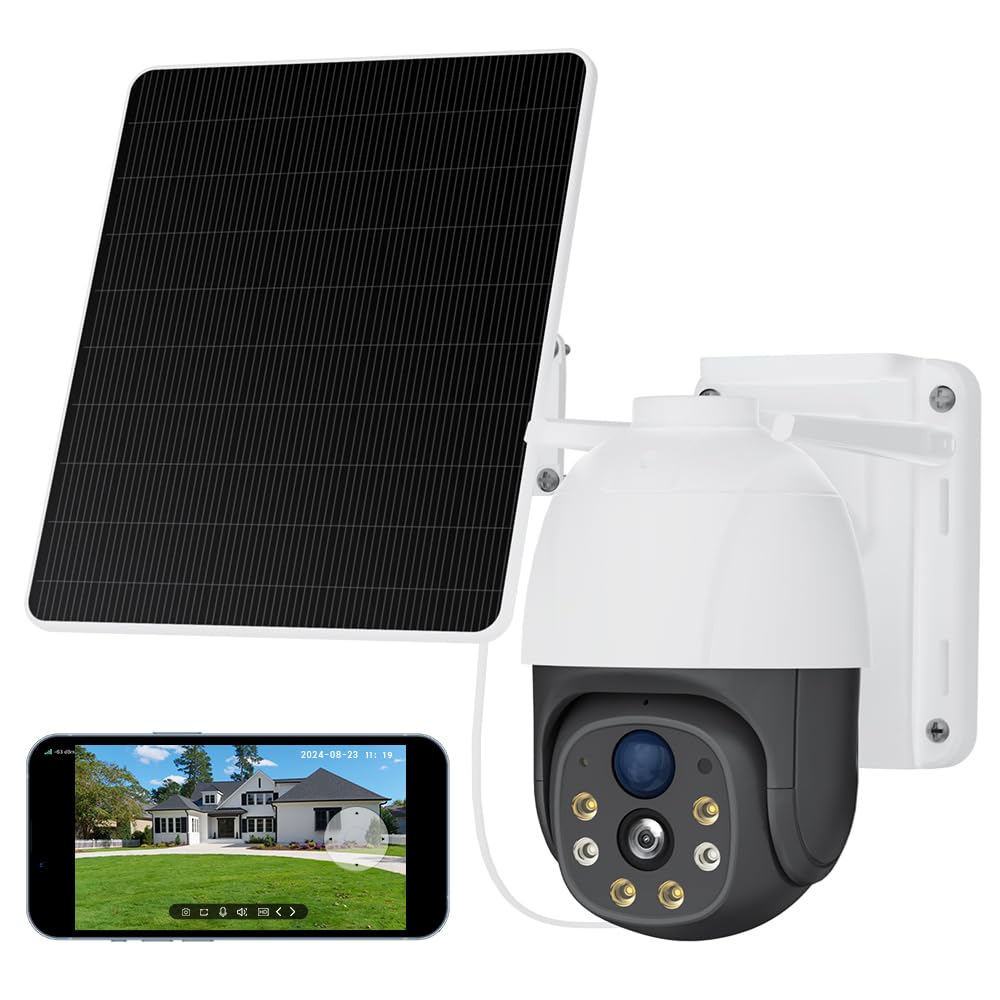
Image 2.1: The XIAOVV 4G LTE Solar Outdoor Security Camera, showcasing its solar panel and various features like 4G LTE signal, full color night vision, AI intelligence, IP65 waterproof rating, device sharing, 2-way audio, HD 1080P, siren, PIR motion detection, and 8000mAh battery capacity.

Image 2.2: A visual representation of the camera's 2K Starlight Color Night Vision, showing a building at night with clear, illuminated details, contrasting with a standard black and white night vision view.
3. Настройка
3.1 Содержимое упаковки
- XIAOVV Solar Camera (1)
- Монтажный кронштейн и винты
- Руководство пользователя
3.2 Установка SIM-карты и карты Micro SD
- Locate the SIM card and Micro SD card slot on the camera, usually protected by a rubber cover.
- Осторожно откройте крышку.
- Insert a valid 4G LTE SIM card (not included) into the SIM card slot with the correct orientation. Ensure it clicks into place.
- Insert a Micro SDHC card (up to 128GB, not included) into the Micro SD card slot with the correct orientation.
- Close the rubber cover firmly to ensure IP66 weatherproofing.
3.3 Крепление камеры
- Choose a suitable outdoor location with good 4G signal reception and direct sunlight exposure for the solar panel.
- Используйте прилагаемый кронштейн и винты, чтобы надежно прикрепить камеру к стене или столбу.
- Отрегулируйте угол наклона солнечной панели, чтобы максимально увеличить воздействие солнечного света в течение дня.
- Убедитесь, что камера имеет прямой обзор на область, которую вы хотите контролировать.

Image 3.1: The XIAOVV camera with its solar panel, shown installed in diverse outdoor settings such as a pasture, fish pond, orchard, construction site, and backyard, illustrating its versatility for different surveillance needs.
3.4 Загрузка приложения и сопряжение
- Загрузите приложение XIAOVV из магазина приложений вашего смартфона (iOS или Android).
- Зарегистрируйте новую учетную запись или войдите в систему, если она у вас уже есть.
- Чтобы добавить новую камеру, следуйте инструкциям в приложении. Обычно это включает сканирование QR-кода на камере или ручной ввод идентификатора устройства.
- Ensure the camera is powered on and the 4G SIM card is active during the pairing process.
4. Инструкция по эксплуатации
4.1 Прямой эфир View
Open the XIAOVV app and select your camera from the device list to access the live video feed. You can view фу в реальном времениtage from your monitored area.
4.2 PTZ-управление
Utilize the on-screen controls in the live view to pan (rotate horizontally), tilt (rotate vertically), and digitally zoom the camera to adjust your viewизменение угла обзора и фокусировка на определенных областях.
4.3 Двусторонняя аудиосвязь
Tap the microphone icon in the app to speak through the camera's speaker, and listen to audio from the camera's microphone. This allows for real-time communication with visitors or to deter intruders.
4.4 Запись и воспроизведение
- Ручная запись: Нажмите кнопку записи в прямом эфире. view to start or stop manual video recording.
- Запись события: The camera automatically records when motion is detected, based on your settings.
- Воспроизведение: Доступ к записанному footage via the 'Playback' or 'History' section in the app. You can filter by date and event.
4.5 Обнаружение движения и оповещения
Configure motion detection sensitivity, detection zones, and alert preferences (e.g., push notifications, siren activation) within the app settings. The camera uses AI-based person detection, PIR, and radar for accurate alerts.

Image 4.1: A visual representation of the AI Automatic Tracking feature, showing a father and child playing in a park with a tracking box following their movement, indicating the camera's ability to automatically follow targets.
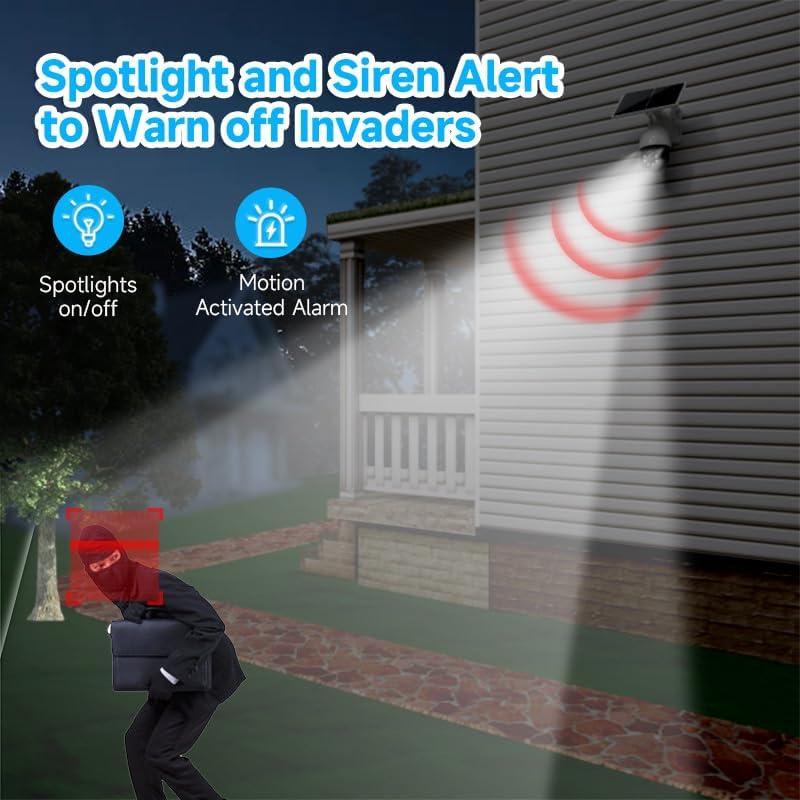
Image 4.2: The camera's spotlight and siren alert system activated at night, illuminating a detected intruder and emitting a warning sound, demonstrating its active deterrence capabilities.
5. Техническое обслуживание
5.1 Очистка
- Регулярно очищайте объектив камеры и солнечную панель мягкой тряпкой.amp Используйте специальную ткань для обеспечения оптимальной эффективности. Избегайте абразивных чистящих средств.
- Ensure the solar panel is free from dirt, dust, leaves, or snow to maintain efficient charging.
5.2 обновлений прошивки
Check the XIAOVV app periodically for available firmware updates. Keeping your camera's firmware up-to-date ensures optimal performance, security, and access to new features.
5.3 Управление хранением
If using a Micro SD card, regularly review и сделайте резервную копию важных файловtage. You can configure the camera to overwrite older footage automatically when the card is full. For cloud storage, manage your subscription and stored data through the app.

Image 5.1: A graph illustrating the benefits of H.265 Video Coding Technology compared to H.264, showing significant savings in storage space and broadband usage, leading to faster loading and smoother playback of videos.
6. Поиск Неисправностей
6.1 Camera Not Connecting to 4G
- Убедитесь, что SIM-карта правильно вставлена и активна с подключенным тарифным планом передачи данных.
- Check 4G signal strength at the camera's location using your smartphone.
- Restart the camera by pressing the reset button or power cycling it.
- Verify that the camera's 4G bands are compatible with your network provider.
6.2 Плохое качество изображения
- Очистите объектив камеры от грязи и пятен.
- Убедитесь, что перед объективом нет никаких препятствий.
- Проверьте уровень сигнала 4G; слабый сигнал может повлиять на качество потоковой передачи.
6.3 Аккумулятор не заряжается
- Убедитесь, что солнечная панель чистая и получает прямой солнечный свет в течение нескольких часов ежедневно.
- Проверьте соединение между солнечной панелью и камерой.
- Verify that the camera is placed in an area with sufficient sunlight.
6.4 Обнаружение движения не работает
- Check motion detection settings in the app; ensure it's enabled and sensitivity is adjusted.
- Убедитесь, что зоны обнаружения настроены правильно.
- Убедитесь, что никакие физические препятствия не блокируют камеру. view or PIR sensor.
7. Технические характеристики
| Особенность | Спецификация |
|---|---|
| Название модели | XIAOVV-P5PLUS-EU4G |
| Связность | 4G LTE (B1/B3/B5/B38/B39/B40/B41) |
| Источник питания | Solar Powered (Integrated Solar Panel) |
| Разрешение изображения | 5 MP (Stills) |
| Разрешение видео | 1080p (формат AVI) |
| Ночное Видение | Starlight Color Night Vision, 15 Meters Range |
| Viewугол наклона | 360 градусов (PTZ) |
| Особые возможности | Two-way audio, Local recording, AI Person Detection, PIR/Radar Alarms, HD Resolution, PTZ Technology |
| Хранилище | Micro SDHC (up to 128 GB), Optional Cloud Storage |
| Сжатие | H.265 |
| Всепогодный рейтинг | IP66 |
| Метод контроля | Smartphone App (XIAOVV App) |
| Размеры | 20 х 20 х 22 см |
8. Гарантия и поддержка
This XIAOVV product comes with a standard manufacturer's warranty. Please refer to the warranty card included in your package or visit the official XIAOVV webсайт для получения подробных условий гарантии.
For technical support, troubleshooting assistance, or any product-related inquiries, please contact XIAOVV customer service through the contact information provided on their official website or within the XIAOVV app.