Введение
This manual provides comprehensive instructions for the W26 Pro Max Smart Watch with Bluetooth Earphones. It covers setup, operation, maintenance, and troubleshooting to ensure optimal use of your device. The W26 Pro Max is a versatile 2-in-1 device, combining a smartwatch with integrated wireless Bluetooth earphones, designed to keep you connected and active.
Содержимое упаковки
При открытии упаковки, пожалуйста, проверьте наличие всех компонентов:
- W26 Pro Max Smart Watch
- Integrated Wireless Bluetooth Earphones
- Зарядный кабель
- Руководство пользователя (этот документ)
- Additional Watch Strap (if included as a free gift)

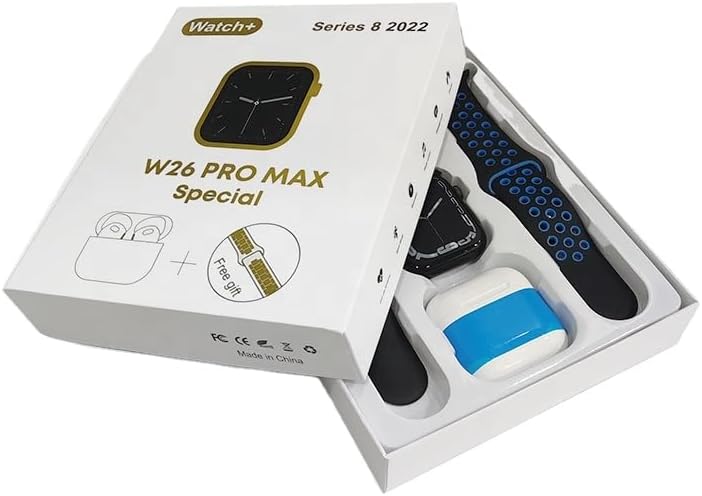
Image: The W26 Pro Max Smart Watch and its accompanying Bluetooth earphones, along with an extra watch strap, are neatly arranged within their retail packaging. The watch face is visible, and the earphones are housed in their charging case.

Изображение: вид сверху вниз view of the W26 Pro Max Smart Watch and Bluetooth Earphones within their packaging. The watch, earphones, and an additional strap are clearly visible, indicating the complete product set.
Руководство по настройке
1. Первоначальная зарядка
Before first use, fully charge both the smartwatch and the integrated earphones. Connect the provided charging cable to the watch and a compatible USB power source. The watch display will indicate charging status. Ensure the earphones are properly seated in their charging case within the watch.
2. Включение и выключение
- Включение питания: Press and hold the side button on the smartwatch until the screen illuminates.
- Выключение: Press and hold the side button, then select the "Power Off" option on the screen.
3. Сопряжение со смартфоном
To unlock full functionality, pair your W26 Pro Max with your smartphone via Bluetooth.
- Убедитесь, что Bluetooth включен на вашем смартфоне.
- On the W26 Pro Max, navigate to the Bluetooth settings.
- On your smartphone, search for available Bluetooth devices and select "W26 Pro Max" from the list.
- При появлении соответствующего запроса подтвердите запрос на сопряжение на обоих устройствах.
- For optimal performance, download and install the recommended companion application (e.g., "FitPro app" as mentioned in product description) from your smartphone's app store.
4. Earphone Pairing
The integrated earphones automatically pair with the smartwatch when removed from their charging slots. To pair them with another device (e.g., directly with your phone):
- Remove the earphones from the smartwatch.
- Включите Bluetooth на устройстве, с которым вы хотите выполнить сопряжение.
- Искать "W26 Pro Max Earphones" (or similar name) in the Bluetooth device list and select to connect.
Инструкция по эксплуатации
Navigating the Smartwatch
- Сенсорный экран: Проведите пальцем влево/вправо, вверх/вниз, чтобы перемещаться по меню и получать доступ к функциям. Коснитесь, чтобы выбрать.
- Боковая кнопка: Нажмите, чтобы вернуться на главный экран или активировать устройство. Длительное нажатие открывает параметры питания или активирует голосового помощника.
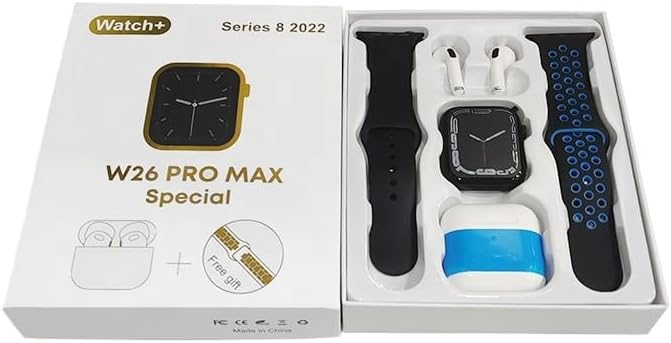
Image: The W26 Pro Max Smart Watch screen shows a voice assistant interface, with text bubbles indicating "Call Linda!" and "What's the weather like today?". This illustrates the voice command functionality.
Основные характеристики
Отслеживание фитнеса и здоровья
The W26 Pro Max is equipped with sensors to monitor various health metrics.
- Мониторинг сердечного ритма: The optical heart rate sensor continuously tracks your heart rate. View real-time data on the watch or in the companion app.
- Шагомер: Отслеживает ваши ежедневные шаги, расстояние и сожженные калории.
- Отслеживание сна: Отслеживает ваши режимы сна, включая фазу глубокого сна, фазу поверхностного сна и время бодрствования.

Image: The W26 Pro Max Smart Watch screen displays heart rate information, showing a graph of heart rate over time, current beats per minute (bpm), and blood pressure readings. This demonstrates the health monitoring capabilities.
Изображение: Подробный view of the W26 Pro Max Smart Watch screen showing heart rate and blood pressure monitoring. The text explains that an optical heart rate sensor is used for precise calculation and data can be viewed on the watch or via the FitPro app.
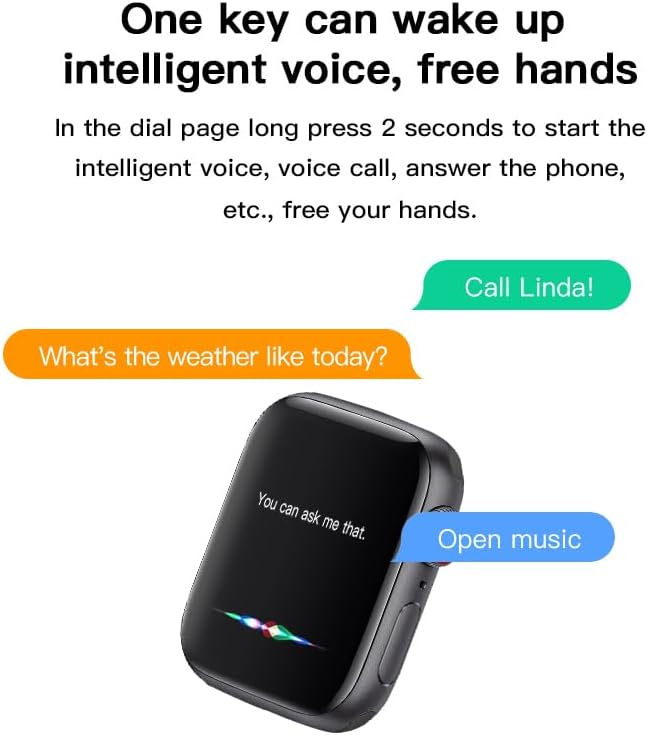
Image: The W26 Pro Max Smart Watch screen displays sleep monitoring data, showing sleep quality (Excellent), percentages of deep sleep, light sleep, and awake time, along with total sleep duration. This highlights the sleep tracking feature.
Коммуникация и СМИ
- Bluetooth-вызовы: Make and receive calls directly from your smartwatch using the integrated microphone and speaker.
- Уведомления: Получайте уведомления о звонках, сообщениях и уведомлениях приложений с сопряженного смартфона.
- Воспроизведение музыки: Control music playing on your smartphone or listen directly via the integrated earphones.

Image: The W26 Pro Max Smart Watch screen shows music playback controls, including play/pause and skip track buttons, along with a visualizer. This indicates the watch's capability to control audio.
Голосовой помощник
Long press the side button to activate the intelligent voice assistant. Use voice commands for calls, weather inquiries, music control, and more, providing hands-free operation.
Техническое обслуживание и уход
- Уборка: Wipe the watch and earphones with a soft, dry, lint-free cloth. For stubborn dirt, slightly dampСмочите ткань водой. Избегайте использования агрессивных химикатов и абразивных материалов.
- Водостойкость: The W26 Pro Max has an IP68 rating, meaning it is resistant to dust and can withstand immersion in water up to 1.5 meters for 30 minutes. However, it is not suitable for diving, hot showers, or saunas. Always dry the device thoroughly after exposure to water.
- Уход батареи: To prolong battery life, avoid fully discharging the device frequently. Charge it regularly and store it in a cool, dry place when not in use for extended periods.
- Хранилище: Храните устройство в прохладном, сухом месте, вдали от прямых солнечных лучей и экстремальных температур.
Поиск неисправностей
| Проблема | Возможная причина | Решение |
|---|---|---|
| Устройство не включается. | Низкий заряд батареи. | Перед повторным включением устройства необходимо заряжать его не менее 30 минут. |
| Невозможно подключиться к смартфону. | Bluetooth is off on phone/watch; device not in pairing mode; interference. | Ensure Bluetooth is enabled on both devices. Restart both devices. Move closer to the phone. Forget previous pairings and try again. |
| Earphones not connecting. | Earphones not properly seated; low earphone battery. | Ensure earphones are fully seated in their charging slots within the watch. Charge the watch to ensure earphones are charging. |
| Неточные данные о состоянии здоровья. | Неправильная посадка; засорение датчика. | Убедитесь, что часы плотно прилегают к запястью, не слишком туго и не слишком свободно. Очистите датчик на задней стороне часов. |
| Короткое время работы батареи. | Frequent use of power-intensive features; old battery. | Reduce screen brightness, limit notifications, disable unnecessary features. Ensure full charge cycles. |
Технические характеристики
| Особенность | Деталь |
|---|---|
| Номер модели | W26 Pro Max |
| Отображать | 1.78-дюймовый AMOLED-сенсорный экран |
| Операционная система | Носить ОС |
| Связность | Bluetooth |
| Емкость аккумулятора | 280mAh (watch) |
| Срок службы батареи | До 3 дней (при типичном использовании) |
| Водостойкость | IP68 |
| Особые возможности | Integrated Bluetooth Earphones, Heart Rate Sensor, Pedometer, Sleep Tracker, Microphone, Speaker, Voice Assistant |
| Емкость памяти | 16 МБ |
| Размеры упаковки | 16.8 х 12.8 х 3 см |
| Масса | 170 г |
Гарантия и поддержка
For information regarding warranty coverage and customer support, please refer to the documentation provided with your purchase or contact the retailer where the product was acquired. As this product is manufactured by "Generic", specific warranty details may vary by region and seller.
For technical assistance or further inquiries, please reach out to the customer service channels provided by your point of purchase.


