
MELONARE PM-1
MELONARE PM-1 Wireless in-Ear Monitor System User Manual
Модель: PM-1
1. Введение
The MELONARE PM-1 Wireless in-Ear Monitor System provides high-definition audio monitoring for live performances, studio recording, and band rehearsals. Utilizing UHF 500MHz frequency hopping technology, it ensures a stable, interference-resistant connection with minimal latency. This system offers flexible mono/stereo selection and supports one-to-many connectivity, allowing a single transmitter to connect to multiple receivers.
This manual provides detailed instructions for setting up, operating, and maintaining your PM-1 system to ensure optimal performance and longevity.
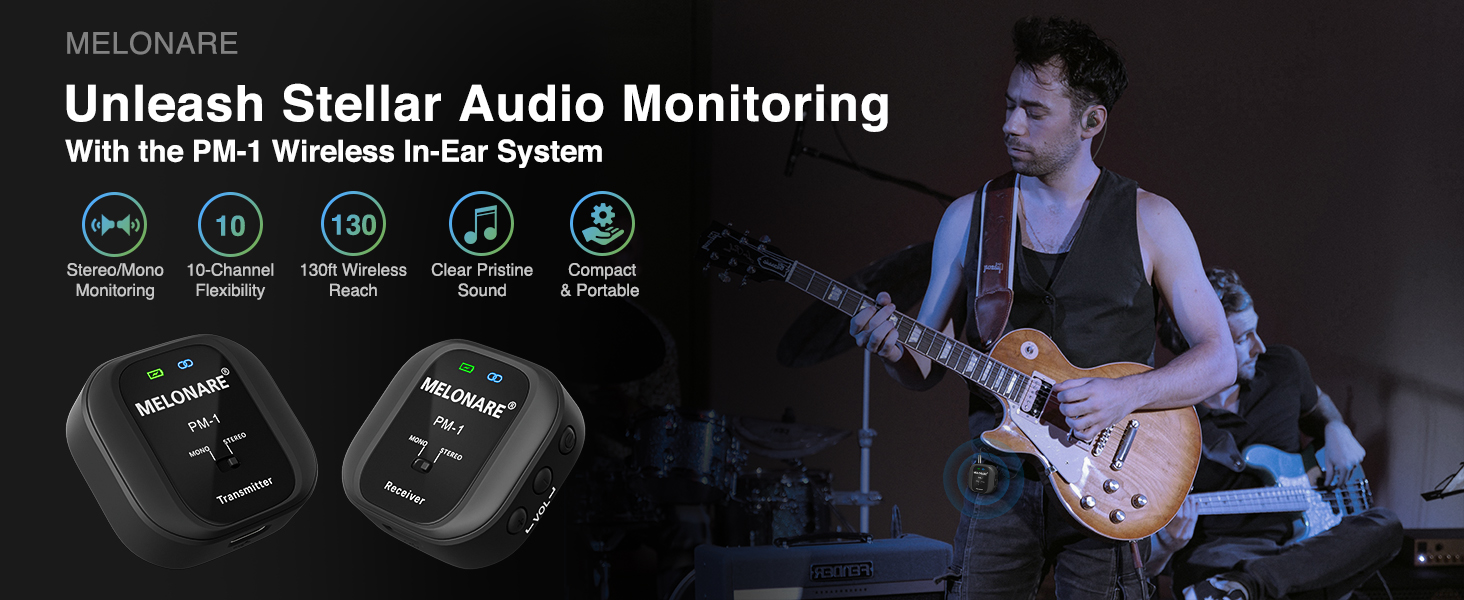
The MELONARE PM-1 Wireless In-Ear Monitor System, designed for compact audio excellence.
2. Содержимое коробки
Убедитесь, что все перечисленные ниже предметы включены в ваш пакет:
- 1 x беспроводной передатчик
- 1 x беспроводной приемник
- 1 x Dual USB Type-C Cable (for simultaneous charging)
- 1 аудиокабель 3.5 мм
- 1 x 6.35mm TS Male to 3.5mm Female Adapter (for mono connections)
- 1 x 6.35mm TRS Male to 3.5mm Female Adapter (for stereo connections)
- 1 x 3.5mm Audio Splitter Cable (for two-person monitoring)
- 1 х Руководство пользователя

Image showing the complete set of accessories included with the PM-1 system.

Visual representation of all items you will receive with your PM-1 system.
3. Продукт закончилсяview и особенности
The MELONARE PM-1 system consists of a compact transmitter and receiver, each equipped with essential controls and indicators.
Особенности передатчика:
- Кнопка питания: Включает/выключает устройство.
- Переключение каналов: Selects from 10 available frequencies.
- Аудиовход: 3.5mm jack for connecting to audio sources.
- Аудиовыход: 3.5mm jack for monitoring audio directly from the transmitter.
- Индикатор заряда батареи: LED shows battery level (Green: 100%-75%, Yellow: 74%-50%, Orange: 49%-25%, Red: 24%-1%).
- Индикатор ВЧ: Blue LED indicates successful pairing and signal synchronization.
- Переключатель МОНО/СТЕРЕО: Переключение между моно и стерео режимами.
- Порт зарядки USB Type-C: Для зарядки передатчика.
Характеристики приемника:
- Кнопка питания: Включает/выключает устройство.
- Регулятор громкости: Регулирует громкость выхода наушников.
- Аудиовыход: Разъем 3.5 мм для подключения наушников.
- Индикатор заряда батареи: LED shows battery level (Green: 100%-75%, Yellow: 74%-50%, Orange: 49%-25%, Red: 24%-1%).
- Индикатор ВЧ: Blue LED indicates successful pairing and signal synchronization.
- Переключатель МОНО/СТЕРЕО: Переключение между моно и стерео режимами.
- Порт зарядки USB Type-C: Для зарядки ресивера.

Detailed diagram of the transmitter and receiver components.
Основные характеристики системы:
- UHF 500MHz Frequency Hopping Technology: Provides a stable, interference-resistant connection superior to 2.4GHz systems.
- Автоматическое сопряжение: Eliminates manual channel selection for quick setup.
- Увеличенный срок службы батареи: 400mAh rechargeable battery offers up to 5 hours of continuous use.
- One-to-Many Connectivity: A single transmitter can connect to multiple receivers across 10 selectable frequencies, with a reliable range of up to 130 ft.
- Низкая задержка: Less than 6ms for real-time audio monitoring.
- Высококачественный звук: 24-бит/48 кГцampling rate, 20Hz-20kHz frequency response, and 109 dB signal-to-noise ratio for clear, rich sound.
- Compact Clip-on Design: Portable and easy to attach to clothing or pockets.

The system utilizes UHF 500MHz for robust wireless performance.

Enjoy reliable performance and freedom of movement with a 130ft range.

Battery indicators show charge levels, and the 400mAh battery provides up to 5 hours of use.

The compact clip-on design allows for secure attachment to pockets or clothing.
4. Руководство по установке
Follow these steps to set up your MELONARE PM-1 Wireless in-Ear Monitor System:
- Зарядка устройств: Before first use, fully charge both the transmitter and receiver using the included Dual USB Type-C cable. The battery indicator LEDs will show charging status and turn green when fully charged.
- Включение питания: Long press the Power Button on both the transmitter and receiver to turn them on. They will automatically pair up, indicated by a steady blue RF indicator.
- Подключите передатчик к источнику звука:
- For mono connections (e.g., single instrument, microphone), use the 3.5mm audio cable with the 6.35mm TS adapter if needed, and connect it to the Audio Input of the transmitter.
- For stereo connections (e.g., mixer stereo output), use the 3.5mm audio cable with the 6.35mm TRS adapter if needed, and connect it to the Audio Input of the transmitter.

The PM-1 system is compatible with a wide range of professional audio equipment.
- Подключите наушники к приемнику: Plug your 3.5mm headphones or in-ear monitors into the Audio Output jack of the receiver.
- Выберите режим моно/стерео: Use the MONO/STEREO switch on both the transmitter and receiver to select your desired audio mode. Ensure both devices are set to the same mode for proper operation.

The system features automatic pairing for quick and easy setup.
5. Инструкция по эксплуатации
Основная операция:
- Регулировка громкости: Use the Volume Control buttons on the receiver to adjust your monitoring volume.
- Выбор канала: If you experience interference, tap the Channel Switch button on the transmitter to cycle through the 10 available frequencies until a clear signal is found. The receiver will automatically follow the transmitter's channel.
- Monitoring from Transmitter: The transmitter includes a 3.5mm audio output, allowing sound engineers to monitor the input signal directly, even when console output is limited.
Mono/Stereo Modes:
The PM-1 system supports both mono and stereo audio modes:
- Моно режим: Provides identical audio to both earpieces for precise tonal feedback. Ideal for monitoring a single instrument or vocal track.
- Стерео режим: Delivers separate audio to the left and right earpieces for enhanced spatial awareness and a more immersive listening experience. Ideal for full band mixes.

Choose between Mono for precise feedback or Stereo for enhanced spatial awareness.
One-to-Many Connectivity:
The PM-1 transmitter can broadcast to multiple receivers simultaneously. This feature is ideal for band rehearsals, live performances, and situations requiring multiple individuals to monitor the same audio source.
- To add more receivers, simply power on additional PM-1 receivers within range of the transmitter. They will automatically pair.
- Ensure all paired receivers are set to the same MONO/STEREO mode as the transmitter.

A single transmitter can broadcast audio to multiple receivers, enabling seamless team coordination.
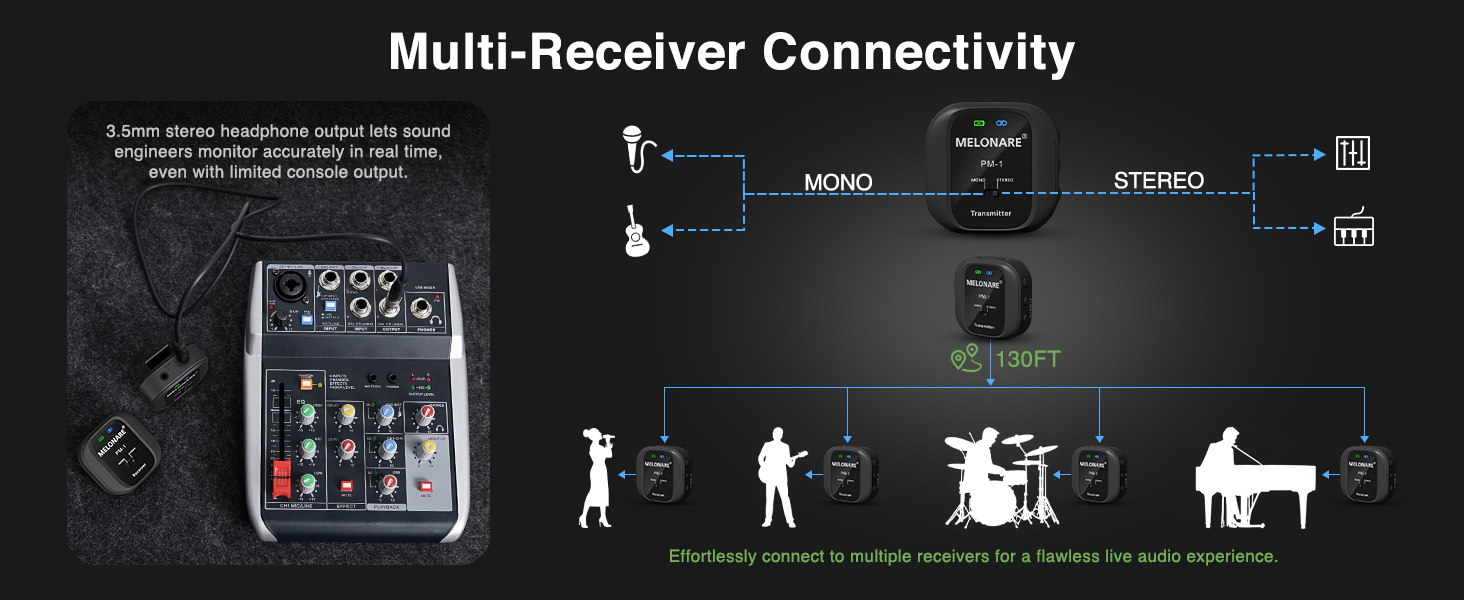
Effortlessly connect to multiple receivers for a flawless live audio experience.
Официальное видео продукта:
This official video from Melonare Audio provides an overview of the PM-1 Wireless in-Ear Monitor System, showcasinего особенности и области применения.
6. Техническое обслуживание
To ensure the longevity and optimal performance of your MELONARE PM-1 system, follow these maintenance guidelines:
- Уборка: Для очистки устройств используйте мягкую сухую ткань. Не используйте жидкие чистящие средства или аэрозоли.
- Хранилище: Храните систему в прохладном, сухом месте, вдали от прямых солнечных лучей и экстремальных температур.
- Уход батареи: To preserve battery life, avoid fully discharging the devices frequently. If storing for an extended period, charge them to about 50% every few months.
- Обращаться с осторожностью: The devices are compact but should be handled gently to avoid damage to ports or internal components.
7. Поиск Неисправностей
If you encounter issues with your MELONARE PM-1 system, refer to the following common problems and solutions:
| Проблема | Возможная причина | Решение |
|---|---|---|
| Нет звука | Device not powered on; Low battery; Incorrect connection; Transmitter/Receiver not paired. | Ensure both devices are powered on and charged. Verify all cables are securely connected. Check RF indicator for successful pairing (steady blue). |
| Sound in only one ear (Mono mode selected) | Mono mode is active. | Toggle the MONO/STEREO switch on both the transmitter and receiver to STEREO mode. |
| Прерывистые сигналы/пропадания сигнала | Interference from other wireless devices; Out of range. | Tap the Channel Switch button on the transmitter to change frequency. Reduce distance between transmitter and receiver (within 130 ft). |
| Плохое качество звука (шум, искажения) | Input signal too high/low; Interference; Damaged cable. | Adjust input volume from the source. Change frequency. Try a different audio cable. |
| Устройство не заряжается | Неисправный кабель/зарядное устройство; Проблема с портом зарядки. | Ensure the USB-C cable and power adapter are functional. Try a different charging port. |
8. Технические характеристики
Detailed technical specifications for the MELONARE PM-1 Wireless in-Ear Monitor System:
| Спецификация | Ценить |
|---|---|
| Частота беспроводной связи | УВЧ 500МГц |
| Задержка | < 6 мс |
| Количество частот | 10 |
| Эффективное расстояние | До 130 футов (прямая видимость) |
| Моно / стерео режим | Выбираемый |
| Sampскорость | 48кГц/24бит |
| Частотная характеристика | 20Гц-20кГц |
| Отношение сигнал / шум (SNR) | 109 дБ |
| Аудио Динамический Диапазон | 103 дБ |
| Емкость аккумулятора | 400 мАч (каждый блок) |
| Время работы | До 5 часов |
| Порт зарядки | USB-порт типа C |
| Материал | Пластик |
| Вес товара | 5.3 ounces (total for system) |
| Размеры продукта | 4.25 x 4.25 x 5.35 дюйма |

Key specifications of the PM-1 system for quick reference.

The PM-1 delivers exceptional audio fidelity with low latency and a wide frequency response.
9. Гарантия и поддержка
MELONARE provides a 365-day warranty for all its products, including the PM-1 Wireless in-Ear Monitor System. This warranty covers manufacturing defects and ensures that the product performs as described under normal use.
If you experience any issues or have questions regarding your PM-1 system, please contact MELONARE customer support. For the quickest assistance, it is recommended to reach out through the Amazon message center or directly via the contact information provided in your product packaging.
Сохраните чек о покупке в качестве подтверждения покупки для предъявления гарантийных претензий.
Ask a question about this manual
Ask about setup, troubleshooting, compatibility, parts, safety, or missing instructions. Manuals+ will review the question and use this page’s manual context to help answer it.