1. Введение
Thank you for choosing the SolarPlay Portable Power Station Q2501. This high-performance solar generator provides a large capacity of 2160Wh and a high output of 2400W (4800W Peak), making it an ideal emergency power solution for home, camping, and outdoor activities. This manual provides essential information for safe and efficient operation, maintenance, and troubleshooting.
The Q2501 features a durable LiFePO4 battery, multiple charging options including solar and AC, and a comprehensive battery management system (BMS) for enhanced safety and longevity.
2. Что в коробке
При распаковке, пожалуйста, проверьте наличие всех следующих предметов:
- Q2501 Portable Solar Power Station
- 2 солнечные панели по 200 Вт
- Зарядный кабель переменного тока
- MC4 XT90 Solar Charging Cable
- Руководство пользователя (этот документ)
Note: Due to the heavy weight of the product, the power station and solar panels may be delivered in separate packages.

Image: The SolarPlay Q2501 Portable Power Station shown alongside two foldable solar panels, illustrating the complete package contents.
3. Продукт закончилсяview
The SolarPlay Q2501 is designed for versatility and high performance. It features multiple output ports and advanced battery technology.
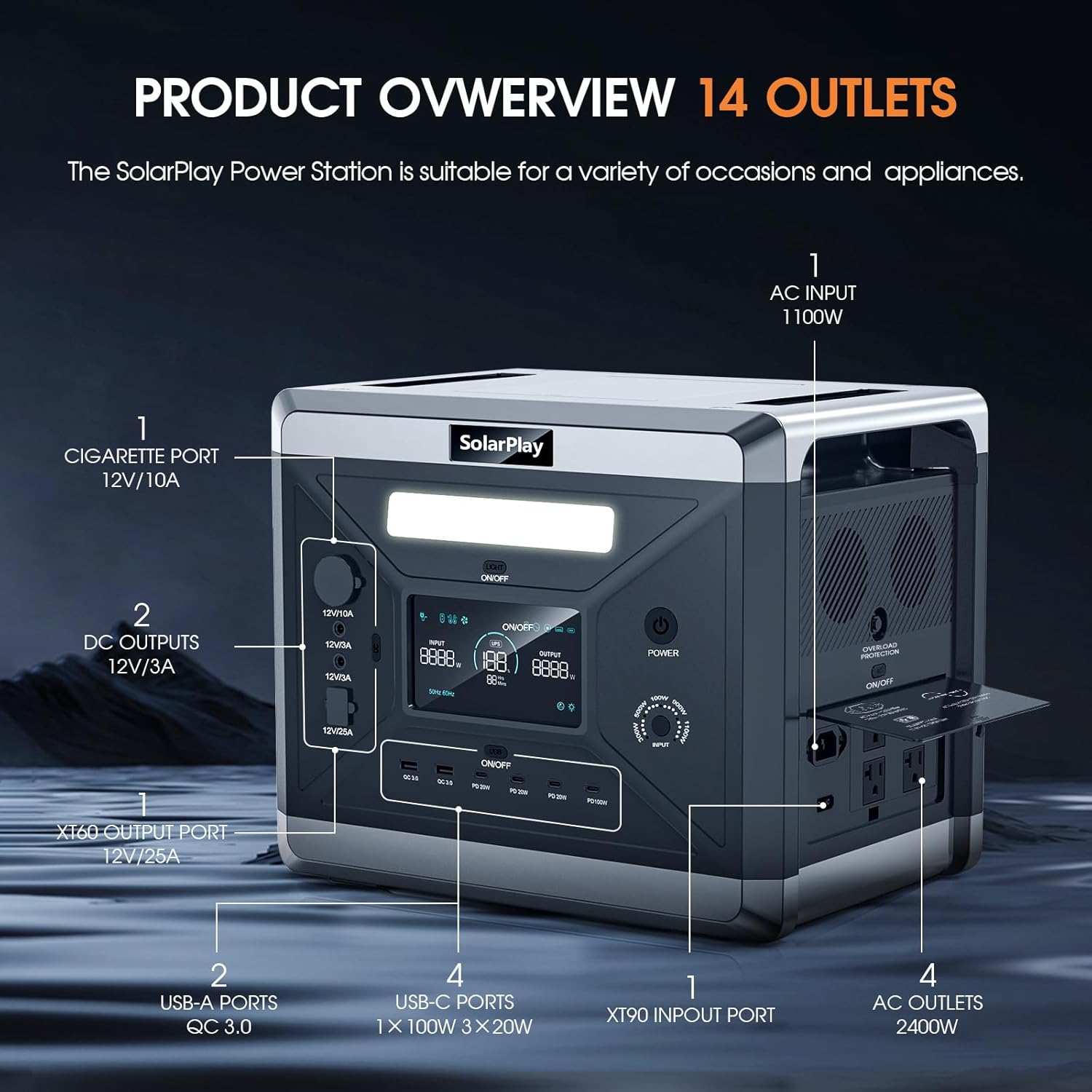
Image: Detailed diagram highlighting the 14 output ports of the SolarPlay Q2501, including AC outlets, USB-A, USB-C, DC5521, cigarette lighter, and XT60 ports.
3.1 Основные характеристики
- Large Capacity & High Output: 2160Wh capacity with 2400W (4800W Peak) AC output, suitable for most home appliances.
- Литий-железо-фосфатный аккумулятор: Built-in lithium iron phosphate battery with over 3500 charge/discharge cycles, offering a lifespan of up to 15 years.
- Fast Dual Charging: Fully charged in approximately 1.5 hours using combined AC and solar input.
- Регулируемая входная мощность: Five levels of input power (300W, 500W, 700W, 900W, 1100W) for flexible charging.
- 14 выходных портов: Includes 4 AC, 2 USB-A (QC3.0), 3 USB-C (PD 20W), 1 USB-C (PD 100W), 1 cigarette lighter, 2 DC5521, and 1 XT60 port.
- Источник бесперебойного питания (ИБП): Switches to battery power in 0.08 seconds during a power outage.
- Тихая работа: Operates at approximately 25 dB, ideal for overnight use.

Image: Visual representation of the Q2501 powering common appliances like laptops, refrigerators, and microwaves, with estimated usage times.
4. Настройка и первоначальное использование
4.1 Распаковка и осмотр
Carefully remove the power station and accessories from the packaging. Inspect all components for any signs of damage. If any items are missing or damaged, please contact SolarPlay customer support immediately.
Video: An unboxing video demonstrating the contents and initial setup of the SolarPlay 2400W/2160Wh Portable Power Station.
4.2 Первоначальная зарядка
Before first use, it is recommended to fully charge the power station. The Q2501 supports multiple charging methods:
- Настенная розетка переменного тока: Connect the AC charging cable to the power station's AC input port and then to a standard wall outlet. The power station can be fully charged in approximately 2 hours at 1100W.
- Солнечные панели: Connect the MC4 XT90 solar charging cable to your solar panels (11.5V to 48V, max. 500W) and then to the XT90 input port on the power station. Charging time varies based on sunlight intensity and panel wattage.
- Разъем прикуривателя автомобиля: Use a 12V/24V car cigarette socket for charging on the go.
- Двойная зарядка (переменный ток + солнечная энергия): For the fastest charging, combine AC and solar input. The power station can be fully charged in about 1.5 hours with max 1100W AC + 500W solar input.

Image: Illustration of the various fast charging methods available for the SolarPlay Q2501, including AC, solar, and car charging.
4.3 Регулируемая входная мощность
You can adjust the input power to optimize charging speed and extend battery life. Select from 300W, 500W, 700W, 900W, or 1100W based on your needs and environment.

Image: A visual guide to adjusting the input power on the Q2501, showing different wattagнастройки и соответствующее время зарядки.
5. Инструкция по эксплуатации
5.1 Включение/выключение питания
Для включения устройства нажмите и удерживайте главную кнопку питания, пока не загорится дисплей. Для выключения устройства нажмите и удерживайте главную кнопку питания еще раз, пока дисплей не погаснет.
5.2 Использование выходных портов
The Q2501 offers a variety of output ports to power different devices:
- Розетки переменного тока: Press the "AC ON/OFF" button to enable AC output. Connect your AC-powered devices (e.g., laptops, small appliances) to the 4 AC ports. Ensure the total wattagе не превышает 2400 Вт.
- USB-порты: The USB-A (QC3.0) and USB-C (PD 20W, PD 100W) ports are always active when the unit is on. Connect your smartphones, tablets, and other USB-powered devices.
- Выходы постоянного тока: Press the "DC ON/OFF" button to enable DC output. Use the 12V/10A cigarette lighter port or the 12V/3A DC5521 ports for compatible devices.
- Выход XT60: The 12V/25A XT60 output port is suitable for high-power DC devices.
ЖК-дисплей 5.3
The integrated LCD display provides real-time information about the power station's status, including input power, output power, battery status, and remaining charge/discharge time.
5.4 светодиодное освещение
The power station includes an LED light for illumination. Press the "LIGHT ON/OFF" button to cycle through different lighting modes: steady on, SOS, and flash.

Изображение: Бывшийamples of the SolarPlay Q2501 in various use scenarios, including outdoor camping, powering tools for outdoor work, and providing home backup power.
6. Техническое обслуживание и уход
- Хранилище: Храните портативную электростанцию в прохладном, сухом месте, вдали от прямых солнечных лучей и экстремальных температур. Для длительного хранения заряжайте устройство до 50-80% каждые 3-6 месяцев, чтобы поддерживать работоспособность батареи.
- Уборка: Для очистки внешней поверхности устройства используйте мягкую сухую ткань. Не используйте абразивные чистящие средства или растворители.
- Состояние аккумулятора: The built-in Battery Management System (BMS) and Control Unit (MCU) manage battery cell voltage and temperature to ensure optimal performance and safety. Avoid fully discharging the battery frequently to prolong its lifespan.
- Вентиляция: Во время работы убедитесь, что вентиляционные отверстия свободны от препятствий, чтобы предотвратить перегрев.

Изображение: рентгеновский снимок view of the SolarPlay Q2501, illustrating the internal LiFePO4 battery cells and the Battery Management System (BMS) for safety and efficiency.
7. Поиск Неисправностей
| Проблема | Возможная причина | Решение |
|---|---|---|
| Устройство не включается | Батарея полностью разряжена; кнопка питания не удерживается достаточно долго. | Зарядите устройство от сети переменного тока; нажмите и удерживайте кнопку питания в течение 3-5 секунд. |
| Выход переменного тока не работает | AC output not enabled; Device wattage exceeds 2400W; Overload protection activated. | Press the "AC ON/OFF" button; Reduce connected load; Disconnect devices, turn off AC, then turn on again. |
| Медленная зарядка через солнечную энергию | Insufficient sunlight; Panels not optimally angled; Dirty panels; Incorrect cable connection. | Ensure direct sunlight; Adjust panel angle; Clean panels; Check cable connections. |
| Display not showing correct info | Временный сбой программного обеспечения. | Restart the power station. If issue persists, contact support. |
Для получения дополнительной помощи обратитесь к контактной информации в разделе «Гарантия и поддержка».
8. Технические характеристики
| Особенность | Деталь |
|---|---|
| Бренд | SolarPlay |
| Название модели | Q2501 Power Station |
| Емкость | 2160Втч |
| Выход переменного тока | 2400 Вт (4800 Вт пик) |
| Тип батареи | LiFePO4 (литий-железо-фосфат) |
| Входная мощность переменного токаtage | 1100W Max |
| Солнечный вход | 11.5V to 48V, 500W Max |
| Размеры продукта | 15.39"Д x 11.22"Ш x 12.56"В |
| Вес товара | 47.4 фунтов (21.5 кг) |
| Всего розеток | 14 |
| Функция ИБП | время переключения 0.08 с |
9. Гарантия и поддержка
SolarPlay offers a Гарантия 5 год for the Q2501 Portable Power Station. If your product malfunctions within this period, please contact SolarPlay customer support for assistance with returns or refunds.
For technical support, troubleshooting, or warranty claims, please contact SolarPlay-US directly. You can often find contact information on the product packaging, the official SolarPlay webсайт или через вашу платформу покупок.
Мы стремимся предоставлять надежную продукцию и превосходное обслуживание клиентов.