
Введение
The JBL Soundgear Frames are innovative Bluetooth audio glasses designed to provide an immersive audio experience while allowing you to remain aware of your surroundings. Equipped with ultra-slim speakers, an integrated microphone, and touch controls, these frames offer seamless connectivity for music, calls, and video conferences. This manual provides essential information for setting up, operating, and maintaining your Soundgear Frames.
Что в коробке?
Carefully unpack your JBL Soundgear Frames and ensure all items are present:
- JBL Soundgear Frames (Onyx)
- Зарядный кабель
- Чистящая салфетка
- Чехол для переноски
Примечание: Дополнительные аксессуары могут продаваться отдельно.
Настраивать
1. Зарядка устройства
Before first use, fully charge your JBL Soundgear Frames. Connect the provided charging cable to the charging port on the frames and to a USB power source. The LED indicator will show charging status.

Изображение: сбоку view of the JBL Soundgear Frames, highlighting the charging port and internal electronics within the temple arms.
- Время зарядки: Полная зарядка занимает примерно 2 часа.
- Срок службы батареи: Up to 8 hours of audio playback on a full charge.
2. Сопряжение по Bluetooth
To connect your Soundgear Frames to a Bluetooth-enabled device:
- Ensure the Soundgear Frames are charged and powered off.
- Press and hold the power button (usually located on one of the temple arms) until the LED indicator flashes blue, indicating pairing mode.
- На вашем устройстве (смартфоне, планшете, компьютере) перейдите в настройки Bluetooth и включите Bluetooth.
- Select "JBL Soundgear Frames" from the list of available devices.
- После подключения светодиодный индикатор загорится синим цветом.
The frames support Bluetooth 5.2 for stable and efficient wireless connectivity.
Инструкция по эксплуатации
Включение/выключение питания
- Включение питания: Press and hold the power button for 2 seconds. The LED will light up.
- Выключение: Press and hold the power button for 3 seconds. The LED will turn off.
Воспроизведение музыки
Use the touch controls located on the temple arms to manage your audio:
- Воспроизведение/Пауза: Single tap on either temple arm.
- Следующий трек: Double tap on the right temple arm.
- Предыдущий трек: Double tap on the left temple arm.
- Увеличить громкость: Swipe forward on the right temple arm.
- Убавить звук: Swipe backward on the right temple arm.
Управление звонками
The integrated microphone allows for clear hands-free calls:
- Ответить/завершить вызов: Single tap on either temple arm.
- Отклонить вызов: Press and hold either temple arm for 2 seconds.
Голосовой помощник
Activate your device's voice assistant (e.g., Siri, Google Assistant) by triple-tapping on either temple arm.

Image: A person wearing the JBL Soundgear Frames outdoors, demonstrating their use in a real-world setting.
Обслуживание
Уборка
To maintain the clarity of your lenses and the integrity of the frames:
- Используйте прилагаемую салфетку для аккуратной протирки линз и оправы.
- Для удаления стойких пятен используйте спрей для чистки линз, специально предназначенный для очков.
- Avoid using abrasive materials or harsh chemicals, as these can damage the lenses and frame finish.
Хранилище
When not in use, store your Soundgear Frames in the provided carrying case to protect them from scratches and impacts.
Уход за аккумулятором
To prolong battery life, avoid exposing the frames to extreme temperatures. If storing for an extended period, charge the battery to approximately 50% before storage.
Поиск неисправностей
| Проблема | Решение |
|---|---|
| Frames do not power on. | Убедитесь, что аккумулятор заряжен. Подключитесь к источнику питания и повторите попытку. |
| Невозможно подключиться через Bluetooth. | Make sure the frames are in pairing mode (flashing blue LED). Check your device's Bluetooth settings and forget previous connections if necessary. Restart both devices. |
| Нет звука или низкая громкость. | Check the volume level on both the frames and your connected device. Ensure the frames are properly paired. |
| Сенсорное управление не реагирует. | Ensure the touch surface is clean and dry. Restart the frames. |
Технические характеристики
| Особенность | Деталь |
|---|---|
| Номер модели | JBLSNDGEARFMSRONX |
| СКП | 050036399845 |
| Цвет | Оникс |
| Форма предмета | Круглый |
| Цвет линз | Черный |
| Тип объектива | Неполяризованный |
| Материал рамы | Термопластик |
| Покрытие кадра | Полный кадр |
| Связность | Блютус 5.2 |
| Спикеры | Ultra-slim 25mm x 9mm |
| Микрофон | Интегрированный |
| Управление | Трогать |
| Срок службы батареи | До 8 часов |
| Время зарядки | Примерно 2 часа |
| Водостойкость | IP54 (Splash and dust resistant) |
| Рекомендуемое использование | Слушаю музыку |
| Возрастной диапазон | Взрослый |
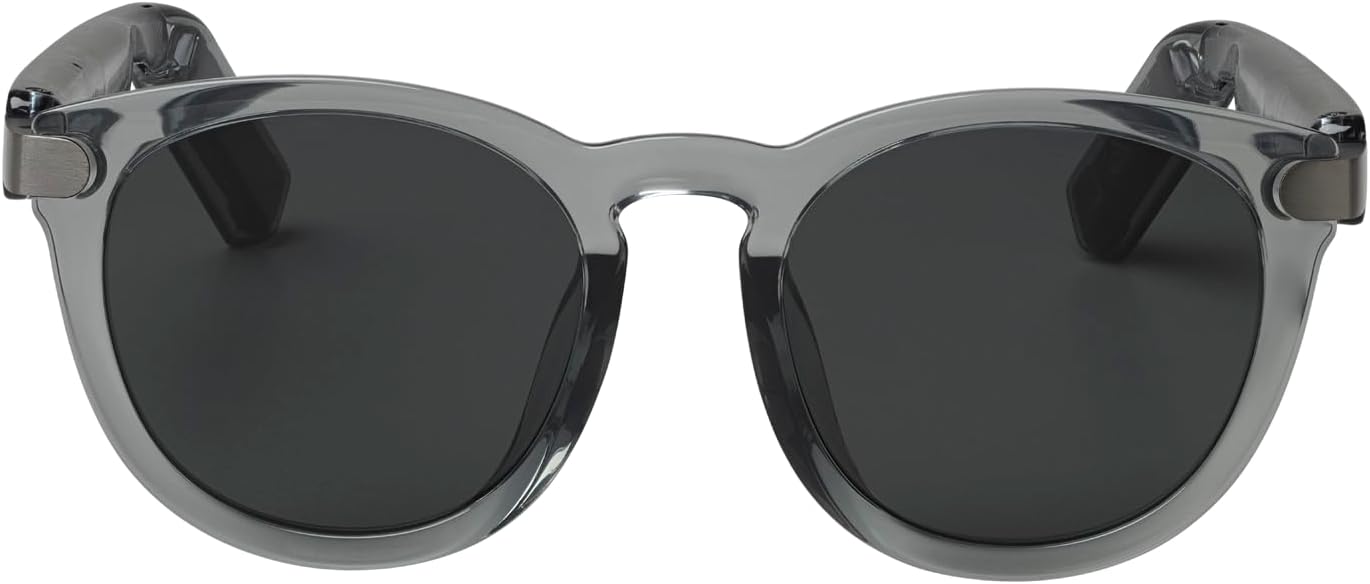
Изображение: Спереди view of the JBL Soundgear Frames, showcasing the round, full-frame design and black non-polarized lenses.

Изображение: Назад view of the JBL Soundgear Frames, showing the overall structure from the rear.
Гарантия и поддержка
JBL products are designed for reliability and performance. For warranty information and customer support, please refer to the warranty card included with your product or visit the official JBL webНа сайте вы также можете найти ответы на часто задаваемые вопросы и дополнительные ресурсы поддержки в режиме онлайн.
Онлайн поддержка: www.jbl.com/support


