
Пробел QIG-D01
Руководство пользователя осушителя воздуха Spacekey QIG-D01
Model: QIG-D01
1. Введение
Thank you for choosing the Spacekey QIG-D01 Dehumidifier. This manual provides essential information for the safe and efficient operation of your new appliance. Please read it thoroughly before use and retain it for future reference. This dehumidifier is designed to reduce excess moisture in areas up to 850 square feet, such as basements, bedrooms, bathrooms, RVs, and closets, improving air quality and comfort.

Рисунок 1: Передняя часть view of the Spacekey QIG-D01 Dehumidifier, showing its white and black design with a digital display and visible water tank.

Figure 2: Visual representation of the dehumidifier's effectiveness in reducing room humidity.

Figure 3: Common issues resolved by maintaining optimal humidity levels with the dehumidifier.
2. Важные инструкции по технике безопасности
Чтобы снизить риск возникновения пожара, поражения электрическим током или получения травм, всегда соблюдайте следующие основные меры предосторожности:
- Перед использованием прибора прочтите все инструкции.
- Не эксплуатируйте осушитель воздуха с поврежденным шнуром или вилкой.
- Убедитесь, что розетка питания правильно заземлена.
- Не блокируйте отверстия для входа и выхода воздуха.
- Держите прибор подальше от воды и других жидкостей.
- Перед чисткой или проведением любых работ по техническому обслуживанию отключите осушитель от сети.
- Не позволяйте детям пользоваться прибором без присмотра.
- This appliance is equipped with a 45° tip-over protection feature. If the unit is tilted beyond 45 degrees, it will automatically shut off to prevent damage or spills.

Figure 4: Illustration of the dehumidifier's 45° tip-over protection, demonstrating automatic shutdown for safety.
3. Продукт закончилсяview
3.1 Components and Design Features
- Основной блок с панелью управления
- Water Tank (3.0L / 106 oz capacity)
- Моющийся воздушный фильтр
- Шнур питания
- Integrated Handles for portability
- Visual Water Tank for easy monitoring
- 45° Tip-over Protection
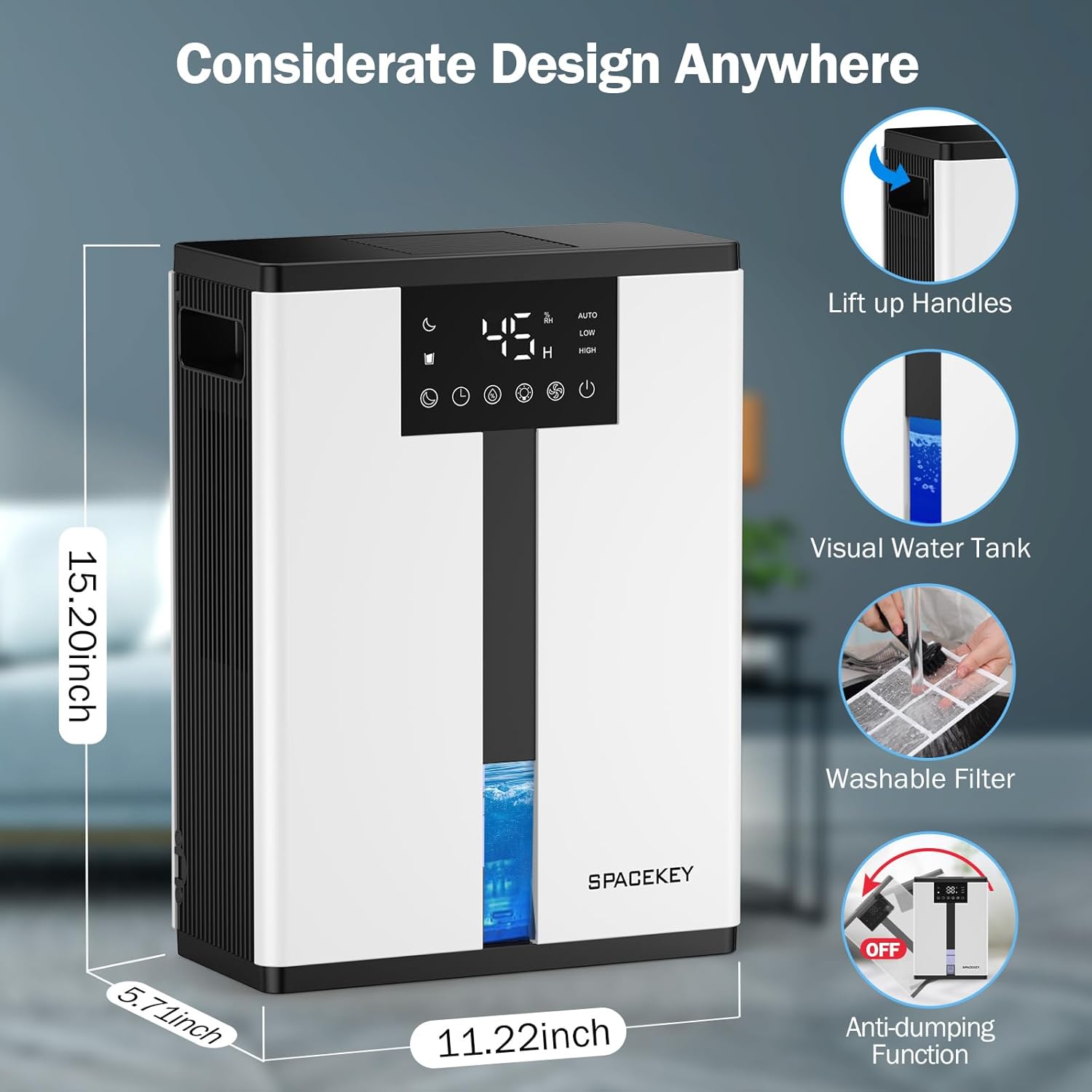
Figure 5: Key design elements and dimensions of the Spacekey QIG-D01 Dehumidifier.
3.2 Advanced Dehumidification Technology
The Spacekey QIG-D01 utilizes semiconductor condensation technology with dual fans and dual semiconductor condensers for enhanced efficiency in moisture removal.
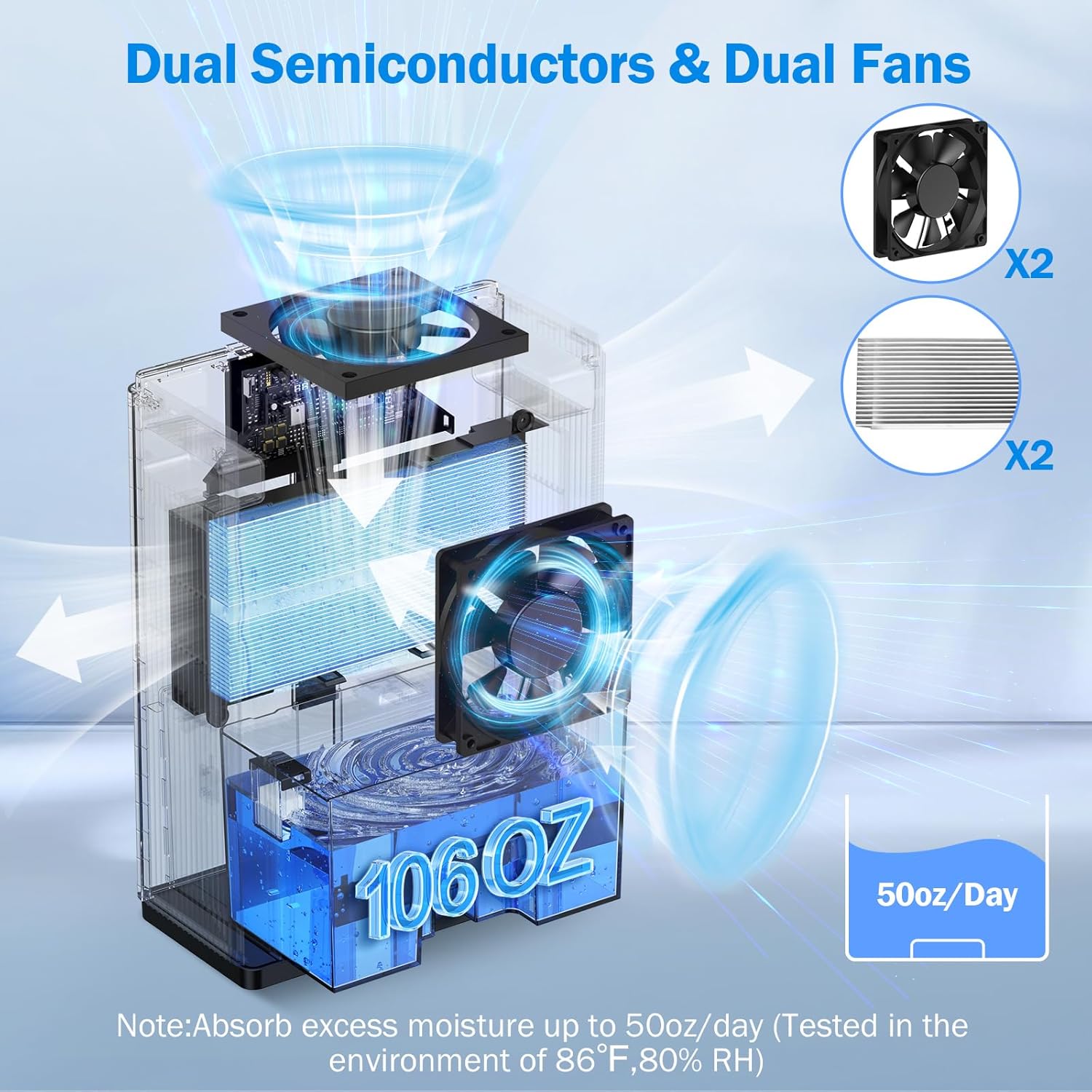
Рисунок 6: Внутренний view of the dual semiconductor and dual fan system for efficient dehumidification.
3.3 Панель управления
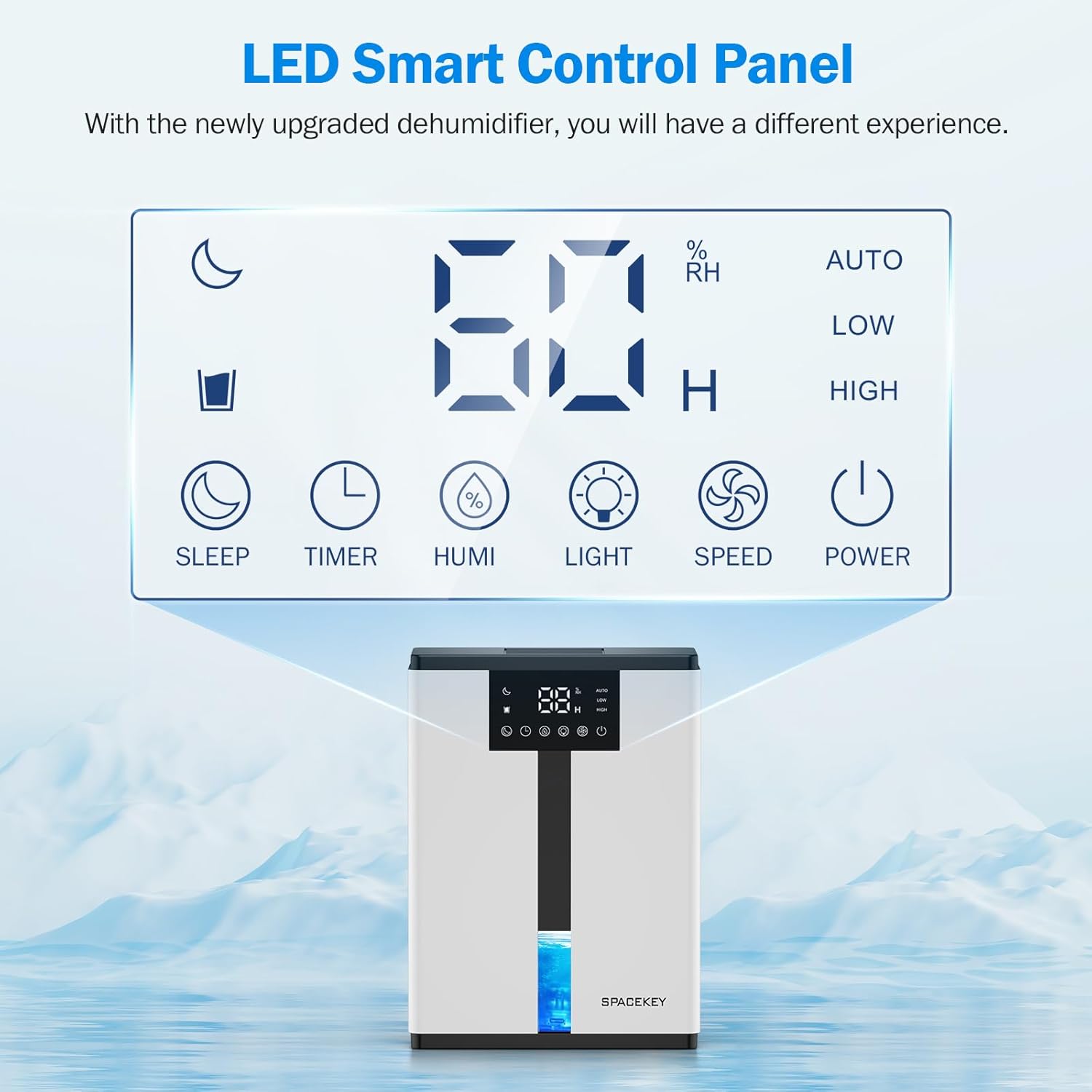
Figure 7: The LED Smart Control Panel, displaying current humidity and various function buttons.
The intuitive LED display shows real-time humidity. Buttons include:
- Спящий режим: Activates quiet operation and can be used with colorful lights.
- Таймер: Sets operating duration (2H, 4H, 6H, 8H, 12H).
- HUMI: Adjusts target humidity (45%, 55%, 65%, or continuous '00').
- СВЕТ: Controls the 7-color ambient light.
- СКОРОСТЬ: Selects fan speed (Auto, Low, High).
- ВЛАСТЬ: Включает / выключает устройство.
4. Инструкции по настройке
- Распаковать: Осторожно извлеките осушитель воздуха из упаковки.
- Размещение: Place the unit on a flat, stable surface in the desired location. Ensure there is at least 8 inches (20 cm) of space around the air inlets and outlets for proper airflow.
- Подключение питания: Подключите шнур питания к заземленной электрической розетке.
- Первоначальная проверка: Ensure the water tank is correctly inserted and empty before starting operation.

Figure 8: Recommended placement areas for the dehumidifier, highlighting its suitability for various indoor environments.
5. Инструкция по эксплуатации
5.1 Включение/выключение питания
Нажмите ВЛАСТЬ кнопка включения или выключения осушителя воздуха.
5.2 Настройка уровня влажности
Нажмите ХУМИ button to cycle through desired humidity levels: 45%, 55%, 65%. The unit will operate until the set humidity is reached, then pause. If set to '00', the unit will operate continuously.

Figure 9: Setting the target humidity level using the HUMI button.
5.3 Регулировка скорости вентилятора
Нажмите СКОРОСТЬ button to select between Auto, Low, and High fan speeds. Auto mode adjusts fan speed based on current humidity.
5.4 Функция таймера
Нажмите ТАЙМЕР button to set an operating duration of 2, 4, 6, 8, or 12 hours. The unit will automatically turn off after the set time.

Figure 10: Using the Timer function to set the operating duration.
5.5 Sleep Mode & Colorful Lights
Нажмите СПАТЬ button to activate sleep mode for ultra-quiet operation (approx. 30dB). Press the СВЕТ button to cycle through 7 colorful ambient lights or select a static color. This feature can be used independently or in conjunction with sleep mode.
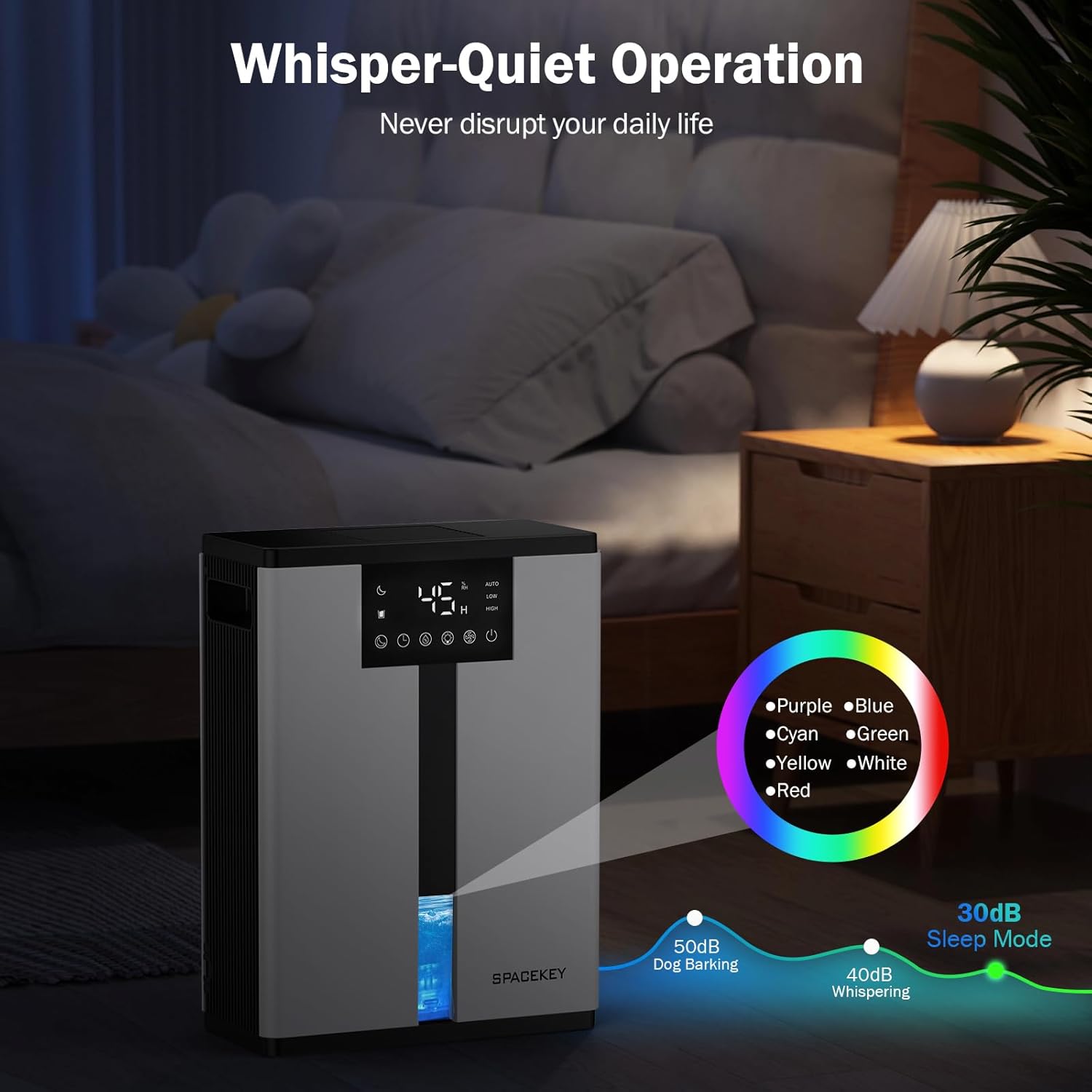
Figure 11: Dehumidifier in Sleep Mode with ambient lighting for a peaceful environment.
5.6 Автоматическое отключение
The dehumidifier will automatically shut off and flash a red light with an audible beep when the water tank is full. Empty the water tank to resume operation.
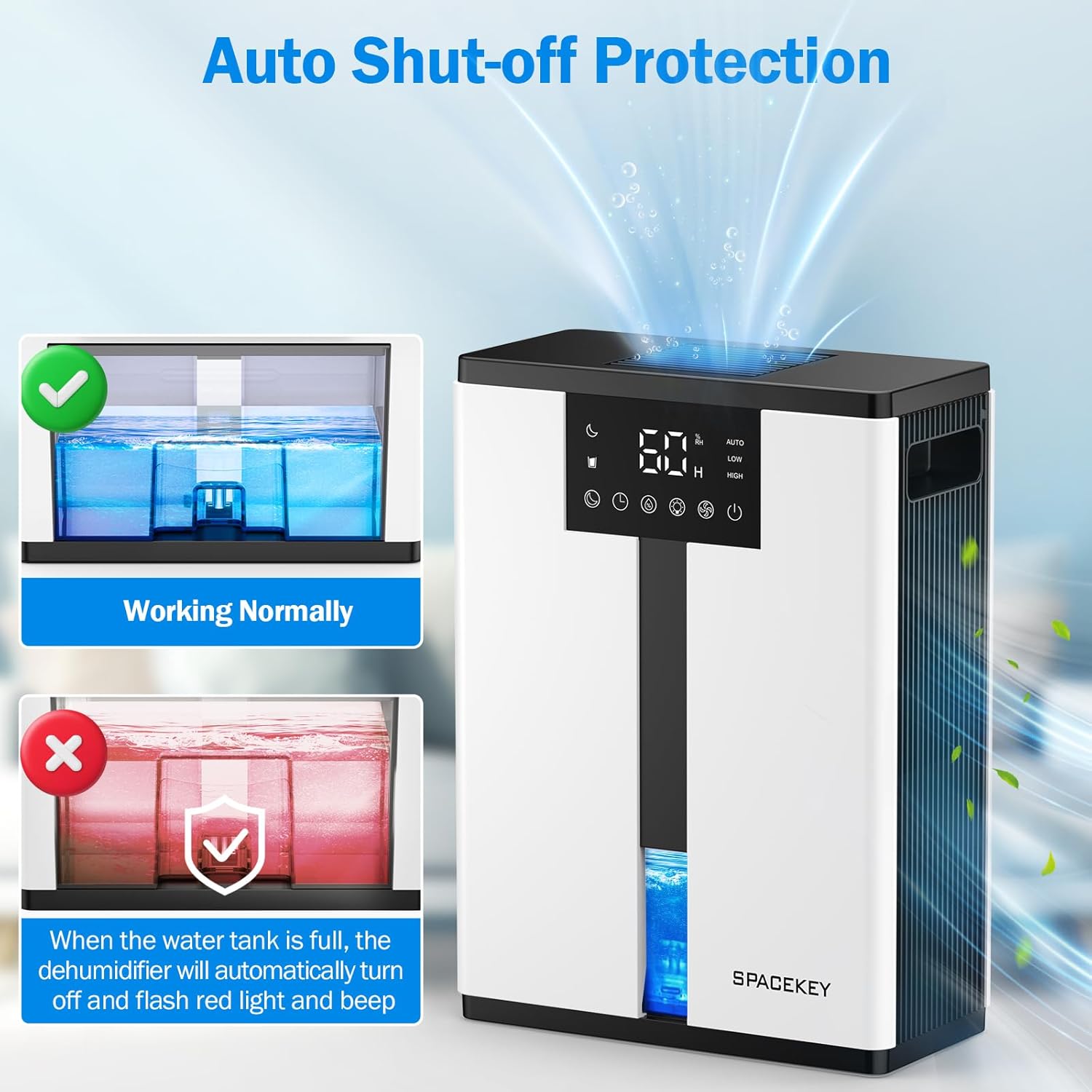
Figure 12: Automatic shut-off mechanism when the water tank is full.
6. Техническое обслуживание
6.1 Опорожнение резервуара для воды
- Аккуратно вытащите резервуар для воды из передней части устройства.
- Снимите крышку бака.
- Вылейте собранную воду.
- Replace the lid and reinsert the water tank firmly into the dehumidifier.

Figure 13: Step-by-step guide to emptying the water tank.
6.2 Очистка воздушного фильтра
The washable filter should be cleaned regularly (every 2-4 weeks, depending on usage) to maintain optimal performance.
- Отключите осушитель.
- Снимите фильтр с задней части устройства.
- Промойте фильтр под проточной водой, чтобы удалить пыль и мусор.
- Дайте фильтру полностью высохнуть на воздухе, прежде чем вставлять его обратно.
- Не используйте осушитель без фильтра.

Figure 14: Instructions for removing and washing the air filter.
6.3 Очистка внешней поверхности
Протрите осушитель снаружи мягкой, damp Ткань. Не используйте абразивные чистящие средства или растворители.
7. Поиск Неисправностей
| Проблема | Возможная причина | Решение |
|---|---|---|
| Осушитель воздуха не включается. | Нет питания; шнур питания не подключен; резервуар для воды полон или неправильно установлен. | Проверьте подключение к электросети; опорожните резервуар для воды и правильно установите его обратно. |
| Вода не собирается или уровень осушения низкий. | Room humidity is already low; air filter is clogged; ambient temperature is too low; unit size is too small for the space. | Ensure humidity is above target; clean air filter; operate in recommended temperature range; consider unit placement or additional units for larger spaces. |
| Блок шумный. | Fan speed is set to High; unit is not on a flat surface. | Switch to Low or Sleep mode; ensure unit is on a stable, flat surface. |
| Red light flashing and beeping. | Резервуар для воды полный. | Empty the water tank and reinsert it. |
8. Технические характеристики
| Особенность | Деталь |
|---|---|
| Название модели | QIG-D01 |
| Бренд | Пробел |
| Емкость осушения | Up to 50 oz (approx. 3 pints) per 24 hours (at 86°F, 80% RH) |
| Емкость резервуара для воды | 3.0 литров (106 жидких унций) |
| Зона покрытия | До 850 квадратных футов |
| Потребляемая мощность | 70 Watts (not more than 1.68 kWh/Day) |
| Уровень шума | Approx. 30dB (in Sleep Mode) |
| Размеры (Д x Ш x В) | 5.71"Д x 11.22"Ш x 15.2"В |
| Вес товара | 8.91 фунта |
| Особые возможности | Automatic Shutoff, Intelligent Humidity Control, 4 Fan Speeds, Timer, 7 Colorful Lights, 45° Tip-over Protection, Washable Filter |
9. Гарантия и поддержка клиентов
Spacekey offers the following support for your dehumidifier:
- Возврат средств в течение 30 дней: For any dissatisfaction.
- Гарантия замены в течение 2 года: В случае дефектов или неисправностей продукции.
- Пожизненное обслуживание клиентов: Dedicated support for any questions or issues.
If you have any questions or require assistance, please do not hesitate to contact Spacekey customer support. We aim to reply within 24 hours.


Рисунок 15: Болееview of Spacekey's customer support and warranty policies.
Ask a question about this manual
Ask about setup, troubleshooting, compatibility, parts, safety, or missing instructions. Manuals+ will review the question and use this page’s manual context to help answer it.