
1. Введение
This manual provides detailed instructions for the installation, operation, and maintenance of the Intellinet 48-Port L3 Managed Gigabit PoE+ Switch, Model 562041. This device is designed for enterprise networks requiring efficient and scalable routing solutions with high-powered Power over Ethernet (PoE) capabilities.
2. Информация по технике безопасности
Observe the following safety precautions to prevent damage to the device and injury to personnel:
- Обеспечьте правильное заземление устройства.
- Не допускайте попадания воды на выключатель и чрезмерной влажности.
- Эксплуатируйте устройство в указанных диапазонах температуры и влажности.
- Use only the power cable provided or a compatible replacement.
- Do not open the switch casinг; обратитесь для обслуживания к квалифицированному персоналу.
- Обеспечьте надлежащую вентиляцию вокруг выключателя, чтобы предотвратить перегрев.
3. Содержимое упаковки
Проверьте наличие всех предметов в упаковке:
- Intellinet 48-Port L3 Managed Gigabit PoE+ Switch (Model 562041)
- Кабель питания
- 19" rackmount brackets
- Резиновые ножки
- Инструкции (данное руководство)
4. Продукт закончилсяview
The Intellinet 562041 is a robust Layer 3 managed switch featuring 48 Gigabit PoE+ ports and six 10G SFP+ uplink slots. It supports a total power budget of 850 watts for PoE devices.
4.1 Передняя панель
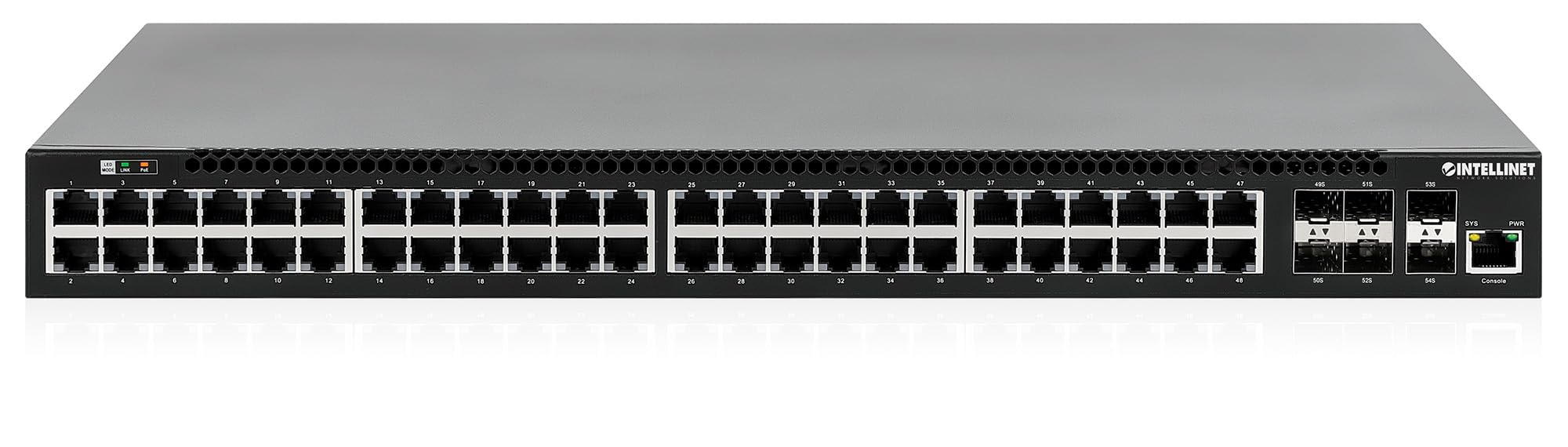
Передняя панель включает в себя:
- 48 x 10/100/1000 Mbps RJ45 Ports: These ports support Power over Ethernet Plus (PoE+) for connecting compatible devices.
- 6 x 10 Gigabit SFP+ Slots: For high-speed uplink connections to other network devices.
- Светодиодные индикаторы: Provide status information for power, system, link activity, and PoE status.
- Консольный порт: For local management and configuration.


4.2 Задняя панель

The rear panel typically includes the AC power input and cooling fans for heat dissipation.

5. Настройка
5.1 Физическая установка
The switch can be installed in a standard 19-inch equipment rack or placed on a desktop.
- Установка в стойку: Attach the provided rackmount brackets to the sides of the switch using the included screws. Secure the switch into a standard 19-inch rack.
- Установка на рабочем столе: Attach the provided rubber feet to the bottom of the switch to prevent scratching and ensure stability. Place the switch on a flat, stable surface.
5.2 Подключение питания
Connect the provided power cable to the AC power input on the rear panel of the switch and then to a grounded electrical outlet. Ensure the power switch is in the OFF position before connecting the power cable.
5.3 Сетевые подключения
- PoE-устройства: Connect PoE-compatible devices (e.g., IP cameras, VoIP phones, wireless access points) to any of the 48 Gigabit RJ45 ports. The switch will automatically detect and provide power to these devices.
- Восходящие соединения: Insert compatible SFP+ transceivers into the 10 Gigabit SFP+ slots and connect them to your core network or other high-speed devices using appropriate fiber optic cables.
- Консольное подключение: For initial configuration or direct management, connect a console cable from your computer to the console port on the switch.
5.4 Начальная конфигурация
Refer to the separate software configuration guide for detailed instructions on accessing the switch's management interface (web-based GUI or command-line interface via console port) and performing initial setup, including IP address assignment, user accounts, and basic network settings.
6. Инструкция по эксплуатации
6.1 Layer 3 Routing
This switch offers dynamic Layer 3 IP routing capabilities, including OSPF (Open Shortest Path First), RIP (Routing Information Protocol), and VRRP (Virtual Router Redundancy Protocol). These protocols enable efficient and scalable routing within complex network environments.

6.2 Питание через Ethernet (PoE+)
The switch provides up to 30 watts of power per port across its 48 PoE+ ports, with a total power budget of 850 watts. This allows for seamless integration of various PoE devices without the need for separate power adapters.
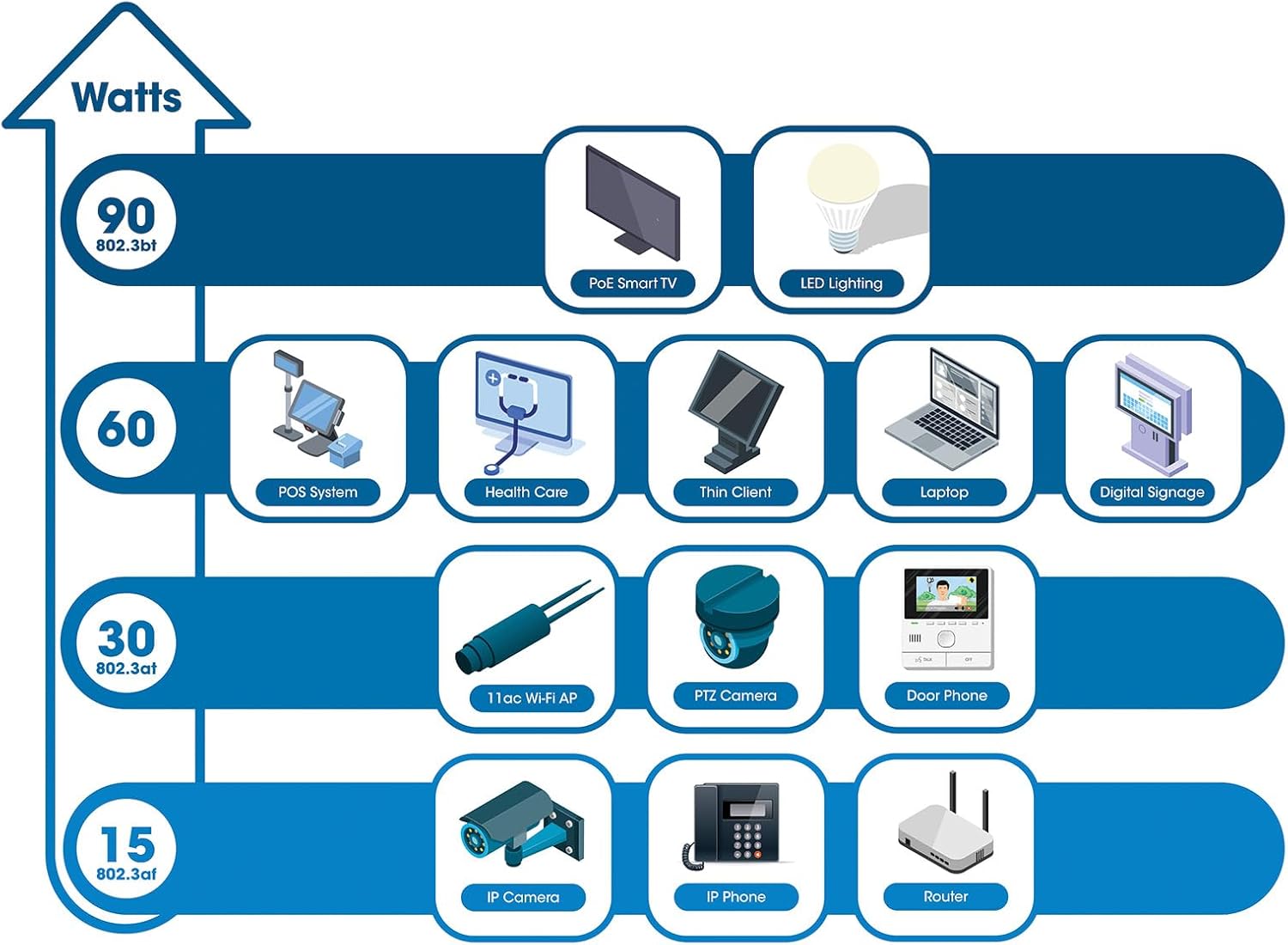
6.3 PoE Scheduling
The switch supports PoE scheduling, allowing administrators to define specific times for powering on, powering off, or rebooting connected PoE devices. This feature can optimize power consumption and enhance network security.


6.4 Self-Healing Functionality (PDM)
The Powered Device Monitor (PDM) feature enables the switch to proactively monitor the status of connected PoE devices. If a device becomes unresponsive, the PDM can automatically restart the PoE port to restore functionality, minimizing downtime and maintaining network integrity.
6.5 Управление облаком
The switch supports cloud management capabilities, allowing for remote configuration, monitoring, and troubleshooting of the device from a centralized platform. Refer to the cloud management documentation for setup and usage details.
7. Техническое обслуживание
7.1 обновлений прошивки
Regularly check the Intellinet Network Solutions website for the latest firmware updates. Applying firmware updates can improve performance, add new features, and address security vulnerabilities. Follow the instructions provided with the firmware update package carefully.
7.2 Очистка
To clean the switch, power it off and disconnect all cables. Use a soft, dry cloth to wipe the exterior. Do not use liquid or aerosol cleaners. Ensure ventilation openings are free from dust and debris.
7.3 Экологические соображения
Ensure the switch operates within its specified temperature and humidity ranges. Avoid placing the switch in direct sunlight, near heat sources, or in areas with high dust accumulation.
8. Поиск Неисправностей
This section addresses common issues you might encounter with the switch.
8.1 Нет питания
- Verify the power cable is securely connected to both the switch and a working electrical outlet.
- Убедитесь, что выключатель питания на задней панели находится в положении «ВКЛ».
- Проверьте работоспособность розетки с помощью другого устройства.
8.2 Отсутствие связи на порту
- Check the Ethernet cable connection at both ends. Ensure it is securely plugged in.
- Verify the cable is not damaged. Try a different cable.
- Убедитесь, что подключенное устройство включено и работает правильно.
- Check the port status in the switch's management interface.
8.3 Устройство PoE не получает питание
- Confirm the connected device is a PoE-compatible device.
- Проверьте состояние светодиодного индикатора PoE для конкретного порта.
- Verify the total PoE power budget (850W) is not exceeded by all connected devices.
- Utilize the Powered Device Monitor (PDM) feature to automatically restart the port if the device is unresponsive.
- Check PoE settings in the switch's management interface.
9. Технические характеристики
| Особенность | Спецификация |
|---|---|
| Номер модели | 562041 |
| Бренд | ИНТЕЛЛЕКТУАЛЬНЫЕ СЕТЕВЫЕ РЕШЕНИЯ |
| Количество портов | 54 (48 x Gigabit PoE+, 6 x 10G SFP+) |
| Тип интерфейса | PoE, SFP |
| Максимальная мощность (бюджет PoE) | 850 Вт |
| Скорость передачи данных | 10 Gigabits Per Second (SFP+ uplinks) |
| Вес товара | 6.2 килограммов (13.64 фунта) |
| Размеры продукта (Д x Ш x В) | 13.78 x 17.32 x 1.73 дюйма |
| Верхний температурный рейтинг | 104 градусов по Фаренгейту (40°C) |
| Нижний температурный рейтинг | 32 градусов по Фаренгейту (0°C) |
| Совместимые устройства | Desktop, Router, PoE devices (IP cameras, VoIP phones, WAPs) |
| Включенные компоненты | 19" rackmount brackets, Instructions, Rubber feet, power cable |
| СКП | 766623562041 |
10. Гарантия и поддержка
10.1 Информация о гарантии
This Intellinet Network Solutions product is covered by a Гарантия производителя 3 годСохраните чек о покупке для предъявления гарантийных претензий. Гарантия распространяется на дефекты материалов и изготовления при нормальном использовании.
10.2 Техническая поддержка
For technical assistance, product documentation, or to register your product, please visit the official Intellinet Network Solutions webили свяжитесь со службой поддержки клиентов. Контактную информацию обычно можно найти на сайте производителя. webсайте или в упаковке продукта.