
Продукт болееview
The CREWORKS 180 PPD Commercial Dehumidifier is designed for effective humidity control in large spaces, ranging from 600 to 1600 square feet. This unit features a robust design with upgraded components for efficient moisture removal and durability. Key features include automatic defrost, a user-friendly control panel, and portability for flexible placement.

Изображение: Спереди view of the CREWORKS 180 PPD Commercial Dehumidifier, highlighting its compact and robust design.
- Эффективное осушение воздуха: Capable of removing up to 180 PPD (Pints Per Day) at saturation, suitable for areas up to 1600 sq. ft.
- Автоматическая разморозка: Prevents frost buildup on coils, ensuring continuous operation and efficiency.
- Прочная конструкция: Features upgraded copper coils for enhanced heat dissipation and longevity.
- Удобное управление: An intuitive display panel allows for easy adjustment of humidity levels and timer settings.
- Портативная конструкция: Equipped with large rear wheels and a convenient handle for easy movement.
Инструкции по установке
Follow these steps to properly set up your CREWORKS 180 PPD Commercial Dehumidifier.
1. Распаковка и размещение
- Аккуратно извлеките осушитель воздуха из упаковки. Проверьте наличие повреждений, полученных при транспортировке.
- Place the unit on a level, stable surface in the desired location. Ensure there is at least 12 inches (30 cm) of clear space around all sides for proper airflow.
- Consider the dimensions of the unit for optimal placement.

Image: Diagram showing the dimensions of the dehumidifier (23.11"D x 17.32"W x 34.13"H).

Изображение: Бывшийamples of suitable environments for the dehumidifier, including warehouses, garages, basements, and fitness centers.
2. Подключение к канализации
The unit includes a drain hose for continuous drainage. This eliminates the need for manual emptying of a water tank.
- Locate the drain outlet on the unit.
- Connect the provided drain hose securely to the drain outlet.
- Route the other end of the hose to a suitable drain point, such as a floor drain, sink, or large container. Ensure the hose is sloped downwards to allow for gravity drainage and is free from kinks or obstructions.

Image: Illustration of the drain hose connection and the overflow alarm feature, which notifies users if drainage is improper.
3. Подключение питания
Подключите шнур питания к заземленной розетке. Убедитесь, что напряжениеtagе соответствует требованиям подразделения.
Инструкция по эксплуатации
This section details how to operate your dehumidifier using the control panel.
Панель управления надview
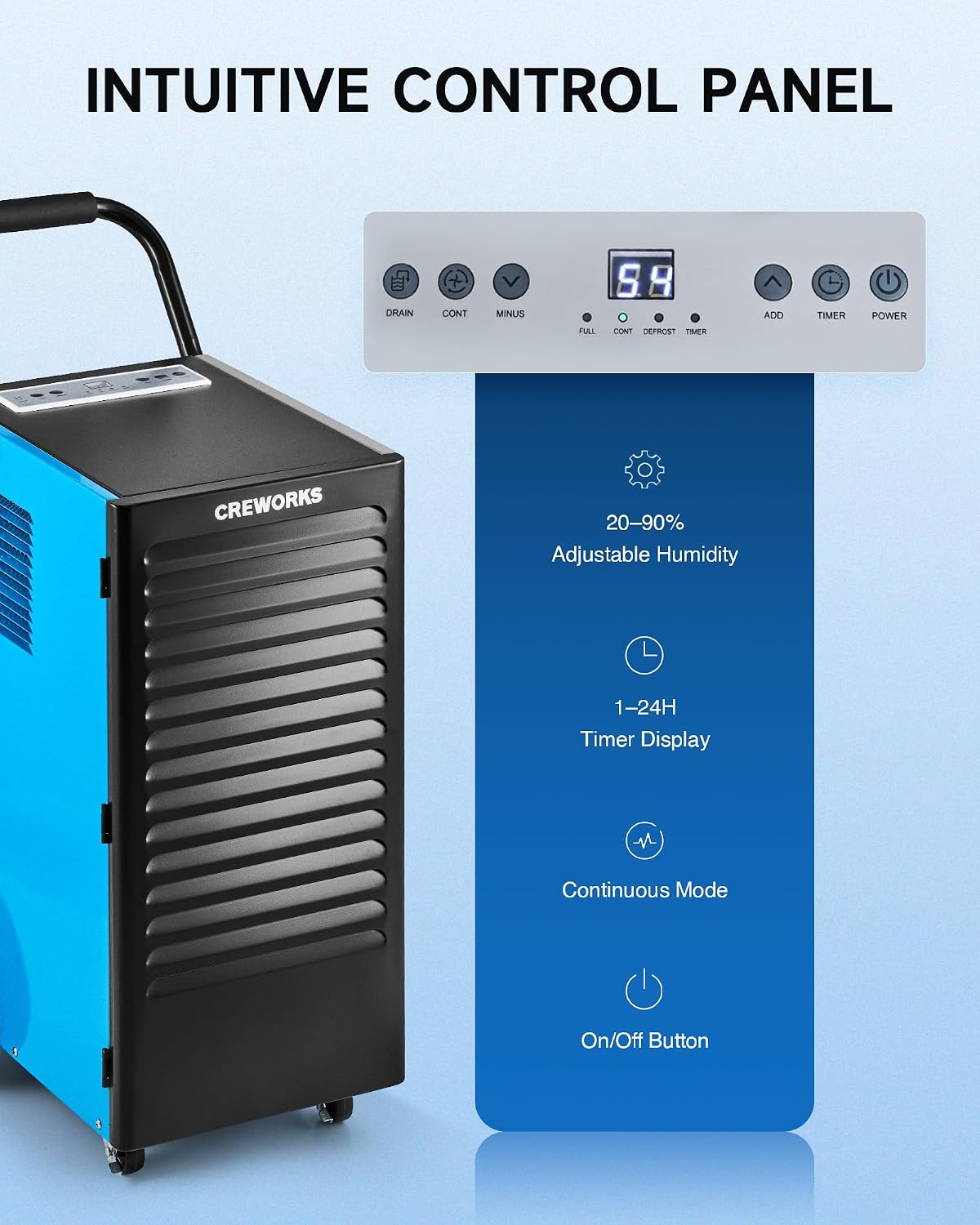
Изображение: Крупный план view of the dehumidifier's intuitive control panel with various buttons and a digital display.
The control panel features a digital display and several buttons for managing the dehumidifier's functions:
- Кнопка питания: Включает или выключает устройство.
- ADD / MINUS Buttons: Adjusts the desired humidity level (20-90%) or timer setting (1-24 hours).
- Кнопка таймера: Sets the operational timer.
- CONT (Continuous) Button: Activates or deactivates continuous dehumidification mode.
- DRAIN Button: Activates or deactivates the drain pump (if applicable to the model).
- Индикаторы дисплея: Shows current humidity, timer, and status indicators for FULL, CONT, DEFROST, and TIMER.
Основная операция
- Включение питания: Нажмите ВЛАСТЬ button to turn on the dehumidifier. The display will show the current room humidity.
- Установите желаемую влажность: Используйте ДОБАВЛЯТЬ or МИНУС buttons to set your desired humidity level between 20% and 90% Relative Humidity (RH). The unit will operate until the set humidity is reached, then cycle on and off to maintain it.
- Непрерывный режим: Нажмите ПРОДОЛЖЕНИЕ button for continuous operation, where the unit will run constantly regardless of the humidity level. This is useful for very damp conditions or for faster drying.
- Функция таймера: Нажмите ТАЙМЕР button to set an auto-on or auto-off time (1-24 hours).
Video: Demonstration of setting the desired humidity level and activating continuous mode on the dehumidifier's control panel.
Автоматическая разморозка
The dehumidifier is equipped with an automatic defrost function. If frost builds up on the evaporator coils, the compressor will temporarily shut off, and the fan will continue to run to melt the frost. The DEFROST indicator light will illuminate during this cycle. Once defrosted, the unit will resume normal dehumidification.

Image: Illustration showing the automatic defrost function, where the dehumidifier temporarily halts the compressor to prevent frosting.
Обслуживание
Регулярное техническое обслуживание обеспечивает оптимальную производительность и продлевает срок службы вашего осушителя воздуха.
1. Очистка воздушного фильтра
The dehumidifier is equipped with a washable air filter. A dirty filter can reduce efficiency and airflow.
- Выключите осушитель воздуха и отсоедините его от розетки.
- Locate and remove the air filter from the unit. Refer to the product diagram for filter location.
- Wash the filter with warm, soapy water. Rinse thoroughly and allow it to air dry completely before reinserting. Do not use a dishwasher or harsh chemicals.
- Вставьте сухой фильтр обратно в устройство.
Рекомендация: Clean the air filter every 2-4 weeks, or more frequently depending on usage and air quality.

Image: Illustration showing the removable and reusable air filter for easy cleaning.
2. Очистка внешней поверхности
Протрите внешнюю поверхность устройства мягкой тряпкой.amp Ткань. Не используйте абразивные чистящие средства или растворители.
3. Хранение
If storing the unit for an extended period, ensure it is clean and dry. Coil the power cord and store the unit in a cool, dry place.
Руководство по устранению неполадок
В этом руководстве вы найдете информацию о распространенных проблемах и способах их решения.
| Проблема | Возможная причина | Решение |
|---|---|---|
| Осушитель воздуха не включается. | No power, power cord loose, unit not plugged in. | Ensure the unit is properly plugged into a working outlet. Check circuit breaker. |
| Устройство работает, но не собирает воду. | Humidity setting too high, room temperature too low, air filter clogged, unit in defrost mode. | Lower the desired humidity setting. Ensure room temperature is above 41°F (5°C). Clean the air filter. Wait for defrost cycle to complete. |
| Unit is freezing up (frost on coils). | Low room temperature, refrigerant issue. | The unit has an automatic defrost function. If freezing persists, ensure room temperature is within operating range. If problem continues, contact support. |
| Подтекает вода. | Drain hose not connected properly, drain hose kinked or blocked, unit not level. | Check drain hose connection and ensure it is secure. Clear any kinks or blockages in the hose. Ensure the unit is on a level surface. |
| Блок шумный. | Неплотно прилегающие детали, неровное положение агрегата, засорение вентилятора. | Ensure the unit is on a stable, level surface. Check for any loose components. Inspect fan for obstructions. |
Технические характеристики продукта
Detailed technical specifications for the CREWORKS 180 PPD Commercial Dehumidifier.
| Особенность | Деталь |
|---|---|
| Бренд | КРЕВЕРКИ |
| Название модели | 180PPD |
| Производительность осушения (при насыщении) | 180 пинт в день |
| Мощность осушения (AHAM) | 85 пинт в день |
| Рекомендуемая зона покрытия | От 600 до 1600 квадратных футов |
| Размеры продукта (Д x Ш x В) | 23.11" x 17.32" x 34.13" |
| Емкость воздушного потока | 350 кубических сантиметров в минуту |
| Режим работы | Непрерывный |
| Особые возможности | Automatic Defrost, Portable, Timer, Wheels, Drain Hose, Display Panel |
| Материал | Металл |
| Хладагент | R32 (Low-Impact) |
Гарантия и поддержка
Информация о гарантии
CREWORKS products typically come with a manufacturer's warranty. Specific warranty terms, including duration and coverage, may vary. Please refer to the warranty card included with your product or contact CREWORKS customer service for detailed information. Keep your purchase receipt as proof of purchase for warranty claims.
Примечание: Some customer reviews indicate a potential for issues after approximately one year of use. Regular maintenance and proper operation as outlined in this manual can help ensure product longevity.
Поддержка клиентов
For technical assistance, troubleshooting beyond this guide, or warranty inquiries, please contact CREWORKS customer support. Contact information can typically be found on the manufacturer's official webсайте или в упаковке продукта.
When contacting support, please have your product model number (180PPD) and purchase date available.