
1. Введение
The OWON HDS25 is a compact, multi-functional handheld device integrating a 2-channel oscilloscope and a 20,000-count multimeter. Designed for portability and versatility, it features a 3.5-inch LCD display, USB Type-C connectivity for charging and data transfer, and supports SCPI commands for remote control. This manual provides essential information for the safe and effective operation, maintenance, and troubleshooting of your HDS25 device.
2. Продукт закончилсяview
2.1 Основные характеристики
- 3-в-1 Функциональность: Combines a 2-channel oscilloscope and a 20,000-count True RMS multimeter.
- Осциллограф: Полоса пропускания 25 МГц, скорость передачи данных в реальном времени 250 Мвыб/с.ample rate, 8K record length.
- Мультиметр: Измеряет переменный/постоянный токtagт. е. переменный/постоянный ток, сопротивление, емкость, диод и целостность цепи.
- Отображать: 3.5-дюймовый ЖК-дисплей высокого разрешения.
- Связь: USB Type-C for charging and PC communication, supports SCPI commands.
- Портативность: Compact design with approximately 4 hours of continuous battery operation.
2.2 Компоненты устройства
The following image illustrates the main components of the OWON HDS25 device:
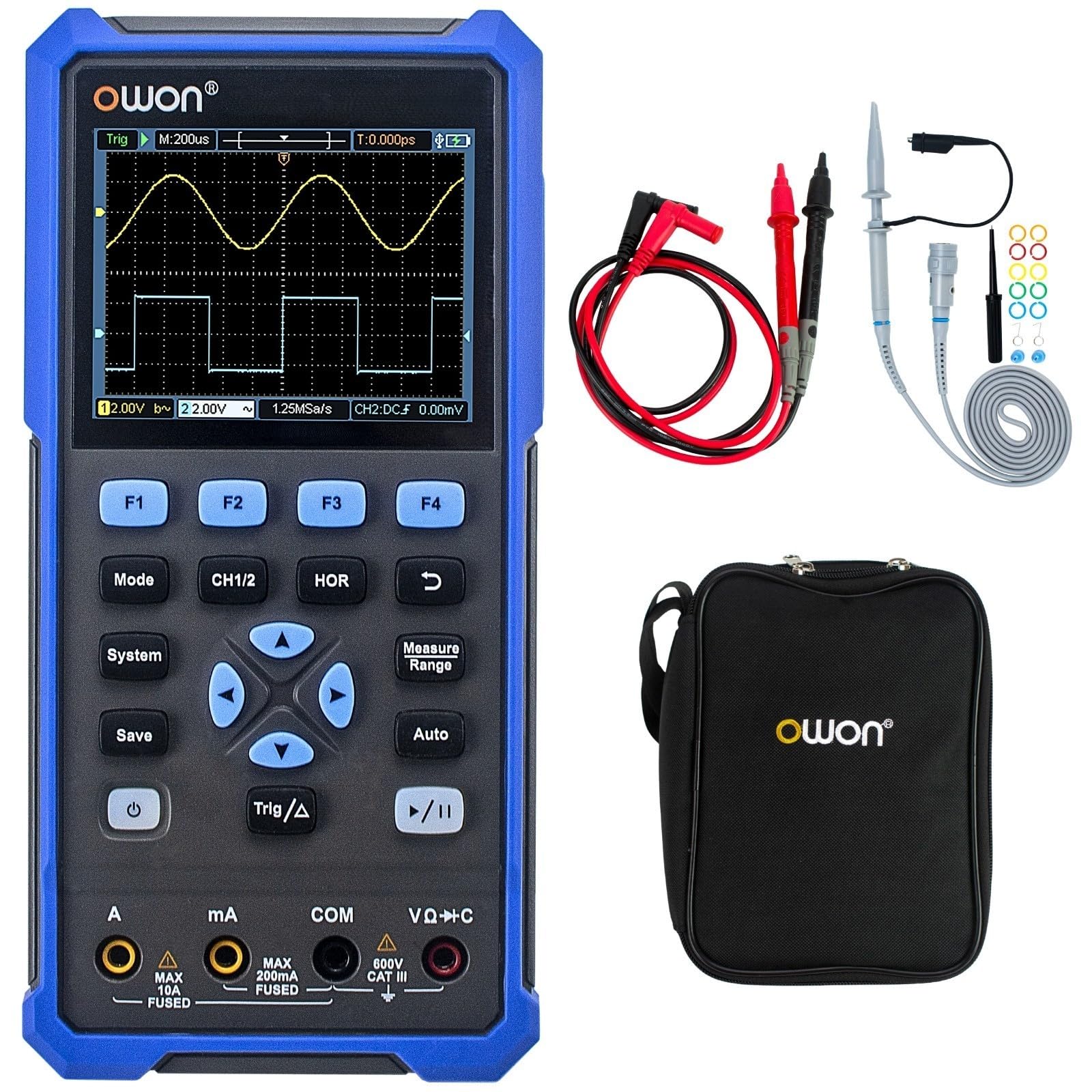
The device features a central 3.5-inch LCD screen for waveform display and measurement readings. Below the screen are function buttons (F1-F4), mode selection buttons (Mode, CH1/2, HOR, System, Save, Auto, Trig/Δ, Power, Play/Pause), and a directional pad for navigation. At the bottom, there are input jacks for current (A, mA), common ground (COM), and voltage/resistance/capacitance (VΩ+C) measurements.

2.3 Принадлежности в комплекте
- USB Type-C Кабель
- Щупы осциллографа (2)
- Инструмент для регулировки зонда
- Измерительные щупы мультиметра
- Защитная сумка

3. Настройка
3.1 Зарядка устройства
Before initial use, fully charge the device using the provided USB Type-C cable and a compatible power adapter (not included). The charging indicator on the device will show the charging status.
3.2 Подключение зондов и проводов
- Щупы осциллографа: Connect the BNC connector of the oscilloscope probes to the CH1 and CH2 input ports on the top of the device. Ensure a secure connection.
- Измерительные щупы мультиметра: For multimeter functions, insert the red test lead into the VΩ+C jack and the black test lead into the COM jack. For current measurements, use the A or mA jacks as appropriate.
3.3 Включение/выключение питания
Нажмите и удерживайте Власть button (usually marked with a circle and vertical line symbol) to turn the device on or off.
4. Инструкция по эксплуатации
4.1 Общая навигация
- Используйте Режим button to switch between Oscilloscope and Multimeter modes.
- The directional pad (up, down, left, right) is used to navigate menus and adjust parameters.
- Кнопки F1 к F4 correspond to on-screen menu options.
- The Система button accesses system settings.
- The Сохранять button allows saving waveforms or measurement data.
4.2 Режим осциллографа
In Oscilloscope mode, the device displays real-time waveforms. Use the following controls:
- Канал 1/2: Selects the active channel or displays both.
- HOR (Horizontal): Adjusts the time base (horizontal scale) of the waveform.
- Вертикальная шкала: Use the directional pad (up/down) to adjust the voltage scale for the selected channel.
- Trig/Δ (Trigger): Configures trigger settings (edge, level, mode) to stabilize the waveform display.
- Авто: Automatically adjusts vertical, horizontal, and trigger settings for a stable waveform display.
- Воспроизведение/Пауза: Freezes or resumes the waveform acquisition.
4.3 Режим мультиметра
In Multimeter mode, the device functions as a digital multimeter. Use the directional pad to select the desired measurement function (Voltage, Current, Resistance, etc.). Ensure the test leads are connected to the correct input jacks for the selected measurement type.
- ТомtagИзмерение (В): Connect leads in parallel with the circuit.
- Current Measurement (A/mA): Connect leads in series with the circuit. Ensure correct jack selection (A or mA) based on expected current.
- Измерение сопротивления (Ом): Connect leads across the component when power is off.
- Проверка целостности цепи/диода: For checking circuit continuity or diode function.
- Измерение емкости (Ф): Connect leads across the capacitor when power is off.
5. Техническое обслуживание
5.1 Очистка
Протрите внешнюю поверхность устройства мягкой тряпкой.amp cloth. Do not use abrasive cleaners or solvents. Ensure the device is powered off and disconnected from all power sources and measurement circuits before cleaning.
5.2 Уход за аккумулятором
Для продления срока службы батареи избегайте частой полной разрядки. Регулярно заряжайте устройство, особенно если оно будет храниться длительное время. Храните устройство в прохладном, сухом месте.
5.3 Хранение
When not in use, store the HDS25 in its protective bag in a clean, dry environment away from direct sunlight, extreme temperatures, and high humidity.
6. Поиск Неисправностей
If you encounter issues with your OWON HDS25, refer to the following common problems and solutions:
| Проблема | Возможная причина | Решение |
|---|---|---|
| Устройство не включается. | Разряжена батарея или неисправна кнопка питания. | Заряжайте устройство не менее 30 минут. Если оно по-прежнему не реагирует, обратитесь в службу поддержки. |
| В режиме осциллографа осциллограмма не отображается. | Incorrect probe connection, wrong vertical/horizontal scale, or trigger settings. | Убедитесь, что щупы надежно подключены. Нажмите Авто button. Adjust vertical (voltage) and horizontal (time) scales. Check trigger level. |
| Показания мультиметра неточны или равны нулю. | Incorrect lead connection, wrong measurement function selected, or open circuit. | Verify test leads are in the correct jacks for the selected function. Ensure proper connection to the circuit. Check for open circuits. |
| Устройство зависает или перестает отвечать. | Сбой в программном обеспечении. | Perform a soft reset by holding the power button until the device turns off, then restart. If the issue persists, contact support. |
7. Технические характеристики
| Особенность | Спецификация |
|---|---|
| Модель | HDS25 |
| Пропускная способность | 25 МГц |
| Каналы | 2 |
| Sampле Скорость | 250 Мвыб/с |
| Длина записи | 8K |
| Показания мультиметра | 20,000 |
| Отображать | 3.5-дюймовый ЖК-дисплей |
| Связность | USB Type-C (charging & data) |
| Срок службы батареи | Приблизительно 4 часов |
| Сертификаты | CE, RoHS, UL |
| Включенные элементы | USB cable, probes, probe adjustment tool, multimeter leads, bag |
8. Гарантия и поддержка
8.1 Информация о гарантии
The OWON HDS25 comes with a 3-летняя гарантия производителя for the main unit and a Гарантия 1 год for included accessories. Please retain your proof of purchase for warranty claims.
8.2 Поддержка клиентов
For technical assistance, troubleshooting, or warranty inquiries, please contact OWON customer support. You can also find the latest user manual and support resources on the official OWON webсайт (owon.co.jp) or on the product page where you purchased the device.