
Введение
Thank you for choosing the Generic M90 PRO TWS Wireless Earbuds. These earbuds are designed to provide a superior audio experience with advanced features such as Bluetooth 5.3 connectivity, Environmental Noise Cancellation (ENC) for clear calls, IPX-7 waterproofing, and a versatile charging case that doubles as a power bank. This manual will guide you through the setup, operation, maintenance, and troubleshooting of your new earbuds to ensure optimal performance and longevity.

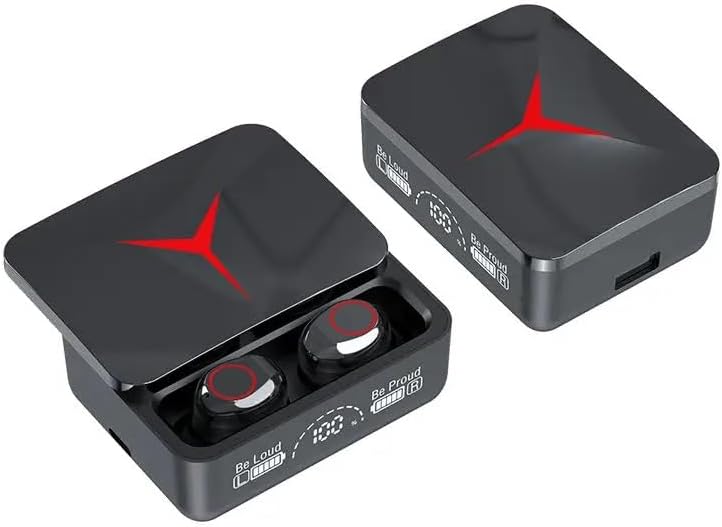
The M90 PRO TWS Wireless Earbuds charging case, featuring a digital display for battery levels and a sleek design.
Что в коробке?
Пожалуйста, проверьте содержимое упаковки, чтобы убедиться в наличии всех предметов:
- M90 Pro TWS Earbuds
- Two Pair of Ear Tips (various sizes)
- Зарядный кабель типа C
- Зарядный футляр
- Руководство пользователя (этот документ)
Руководство по настройке
1. Первоначальная зарядка
Before first use, fully charge the earbuds and the charging case. The charging case has a 1200mAh battery capacity, and each earbud has a 40mAh battery. A full charge typically takes about 1 hour.
- Подключите прилагаемый зарядный кабель Type-C к зарядному порту на чехле и источнику питания USB.
- Светодиодный дисплей на зарядном футляре покажет процент заряда батареи.tage.
- Place the earbuds into the charging case. They will automatically begin charging. The earbuds' indicator lights will show charging status.

The 1200mAh charging case provides extended battery life and supports fast charging via Type-C.
2. Сопряжение с вашим устройством
The M90 PRO earbuds feature one-step automatic pairing for convenience.
- Убедитесь, что Bluetooth включен на вашем смартфоне или другом устройстве.
- Откройте зарядный кейс и извлеките оба наушника. Они автоматически включатся и перейдут в режим сопряжения.
- On your device, search for Bluetooth devices and select "M90 Pro" from the list.
- После подключения вы услышите подтверждающий сигнал, а индикаторы наушников изменят цвет.
Note: If pairing fails, place the earbuds back into the case, close the lid, wait a few seconds, and then repeat the steps.
Automatic pairing simplifies the connection process, allowing instant use upon removal from the case.
Инструкция по эксплуатации
Сенсорное управление
The M90 PRO earbuds are equipped with intuitive smart touch controls for easy management of music and calls. Specific touch functions may vary slightly based on the device and application, but common functions include:
- Воспроизведение/Пауза: Нажмите один раз на любой наушник.
- Следующая песня: Дважды нажмите на правый наушник.
- Предыдущая песня: Дважды нажмите на левый наушник.
- Увеличить громкость: Трижды нажмите на правый наушник.
- Убавить звук: Трижды нажмите на левый наушник.
- Ответить/завершить вызов: Нажмите один раз на любой наушник.
- Отклонить вызов: Нажмите и удерживайте любой наушник в течение 2 секунд.
- Активировать голосового помощника: Press and hold either earbud for 3 seconds (supports Xiaomi AI, Amazon Alexa, Apple Siri, Google Assistant).
Функция Power Bank
The charging case can also serve as an emergency power bank for your mobile phone or other small devices.
- Locate the USB output port on the charging case.
- Connect your device's charging cable to this USB port.
- Зарядный кейс начнет подавать питание на ваше устройство.

The charging case can provide emergency power to your mobile phone via its USB output port.
Call Quality and Noise Cancellation
The earbuds feature HD Voice Technology and Environmental Noise Cancellation (ENC) to separate your voice from surrounding noise, ensuring crystal-clear communication during calls.

Experience clear calls with HD Voice Technology and ENC, minimizing background noise.
Обслуживание
Proper maintenance will extend the lifespan of your M90 PRO TWS Wireless Earbuds.
- Уборка: Регулярно протирайте наушники и зарядный кейс мягкой, сухой тканью без ворса. Не используйте едкие химикаты или абразивные материалы.
- Советы по уху: Remove and clean the ear tips periodically with mild soap and water, then ensure they are completely dry before reattaching.
- Водостойкость: The earbuds are IPX-7 waterproof, meaning they can withstand immersion in up to 1 meter of water for 30 minutes. However, the charging case is not waterproof. Avoid exposing the charging case to liquids. Always ensure earbuds are dry before placing them back into the charging case.
- Хранилище: Когда наушники не используются, храните их в зарядном футляре, чтобы защитить и зарядить. Храните в прохладном, сухом месте, вдали от экстремальных температур.
- Уход батареи: To preserve battery health, avoid fully discharging the earbuds and charging case frequently. Charge them regularly, even if not in constant use.
Поиск неисправностей
If you encounter issues with your M90 PRO TWS Wireless Earbuds, please refer to the following common solutions:
| Проблема | |
|---|---|
| Наушники не подключаются к устройству. |
|
| Работает только один наушник. |
|
| Низкая громкость или плохое качество звука. |
|
| Зарядный чехол не заряжается. |
|
Технические характеристики
| Общий | |
|---|---|
| Название модели | M90 Pro Wireless Earphone |
| Бренд | Общий |
| Цвет | Черный |
| Материал | Акрилонитрил-бутадиен-стирол (АБС), пластик |
| Вес товара | 3.52 унции |
| Размеры продукта | 4.49 x 3.94 x 1.57 дюйма |
| Аудио и возможности подключения | |
| Технология связи | Беспроводная связь (Bluetooth 5.3) |
| Диапазон Bluetooth | 10 метра |
| Диапазон частот | 20 Гц - 20 000 Гц |
| Сопротивление | 32 Ом |
| Контроль шума | Активное шумоподавление (ENC) |
| Тип аудиодрайвера | Динамический драйвер |
| Заряд батареи | |
| Earpiece Battery Capacity | 40 мАч (каждый) |
| Емкость аккумулятора в кейсе для переноски | 1200 миллиamp Часы |
| Срок службы батареи (наушники) | До 5 часов |
| Время зарядки | 1 Hour (earbuds & case) |
| Функции | |
| Уровень водонепроницаемости | Водонепроницаемость IPX-7 |
| Тип управления | Touch control, Voice Assistant |
| Особые возможности | Fast Charging, Lightweight, Noise Cancellation, Touch Control, Wireless Charging (Power Bank Function) |
Гарантия и поддержка
Информацию о гарантии и поддержке клиентов можно найти в документации, прилагаемой к товару, или связаться напрямую с продавцом. Сохраните чек на случай предъявления гарантийных претензий.