
1. Введение
This document provides essential information regarding the ShopJimmy replacement brushroll and suction motors for Shark IQ Robot Vacuums. These parts are designed to restore the cleaning performance of your robot vacuum.
1.1 продукта болееview
This product includes replacement brushroll and suction motors. These components are crucial for the effective operation of your robot vacuum's cleaning system. The parts provided are refurbished by a Shark-authorized refurbisher and may exhibit minor cosmetic scuffs or scratches that do not affect their functionality. All included brushes and tools have been thoroughly cleaned or refurbished as necessary to ensure optimal performance.
1.2 Совместимость
These replacement motors are compatible with a range of Shark IQ Robot Vacuum models, including but not limited to:
- Shark AV992GVRUS
- Shark QR1G00S1US, QR1G00SRUS, QR1000SB, QR1000SG, QR1000SW
- Shark RV852WVQBR, RV1000S, RV1100S, RV1100SRUS, RV1101ARUS, RV1300S3US, RV1401ZWUS, RV9105WWUS, RV9113A1US, RV9124S3US, RV9133S1US, RV9153S1US, RV9155WWUS, RV9155WXUS, RV9904V3US
- Shark UR1000S1US, UR1000SR, UR1100S1US, UR1105ARUS, UR1300S3US
Please verify your robot vacuum's model number to ensure compatibility before proceeding with installation.
2. Содержимое упаковки
Ваш пакет должен содержать следующие компоненты:
- 1x Suction Motor Assembly
- 1x Brushroll Motor Assembly
- Additional small motors for side brushes or other functions (as pictured)
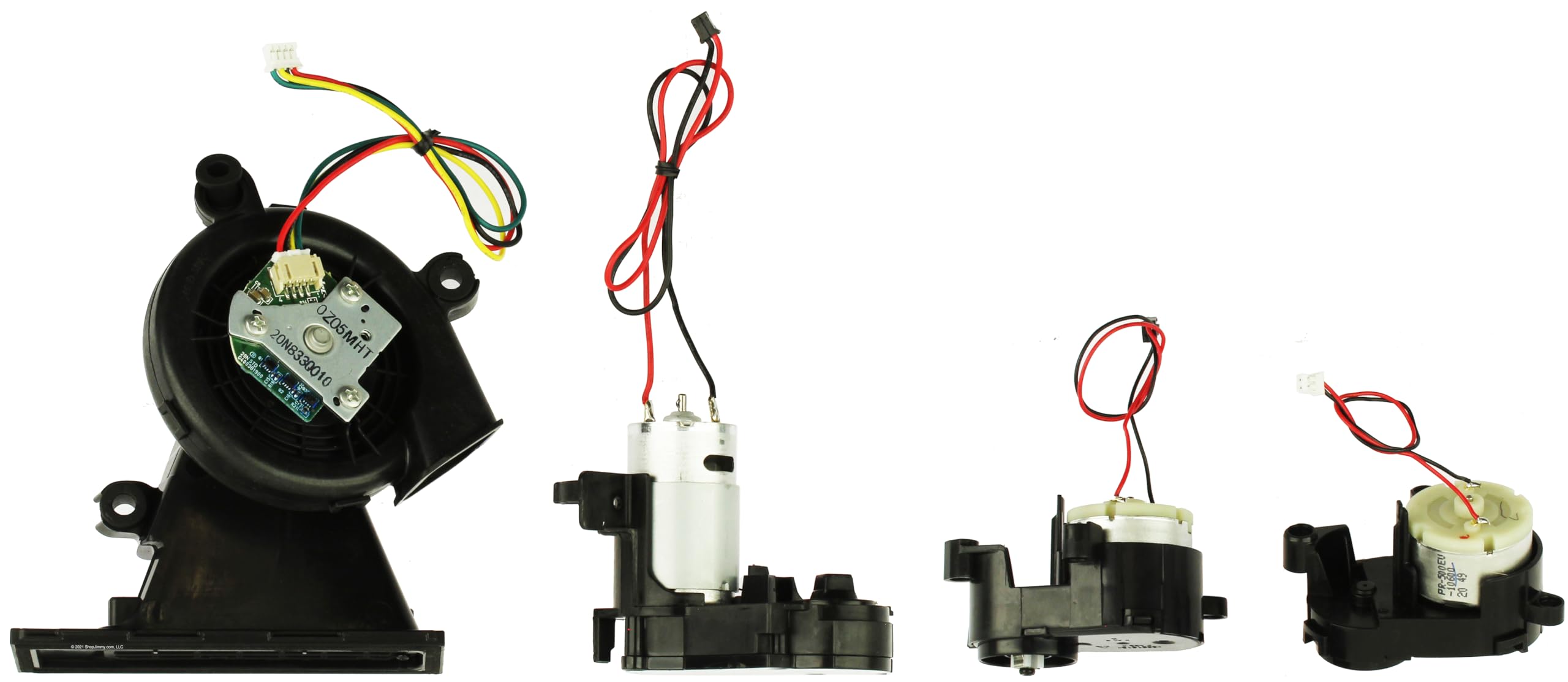
Figure 1: Included replacement motors. This image displays the main suction motor assembly, the brushroll motor assembly, and two smaller motors, all with their respective wiring and connectors.
3. Инструкция по установке
Replacing internal components of a robot vacuum requires careful attention to detail. It is recommended to consult specific disassembly and reassembly guides for your particular Shark IQ Robot Vacuum model.
- Безопасность прежде всего: Always ensure your robot vacuum is powered off and disconnected from its charging base before beginning any repair or maintenance.
- Доступ к компонентам: Carefully disassemble the robot vacuum's casing to access the internal motor components. This typically involves removing screws from the bottom and potentially the top cover. Refer to online resources or repair videos specific to your model for detailed steps.
- Identify Motors: Locate the existing brushroll and suction motors. Note their wiring connections and mounting positions.
- Отключить и удалить: Gently disconnect the wiring harnesses from the old motors. Remove any screws or clips securing the old motors in place and carefully extract them.
- Install New Motors: Position the new ShopJimmy replacement motors in the exact locations of the old ones. Secure them with the original screws or clips.
- Подключение проводки: Reconnect the wiring harnesses to the new motors. Ensure connections are secure and correctly oriented.
- Собрать заново: Carefully reassemble the robot vacuum's casinг, убедившись, что все винты затянуты и провода не защемлены.
- Тестовая функциональность: Place the robot vacuum on its charging base, power it on, and initiate a cleaning cycle to verify proper operation of the new motors.
Примечание: Disassembly and reassembly procedures can vary significantly between robot vacuum models. Searching for "[Your Shark IQ Model Number] motor replacement" on video-sharing platforms may provide visual guidance.
4. Техническое обслуживание
To ensure the longevity and optimal performance of your new motors and robot vacuum, regular maintenance is recommended:
- Clean Brushroll: Regularly remove hair, string, and debris from the brushroll to prevent strain on the brushroll motor.
- Пустой пылесборник: Empty the dust bin frequently to maintain optimal suction and reduce strain on the suction motor.
- Чистые фильтры: Clean or replace the robot vacuum's filters according to the manufacturer's recommendations to ensure proper airflow and suction.
- Inspect Side Brushes: Check side brushes for wear or entanglement and clean them as needed.
- Избегайте жидкостей: Do not expose the robot vacuum or its internal components to liquids, as this can damage the motors and electronics.
5. Поиск Неисправностей
If you encounter issues after installing the new motors, consider the following troubleshooting steps:
- No Power/No Movement:
- Ensure all wiring connections are secure and correctly seated.
- Verify the robot vacuum's battery is charged and properly installed.
- Check for any error codes displayed on the robot vacuum and consult your original vacuum manual.
- Плохое всасывание:
- Check if the dust bin is full or improperly seated.
- Inspect the filters for clogs and clean or replace them.
- Ensure there are no blockages in the suction path or main brushroll area.
- Валик щетки не вращается:
- Снимите щетку и удалите все запутанные волосы и мусор.
- Ensure the brushroll is correctly installed and seated.
- Check the brushroll motor's wiring connection.
- Коды ошибок: If your robot vacuum displays a specific error code (e.g., "Error #9" as mentioned in a customer review), refer to your original Shark IQ Robot Vacuum user manual or Shark's official support resources for diagnosis and resolution.
If issues persist, contact ShopJimmy customer support for further assistance.
6. Технические характеристики
| Номер детали | UR100S-MOTORS |
| Тип продукта | Replacement Brushroll and Suction Motors |
| Состояние | Refurbished (may have cosmetic scuffs/scratches) |
| Совместимые бренды | Shark (IQ Robot Vacuums) |
| СКП | 810159291446 |
7. Гарантия и поддержка
7.1 Информация о гарантии
This ShopJimmy product is covered by a 180-дневная гарантия Гарантия действует с даты покупки. Данная гарантия распространяется на дефекты материалов и изготовления при нормальной эксплуатации. Она не распространяется на повреждения, возникшие в результате неправильного использования, несчастного случая, несанкционированной модификации или неправильной установки.
7.2 Поддержка клиентов
For technical assistance, warranty claims, or any questions regarding your ShopJimmy replacement motors, please contact ShopJimmy customer support. Refer to your purchase documentation or the ShopJimmy webсайт для контактных данных.
When contacting support, please have your product's part number (UR100S-MOTORS) and proof of purchase readily available.