
1. Введение
The OSD Audio DAC-X200 is a powerful 2-channel Class D stereo amplifier designed to deliver high-fidelity audio. It features a built-in Hi-Res 24bit/192khz DAC, offering superior digital audio conversion. With versatile input options including USB, Optical, and RCA, and A/B speaker switching, this amplifier is suitable for various home audio setups, from driving bookshelf speakers to powering floorstanding units.
2. Инструкции по технике безопасности
- Источник питания: Подключайте устройство только к указанному источнику питания.tage.
- Вентиляция: Обеспечьте достаточную вентиляцию. Не закрывайте вентиляционные отверстия.
- Вода и влага: Не подвергайте устройство воздействию дождя, сырости или чрезмерной влажности.
- Источники тепла: Располагайте устройство вдали от источников тепла, таких как радиаторы, обогреватели, печи и другие приборы, выделяющие тепло.
- Уборка: Чистить только сухой тканью.
- Обслуживание: Не пытайтесь ремонтировать этот продукт самостоятельно. Поручите все обслуживание квалифицированному обслуживающему персоналу.
- Размещение: Place the unit on a stable, flat surface. Avoid placing heavy objects on top of the ampпожизненнее.
3. Содержимое упаковки
Проверьте наличие всех предметов в упаковке:
- OSD Audio DAC-X200 Ampпожизненнее
- Краткое руководство пользователя
- Силовой кабель
- Пульт дистанционного управления (если входит в комплект вашей модели)
4. Продукт закончилсяview
4.1 Передняя панель
The front panel provides access to essential controls for daily operation.

Рисунок 4.1: Передний view of the DAC-X200 amplifier, showing the power button, speaker selectors, balance, and volume controls.

Рисунок 4.2: Detail of the front panel, highlighting the Power button and Speaker A/B selection buttons.

Рисунок 4.3: Detail of the front panel, showing the Balance and Volume control knobs.
4.2 Задняя панель
The rear panel houses all input and output connections for audio sources and speakers.
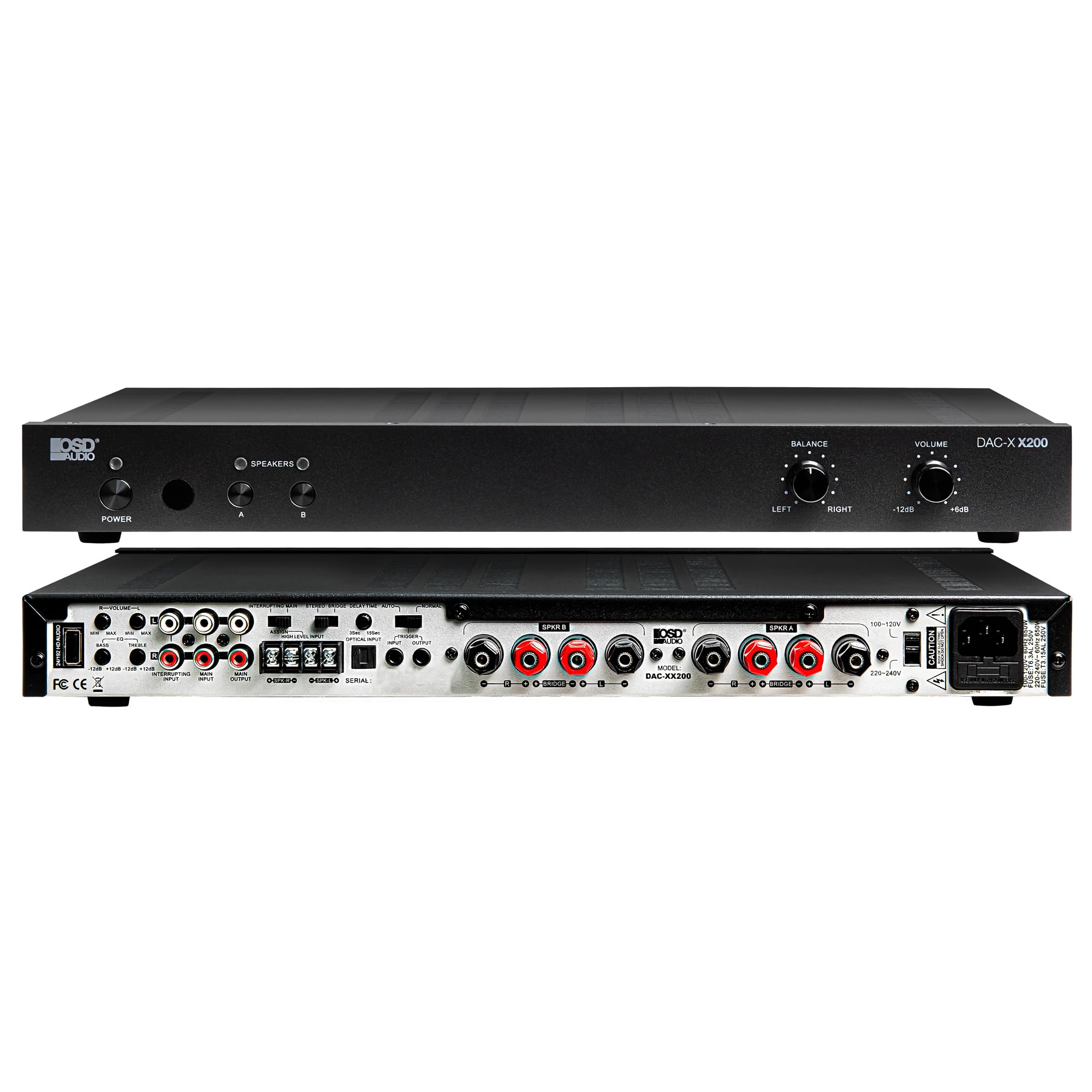
Рисунок 4.4: Задний view of the DAC-X200 amplifier, displaying various audio inputs (USB, Optical, RCA), speaker outputs, and power input.

Рисунок 4.5: Detail of the rear panel inputs, including USB, Optical, and RCA connections.

Рисунок 4.6: Detail of the rear panel speaker output terminals for Speaker A and Speaker B.
5. Настройка
5.1 Размещение
Place the DAC-X200 on a flat, stable surface with adequate space around it for ventilation. Avoid enclosed cabinets or areas with poor airflow to prevent overheating.
5.2 Подключение динамиков
- Обеспечить ampВыключатель выключен и отсоединен от сети.
- Подключите пассивные колонки к SPEAKER A и/или SPEAKER B terminals on the rear panel. Observe correct polarity (+ to + and - to -).
- For optimal performance, use high-quality speaker wire.
5.3 Подключение источников звука
The DAC-X200 supports multiple input types:
- USB-вход: Connect a computer or other USB audio source using a Type A to Type A USB 2.0 cable.
- Оптический вход: Подключайте цифровые аудиоисточники, такие как телевизоры или CD-проигрыватели, с помощью оптического кабеля.
- Входы RCA: Connect analog audio sources such as music streamers, turntables (with a pre-amp), or other devices using RCA cables.
5.4 Подключение питания
After all audio and speaker connections are made, connect the supplied power cable to the amplifier's power inlet and then to a suitable AC power outlet.
6. Инструкция по эксплуатации
6.1 Включение/выключение питания
Нажмите ВЛАСТЬ кнопка на передней панели для включения amplifier on or off. The power indicator light will illuminate when the unit is on.
6.2 Выбор входа
The DAC-X200 features smart source switching, automatically detecting and switching to an active input. If multiple inputs are active, you may need to manually select the desired input using the remote control (if applicable) or by cycling through inputs.
6.3 Регулятор громкости
Adjust the overall output volume using the ОБЪЕМ knob on the front panel. Rotate clockwise to increase volume and counter-clockwise to decrease it.
6.4 Регуляторы тембра
Используйте БАЛАНС knob to adjust the left/right channel balance. The DAC-X200 also includes bass and treble adjustment knobs (located on the rear panel or accessible via remote, depending on model variation) to fine-tune the sound to your preference or room acoustics.
6.5 A/B Speaker Switching
Нажмите A or B buttons on the front panel to select which set of speakers (Speaker A, Speaker B, or both) are active. This allows for multi-room audio configurations.
7. Техническое обслуживание
- Уборка: Используйте мягкую сухую ткань для очистки внешних поверхностей ampНе используйте жидкие чистящие средства или аэрозоли.
- Вентиляция: Периодически проверяйте, чтобы вентиляционные отверстия были очищены от пыли и мусора.
- Хранилище: При длительном хранении устройства отключите его от розетки и храните в прохладном, сухом месте.
8. Поиск Неисправностей
| Проблема | Возможная причина | Решение |
|---|---|---|
| Нет электричества | Кабель питания не подключен; Розетка неактивна; Ampпожизненно. | Check power cable connection; Test power outlet; Press the Power button. |
| Нет звука | Incorrect input selected; Speaker cables loose; Volume too low; Speakers A/B not selected. | Select correct input; Check speaker connections; Increase volume; Ensure Speaker A or B is active. |
| Искаженный звук | Input signal too high; Speaker impedance mismatch; Faulty cable. | Reduce source volume; Verify speaker impedance (8̣ or 4̣); Replace audio cables. |
| Input not switching automatically | Multiple active sources; Specific source not detected. | Manually select input; Ensure only one source is playing if auto-switching is desired. |
9. Технические характеристики
- Модель: ЦАП-X200
- Выходная мощность: 100W RMS per channel at 8̣; 225W RMS per channel at 4̣; 450W bridged mono
- Количество каналов: 2
- DAC: Hi-Res 24bit/192khz, DSD formats supported
- Входные данные: USB, Optical, RCA
- Зоны выступлений: A/B Switching
- Размеры (Д x Ш x В): 16.7 x 10 x 2 дюйма
- Тип материала: Пластик
- СКП: 810074881173
10. Информация о гарантии
OSD Audio products are designed for reliability and performance. This product is covered by a limited warranty against defects in materials and workmanship. Please refer to the official OSD Audio website or your purchase documentation for specific warranty terms and conditions, including duration and coverage details. Keep your proof of purchase for warranty claims.
11 Поддержка
For technical assistance, troubleshooting not covered in this manual, or service inquiries, please contact OSD Audio customer support. You can find contact information, FAQs, and additional resources on the official OSD Audio webсайт.
Webсайт: www.osdaudio.com