
1. Введение
The Minolta MND60V VLOG Camera Kit is designed for capturing high-quality photos and videos. This kit includes a 64MP camera capable of 4K Ultra HD video at 60 frames per second, along with essential accessories such as a tripod, external microphone, LED light, and wide-angle/macro lenses. This manual provides instructions for setting up, operating, and maintaining your camera kit to ensure optimal performance.

Image 1.1: The Minolta MND60V VLOG Camera Kit, showcasing its core capabilities for high-resolution photography and video recording.
2. Содержимое упаковки
Прежде чем начать, убедитесь, что все перечисленные ниже предметы включены в ваш пакет:
- Minolta MND60V Camera
- Accessory Mount Arms
- Светодиодный видеосвет
- Чехол для переноски
- Tripod Pouch
- Стереомикрофон
- Плечевой ремень
- Карта памяти 32 ГБ
- Штатив с дистанционным управлением
- Литий-ионный аккумулятор
- Адаптер переменного тока
- Wide-angle + Macro Lens
- Кабели USB
- Руководство пользователя (этот документ)
- Гарантийный талон

Image 2.1: All components included in the Minolta MND60V VLOG Camera Kit.
3. Настройка
3.1 Зарядка аккумулятора
- Insert the Lithium-Ion Battery into the camera.
- Connect the AC Adaptor to the camera's USB port and plug it into a power outlet.
- Загорится индикатор зарядки. После полной зарядки индикатор изменит цвет или погаснет.
3.2 Установка карты памяти
The camera supports Micro SD cards. A 32GB card is included.
- Locate the memory card slot on the camera (refer to the camera diagram).
- Вставьте карту Micro SD золотыми контактами вниз до щелчка.
- Чтобы извлечь карту, слегка нажмите на нее, пока она не выскочит.
3.3 Прикрепление аксессуаров
The kit includes various accessories to enhance your recording experience.

Image 3.1: Minolta MND60V camera with all accessories mounted.
- Штатив: Attach the camera to the tripod's mounting screw. The tripod can be used as a stand, a selfie stick, or a power source with its built-in 2,500mAh battery.
- Внешний микрофон: Mount the stereo microphone onto one of the accessory mount arms and plug its cable into the camera's microphone input jack.
- Светодиодный видео свет: Mount the LED light onto another accessory mount arm. Ensure it is charged or has fresh batteries if applicable.
- Wide-angle + Macro Lens: Screw the desired lens onto the front of the camera's main lens.
4. Эксплуатация камеры
4.1 Включение/выключение питания
Чтобы включить или выключить камеру, нажмите и удерживайте кнопку питания, расположенную на корпусе камеры.
4.2 Basic Photo and Video Recording
- Выбор режима: Use the mode dial or menu to select between photo and video modes.
- Обрамление: Use the 3-inch LCD screen to compose your shot. The screen can be flipped for self-recording.
- Запись/Затвор: Press the dedicated record button for video or the shutter button for photos.
4.3 Использование ЖК-экрана
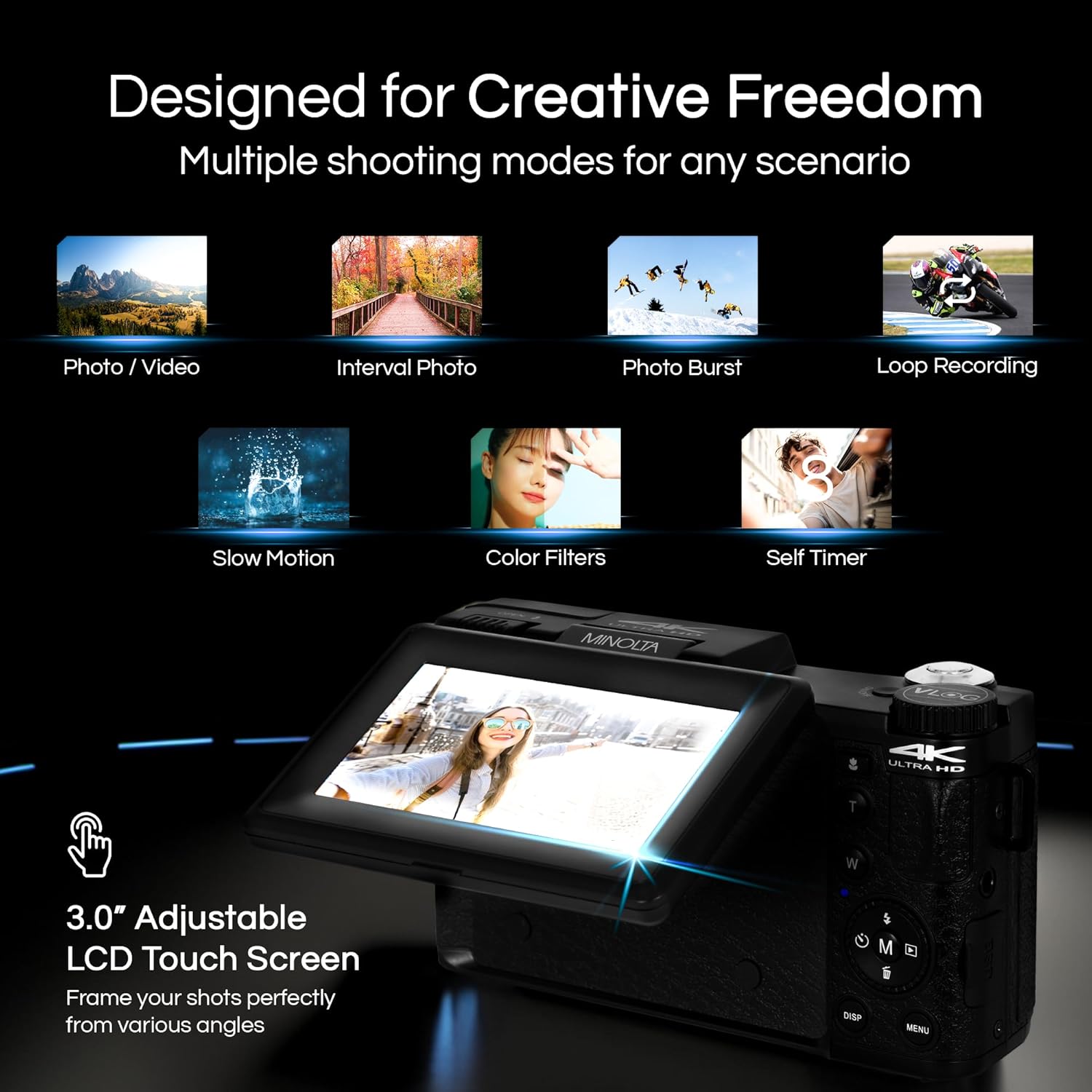
Image 4.1: The adjustable LCD screen showing various shooting modes.
The 3-inch LCD screen provides a live view, access to menus, and playback options. It can be rotated and flipped, making it suitable for vlogging and shooting from various angles. Navigate menus using the touch screen or physical buttons.
4.4 Функция масштабирования
The camera features 16x digital zoom. Use the zoom lever (often marked 'W' for Wide and 'T' for Telephoto) to adjust the focal length. Note that digital zoom may reduce image quality compared to optical zoom.

Изображение 4.2: Примерample of using digital zoom to capture distant details.
4.5 Специальные функции и режимы

Image 4.3: Icons illustrating the camera's creative modes.
The MND60V offers several creative modes:
- Замедленная съемка: Записывает видео с более высокой частотой кадров для воспроизведения в замедленном режиме.
- Циклическая запись: Непрерывная запись видео с перезаписью самых старых записей. files когда карта памяти заполнена.
- Промежуток времени: Делает серию снимков через заданные интервалы и объединяет их в видеоролик.
- Выбор сцены: Pre-set modes optimized for specific shooting conditions (e.g., portrait, landscape).
- Автоспуск: Delays the shutter release for a few seconds, allowing you to get into the shot.
4.6 Использование пульта дистанционного управления
The included tripod features a built-in wireless remote. This allows you to start/stop recording or take photos from a distance, ideal for group shots or vlogging.
4.7 Передача Files
Connect the camera to a computer using the provided USB cable. The camera will appear as a removable drive, allowing you to copy photos and videos to your computer.
5. Техническое обслуживание
5.1 Чистка камеры
- Для чистки корпуса камеры используйте мягкую сухую ткань.
- Для чистки линз используйте специальную салфетку и раствор. Избегайте прикосновения к поверхности линзы пальцами.
- Не используйте агрессивные химикаты или абразивные материалы.
5.2 Уход за аккумулятором
- Перед первым использованием полностью зарядите аккумулятор.
- Когда аккумулятор не используется, храните его в сухом прохладном месте.
- Не подвергайте батарею воздействию экстремальных температур.
5.3 Хранение
When not in use, store the camera and its accessories in the provided carrying case to protect them from dust, moisture, and physical damage.
6. Поиск Неисправностей
If you encounter issues with your Minolta MND60V camera, refer to the following common problems and solutions:
| Проблема | Возможная причина | Решение |
|---|---|---|
| Камера не включается. | Battery is drained or incorrectly inserted. | Убедитесь, что аккумулятор полностью заряжен и правильно вставлен. |
| Photos/Videos are blurry. | Autofocus issue, insufficient light, or camera shake. | Ensure proper lighting. Allow camera to focus before capturing. Use the tripod for stability. Avoid excessive digital zoom in low light. |
| Аккумулятор быстро разряжается. | Frequent use of screen/LED light, cold environment, or aging battery. | Reduce screen brightness. Turn off LED light when not needed. Keep battery warm in cold conditions. Consider a replacement battery if performance significantly degrades. |
| Ошибка карты памяти. | Карта заполнена, повреждена или несовместима. | Format the memory card (this will erase all data). Try a different compatible Micro SD card. |
| No audio in video recordings. | External microphone not connected or faulty. | Ensure the external microphone is securely plugged into the camera's microphone input. Check microphone settings in the camera menu. |
7. Технические характеристики
Key technical specifications for the Minolta MND60V VLOG Camera Kit:
| Особенность | Спецификация |
|---|---|
| Номер модели | MND60V |
| Эффективное разрешение неподвижного изображения | 64 МП |
| Разрешение видео | 4K (3840 Pixels Effective Video Resolution) |
| Частота видеокадров | 60 кадров в секунду (для разрешения 4K) |
| Технология фотодатчика | CMOS (2/3-inch Photo Sensor Size) |
| Отображать | 3-дюймовый ЖК-экран |
| Тип фокусировки | Автофокус |
| Цифровой зум | 16x |
| Тип объектива | Wide Angle (Minimum/Maximum Focal Length: 3.95 mm) |
| Максимальная диафрагма | 1.8 ж |
| Стабилизация изображения | Цифровой |
| Тип флэш-памяти | Микро SD-карта |
| Технология связи | USB |
| Формат захвата видео | МП4 |
| Поддерживаемый аудиоформат | ААК |
| Поддерживаемый формат изображения | JPEG |
| Источник питания | Lithium-Ion Battery (1 AAA battery required for remote, included) |
| Вес товара | 3.5 фунта |
| Цвет | Черный |
| Функции | Anti-Shake, Built-In Flash, Microphone Input, Remote Control, Slow Motion, Time Lapse, Timer |
8. Информация о гарантии
The Minolta MND60V VLOG Camera Kit comes with a Limited 1 Year Manufacturer Warranty. Please refer to the included Warranty Card for detailed terms and conditions, including coverage, limitations, and how to make a claim.
9. Поддержка клиентов
For further assistance, technical support, or inquiries regarding your Minolta MND60V VLOG Camera Kit, please visit the official Minolta webили свяжитесь с их службой поддержки клиентов. Контактную информацию обычно можно найти на гарантийном талоне или на сайте производителя. webсайт.