
1. Продукт закончилсяview
The VIMIN VM-S250501M is a 2.5G Web Managed Ethernet Switch designed for high-performance network environments. It features five 2.5 Gigabit RJ45 ports and one 10 Gigabit SFP+ port, providing flexible connectivity options for various devices. This switch supports multiple speeds (100Mbps, 1Gbps, 2.5Gbps) with intelligent auto-negotiation, making it suitable for 2.5G NAS, gaming PCs, WiFi 6 routers, and 4K video streaming. It incorporates essential Layer 2 management features such as Link Aggregation, IGMP Snooping, Quality of Service (QoS), and VLAN support, all accessible through a user-friendly web-based graphical interface.
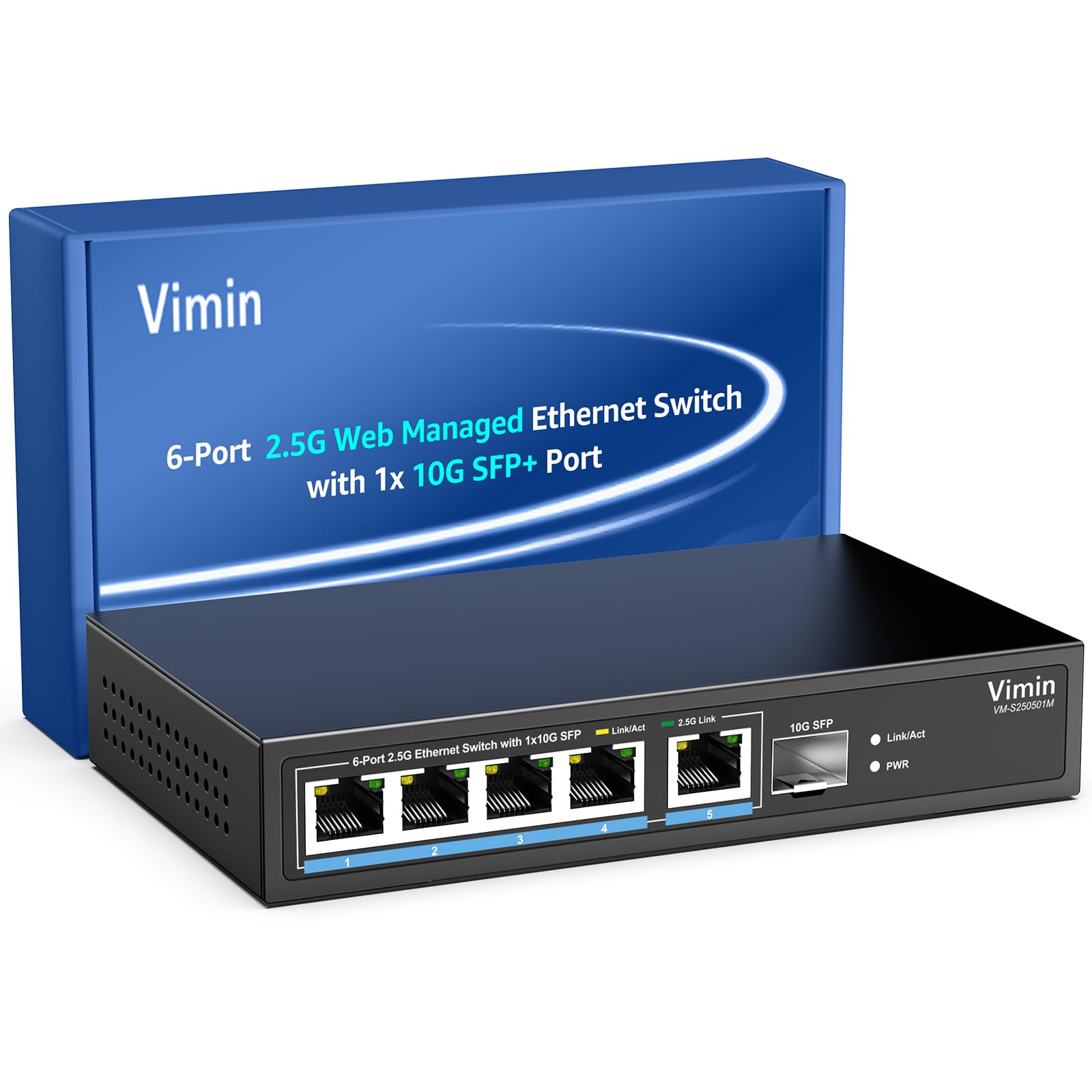
Рисунок 1: Передняя часть view of the VIMIN VM-S250501M switch, showing the 2.5G RJ45 ports, 10G SFP+ port, and LED indicators.

Figure 2: Illustration highlighting the durability, high compatibility, and versatility of the switch.
2. Инструкции по настройке
2.1 Содержимое упаковки
Убедитесь, что в комплект входят следующие предметы:
- 1 x VIMIN VM-S250501M 2.5G Web Управляемый коммутатор Ethernet
- 1 х Адаптер питания
- 1 х Руководство пользователя

Figure 3: The switch, power cable, and user manual are included in the package.
2.2 Физическая установка
The switch can be placed on a desktop or mounted on a wall. Ensure proper ventilation around the device.
- Размещение на рабочем столе: Поместите коммутатор на плоскую устойчивую поверхность.
- Настенный монтаж: The switch features two mounting holes at the base for wall installation. Use appropriate screws (not included) to secure the device to a wall.
2.3 Подключение питания
- Connect the power adapter to the DC 12V/1A power port on the rear panel of the switch.
- Вставьте другой конец адаптера питания в стандартную электрическую розетку.
- The Power LED indicator on the front panel will illuminate when the switch is powered on.
2.4 Подключение сетевых устройств
Connect your network devices (e.g., computers, NAS, routers, access points) to the switch using appropriate Ethernet cables.
- Порты RJ45 (1-5): Use Category 5e (Cat5e) or Category 6 (Cat6) UTP cables for optimal performance with 1G/2.5G connections. For 100Mbps, Cat5 cables are sufficient.
- Порт SFP+ (6): Insert a compatible 1G/2.5G/10G SFP+ optical fiber module (not included) into the SFP+ slot, then connect a fiber optic cable.

Figure 4: Illustrates connecting devices to the switch and recommended cable types for different speeds.
3. Эксплуатация переключателя
3.1 светодиодных индикатора
Светодиоды на передней панели отображают информацию о состоянии в режиме реального времени:
- 5*2.5G Ports (RJ45):
- Yellow: Indicates a 10/100/1000Mbps link or activity.
- Green: Indicates a 2.5Gbps link.
- 1*10G SFP (SFP+ Port):
- Green: Indicates a 1G/2.5G/10G link.
- Flashing: Indicates data transmission.
- PWR (Мощность):
- Горит: устройство включено.
- Выкл.: устройство выключено.

Figure 5: Detailed explanation of the LED indicators on the switch.
3.2 Доступ к Web Интерфейс управления
The switch can be configured and managed via a webграфический пользовательский интерфейс (GUI) на основе графического интерфейса пользователя.
- Убедитесь, что ваш компьютер подключен к одному из портов RJ45 коммутатора.
- Откройте web браузер (например, Chrome, Firefox, Edge).
- In the address bar, enter the default IP address: 192.168.1.199.
- Press Enter. A login page will appear.
- Введите имя пользователя и пароль по умолчанию:
- Имя пользователя: админ
- Пароль: админ
- Click "Log In" to access the management interface.
В целях безопасности рекомендуется изменить пароль по умолчанию после первоначального входа в систему.

Рисунок 6: Скриншот web Страница входа в интерфейс управления.
3.3 Basic Management Features
The web interface provides access to various Layer 2 management functions:
- Агрегация ссылок: Combine multiple physical links into a single logical link for increased bandwidth and redundancy. Supports static link aggregation.
- Гигантская рама: Support for larger Ethernet frames (up to 12KB) to improve network efficiency for large data transfers.
- VLAN (виртуальная локальная сеть): Segment your network into smaller, isolated broadcast domains. Supports up to 32 VLANs (on 4K VLAN IDs), MTU/Port/802.1Q VLAN.
- Качество обслуживания (QoS): Prioritize network traffic to ensure critical applications receive sufficient bandwidth. Supports port-based, 802.1p, and DSCP priority, with 4 priority queues, rate limiting, and storm control.
- Отслеживание IGMP: Оптимизация доставки многоадресного трафика, предотвращение ненужной рассылки многоадресных пакетов на все порты.
- Зеркалирование портов: Копирование трафика с одного или нескольких исходных портов на целевой порт для мониторинга и анализа сети.
- Кабельный тест: A diagnostic tool to check the status and length of connected Ethernet cables.

Рисунок 7: Болееview of the basic management features available through the web интерфейс.
4. Техническое обслуживание
4.1 Общий уход
- Keep the switch in a cool, dry environment, away from direct sunlight, heat sources, and moisture.
- Обеспечьте достаточную циркуляцию воздуха вокруг устройства, чтобы предотвратить перегрев.
- Clean the exterior of the switch with a soft, dry cloth. Do not use liquid cleaners or aerosols.
4.2 обновлений прошивки
Periodically check the VIMIN official webСайт для обновления прошивки. Обновления прошивки могут предоставлять новые функции, улучшать производительность и повышать безопасность. Внимательно следуйте инструкциям, прилагаемым к пакету обновления прошивки.
4.3 Сброс настроек устройства
If the switch is not functioning correctly or you forget the login credentials, you can reset it to factory default settings. Locate the "Reset" button on the rear panel of the switch. With the switch powered on, use a paperclip or a similar pointed object to press and hold the Reset button for approximately 5-10 seconds until the LEDs flash, then release. The switch will restart with factory default settings.
5. Поиск Неисправностей
5.1 Нет питания
- Убедитесь, что адаптер питания надежно подключен как к выключателю, так и к исправной электрической розетке.
- Проверьте работоспособность розетки, подключив к ней другое устройство.
- Проверьте адаптер питания на наличие видимых повреждений.
5.2 No Link/Connectivity
- Check the Ethernet cables connected to the switch and your devices. Ensure they are securely plugged in and not damaged.
- Verify the Link/Act LEDs on the switch for the connected ports. If they are off, there might be a cable issue or the connected device is not powered on/configured correctly.
- Try using a different Ethernet cable or port.
- Ensure the connected device's network adapter is enabled and configured correctly.
5.3 Низкая скорость сети
- Ensure you are using Cat5e or Cat6 cables for 1G/2.5G connections. Lower category cables may limit speed.
- Check the Link/Act LED color for the connected port. A yellow LED on a 2.5G port indicates a 1G or lower connection.
- Verify that your connected devices (e.g., network card, NAS) support 2.5G or 10G speeds.
- Check for network congestion or high traffic on your network.
- Рекомендуется обновить прошивку коммутатора.
5.4 Невозможно получить доступ Web Интерфейс
- Ensure your computer is on the same network segment as the switch. The default IP is 192.168.1.199, so your computer's IP should be in the 192.168.1.x range (e.g., 192.168.1.100) with a subnet mask of 255.255.255.0.
- Verify that the Ethernet cable is properly connected and the Link/Act LED is on.
- Очистите кэш браузера или попробуйте другой браузер.
- If you have changed the switch's IP address and forgotten it, or forgotten the login password, perform a factory reset (refer to Section 4.3).
6. Технические характеристики
| Модель | VM-S250501M |
| Стандарты | IEEE 802.3/802.3u/802.3ab/802.3bz/802.3x/802.3cb |
| Порты | 5 x 10/100/1000/2500 Mbps RJ45, 1 x 10G SFP+ slot |
| Коммутационная способность | 45 Гбит/с |
| Таблица MAC-адресов | 4K |
| Скорость пересылки пакетов | 33.48 млн пакетов в секунду |
| Jumbo Frame | 12 КБ |
| Пакетный буфер | 8 Мбит |
| Источник питания | 12 В/1 А постоянного тока |
| Network Cable (Max 100m) |
|
| Метод монтажа | Desktop and Wall Mount |
| Рабочая температура | 0℃ ~ 45℃ (32℉ ~ 113℉) |
| Температура хранения | -40℃ ~ 70℃ (-40℉ ~ 158℉) |
| Рабочая влажность | 10% ~ 90% без конденсации |
| Влажность при хранении | 5% ~ 95% без конденсации |
| Масса | 380 г |
| Размеры (Д x Ш x В) | 160 x 95 x 30 мм (6.3 x 3.7 x 1.2 дюйма) |
| Материал корпуса | Металл |
| Цвет | Черный |
7. Гарантия и поддержка
7.1 Гарантия на продукт
The VIMIN VM-S250501M 2.5G Web Managed Ethernet Switch comes with a гарантия один год с даты покупки. Данная гарантия распространяется на производственные дефекты и гарантирует соответствие изделия заявленным эксплуатационным характеристикам при нормальном использовании. Сохраните чек о покупке для предъявления гарантийных претензий.
7.2 Техническая поддержка
VIMIN provides пожизненная техническая поддержка for this product. If you encounter any issues or have questions regarding the setup, operation, or troubleshooting of your switch, please contact our support team.
Контактная информация:
- Электронная почта: support@vimintech.com
Figure 8: VIMIN support information, including email contact.