
1. Введение
Thank you for choosing the Dexnor Keyboard Case. This manual provides essential information for setting up, operating, and maintaining your new keyboard case. Designed to enhance your Samsung Galaxy Tab experience, this case features a magnetic attachment, a precise multi-touch trackpad, a 7-color backlit QWERTZ keyboard, and convenient S Pen storage. Please read this manual thoroughly before use to ensure optimal performance and longevity of your device.
2. Совместимость
This keyboard case is exclusively designed for the following Samsung Galaxy Tab models:
- Samsung Galaxy Tab S10 Lite (Model SM-X400, SM-X406B)
- Samsung Galaxy Tab S10 FE 10.9" 2025 (Model SM-X520, SM-X526, SM-X526B)
- Samsung Galaxy Tab S9 FE 10.9" 2023 (Model SM-X510/SM-X516B/SM-X518U)
- Samsung Galaxy Tab S9 11" 2023 (Model SM-X710/SM-X716B/SM-X718U)
Note: This case is NOT compatible with Samsung Galaxy Tab S9+/S9 FE+ 12.4" or Samsung Galaxy Tab S11 (2025) 11". Please verify your tablet model before purchase.

Figure 2.1: Compatible and incompatible tablet models.
3. Содержимое упаковки
Проверьте комплектацию на наличие следующих предметов:
- Dexnor Keyboard Case
- Зарядный кабель USB-C
- Краткое руководство пользователя
- Руководство пользователя (этот документ)
4. Настройка
4.1 Подключение планшета
The keyboard case features a strong magnetic hinge for secure attachment. Simply align your Samsung Galaxy Tab with the magnetic area on the case. The tablet will snap into place, transforming your device into a laptop-like setup.

Figure 4.1: Magnetic attachment and adjustable viewугол наклона.
4.2 Сопряжение клавиатуры через Bluetooth
- Убедитесь, что клавиатура достаточно заряжена.
- Turn on the keyboard by pressing the power button (usually located on the side or top edge of the keyboard). The indicator light will flash, indicating it's in pairing mode.
- На вашем планшете Samsung Galaxy Tab перейдите в Настройки > Подключенные устройства > Bluetooth и включите Bluetooth.
- Your tablet will search for available devices. Select "Dexnor Keyboard" (or similar name) from the list.
- Следуйте инструкциям на экране, чтобы завершить процесс сопряжения. После сопряжения индикатор на клавиатуре перестанет мигать.
5. Инструкция по эксплуатации
5.1 Регулировка Viewуглы
The robust aluminum alloy hinge allows for flexible viewing angles, transforming your tablet into a versatile workstation. Adjust the tablet's position to your preferred angle for typing, reading, or viewсодержание.

Figure 5.1: Tablet in floating cantilever position for optimal viewинж.
5.2-дюймовая мультисенсорная сенсорная панель
The integrated high-precision multi-touch trackpad supports various gestures for seamless navigation. Use multi-finger gestures for actions such as scrolling, swiping, and zooming, enhancing your productivity.

Figure 5.2: Multi-touch trackpad for precise control.
5.3 Клавиатура с подсветкой
The keyboard features 7 different backlight colors and 3 adjustable brightness levels for comfortable typing in any lighting condition. Use the dedicated backlight key (often a sun icon or Fn + light key combination) to cycle through colors and adjust brightness.

Figure 5.3: Backlit QWERTZ keyboard with adjustable colors.
5.4 Держатель для ручки S
The case provides two convenient locations for your S Pen: an integrated magnetic holder within the keyboard for secure storage and a cutout slot at the rear of the case for charging and additional storage. This design ensures quick access and prevents loss.
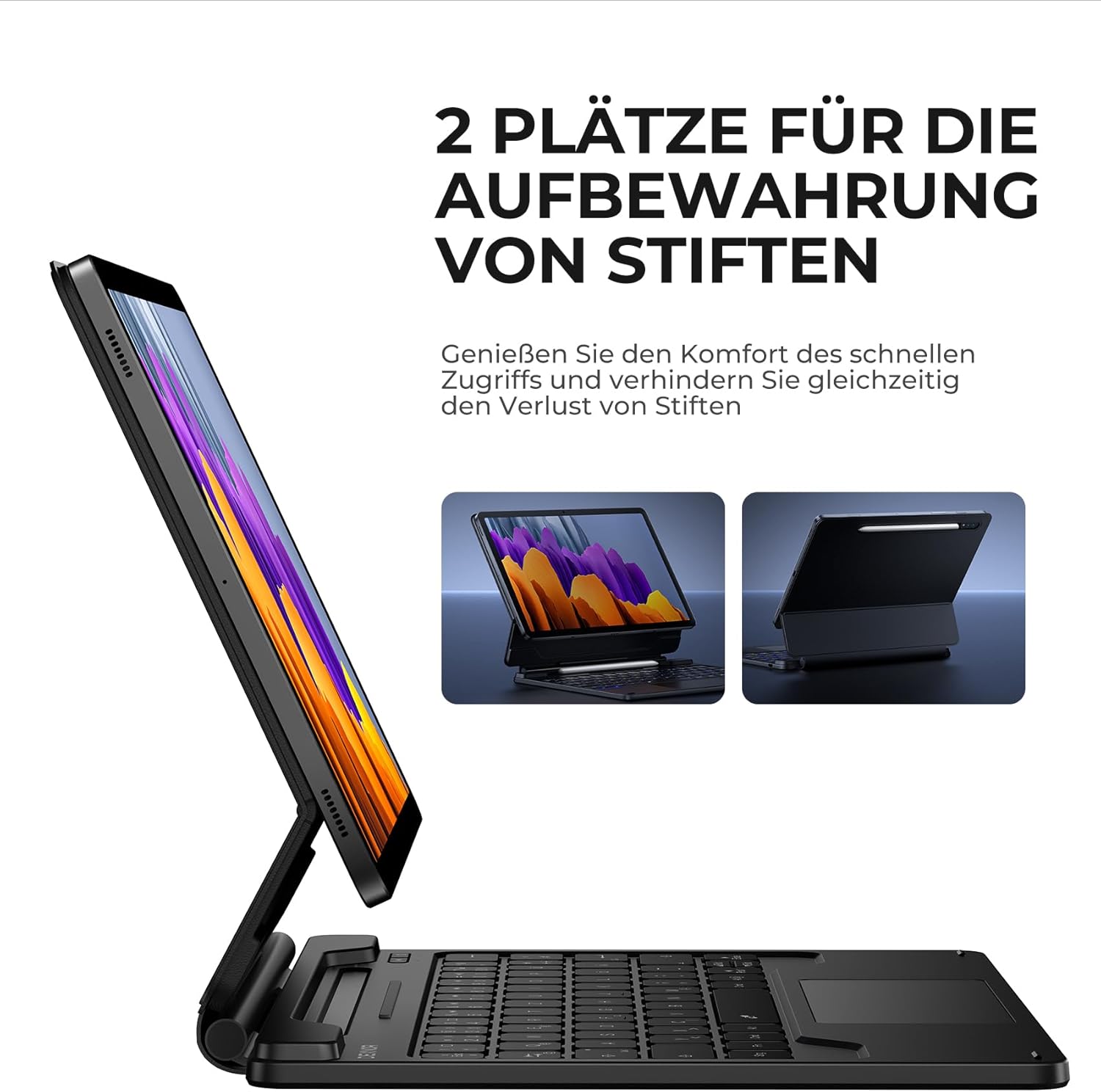
Figure 5.4: Dual S Pen storage options.
5.5 DEX Mode
Combine your tablet with the keyboard case and activate Samsung DEX mode to transform your tablet into a desktop-like experience. This allows for enhanced multitasking and productivity, similar to a traditional laptop setup.
5.6 сочетания клавиш
The keyboard includes a series of convenient shortcut keys for quick control over media playback, volume, and other tablet functions. Refer to the keyboard layout for specific key functions.

Figure 5.5: Keyboard layout with shortcut keys.
5.7 Функция автоматического перехода в спящий режим/пробуждения
The case supports automatic sleep/wake functionality. Closing the case will put your tablet to sleep, and opening it will wake it up, conserving battery life for both your tablet and the keyboard.
6. Зарядка клавиатуры
The keyboard is equipped with a long-lasting 650 mAh battery. To charge the keyboard:
- Connect the provided USB-C charging cable to the charging port on the keyboard.
- Другой конец кабеля подключите к USB-адаптеру питания (не входит в комплект) или к USB-порту компьютера.
- The charging indicator light will illuminate during charging and turn off once fully charged. A full charge takes approximately 3.5 hours.
A single charge provides up to 200 hours of working time and 1200 hours of standby time.

Рисунок 6.1: Порт зарядки USB-C.
7. Техническое обслуживание
To ensure the longevity and optimal performance of your Dexnor Keyboard Case:
- Уборка: Используйте мягкий, damp cloth to wipe the exterior of the case. For the keyboard keys, use a soft, dry cloth or a specialized keyboard cleaner. Avoid harsh chemicals or abrasive materials.
- Хранилище: When not in use for extended periods, store the keyboard case in a cool, dry place. Ensure the case is closed to protect the tablet and keyboard.
- Избегайте жидкостей: Держите клавиатуру подальше от жидкостей, чтобы предотвратить повреждение внутренних компонентов.
- Обращаться с осторожностью: While durable, avoid dropping the case or subjecting it to excessive force.
8. Поиск Неисправностей
8.1 Клавиатура не подключается
- Проверьте аккумулятор: Убедитесь, что клавиатура заряжена.
- Ремонт: Delete the keyboard from your tablet's Bluetooth device list and attempt to pair it again (refer to Section 4.2).
- Перезагрузите устройства: Перезагрузите планшет и клавиатуру.
- Вмешательство: Отойдите от других беспроводных устройств, которые могут создавать помехи.
8.2 Тачпад не реагирует
- Проверьте подключение: Убедитесь, что клавиатура правильно подключена по Bluetooth.
- Чистый трекпад: Убедитесь, что поверхность тачпада чистая и свободна от мусора.
- Перезапуск: Перезагрузите клавиатуру и планшет.
8.3 Подсветка не работает
- Проверьте аккумулятор: Низкий заряд батареи может повлиять на работу подсветки. Зарядите клавиатуру.
- Включить/выключить подсветку: Press the backlight key (or Fn + backlight key) to ensure it's not turned off or at the lowest brightness setting.
8.4 Проблемы с зарядкой
- Проверьте кабель: Убедитесь, что кабель USB-C надежно подключен как к клавиатуре, так и к источнику питания. При наличии попробуйте другой кабель USB-C.
- Источник питания: Попробуйте использовать другой USB-адаптер питания или порт.
9. Технические характеристики
| Бренд | Dexnor |
| Номер модели | ДК005 |
| Технология связи | Bluetooth |
| Особые возможности | Multi-Touch Trackpad, Backlit Keyboard, S Pen Holder |
| Совместимые устройства | Samsung Galaxy Tab S10 Lite 10.9", Samsung Galaxy Tab S9 11", Samsung Galaxy Tab S9 FE/S10 FE 10.9" |
| Состав батареи | Литий-ионный |
| Емкость аккумулятора | 650 мАч |
| Время зарядки | Приблизительно 3.5 часов |
| Рабочее время | До 200 часов |
| Время в режиме ожидания | До 1200 часов |
| Раскладка клавиатуры | QWERTZ (немецкий) |
| Размеры продукта | 25.9 x 20.5 x 1.9 см |
10. Гарантия и поддержка
Dexnor provides a 1-year manufacturer's warranty for this product. Additionally, lifetime technical support is available.
For warranty claims, technical assistance, or any product-related inquiries, please contact Dexnor customer support through the retailer's platform or visit the official Dexnor webсайт для контактной информации.


