
1. Введение
This user manual provides detailed instructions for the setup, operation, maintenance, and troubleshooting of your GEEKOM Mini IT12 Mini PC. Please read this manual thoroughly before using the device to ensure proper functionality and longevity.
2. Что в коробке
Upon opening your GEEKOM Mini IT12 package, you should find the following items:
- 1 x GEEKOM Mini IT12 Mini PC
- 1 х HDMI-кабель
- 1 x крепление VESA
- 1 х Адаптер питания
- 1 x Руководство пользователя (этот документ)
Видео: Unboxing GEEKOM Mini IT12. This video demonstrates the unboxing process and shows all included components.

Изображение: The GEEKOM Mini IT12 shown with its VESA mount, demonstrating its compact size and mounting capability.
3. Продукт закончилсяview
The GEEKOM Mini IT12 is a compact yet powerful mini PC designed for various computing needs. It features a robust processor, ampЭкономия памяти и широкие возможности подключения.
3.1 Передняя панель
Изображение: Подробный view of the front and rear ports on the GEEKOM Mini IT12.
- Устройство чтения SD-карт: For reading and writing data to SD cards.
- Два порта USB 3.2 Gen 2: Высокоскоростные порты передачи данных.
- Разъем для наушников 3.5 мм: Для вывода звука на наушники или колонки.
- Кнопка питания: Для включения/выключения устройства.
3.2 Задняя панель
- Разъем постоянного тока: Power input for the Mini PC.
- Порты USB 4 (2 шт.): High-speed data transfer and display output, supporting up to 8K resolution.
- Порт LAN 2.5 Гбит/с: Для высокоскоростного проводного сетевого подключения.
- USB 3.2 Gen 2 Port (x1): Высокоскоростной порт передачи данных.
- Порт USB 2.0 (1 шт.): Стандартный USB-порт для периферийных устройств.
- Два порта HDMI 2.0: Для подключения к дисплеям, поддерживающим разрешение до 4K.
4. Настройка
Follow these steps to set up your GEEKOM Mini IT12 Mini PC:
- Подключение к дисплею: Use an HDMI cable to connect the Mini IT12 to your monitor or TV. The device supports up to four displays simultaneously via its HDMI and USB4 ports.
- Подключите периферийные устройства: Подключите клавиатуру, мышь и любые другие USB-устройства к доступным USB-портам.
- Подключиться к сети: For wired internet, connect an Ethernet cable to the 2.5GbE LAN port. For wireless internet, the device supports Wi-Fi 6E.
- Подключите питание: Подключите адаптер питания к разъему постоянного тока на задней панели, а затем подключите адаптер к розетке.
- Включение питания: Нажмите кнопку питания на передней панели, чтобы включить мини-ПК.
5. Операционная
The GEEKOM Mini IT12 comes pre-installed with Windows 11 Pro, offering a familiar and user-friendly operating environment.
5.1 Первоначальная загрузка и настройка Windows
On the first boot, you will be guided through the Windows 11 Pro setup process. Follow the on-screen instructions to configure your language, region, network, and user account settings.
5.2 Поддержка нескольких дисплеев
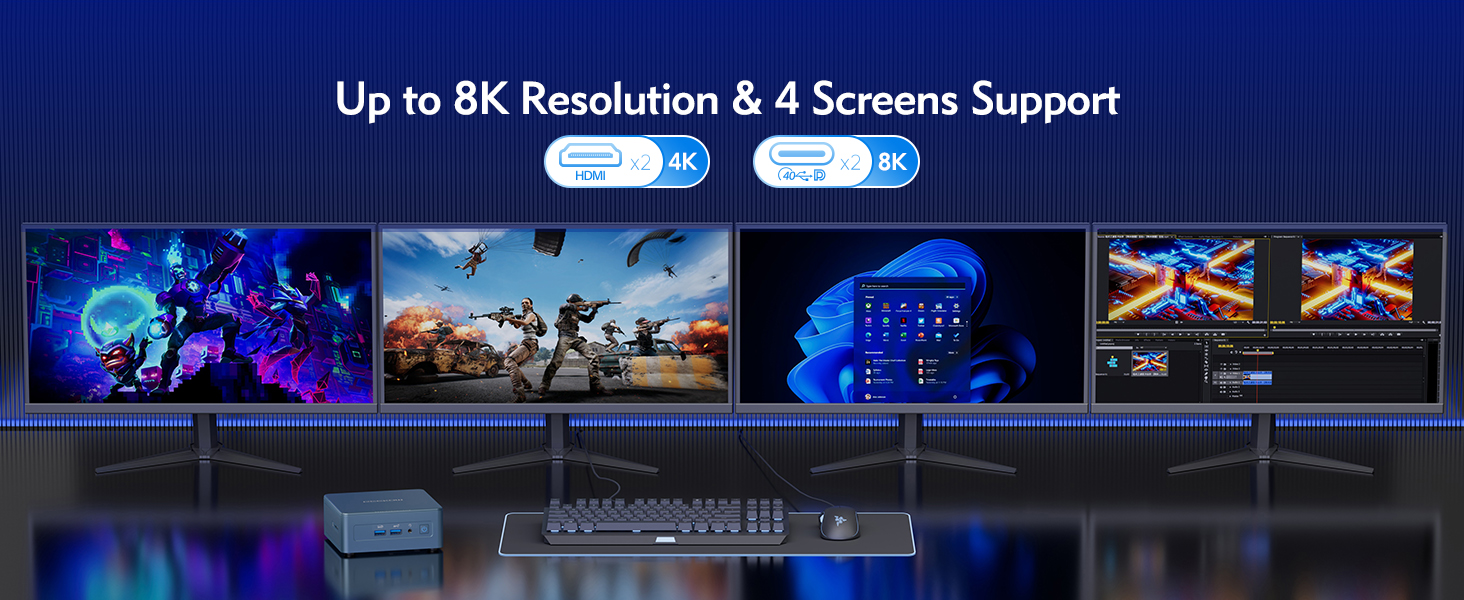
The Mini IT12 supports up to four displays simultaneously, allowing for enhanced productivity and immersive experiences. Connect your displays to the available HDMI 2.0 ports and USB4 ports. You can configure display settings within Windows 11 Pro (Right-click on desktop > Display settings).

Изображение: The GEEKOM Mini IT12 demonstrating its capability to support four screens simultaneously for enhanced productivity.
5.3. Беспроводное подключение
The Mini IT12 is equipped with Wi-Fi 6E and Bluetooth 5.2 for fast and reliable wireless connections. Connect to your wireless network via Windows settings and pair Bluetooth devices as needed.

Изображение: Illustration of the GEEKOM Mini IT12's powerful Wi-Fi 6E and Bluetooth 5.2 capabilities, ideal for wireless peripherals and fast internet.
6. Техническое обслуживание и модернизация
The GEEKOM Mini IT12 offers options for memory and storage expansion to enhance its performance and capacity.
6.1 Expanding RAM
The Mini IT12 supports dual-channel DDR4 SODIMM memory, expandable up to 64GB. Refer to the video below for detailed instructions on how to expand the RAM.
Видео: How to expand RAM in GEEKOM Mini IT12. This video guides you through the process of installing additional RAM modules.
6.2 Installing an SSD
The Mini IT12 includes an M.2 2280 PCIe Gen 4 x4 SSD slot, expandable up to 2TB, and an M.2 2242 SATA SSD slot, expandable up to 1TB. Follow the video instructions for SSD installation.
Видео: How to install an SSD in GEEKOM Mini IT12. This video demonstrates the steps for adding an SSD to your Mini PC.
6.3 Installing a Hard Disk Drive (HDD)
The Mini IT12 also features a 2.5" SATA HDD (7mm) slot, expandable up to 2TB. Watch the video below for guidance on HDD installation.
Видео: How to install an HDD in GEEKOM Mini IT12. This video provides instructions for installing a hard disk drive.
7. Поиск Неисправностей
If you encounter issues with your GEEKOM Mini IT12, try the following common troubleshooting steps:
- Нет питания: Убедитесь, что адаптер питания надежно подключен как к мини-ПК, так и к работающей розетке. При наличии попробуйте другую розетку или адаптер питания.
- Нет дисплея: Check all HDMI/USB4 cable connections to your monitor. Ensure the monitor is powered on and set to the correct input source.
- Нет соединения с интернетом: For wired connections, verify the Ethernet cable is properly connected. For Wi-Fi, check your router and ensure Wi-Fi is enabled in Windows settings.
- Низкая производительность: Close unnecessary applications. Check for background updates. Consider upgrading RAM or storage if performance issues persist.
- Периферийное устройство не обнаружено: Попробуйте подключить периферийное устройство к другому USB-порту. Убедитесь, что драйверы обновлены.
Для получения дополнительной помощи обратитесь к разделу «Гарантия и поддержка».
8. Технические характеристики
Below are the key specifications for the GEEKOM Mini IT12 Mini PC:
| Особенность | Спецификация |
|---|---|
| Процессор | 12th Gen Intel Core i7-12650H (10 Cores/16 Threads, up to 4.7GHz) |
| Графика | Intel Iris Xe Graphics eligible |
| БАРАН | 32GB DDR4 RAM (Dual-channel, expandable up to 64GB) |
| Хранилище | 1TB PCIe Gen 4 SSD (expandable up to 2TB), M.2 2242 SATA SSD slot (expandable up to 1TB), 2.5" SATA HDD slot (expandable up to 2TB) |
| Операционная система | Windows 11 Профессиональная |
| Видеовыход | 2x HDMI 2.0 (4K), 2x USB4 (8K) - Supports up to 4 displays |
| Беспроводное подключение | Wi-Fi 6E, Bluetooth 5.2 |
| Локальная сеть | Порт локальной сети 2.5GbE |
| Порты | 2x USB4, 3x USB 3.2 Gen 2, 1x USB 2.0, 2x HDMI 2.0, 1x SD Card Reader, 1x 3.5mm Headphone Jack, 1x DC Jack |
| Размеры | 4.6 x 4.4 x 1.79 дюйма |
| Масса | 1.4 фунта |

Изображение: Болееview of the GEEKOM Mini IT12 highlighting its core specifications and features.
9. Гарантия и поддержка
Your GEEKOM Mini IT12 Mini PC is covered by a manufacturer's warranty. For specific warranty terms and conditions, please refer to the warranty card included in your product packaging or visit the official GEEKOM webсайт.
For technical support, troubleshooting assistance, or service inquiries, please contact GEEKOM customer support through their official channels. You can typically find contact information on the GEEKOM website or in the included user guide.
Интернет-ресурсы:
- GEEKOM Official Webсайт: www.geekompc.com
- Электронная почта поддержки клиентов: support@geekompc.com