
Seventable hq-dnzh041-09
Seventable White Computer Desk (Model hq-dnzh041-09) Instruction Manual
Модель: hq-dnzh041-09
Введение
This manual provides comprehensive instructions for the assembly, operation, and maintenance of your Seventable White Computer Desk. Please read this manual thoroughly before assembly and use to ensure proper functionality and safety.
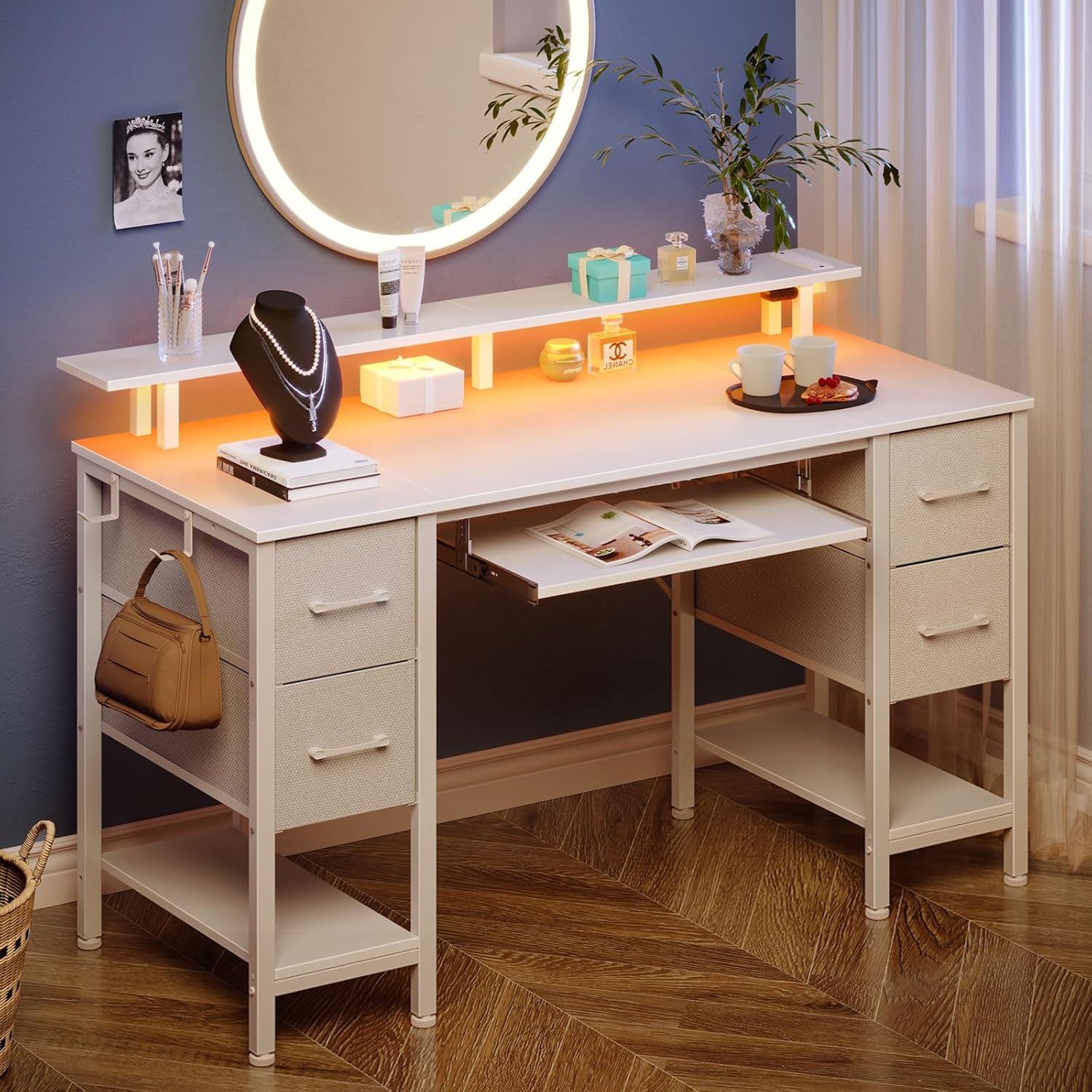
Figure 1: Seventable White Computer Desk in a modern room setting, showcasinг его дизайн и особенности.
Информация по безопасности
- Данный товар требует сборки. Перед использованием убедитесь, что все компоненты надежно закреплены.
- Use the UL-certified charging ports for safe and efficient charging of devices.
- Не перегружайте стол или полки сверх указанной грузоподъемности.
- Keep liquids away from electrical components, including the power strip and LED lights.
- For optimal stability, place the desk on a flat, level surface.
Список компонентов и деталей
Перед началом сборки убедитесь, что все перечисленные ниже детали присутствуют и не повреждены. Для визуальной идентификации компонентов обратитесь к схеме сборки.

Рисунок 2: В разобранном виде view of the desk components with dimensions and weight capacities.
Основные компоненты:
- Настольные панели
- Подставка для монитора
- Подставка для клавиатуры
- Side Frames and Support Bars
- Тканевые выдвижные ящики (4 шт.)
- Power Strip with 2 AC Outlets, 2 USB Ports, and 1 Type C Port
- Светодиодные ленты
Аппаратное обеспечение:
Assorted screws, bolts, and an Allen wrench are typically included. Please refer to the detailed parts list in your packaging for exact quantities and types.
Настройка и сборка
Assembly is required for this product. It is recommended that two people work together to facilitate the installation process.
Этапы Генеральной Ассамблеи:
- Распакуйте и организуйте: Carefully unpack all components and lay them out on a clean, soft surface to prevent scratches. Verify all parts against the provided parts list.
- Собрать раму: Attach the side frames and support bars according to the included diagram. Ensure all connections are secure but do not overtighten screws until the desk is fully assembled.
- Установите панели управления рабочего стола: Secure the main desktop panels to the assembled frame.
- Прикрепите подставку для монитора: Mount the monitor stand to the designated positions on the desktop.
- Установите панель клавиатуры: Attach the sliding rails and then the keyboard tray beneath the main desktop.
- Вставные ящики для ткани: Assemble the non-woven fabric drawers by inserting the bottom panels and place them into the designated shelving tiers. The drawer configuration is customizable.
- Install Power Strip and LED Lights: Secure the power strip into its designated slot. Attach the LED light strips to the underside of the monitor stand or desktop as per instructions. Connect the power strip and LED lights to a power source.
- Окончательная затяжка: После установки всех компонентов тщательно затяните все винты и болты.
- Выравнивание: Adjust the desk's feet to ensure it is stable and level on your floor.

Figure 3: Assembly diagram for the Seventable Computer Desk.
Figure 4: Fabric drawer assembly steps.
Инструкция по эксплуатации
Удлинитель:
The desk features a built-in power strip with 2 AC outlets, 2 USB ports, and 1 Type C port. This allows for convenient charging of multiple devices simultaneously, such as phones, tablets, gaming consoles, and other electronics. Ensure the power strip is properly connected to a wall outlet.

Figure 5: Integrated power strip with various charging ports.
Светодиодные фонари:
The desk is equipped with dynamic multi-color RGB LED light strips. These lights can be controlled via a phone application or a physical controller. You can personalize brightness, color (over 60,000 options), mode, and timer settings. The LED lights can also synchronize with music for an enhanced ambiance.

Figure 6: Desk with RGB LED lighting in a gaming environment.
Ящики для хранения:
The desk includes 4 non-woven fabric drawers and two shelving tiers. These provide ampместо для хранения files, office supplies, or gaming equipment. The drawers and shelves are customizable, allowing you to arrange them based on your specific storage needs.

Figure 7: Customizable fabric drawers for organized storage.
Подставка для монитора:
The full-size monitor stand is designed to accommodate two monitors at an optimal height. This ensures your computer screen aligns with your eye level, promoting a comfortable viewing angle and minimizing neck and back strain. It also offers additional storage space for books, pens, and other items, maximizing desktop area.

Figure 8: Ergonomic design of the monitor stand for correct posture.
Подставка для клавиатуры:
A pull-out keyboard tray is included, spacious enough for a full-size 108-key keyboard or an 87-key keyboard with a mouse. This feature helps maximize desktop space and positions the keyboard to prevent eye strain from being too close to the computer screen.

Видео 1: Оверview of the Seventable Computer Desk features, including the keyboard tray.

Figure 9: Pull-out keyboard tray for ergonomic typing.
Дополнительные возможности:
- Крючок для наушников: A convenient hook is provided for hanging headphones, keeping them easily accessible and off the desktop.
- Регулируемые ножки: The desk includes adjustable feet to ensure stability on uneven floors.

Figure 10: Convenient headphone hook.

Figure 11: Adjustable foot for stability.
Обслуживание
- Уборка: Протрите поверхности стола мягкой тряпкой.amp Ткань. Избегайте использования едких химикатов и абразивных чистящих средств, которые могут повредить покрытие.
- Проверка оборудования: Периодически проверяйте все винты и болты, чтобы убедиться в их надежной фиксации. При необходимости подтяните.
- Уход за ящиком: Тканевые ящики можно чистить локально с помощью мягкого моющего средства и воды. Дайте им полностью высохнуть на воздухе.
- Электрические компоненты: Ensure the power strip and LED lights are kept dry and free from dust. Disconnect from power before cleaning.
Поиск неисправностей
- Колебания стола: Check that all assembly hardware is securely tightened. Adjust the leveling feet on the bottom of the desk to stabilize it on uneven floors.
- Светодиодные фонари не работают: Ensure the LED lights are properly connected to the power strip and that the power strip is plugged into a functional wall outlet. Check the controller or phone app settings.
- Устройства не заряжаются: Verify that the power strip is plugged in and turned on. Ensure your devices and charging cables are functioning correctly.
- Drawers Stick/Don't Slide Smoothly: Check for any obstructions in the drawer rails. Ensure the drawers are correctly assembled and inserted into their slots.
Технические характеристики
| Особенность | Деталь |
|---|---|
| Бренд | Seventable |
| Номер модели | hq-dnzh041-09 |
| Цвет | Белый |
| Размеры продукта | 18.5"Д x 47.2"Ш x 34.7"В |
| Вес товара | 41.9 фунта |
| Тип материала | Древесностружечная плита (верхняя часть), легированная сталь (нижняя часть) |
| Количество ящиков | 4 (Ткань) |
| Количество полок | 2 |
| Розетки | 2 AC Outlets, 2 USB Ports, 1 Type C Port |
| Особые возможности | LED Lights, Monitor Stand, Keyboard Tray, Storage |
| Требуется сборка | Да |
| Включено в список UL | Да |
Гарантия
Этот продукт поставляется с Нет гарантии в соответствии со спецификациями производителя.
Поддерживать
For any questions, concerns, or assistance with your Seventable Computer Desk, please contact the manufacturer directly.
Электронная почта: cs@seventable.com
Please have your model number (hq-dnzh041-09) and purchase information ready when contacting support.